Q170226E01.pdf - 第305页
RH5 8.3 List of Jumper Switch Settings SERVICE MANUAL 8.3−8 DA3SEC−85−540−B0 8.3.2 RCG Board Setting (X984 − 204)
8.3 List of Jumper Switch Settings
SERVICE MANUAL
RH5
8.3−7
DA3SEC−85−540−B0
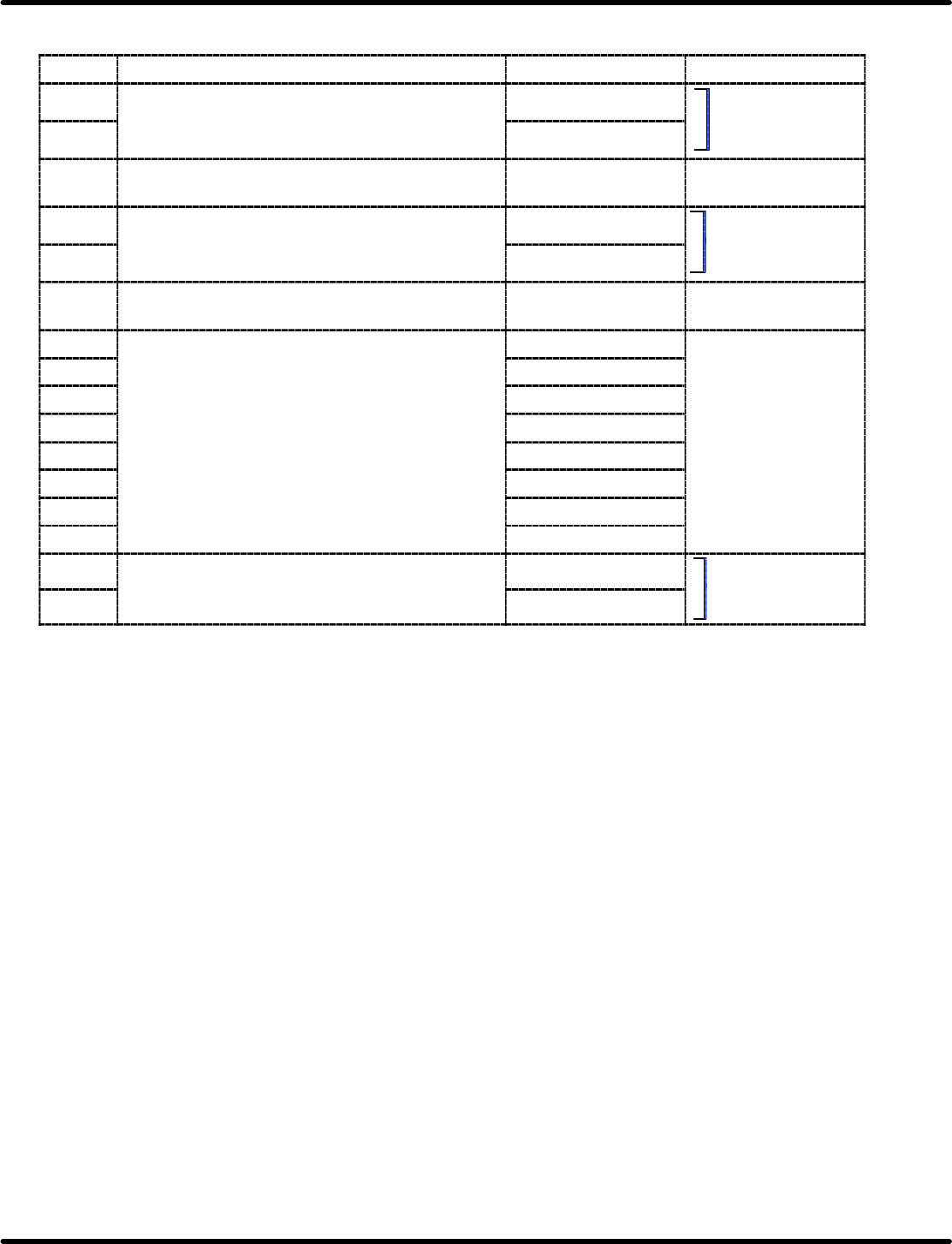
Jumper switch setting table
Name Description Short Open
JP1 Selects the type of CGROM installed by user. 512 *
Select
either
one
JP2 256
S
e
l
ect e
i
t
h
er one.
JP3 Selects the polarity of SYNC signal for CRT
display.
Positive logic *
JP4 Selects reversing color function in color display. Enabled
Select
either
one
JP5 Disabled *
Select
either
one
.
JP6 Selects whether or not to use SIO interrupt
mode.
Vector mode Non−vector mode
JP7−1 Selects the signal line for
it ti
P2
b
(PIC IRO)
INT0 signal *
JP7−2
interrupting P2 bus.
(
)
(PIC IR1)
INT1 signal *
JP7−3
(
)
(OUT0)
INT2 signal *
JP7−4
(OUT1)
INT3 signal *
Not
sed
JP7−5
(PIC IR4)
(PIC
IR5)
INT4 signal *
Not used
JP7−6
(PIC IR5)
(PIC
IR6)
INT5 signal *
JP7−7
(PIC IR6)
(PIC
IR7)
INT6 signal *
JP7−8
(PIC
IR7)
INT7 signal
JP8 Selects the CTS input signal source for
communication
CH
−
D
External CTS
Select either one.
JP9
communication
CH
−
D
.
Internal RTS *
Select
either
one
.
Items marked with an asterisk denote standard factory−setting shipment settings.
RH5
8.3 List of Jumper Switch Settings
SERVICE MANUAL
8.3−8
DA3SEC−85−540−B0
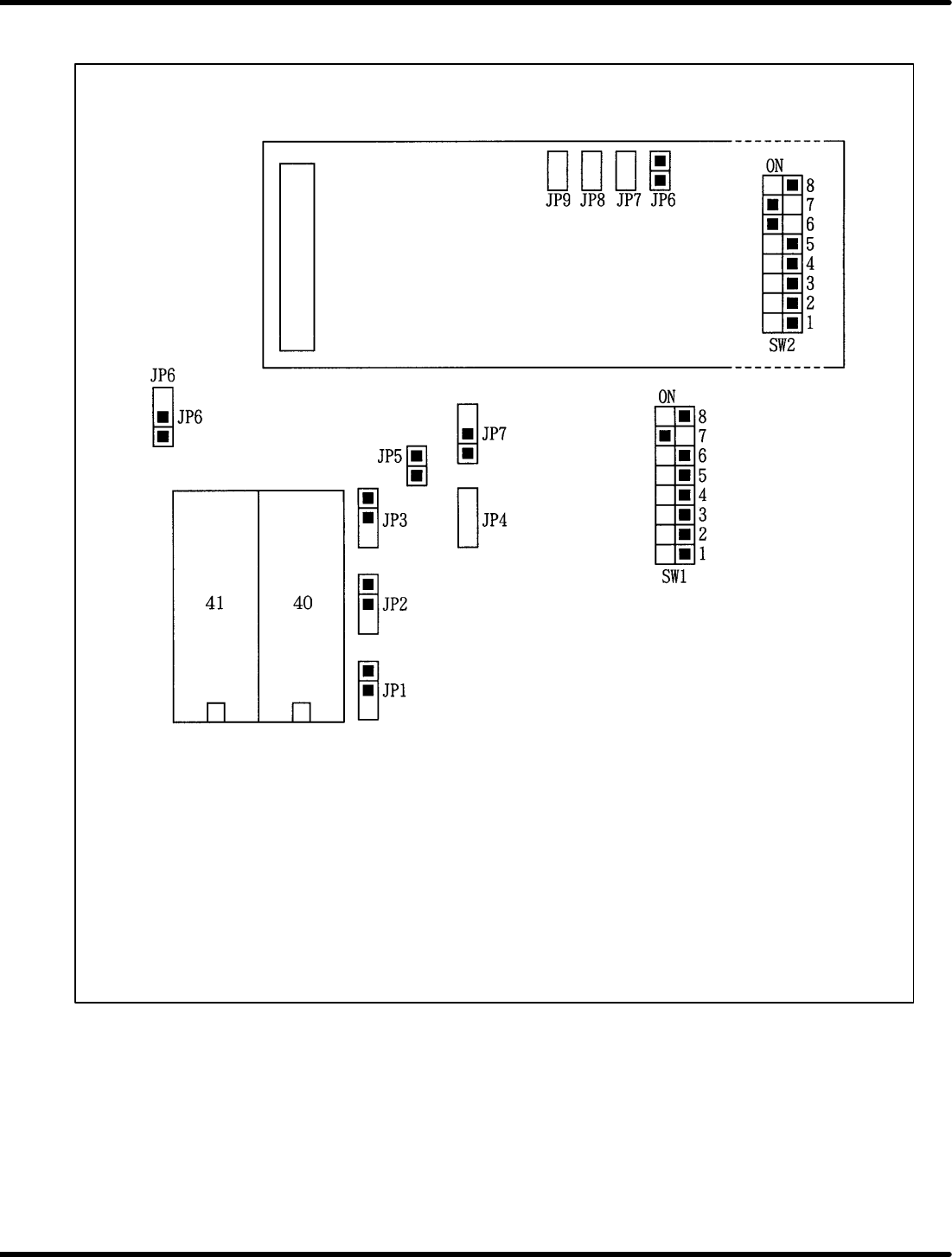
8.3.2 RCG Board Setting (X984 − 204)
8.3 List of Jumper Switch Settings
SERVICE MANUAL
RH5
8.3−9
DA3SEC−85−540−B0
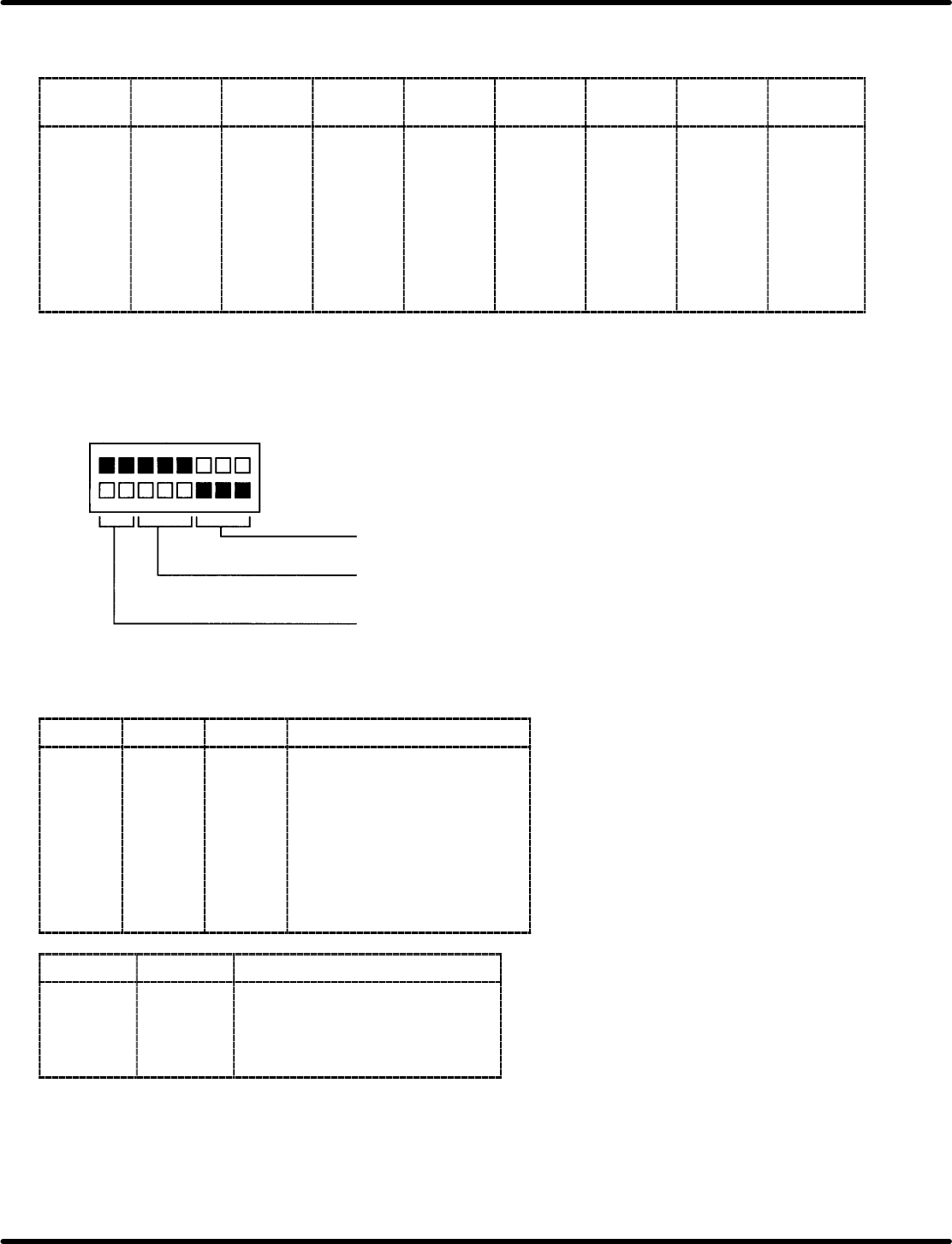
DIP switch settings
(1) SW1: For setting multibus interrupt level
Bit 7
Bit 6 Bit 5 Bit 4 Bit 3 Bit 2 Bit 1 Bit 0
Interrupt
level
OFF
OFF
OFF
OFF
OFF
OFF
OFF
ON
OFF
OFF
OFF
OFF
OFF
OFF
ON
OFF
OFF
OFF
OFF
OFF
OFF
ON
OFF
OFF
OFF
OFF
OFF
OFF
ON
OFF
OFF
OFF
OFF
OFF
OFF
ON
OFF
OFF
OFF
OFF
OFF
OFF
ON
OFF
OFF
OFF
OFF
OFF
OFF
ON
OFF
OFF
OFF
OFF
OFF
OFF
ON
OFF
OFF
OFF
OFF
OFF
OFF
OFF
INT0
INT1
INT2
INT3
INT4
INT5
INT6
INT7
=REFERENCE=
SW1 factory setting: INT6
(2) SW2 (Transfer function setting with RS−232C)
Not specified (reserved for
general−purpose use setting)
Word configuration
selection
Baud rate
07
ON
OFF
Bit 4 Bit 3 Bit 2 Word configuration
OFF
OFF
OFF
OFF
ON
ON
ON
ON
OFF
OFF
ON
ON
OFF
OFF
ON
ON
OFF
ON
OFF
ON
OFF
ON
OFF
ON
7 bit Even 2 stop bit
7 bit Odd 2 stop bit
7 bit Even 1 stop bit
7 bit Odd 1 stop bit
8 bit 2 stop bit
8 bit 1 stop bit
8 bit Even 1 stop bit
8 bit Odd 1 stop bit
Bit 1 Bit 0 Baud rate
OFF
OFF
ON
ON
OFF
ON
OFF
ON
2400 bps
4800 bps
9600 bps
19200 bps
=REFERENCE=
x SW2 factory setting: All bits are OFF
x Transfer function with RS−232C can be applied only for the machine, but not for the software.