Q170226E01.pdf - 第158页
5.17 Anvil Insertion Detection Amplifier Check SERVICE MANUAL RH5 5.17−3 DA3SEC−83−8ZO−A0 Figure 5.17−3− Distortion gauge amplifier board volume and check pin assignments Power source unit Distortion gauge amplifier boar…
RH5
5.17 Anvil Insertion Detection Amplifier Check
SERVICE MANUAL
5.17−2
DA3SEC−83−8ZO−A0
Distortion gauge amplifier board
sensitivity check
1. Remove the cover of the distortion gauge
amplifier board on the power source unit and
connect an oscilloscope to the check pin TP1
and TPGND of the board.
2. Set the range of the oscilloscope at around
1V/Div and 50 mS/Div.
3. Edit the NC data so that component insertion is
enabled. (Do not set a board.)
4. Execute the edited NC data in SEMIAUTO
mode up to the block involving component
insertion.
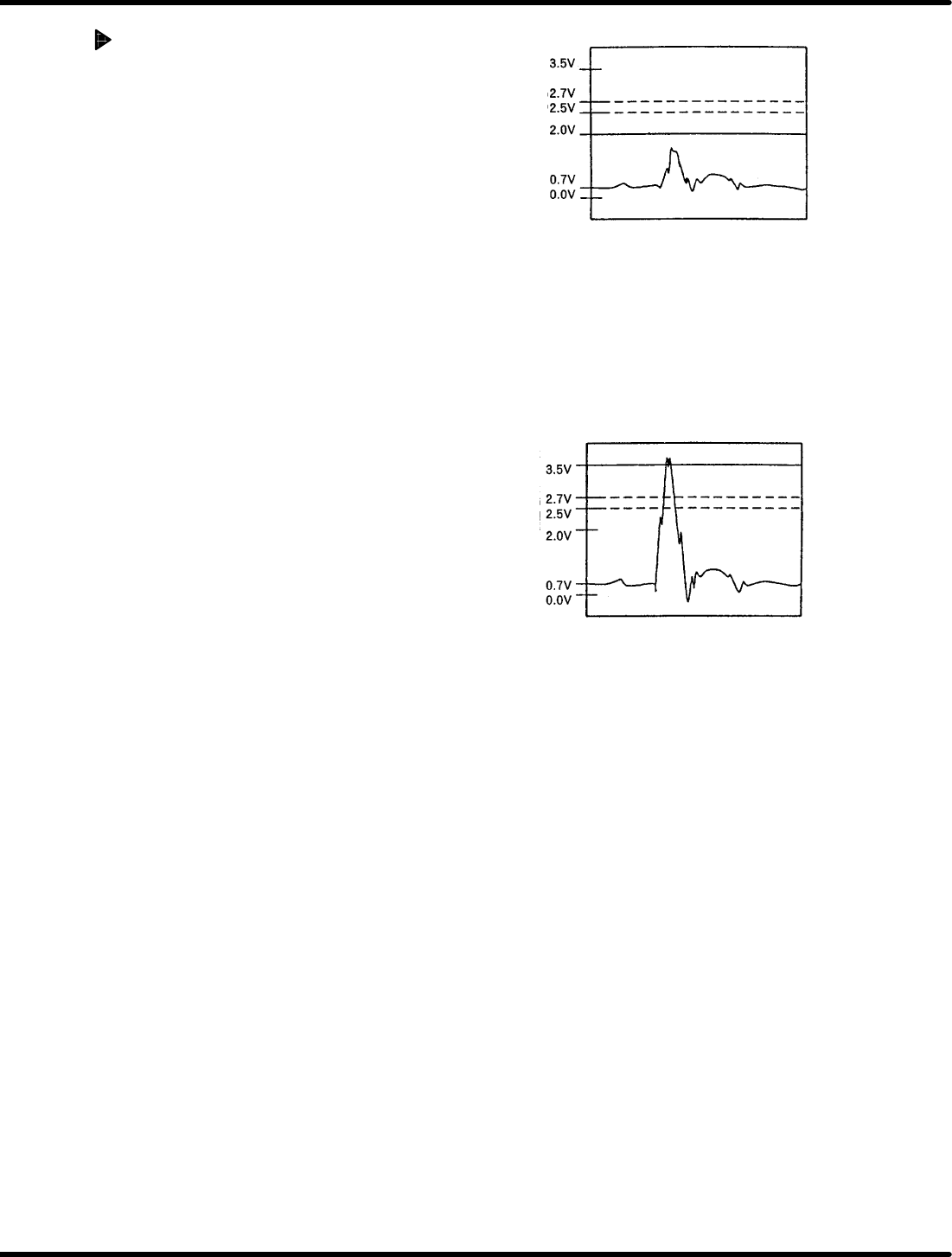
5. Adjust the volume VR1 so that the waveform of
the oscilloscope is below 2V when idling the
cam shaft in semi auto cam rotation.
=CHECK=
x The volume can be adjusted between max.
and min. by approx. 20 turns, and it can be
further turned even after reaching the max.
or min. position.
x The sensitivity of the volume decreases in
clockwise turn and increases in
counterclockwise turn.
x If the volume does not read 2V or less,
check the fixed and movable blades for
any contact.
6. Repeat step 5 for TP2 (VR2) and TP3 (VR3)
7. Set a board and check that the waveform of the
oscilloscope is below 2V when idling the cam
shaft in SEMIAUTO mode.
=CHECK=
If the waveform is more than 2V, check the
anvil and board for contact.
8. Check that waveform of the oscilloscope
exceeds 3.5 V when an electronic component is
inserted in SEMIAUTO mode.
=CHECK=
x Use electronic components with soft cooper
wire of I 0.45 mm in diameter.
x When the waveform is below 3.5, adjust the
volume VR1 to make it exceed 3.5 V.
x If the volume is adjusted, repeat steps 7
and 8 and check that the
above−mentioned waveforms can be
observed.
9. Repeat steps 7 and 8 for TP2 (VR2) and TP3
(VR3).
Figure 5.17−1− Waveform in idling
On voltage
OFF voltage
Reference
voltage
Figure 5.17−2− Waveform in component insertion
On voltage
OFF voltage
Reference
voltage
5.17 Anvil Insertion Detection Amplifier Check
SERVICE MANUAL
RH5
5.17−3
DA3SEC−83−8ZO−A0
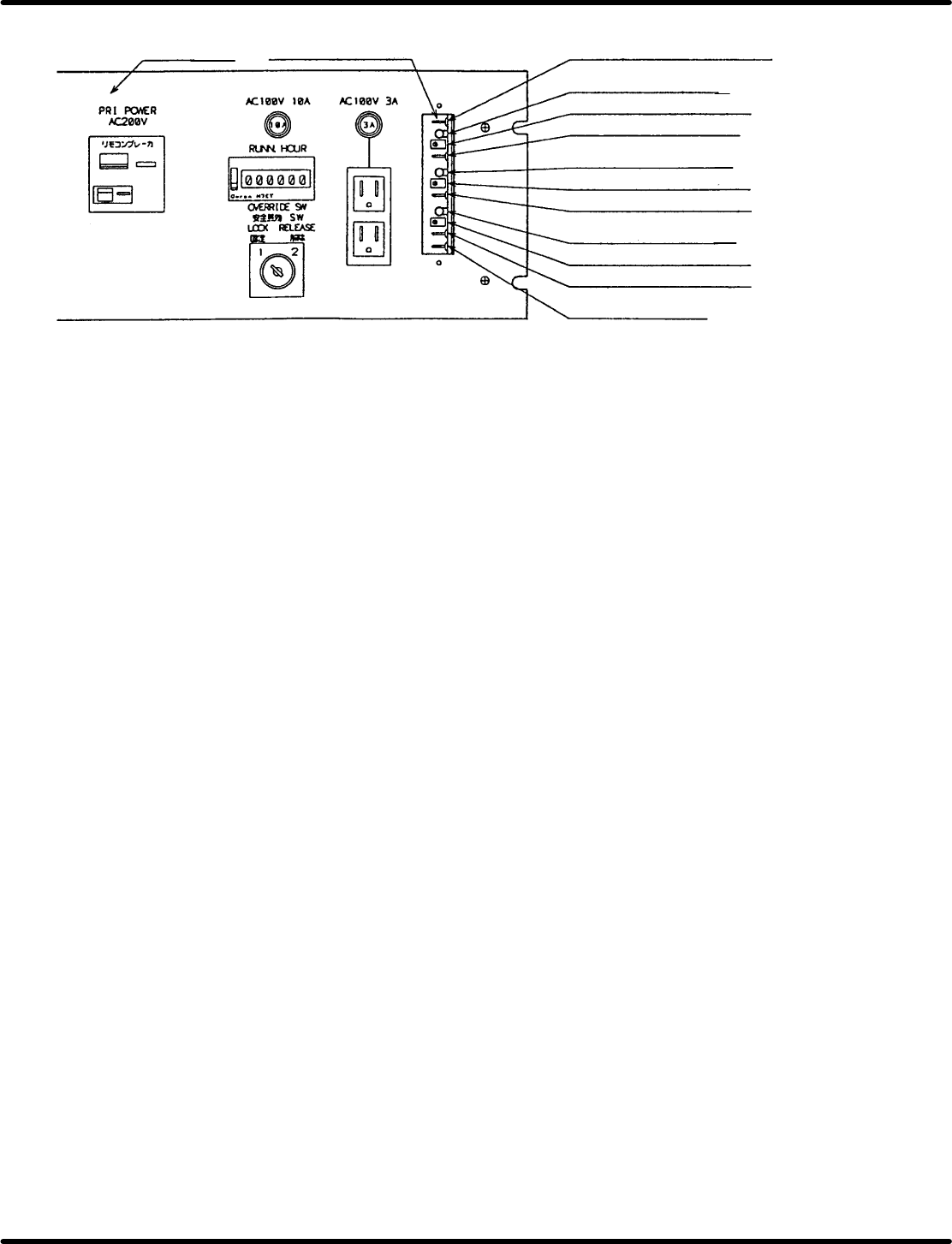
Figure 5.17−3− Distortion gauge amplifier board volume and check pin assignments
Power source
unit
Distortion gauge
amplifier board
TPC: comparator voltage check pin
LED1: Ch1 output monitor
VR1: Ch1 sensitivity control
TP1: Ch1 voltage check pin
LED2: Ch2 output monitor
VR2: Ch2 sensitivity control
TP2: Ch2 voltage check pin
LED3: Ch3 output monitor
VR3: Ch3 sensitivity control
TP3: Ch3 voltage check pin
TPGND: Grand pin

RH5
5.17 Anvil Insertion Detection Amplifier Check
SERVICE MANUAL
5.17−4
DA3SEC−83−8ZO−A0
= MEMO =