XP-142E System Reference-SYS-XP142-2.0E.pdf.pdf - 第101页
Part 2 Chapter 6 Production Information Display Edition 2.0 2-6-11 XP-142E System Reference 6.2.5 Machine Status Information Screen Setting Item Explanation Status In this explanation, operation rate calculation formulas…
Operation Button Explanations
Proceeds to the panel information screen.
Proceeds to the machine status information screen.
Proceeds to the feeder information screen.
Proceeds to the nozzle information screen.
Proceeds to the error information screen.
Saves all the tabulated production information in the screen to a
floppy disk.
Closes this screen and returns to either the production information
display conditions setting screen, or the log file selection screen.
Part 2 Chapter 6 Production Information Display
Edition 2.0 2-6-10 XP-142E System Reference
Part 2 Chapter 6 Production Information Display
Edition 2.0 2-6-11 XP-142E System Reference
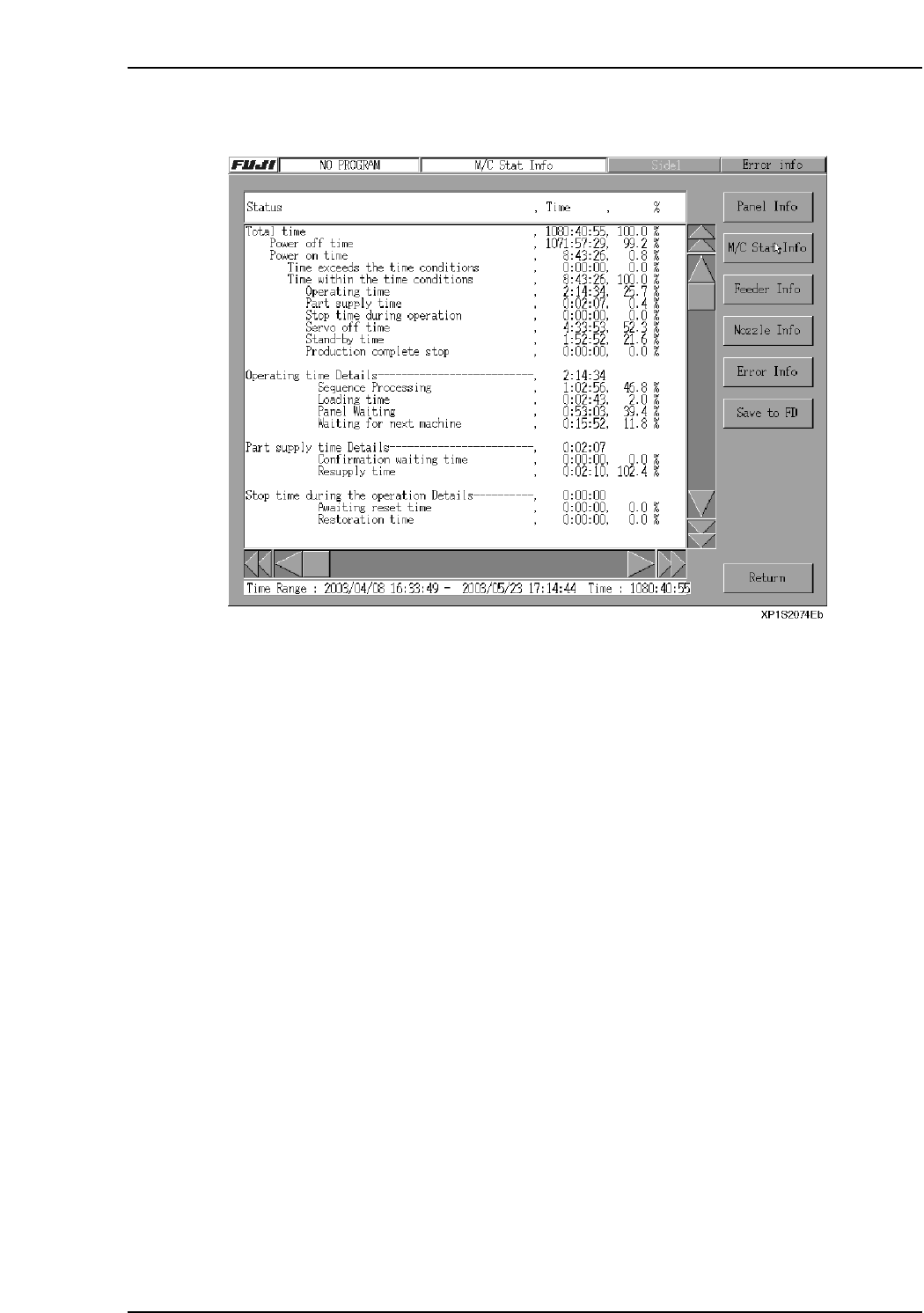
6.2.5 Machine Status Information Screen
Setting Item Explanation
Status
In this explanation, operation rate calculation formulas are shown in square brackets.
Total time
The current screen's display information shows the total tabulation period (from start
time to finish time).
• If a time range has been specified, the tabulation period is that time range.
• If a program has been specified, the tabulation period is the time from that program's
initial event to final event.
• If both a time range and a program have been specified, the tabulation period is the
time range.
• If a log file has been specified, the tabulation period is the time from that log file's
initial event to final event.
Power OFF Time
• Indicates the amount of machine power OFF time which occurred during the
tabulation period.
• Power OFF time = tabulation period - power ON time.
%: [Power OFF time / tabulation period]

Part 2 Chapter 6 Production Information Display
Edition 2.0 2-6-12 XP-142E System Reference
Power ON Time
• Indicates the amount of machine power ON time which occurred during the
tabulation period.
• If a time range was specified, the power ON time is the amount of logged time within
that time range.
• If a program was specified, the power ON time is the amount of logged time for that
program.
• If both a time range and a program were specified, the power ON time is the amount
of logged time for the program.
• If a log file was specified, the power ON time is the total time from that log file's
initial event to final event.
%: [Power ON time / tabulation period]
Time exceeds the time conditions
• Indicates the total start-to-end time of a production program which ran outside the
specified time range for production information tabulation.
This time is “0” when the production information was tabulated in a format other
than time units.
%: [Time outside specified time range / power on time]
Time within the time conditions
• Indicates the production information tabulated within the specified time range. The
total start-to-finish time of the production program is indicated. The displayed time
is the same as the “Tabulation Period” when the production information was
tabulated in a format other than time units.
%: [Time within the time conditions / power on time]
Operating time
• Indicates the amount of machine automatic operation time which occurred in the
specified time range.
• Operating time details display in the center of the screen.
%: [Automatic operation time / specified time range]
Part supply time
• Indicates the amount of power ON time which was consumed by part replenishments
(during automatic operation). This time extends from the parts-out machine stop
until operation is resumed, and includes the reading of other programs, up to a
shutdown, etc.
• When a "parts-out machine stop" is detected during automatic operation, a
momentary OFF status occurs.
• Part replenishment time details display at the center of the screen.
%: [Parts-out machine stop time / power ON time]
Stop time during operation
• Indicates the amount of power ON time consumed by machine stops which occur
during automatic operation. This time extends from the machine stop until operation
is resumed, and includes the reading of other programs, up to a shutdown, etc.
• When an "error machine stop" or a "vision error machine stop" is detected during
automatic operation, a momentary OFF status occurs.
• Operation stop time details display at the center of the screen.
%: [Error machine stop + vision error machine stop / power ON time]