XP-142E System Reference-SYS-XP142-2.0E.pdf.pdf - 第196页
4. Expander (ESR0710a) The expander is used to expand an loaded program so that multiple boards (max. of 255) can be created on a single panel. Because these data settings are not saved, the data must be re-entered if th…

3.8 Options When Ending Editor Operation
(ESR0716a)
The following editor ending options are available when the editor [Close] button is
pressed after editing a program.
Program name: The name under the which the edited production program file
is to be saved can be entered using the keyboard which
displays when this textbox is selected.
Data check: The edited production program is checked to verify that its
data is appropriate.
Save to file and Close: The edited production program is saved to the file.
Close without saving: The edited content of the production program file is
abandoned (cleared), and the file is saved in its original pre-
edited form.
Cancel: Cancels the “Close editing” command, and returns to an
editing status.
Part 3 Chapter 3 Editor
Edition 2.0 3-3-40 XP-142E System Reference
4. Expander
(ESR0710a)
The expander is used to expand an loaded program so that multiple boards (max. of 255) can be
created on a single panel. Because these data settings are not saved, the data must be re-entered if the
program is expanded again.
Expansion Conditions
The base program’s board number “0” must remain as it is (this block is not part of the
expansion).
If the only board number in the base program is “Block No. 0”, that program cannot be
expanded.
Expansion cannot be performed at base program board numbers other than “1”
(excluding “0”).
The “Offset Q” item at the 1st line must be “0 degrees”. Any other setting is ignored.
There is no error display even if the expansion result exceeds the panel size.
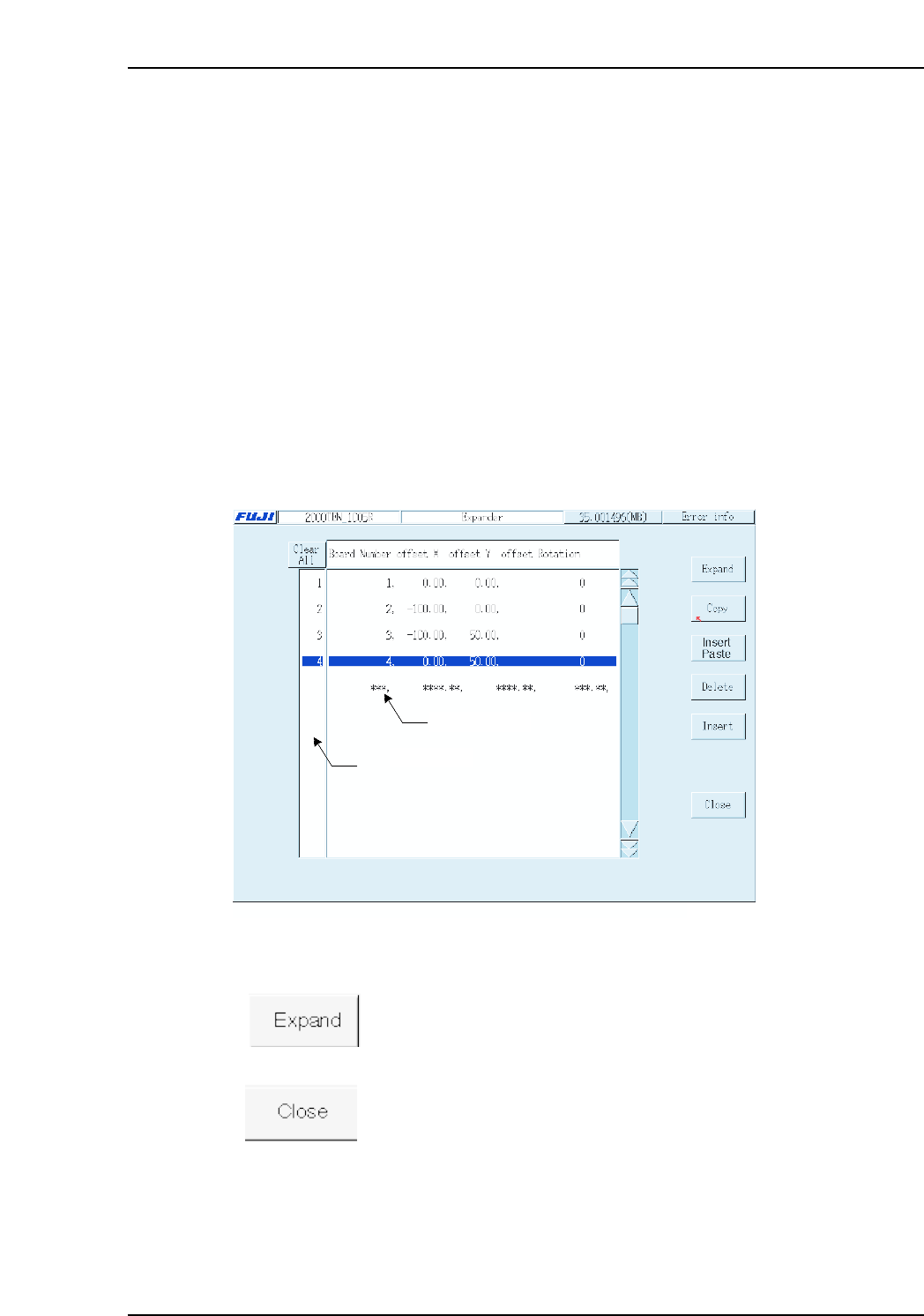
The Expander screen layout is shown below.
Operation Buttons
Expands the base program to create a multi-board program based on
the specified board data.
Press this button when expansion is completed, to display
confirmation messages regarding how the expansion result is to be
saved. The first message inquires if the expansion result is to be
saved to memory, and the next message inquires if the expansion
result is to be saved to a file.
Data input line
Selecting area
XP2S2193Ea
Part 3 Chapter 4 Expander
Edition 2.0 3-4-1 XP-142E System Reference

The following buttons apply to the line which has been selected in the selection area at
the left side of the screen.
Copies the selected line to the clipboard.
Pastes the clipboard data above the selected line.
Deletes the selected line, and moves the subsequent lines up to fill the
vacated space.
Inserts a new (blank) line above the selected line.
Cancels all selections.
Setting Item Explanations
Board Number
Specifies the board number. The board number at the first line must always be “1”.
Beginning from the second line, the user can specify the numbers as desired.
Offset X
At the first line, this setting specifies the X-coordinate (distance from program origin)
which serves as the base program reference position.
Beginning from the second line, this setting specifies the position of the board relative to
the first line’s program origin.
Offset Y
At the first line, this setting specifies the Y-coordinate (distance from program origin)
which serves as the base program reference position.
Beginning from the second line, this setting specifies the position of the board relative to
the first line’s program origin.
Offset Rotation
Specifies the part angle which serves as the reference position.
0 degrees: Base program angle is unchanged
90 degrees: Offset 90 degrees from base program
180 degrees: Offset 180 degrees from base program
270 degrees: Offset 270 degrees from base program
Part 3 Chapter 4 Expander
Edition 2.0 3-4-2 XP-142E System Reference