XP-142E System Reference-SYS-XP142-2.0E.pdf.pdf - 第50页
2.1.10 Statistical Information The statistical information function is used to obtain information about nozzle and slot errors. The procedure for specifying statistical information settings is given below. Procedure 1. A…
2.1.9 Tape Cutter
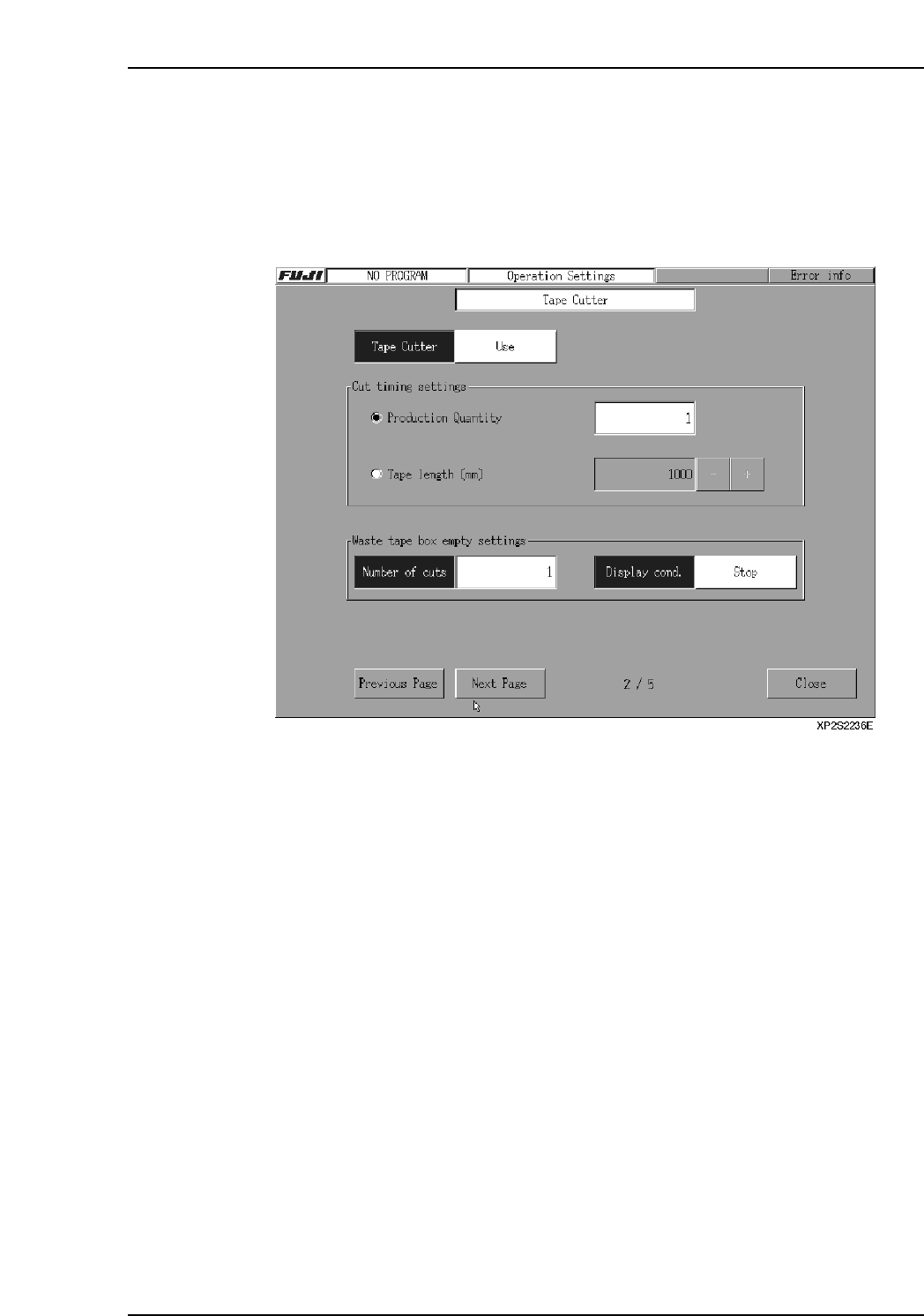
The procedure for specifying tape cutter settings is explained below.
Procedure
1. At the [Main] screen, select [Maintenance A] - [Operation Settings] to display the
[Operation Settings] screen.
2. Press the [Next Page] button to display the [Tape Cutter] screen.
3. Click on the area next to the “Tape Cutter” item, then make the “Use/Not Used”
selection.
4. At the “Cut Timing Setting” area, specify the cutter operation conditions. If cutter
operation is to occur when the scheduled panel production quantity is reached,
select “Production Quantity”, then specify the count value. (The setting range is 0
~ 99999. If a setting of “0” is specified, tape cutter operation will not occur.) If
cutter operation is to occur when a specified tape length is reached, select “Tape
Length”, then specify the desired length value. Cutter operation occurs when any
tape reaches this length, even if production is in progress.
Ex. If the tape length is set to 100 mm, and the tape lengths of feeders A, B, and
C on Stage1 are 100, 80, and 60 mm, then the tape cutter will cut, because
the 100 mm of tape on feeder A meets the setting. After the tape is cut, the
tape length counters are all reset to 0 mm.
[+]: Each time this key is pressed, the value increases by 50. If pressed when the
value is 1000, the value becomes 0.
[ - ]: Each time this key is pressed, the value decreases by 50. If pressed when the
value is 0, the value becomes 1000.
If a “0” value is specified, cutter operation will not occur. (Units: mm)
5. Click on the area next to the “Number of cuts” area to specify the tape cutter
operation count at which a message displays, notifying the operator to empty the
waste tape box. (Setting range is 0 ~ 99999. If “0” is specified, the message does
not display.)
6. Select the machine status action which is to occur when the tape cutter operation
count reaches the setting value.
Warning: Waste tape box warning displays, and machine operation continues.
Stop: Waste tape box warning displays, machine operation stops.
Part 2 Chapter 2 Settings Prior to Start Production
Edition 2.0 2-2-7 XP-142E System Reference
2.1.10 Statistical Information
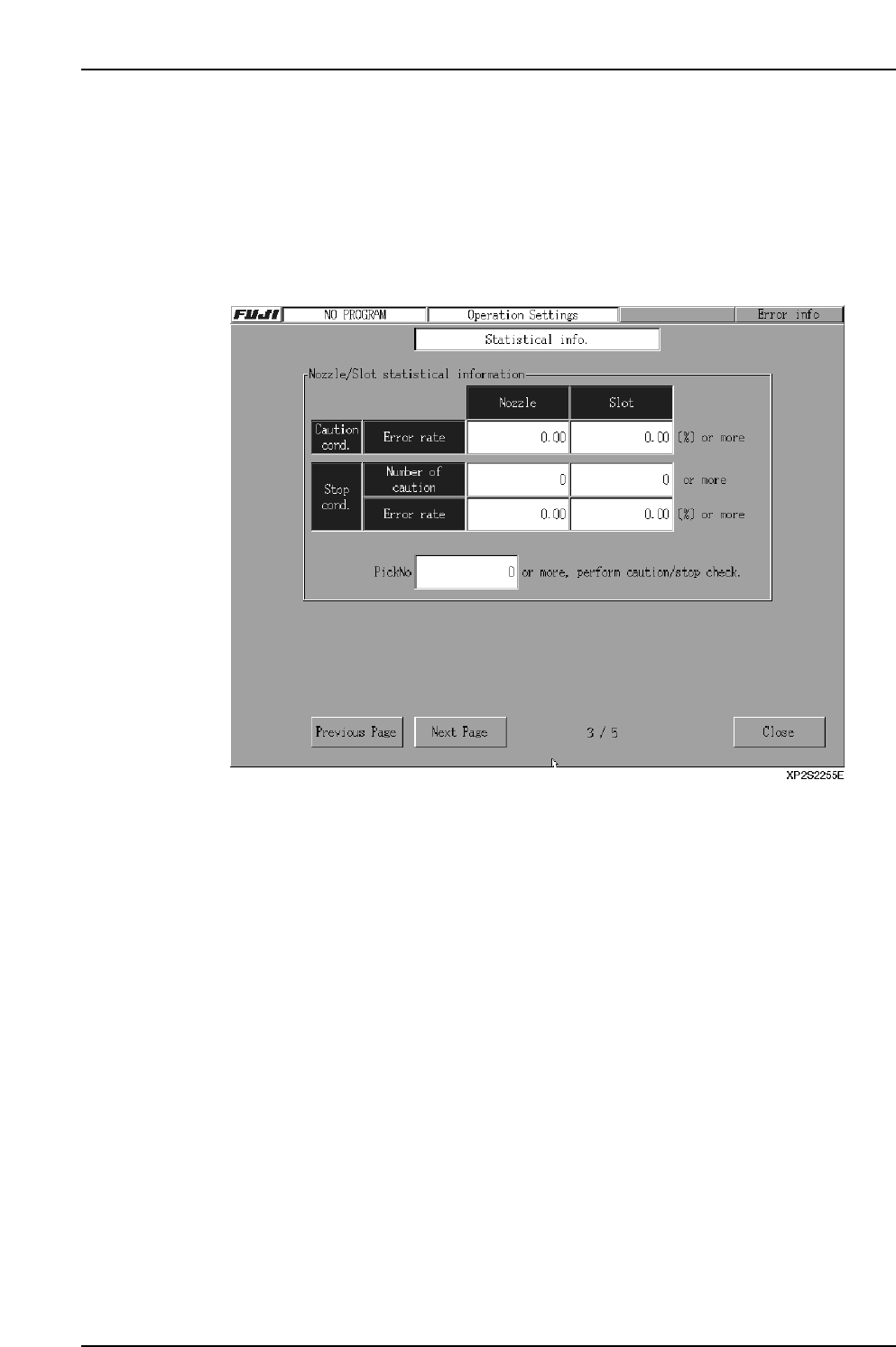
The statistical information function is used to obtain information about nozzle and slot
errors. The procedure for specifying statistical information settings is given below.
Procedure
1. At the [Main] screen, select [Maintenance A] - [Operation Settings] to display the
[Operation Settings] screen.
2. Press the [Next Page] button to display the [M/C Stat Info] screen.
3. In the textbox next to the “PickNo” item, specify the minimum pickup count at
which an error check is to occur. An error check will occur when a given slot or
nozzle reaches this pickup operation count. The setting range is 0 ~ 10000. When
set as “0”, the minimum pickup count for a caution check will be [1 / caution
conditions error rate] x [100], and the minimum pickup count for a stop check will
be [1 / stop conditions error rate] x [100].
4. In the textboxes beside the caution conditions error rate item, specify the nozzle
and slot error rates at which cautions are to occur. The setting range is 0.00 ~ Stop
conditions error rate. When the stop conditions error rate is 0.00, a setting of up to
100.00 can be specified. When set as “0.00”, there are no caution displays.
5. In the textboxes beside the stop conditions “number of cautions” item, specify the
number of cautions at which the machine is to be stopped. The machine stops
when the number of nozzle cautions reaches the setting value specified at the
Nozzle textbox. The setting range is 0 ~ Total number of nozzles. When set as
“0”, there are no caution count checks. The machine also stops when the number
of slot cautions reaches the setting value at the Slot textbox. The setting range is 0
~ Number of slots. When set as “0”, there are no caution count checks.
6. In the textboxes beside the stop conditions “number of cautions” item, specify the
nozzle and slot error rates at which the machine is to be stopped. The setting
range is 0.00 and “number of caution conditions ~ 100.00. When set as “0.00”,
there are no count checks.
Part 2 Chapter 2 Settings Prior to Start Production
Edition 2.0 2-2-8 XP-142E System Reference
2.1.11 Local Verify (Optional)
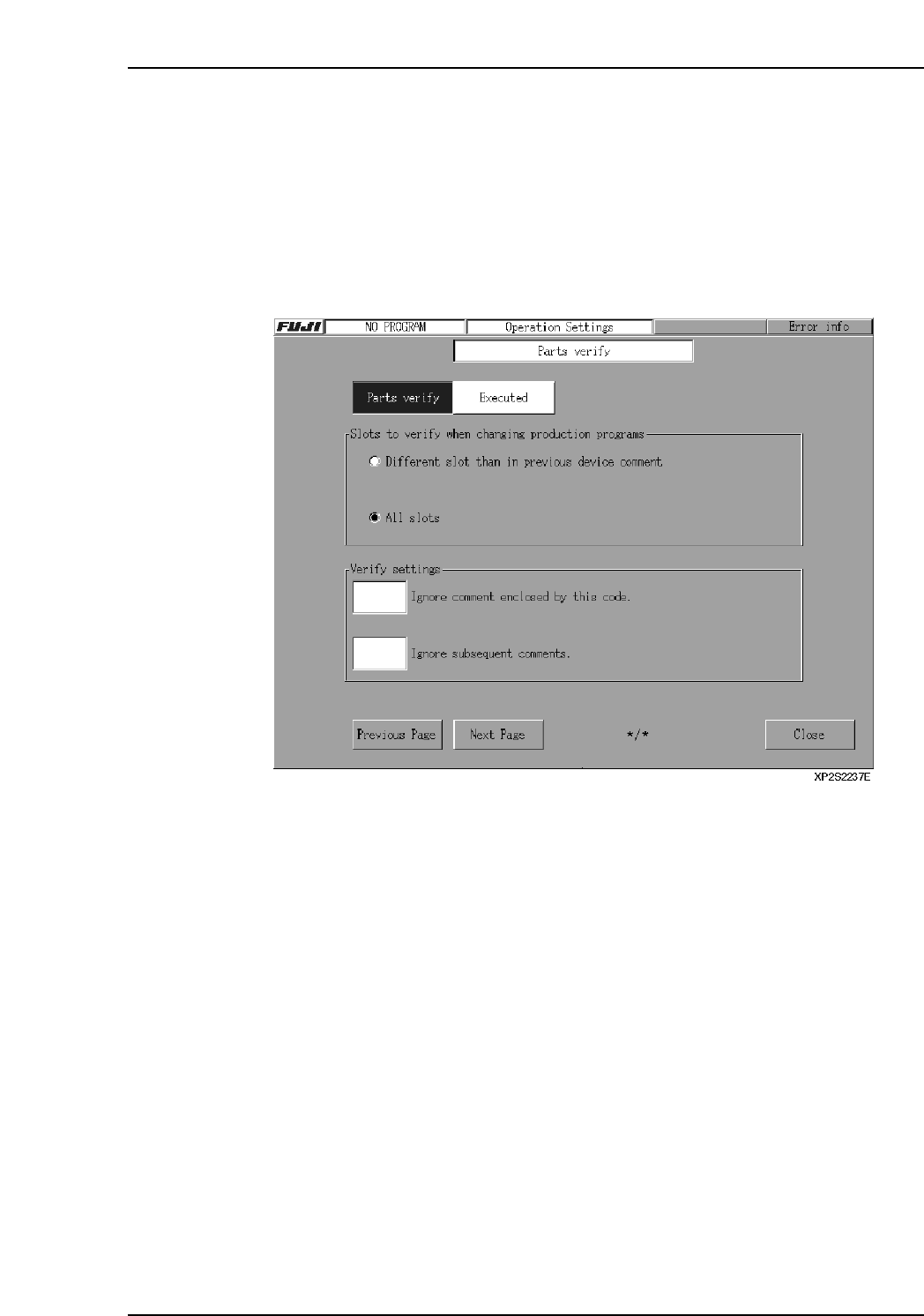
This is a part set position check function (optional) which prevents the wrong parts from
being set in the machine slots. The setting procedure for this function is given below. (A
setup procedure is required in order to use this local verify function.)
Procedure
1. At the [Main] screen, select [Maintenance A] - [Operation Settings] to display the
[Operation Settings] screen.
2. Press the [Next Page] button to display the [Parts Verify] screen.
3. In the textbox next to the “Parts Verify” item, specify whether or not the verify
function is to be used. If “Executed” is selected, continue with the settings
described below.
4. Select whether or not a slot verify operation is to occur under one of the displayed
conditions.
Different slot than in previous device comment: Only slots which are different
from those used by the previous
production program are checked.
All slots: All slots are checked.
5. When a portion of a barcode reading is to be ignored, that portion can be skipped
by using a 1-digit ASCII Code.
Ignore comment enclosed by this code:
The portion surrounded between this ASCII code is ignored.
Ex. If a slash “/” is specified in the field for “Ignore comment enclosed by this
code,” then “12345/6789/0123” will be read as “0123450123”. However, if
only one symbol is used (not a pair), then the numbers after the symbol will
be ignored. Thus, “12345/6789/0123/456” will be read as “123450123”.
Ignore subsequent comments:
All comment which follow the ASCII code are ignored.
[Ex] if a “/” is used as the ASCII code, a “12345/6789/0123” comment will be
interpreted as “12345”.
Part 2 Chapter 2 Settings Prior to Start Production
Edition 2.0 2-2-9 XP-142E System Reference