XP-142E System Reference-SYS-XP142-2.0E.pdf.pdf - 第107页
About Error Details Select the feeder you would like to see from the list in the [Feeder Info] screen and then click the [Error Detail] button. A screen with details of errors for that feeder will appear, as shown below.…
Comment
Displays comments for feeders which are in the log data which satisfies the specified
conditions, or registered in the selected log file.
Operation Button Explanations
Proceeds to the panel information screen.
Proceeds to the machine status information screen.
Displays error information for the selected feeder.
(Refer to the following page.)
This button appears when the error information is displayed, and
is used to return to the [Feeder Data] screen.
Proceeds to the nozzle information screen.
Proceeds to the error information screen.
Saves information data to a floppy disk.
If the standard feeder data screen is open, all tabulated feeder data
is saved to floppy disk. From the error details screen, only error
information from the currently displayed screen is saved to floppy
disk.
Closes this screen and returns to either the production information
display conditions setting screen, or the log file selection screen.
Part 2 Chapter 6 Production Information Display
Edition 2.0 2-6-16 XP-142E System Reference
About Error Details
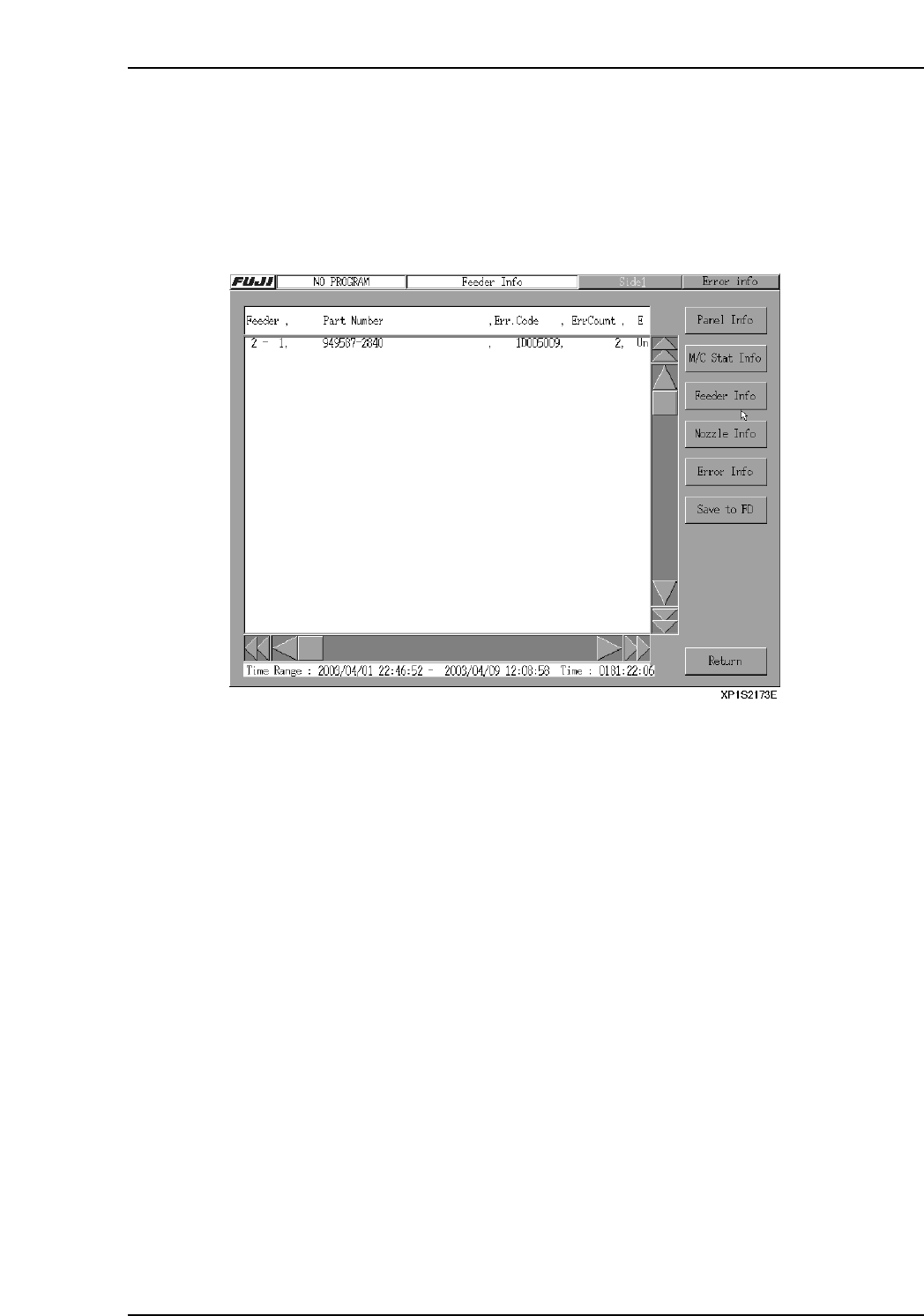
Select the feeder you would like to see from the list in the [Feeder Info] screen and then
click the [Error Detail] button. A screen with details of errors for that feeder will appear,
as shown below. The display toggles between [Feeder Info] and [Error Detail] when
these buttons are selected.
Note: If a feeder with no errors is selected, no information will appear even if [Error Detail] is
selected. This is also true if the [TOTAL] column is selected.
Feeder
The stage and slot number of the specified feeder.
Part Number
The part number of the part in the feeder.
Error Code
The number of the error code that occurred.
Error Count
The number of errors for that feeder.
Error Message
An explanation of the error.
Part 2 Chapter 6 Production Information Display
Edition 2.0 2-6-17 XP-142E System Reference
Part 2 Chapter 6 Production Information Display
Edition 2.0 2-6-18 XP-142E System Reference
6.2.7 Nozzle Information Screen
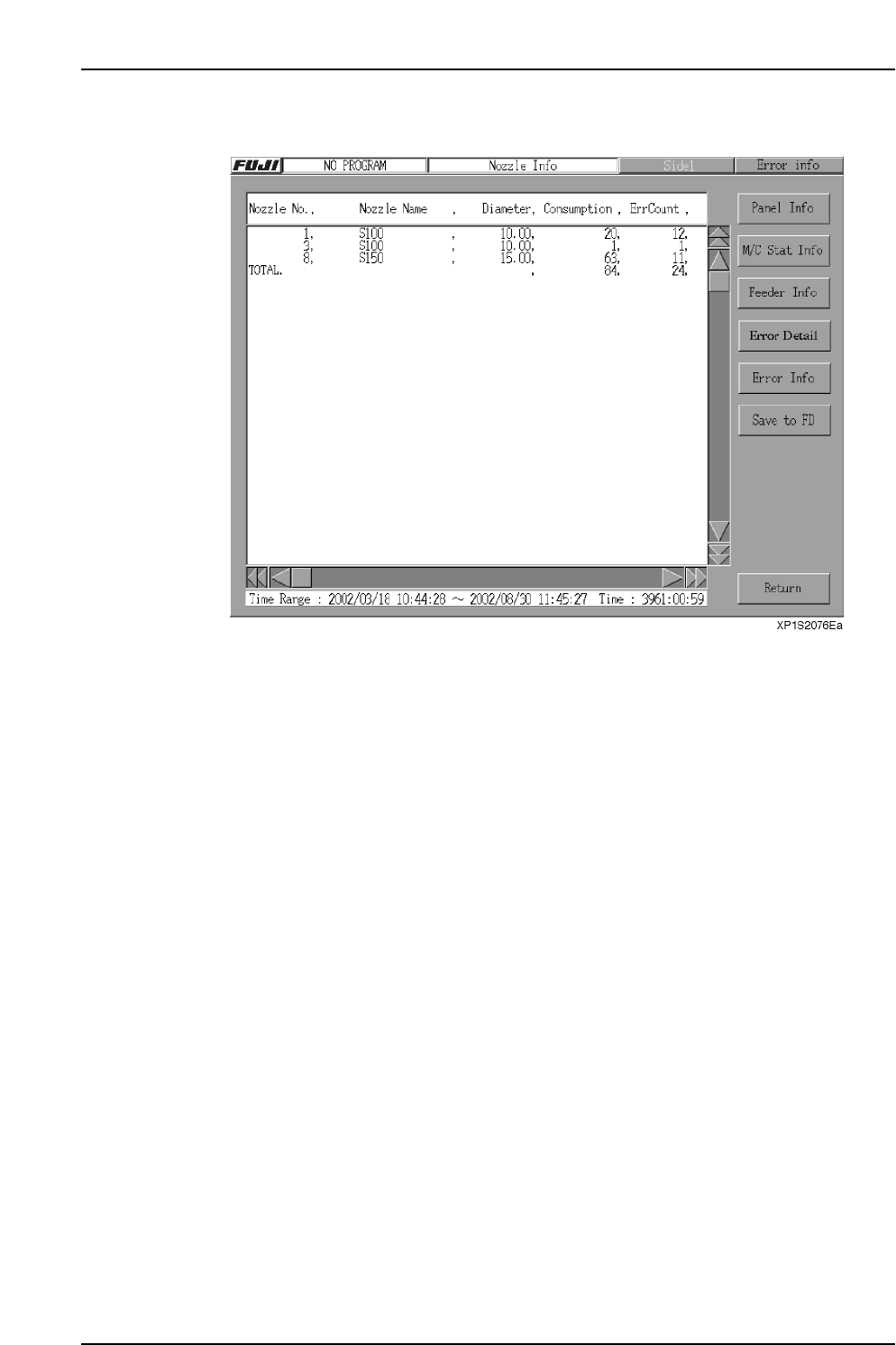
* This screen displays all the data which applies to each nozzle number, nozzle size, and
nozzle name.
Setting Item Explanations
Nozzle No.
Displays nozzle numbers which are in the log data which satisfies the specified
conditions, or registered in the selected log file. Logs with a NO_PROGRAM status are
not included in this processing.
Nozzle Name
Displays nozzle names which are in the log data which satisfies the specified conditions,
or registered in the selected log file.
Diameter
Displays nozzle diameters which are in the log data which satisfies the specified
conditions, or registered in the selected log file.
Consumption
Displays the total placing counts for nozzle numbers which are in the log data which
satisfies the specified conditions, or registered in the selected log file.
Error Count
Displays the error count for the nozzles which are in the log data which satisfies the
specified conditions, or registered in the selected log file.
The number of the parts by which the vision processing error occured.