XP-142E System Reference-SYS-XP142-2.0E.pdf.pdf - 第35页
Notes: Part 1 Chapter 1 Machine Overview Edition 2.0 1-1-4 XP-142E System Reference
1.2 Touch Screen
(ESR0105d)
The operator issues commands to the machine from the touch screen at the front or rear
of the machine. Each screen that appears at the touch screen contains a number of
command buttons, which display the commands associated with the selection. Some
screens, as in the example below, are divided into sections with related commands being
grouped together.
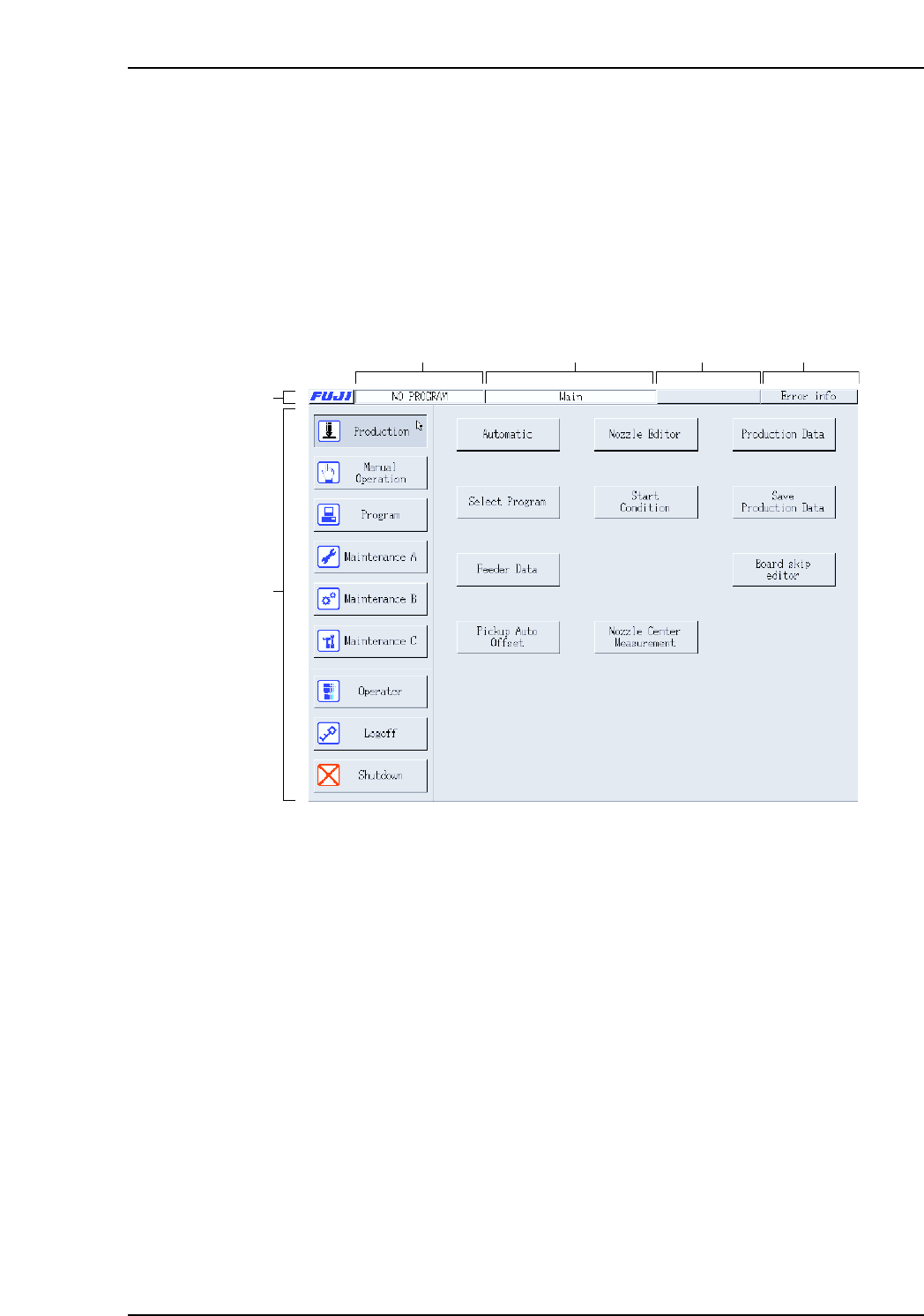
The screen shown below has been created for the purposes of this explanation and shows
the sections of each screen that are explained below.
Title bar
A: Press the [FUJI] button to display version information for the machine control
software.
B: The name of the active program displays at this section of the title bar.
C: The name of the current screen displays at this section of the title bar.
D: The maximum consecutive memory space which is available displays at this
section of the title bar.
E: This button displays in red and is enabled when a vision processing error occurs.
If this button is pressed while displayed in red, the system returns to the vision
processing screen. When a standard error such as a pick-up error, etc., occurs,
information about that error displays in a dialog box at the center of the screen.
Main area
F: The command buttons in the main section of each screen can be pressed to access
further related commands. Refer to part 5 for a detailed explanation of the
command hierarchy.
XP1S1003Eb
(A)
(F)
(B) (C) (D) (E)
Part 1 Chapter 1 Machine Overview
Edition 2.0 1-1-3 XP-142E System Reference

Notes:
Part 1 Chapter 1 Machine Overview
Edition 2.0 1-1-4 XP-142E System Reference

2. Glossary
(ESR0106k)
This chapter defines some of the terms used throughout this manual.
Note: A number of important changes have been made to Fuji terminology which may cause confusion for users
of other Fuji machines. These changes have been made after consulting our users in reference to
applying terminology in alignment with SEMI standards.
What was called a ‘board’ in the past is now referred to as ‘panel’ and what was called a ‘block’ in the past
is now referred to as a ‘board’. Therefore, ‘mulitblock board’ is now called a ‘multiboard panel’.
board
A board is one of several identical circuits that constitute a panel, which are separated when assembly
is complete.
Connect/Disconnect Parts Supply Side
This machine allows parts to be supplied from the machine front (Side 1) or rear (Side 2). Parts are
supplied by connecting an MFU to the machine. The MFU can also be detached from the machine.
cycle steal
Using this function, the machine automatically adjusts itself, with movement that is not directly
related to production.
global skip mark
A mark applied to a multiboard panel to indicate that a skip mark has been attached, and that the
machine must inspect to determine which blocks will be skipped. If a global skip mark is not
detected, parts are placed on the boards on the panel without performing further skip mark reading.
See also “multiboard panel”.
inching (JOG)
The action of manually moving a machine axis using the inching keys displayed at the touch panel of
the machine. The inching keys are held down to move the axis to the desired position.
multiboard panel
A panel that is composed of several identical smaller boards which are separated when assembly is
complete.
Multi-Feeder Unit (MFU)
The unit on which mechanical feeders are mounted. An MFU for the XP-142E holding up to 50
feeders can be set at the removable supply side of the machine.
recipe
The operating instructions that enable the machine to assemble all, or a specified portion of the panel.
recovery
The action of reexecuting a pick-up sequence which was not successfully performed at the previous
attempt. The number of recovery attempts and the mode of recovery are user specified.
skip mark
A mark on the panel which makes it possible to prevent the machine from placing parts on a specific
board of a multiboard panel. If the machine detects a skip mark at the specified position on the
board, it knows assembly for that board is not required.
touch screen
The interface on the machine which allows the operator to execute the machine commands by
touching the appropriate button on the screen.
Part 1 Chapter 2 Glossary
Edition 2.0 1-2-1 XP-142E System Reference