XP-142E System Reference-SYS-XP142-2.0E.pdf.pdf - 第44页
2.1.1 Production Mode There are four modes of production: “Product”, “Idle 1”, “Idle 2”, and “Pass”. Details of each mode are explained below. Product: This mode is used during assembly. Parts are picked up, inspected, a…
2. Settings Prior to Start Production
2.1 Operation Settings
(ESR0203h)
The machine operation conditions are specified by the following 5 setting items
(4 settings when “local verify” is not used).
• Mode selection: Specifies the mode of machine operation (Production mode,
operation mode, etc.)
• Tape cutter: Settings for the upper tape cutter used when supplying parts
on tape reels.
• Statistical information: Settings which determine how nozzle & slot error data are
collected.
• Local verify (optional): Settings for the parts set position verify operation performed
by the barcode reader.
• Other: Settings related to panel vacuum and nozzle size checks.
Display example
1. Displays the currently opened page name.
The “page count / total number of pages” of the currently opened page displays.
2. [Close]
Press to close the [Operation Settings] screen and return to the [Main] screen.
3. Page switching buttons
Press [Previous page] to go back 1 page. If [Previous page] is pressed at page 1,
the final page displays. Press [Next page] to advance 1 page. If [Next page] is
pressed at the final page, the first page (page 1) displays.
Part 2 Chapter 2 Settings Prior to Start Production
Edition 2.0 2-2-1 XP-142E System Reference
2.1.1 Production Mode
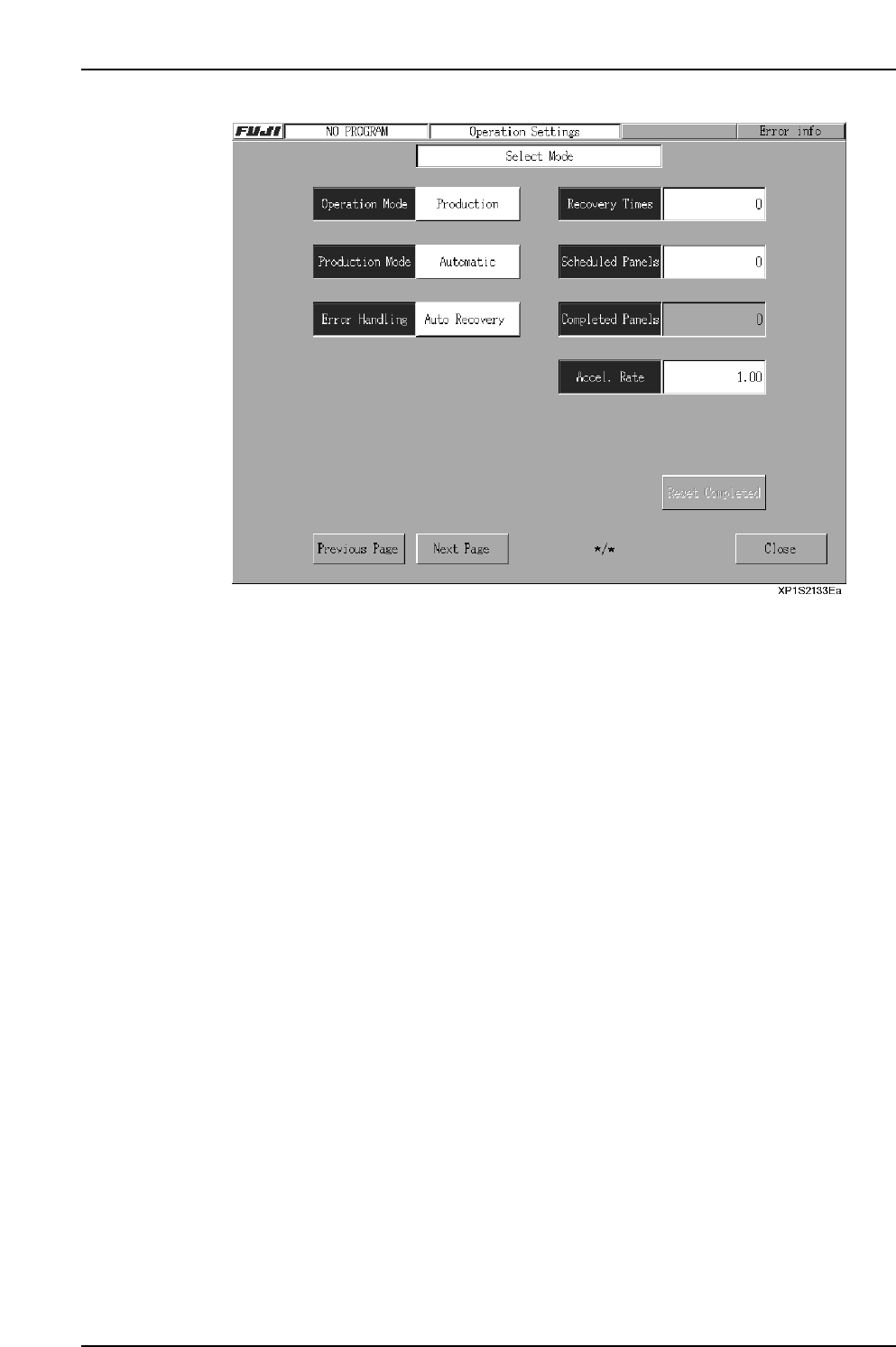
There are four modes of production: “Product”, “Idle 1”, “Idle 2”, and “Pass”. Details of
each mode are explained below.
Product: This mode is used during assembly. Parts are picked up, inspected, and
placed on the panel.
Idle 1: This mode is selected primarily for machine adjustment and test run
operations. The nozzle moves to the part pickup position, and actually feed
the part. The feeder should be removed from the MFU to prevent parts
from being scattered.
Idle 2: This mode is selected primarily for machine adjustment and test run
operations. In this mode, the nozzle moves to the part pickup position, but
does not feed the part. It is not necessary to remove the feeders from the
MFU.
Pass: Pass mode is used when the machine is not used in current production. In
pass mode the machine simply acts as a conveyor, moving the panel on to
the next machine in the line.
Procedure
1. At the [Main] screen, press [Maintenance A] then [Operation Settings] to display
the [Operation Settings] screen.
2. Select the desired mode from the “Product”, “Idle 1”, “Idle 2”, “Pass” candidates
at the upper left of the screen.
3. Press [Close] to return to the [Main] screen.
Part 2 Chapter 2 Settings Prior to Start Production
Edition 2.0 2-2-2 XP-142E System Reference

2.1.2 Operation Mode
The machine has three modes of operation, “Sequence”, “Step” and “Pause”. These
modes of operation have different purposes as is explained below.
Sequence: Use Sequence for assembly. In this mode the machine operates
continuously, performing each of the sequences defined in the program.
Step: Use Step to test the operation of the machine. In this mode the machine
performs one sequence at a time, and the START button must be pressed to
perform the next sequence.
Pause: The “Pause” mode is used to perform machine test runs. In this mode,
machine operation is divided into several cycles. Press the [CYCLE STOP]
button to pause, then press [Start] to resume operation beginning from the
next sequence. Operation proceeds to the next cycle each time the START
button is pressed.
Procedure
1. At the [Main] screen, press [Maintenance A] then [Operation Settings] to display
the [Operation Settings] screen.
2. Select the desired mode from the “Sequence”, “Step”, “Pause” candidates at the
upper left of the screen.
3. Press [Close] to return to the [Main] screen.
2.1.3 Error Handling
The machine can be set to react differently to a parts error. Parts error refers to parts
pick-up and parts inspection errors. There are three modes of operation triggered by a
parts error, “Auto Recovery”, “Error Stop” and “Error Pass” which can be changed by
the operator.
Auto Recovery: The machine will repeat a sequence it failed to carry out (due to a
pick-up miss or part inspection error) up to the specified number of
times (this is referred to as the ”Recovery Limit”).
Error Stop: The machine stops if a pick-up miss or part inspection error occurs.
Error Pass: The machine ignores pick-up miss or part inspection errors, and
continues operation.
Procedure
1. At the [Main] screen, press [Maintenance A] then [Operation Settings] to display
the [Operation Settings] screen.
2. Select the desired mode by pressing the recovery mode button.
3. Press [Close] to return to the [Main] screen.
Part 2 Chapter 2 Settings Prior to Start Production
Edition 2.0 2-2-3 XP-142E System Reference