XP-142E System Reference-SYS-XP142-2.0E.pdf.pdf - 第152页
1. Function Overview (ESR0701b) Production programs can be created and edited on the XP. The coordinate system used in programming is the same as the rectangular coordinate system used in mathematics. CCW direction angle…

Part 3
On-Machine
Programming
(ESR07AA)
This part explains the editing and
creation of production programs at
the machine.
1. Function Overview . . . . . . . . . . . . . . . . . . .3-1-1
2. Program Menu . . . . . . . . . . . . . . . . . . . . . .3-2-1
3. Editor . . . . . . . . . . . . . . . . . . . . . . . . . . . . .3-3-1
4. Expander . . . . . . . . . . . . . . . . . . . . . . . . . .3-4-1
1. Function Overview
(ESR0701b)
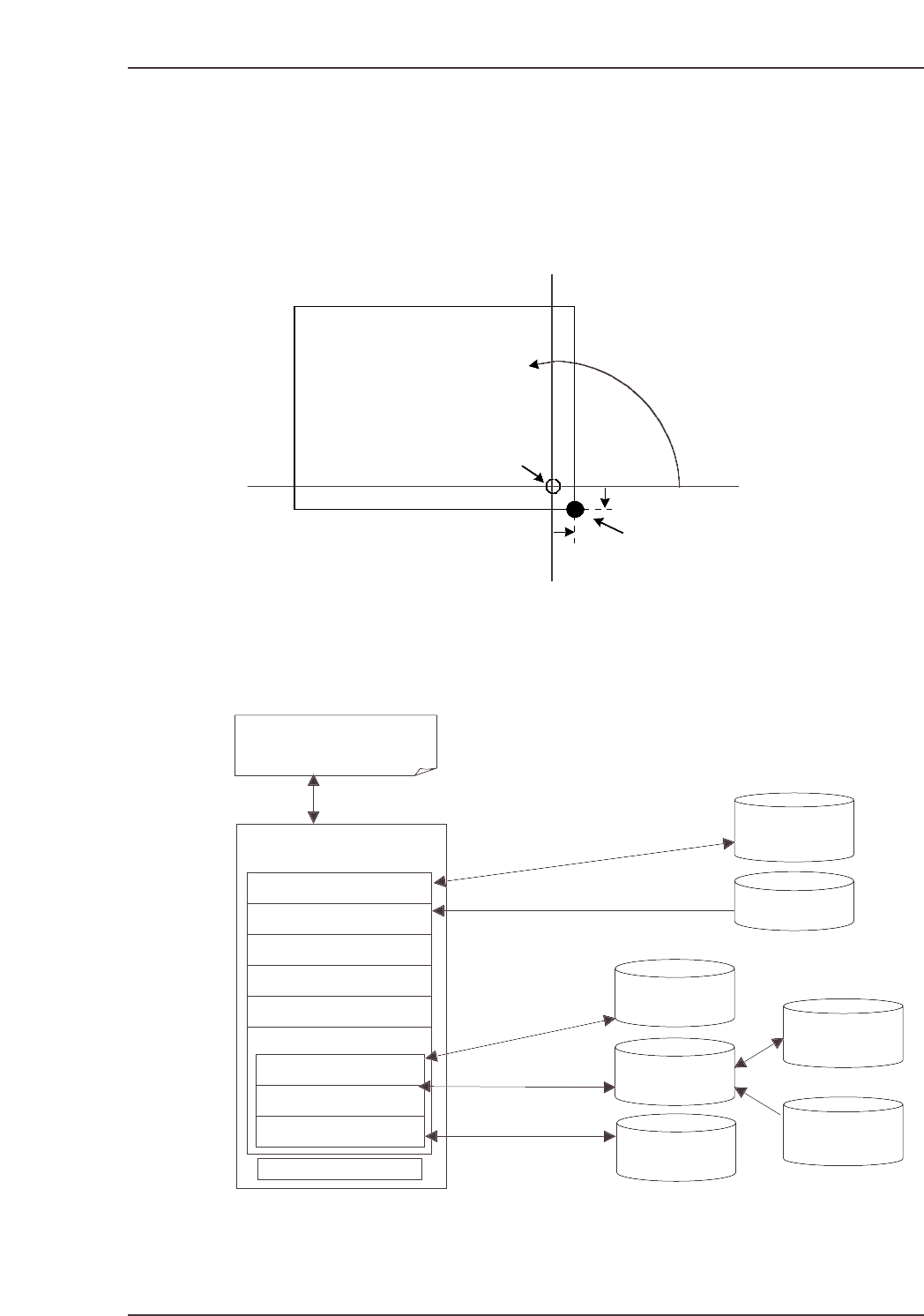
Production programs can be created and edited on the XP. The coordinate system used in
programming is the same as the rectangular coordinate system used in mathematics. CCW direction
angles are “plus” angles (“minus” angles cannot be specified). The program origin is a point 5 mm
above and to the left of the panel’s bottom right corner (Fuji standard specification machines).
1.1 Production Program Data Configuration
Production programs for XP machines use the data configuration shown below.
Production program
Mark file read/save
Library read/save
PartNumber
library *.PDH
PartType library
*.PDS
Packaging library
*.PDP
Library read/save
Library read/save
(*.PGO)
Nozzle data
Mark data
Sequence data
Panel data
Part data
Feeder setup data
PartNumber data
PartType data
Packaging data
:
Read from file
Stored to file
ozzle spec. data
Referencing
Mark file *.FMK
*.BMK *.LMK
Template vision
file *.PNG
Template file
*.TPL
Reading
Production program
being edited
XP2S2225E
A Proper data CCIMF
Template Mode setting
is required in order to
read template files.
Y+
Panel
Q+
Program origin
X- X+
X
Panel’s bottom right corner
Y-
+5 mm
-5 mm
Y
XP2S2043E
Part 3 Chapter 1 Function Overview
Edition 2.0 3-1-1 XP-142E System Reference
Even if the PartNumber, PartType, and Packaging data are edited and saved in the
library, this edited data is not automatically transferred to the production program
stored on the machine. To change the part data specified in the production program data
to the library data settings, the data must be read at each of the data editors and saved to
the production program.
Part Data Configuration
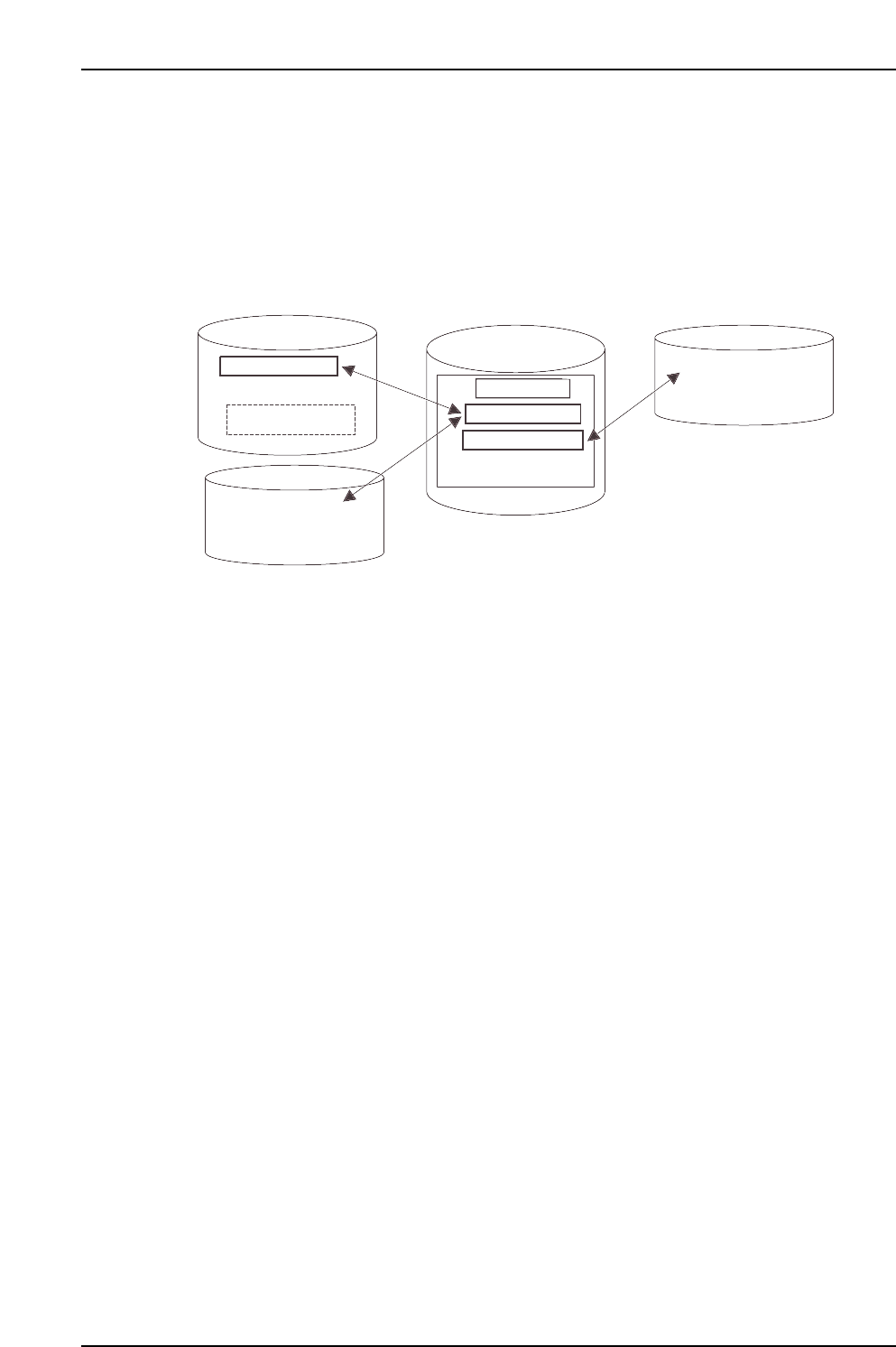
The configuration of part data used on XP machines is shown below.
1.2 List Display Hint
The time required to display files is proportionate to the number of files.
Regularly delete unnecessary files (production programs/part data/mark data) using
the [Program] - [File Manager] commands. Questionable files should be copied to a
floppy or other storage device before being deleted from the machine.
Part Number
Part Type Name
Packaging Name
Part Number data
Packaging Name
Packaging data
Part Type Name
Template data
Part Type data
File name
(For template editing)
Image data
XP2S2226E
Part 3 Chapter 1 Function Overview
Edition 2.0 3-1-2 XP-142E System Reference