XP-142E System Reference-SYS-XP142-2.0E.pdf.pdf - 第81页
Nozzle & Slot Display [Machine Info Screen] Error rates display when the nozzle and slot display is clicked at the [Machine info] screen. If a parts-out slot is clicked, information displays for the slot which was cl…
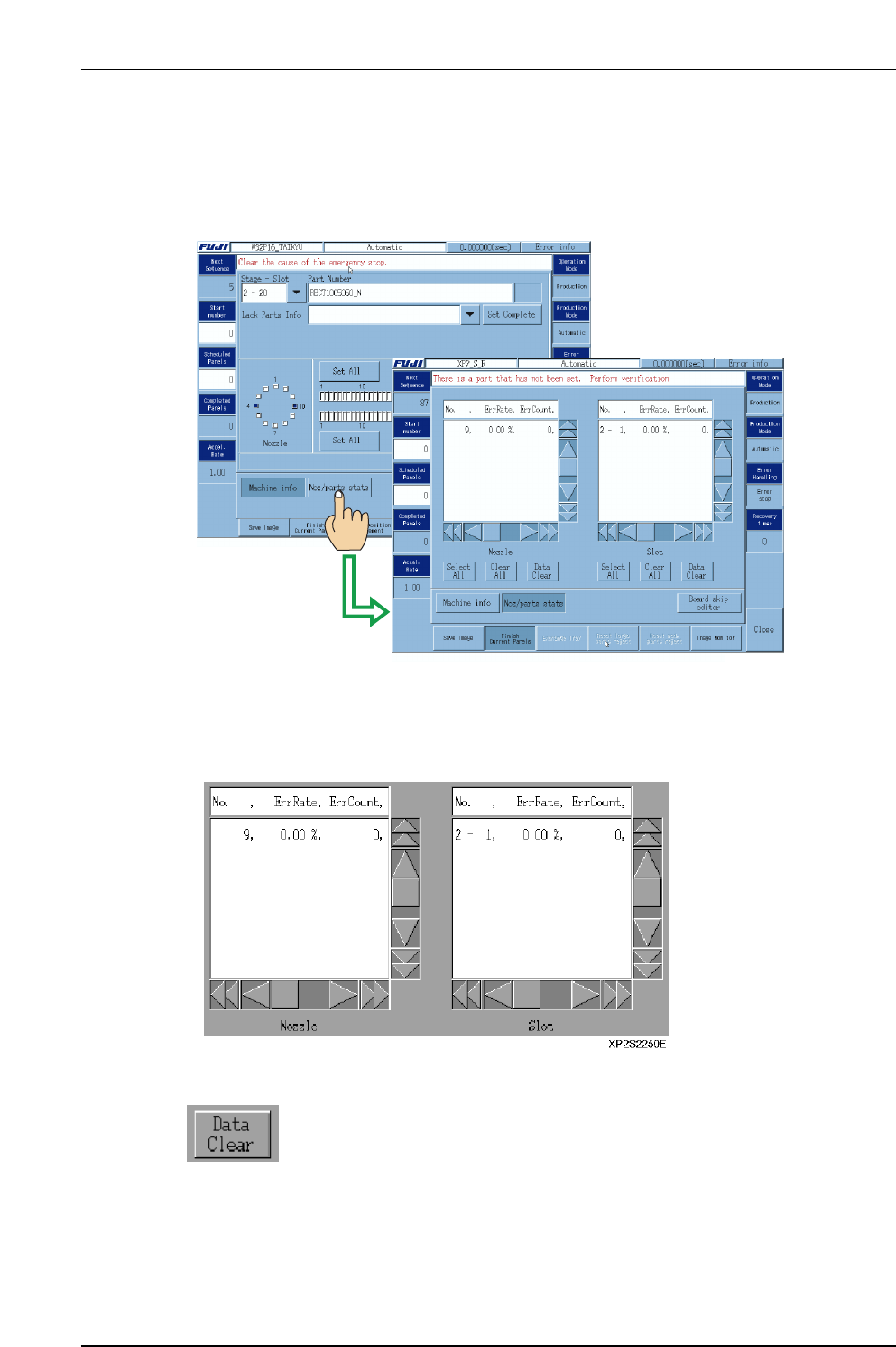
4.2.3 Nozzle/Parts Statistical Information
The “statistical information” operation setting described above permits the display of
nozzle/parts error status data which can be checked during automatic operation.
To view this data during automatic operation, select [Noz/parts stats] at the [Automatic]
screen.
[Data display list]
Error rates display for the 5 nozzles and slots with the highest error rates. (Error rates for
other nozzles and slots can be viewed by using the scroll bar to scroll down.)
The list shows the No., the error rate, the error count, and the total number of pickups.
[Manually reset statistical data]
Press to reset (clear) the statistical data for the selected nozzles/slots.
This button is disabled during automatic operation.
XP1S2249E
Part 2 Chapter 4 Starting the Production
Edition 2.0 2-4-8 XP-142E System Reference
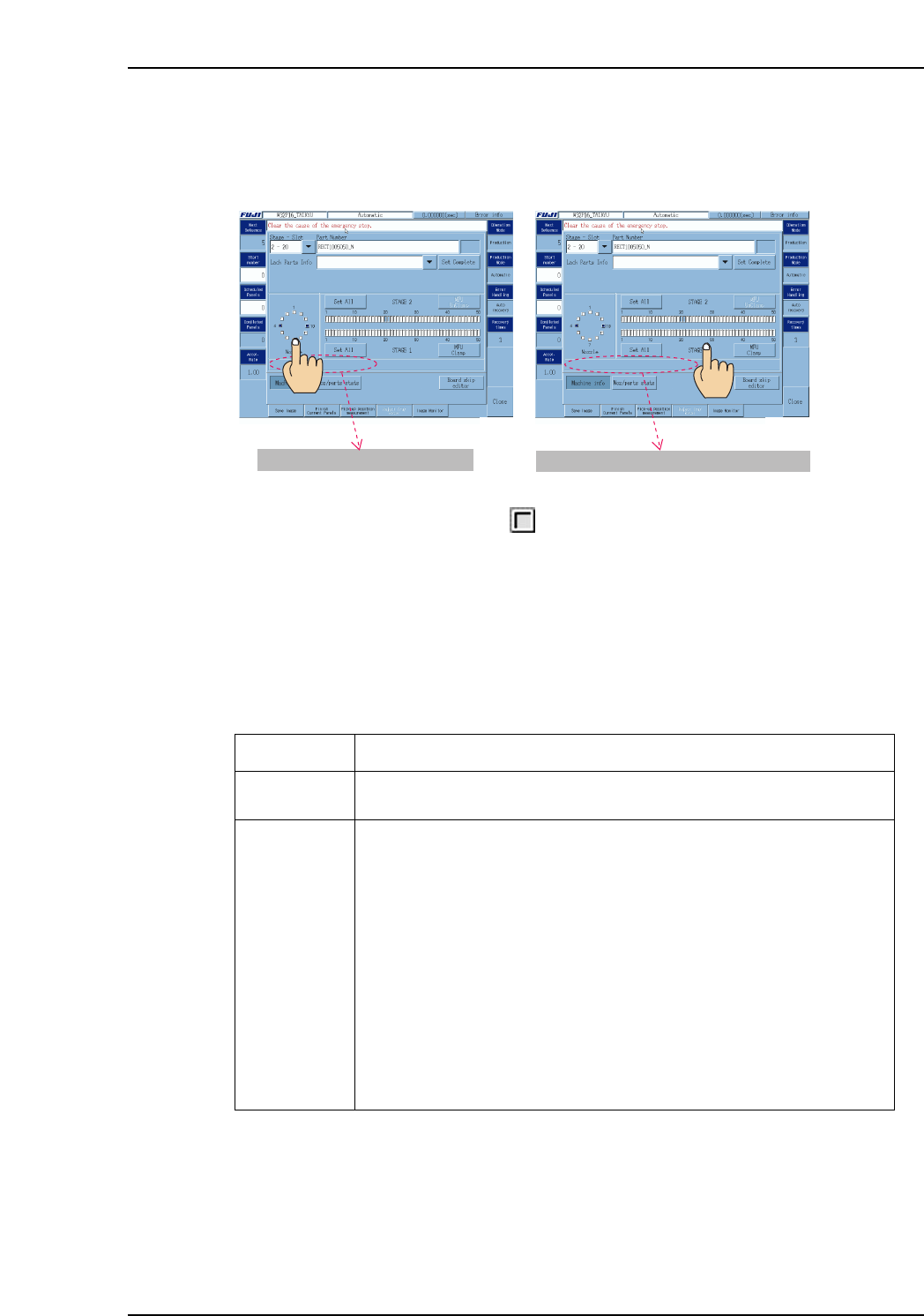
Nozzle & Slot Display [Machine Info Screen]
Error rates display when the nozzle and slot display is clicked at the [Machine info]
screen. If a parts-out slot is clicked, information displays for the slot which was clicked
at the “Parts-out info” list.
Nozzles and slots display in yellow when the statistical information indicates a
caution condition.
Statistical Processing
Data collection processing
When a pickup and placement cycle (hereafter referred to as 1 cycle) is completed, the
number of errors (non-placement count) and the number of pickups are processed by the
statistical processing counter. The counter collects data from the last 10,000 cycles for
each nozzle and slot.
The status is refreshed following the count operation. (Refresh processing also occurs
when returning to the automatic operation screen after making an operation conditions
change at the [Operation Settings] screen when operation is not in progress.)
Mode
Error stop
Auto recovery
The number of errors (non-placement count) and pickups are counted after
each cycle.
Prior to count processing which is performed after 1 cycle, operation varies,
depending on whether or not a recover operation is to occur.
When recovery is executed:
During the recovery operation, the number of pickup errors is counted and
saved for each nozzle and feeder by the dedicated counter.
When recovery is not executed:
• [Parts-out] ⇒ Dedicated recovery counter is reset.
• [Other error] ⇒ The dedicated counter data (error count, pickup count)
is saved at the statistical processing counter.
If placement has occurred:
The number of pickups is counted.
The dedicated counter data (error count, pickup count) is saved at the
statistical processing counter.
Count Method
XP2S2253E
Nozzle (5) Error Rate (0.00 %)
Nozzle (5) Error Rate (0.00 %)
Stage - Slot (1-25) Error Rate (0.00 %)
Stage - Slot (1-25) Error Rate (0.00 %)
XP1S2252E
Part 2 Chapter 4 Starting the Production
Edition 2.0 2-4-9 XP-142E System Reference

Data Reset Conditions
Auto reset: Reset occurs automatically during automatic operation preparation after
switching production programs or editing data. Nozzle and slot data
where changes occurred are initialized at that time. (Changed data are
initialized when the automatic operation screen is opened.)
Manual reset: Reset is possible by pressing the [Data Clear] button at the [Statistical
info] screen.
Caution Processing
1. The signal tower lights.
2. Relevant nozzles and slots display in yellow at the [M/C stat info] screen.
3. Relevant data displays in red at the [Statistical info] screen.
Count processing does not occur, however, when the following conditions apply:
• When in the Idle mode.
• When in the Pass mode.
• When in the Error Pass mode.
Cycle Stop Processing
At caution processing operations, the following occurs in addition to items 1~3 above.
(The same applies under “no-check” conditions.) The following message displays at the
status bar, and a cycle stop occurs: “Please correct the cycle stop cause detected by
statistical processing.”
Signal Tower Processing
• When a warning condition occurs, the signal tower lights in accordance with its
settings.
• The warning status remains in effect until a reset occurs.
• If the warning status is cleared, the signal tower lamp remains on if other
statistical warning causes remain uncorrected.
Part 2 Chapter 4 Starting the Production
Edition 2.0 2-4-10 XP-142E System Reference