XP-142E System Reference-SYS-XP142-2.0E.pdf.pdf - 第180页
Barcode The barcode label may contain up to 30 characters other than double-quotation marks. Part Type Name Select the part type name from among the registered part type names. Packaging Name Select the packaging name fr…
Press to edit a packaging data.
Setting Item Explanations
Part Number
Specifies the part number (max. of 30 characters).
Note: The following characters may not be used in file names: ( : \ / ; * ? “ < > | ) Also, characters
(˜ .) may not be used at the beginning of the file names.
Direction
This setting changes the direction of a part in part data relative to the part supply
direction. If the supply direction of a part changes after part data is created, specify the
degree of counterclockwise rotation the part must be rotated. (The default setting when
part data is created is 0 degrees.)
Specify “1” for +90 degree rotation from direction 0.
Specify “2” for +180 degree rotation from direction 0.
Specify “3” for +270 degree rotation from direction 0.
Polarity Setting
This setting specifies (from a drop-down list) whether a created production program is to
be a standardized program (supports polarity function) or not. A standardized program
need not be changed even if the part supply direction is changed. The “conventional
program” method requires a program change when the part supply direction is changed.
Refer to the following explanation of “Polarity Function” for more detail.
0: Not use “Conventional program” method (Presently not supported)
1: Yes “Standardized program” method (with polarity)
2: No “Standardized program” method (without polarity)
(Presently not supported)
Polarity Function
For F4G and FUJICAM
XP machines support only production programs created by the standardized program
method (polarity method). Both the “Polarity Yes” and “Polarity No” settings are both
processed as “Polarity Yes”.
Standardized Program Method
Parts which are mounted at the same angle as the angle specified when the part data was
created, have a placement angle of 0-degrees. Therefore, even if the part supply
direction is different (when direction is different; when part supply direction is
different), the part can always be placed at the same angle.
Program Data Check
An error occurs at data checks when a loaded program has “No” specified at the panel
data’s “Program Polarity” item, or “Not Use” specified at the part data’s “Polarity
Setting” item.
Program Polarity
Yes
No
Not Use
All
Polarity setting of "Not Use" is not supported.
Program polarity setting of "No" is not supported.
Polarity Setting Error Display
XP2S2233E
Part 3 Chapter 3 Editor
Edition 2.0 3-3-24 XP-142E System Reference

Barcode
The barcode label may contain up to 30 characters other than double-quotation marks.
Part Type Name
Select the part type name from among the registered part type names.
Packaging Name
Select the packaging name from among the registered packaging names.
Part 3 Chapter 3 Editor
Edition 2.0 3-3-25 XP-142E System Reference
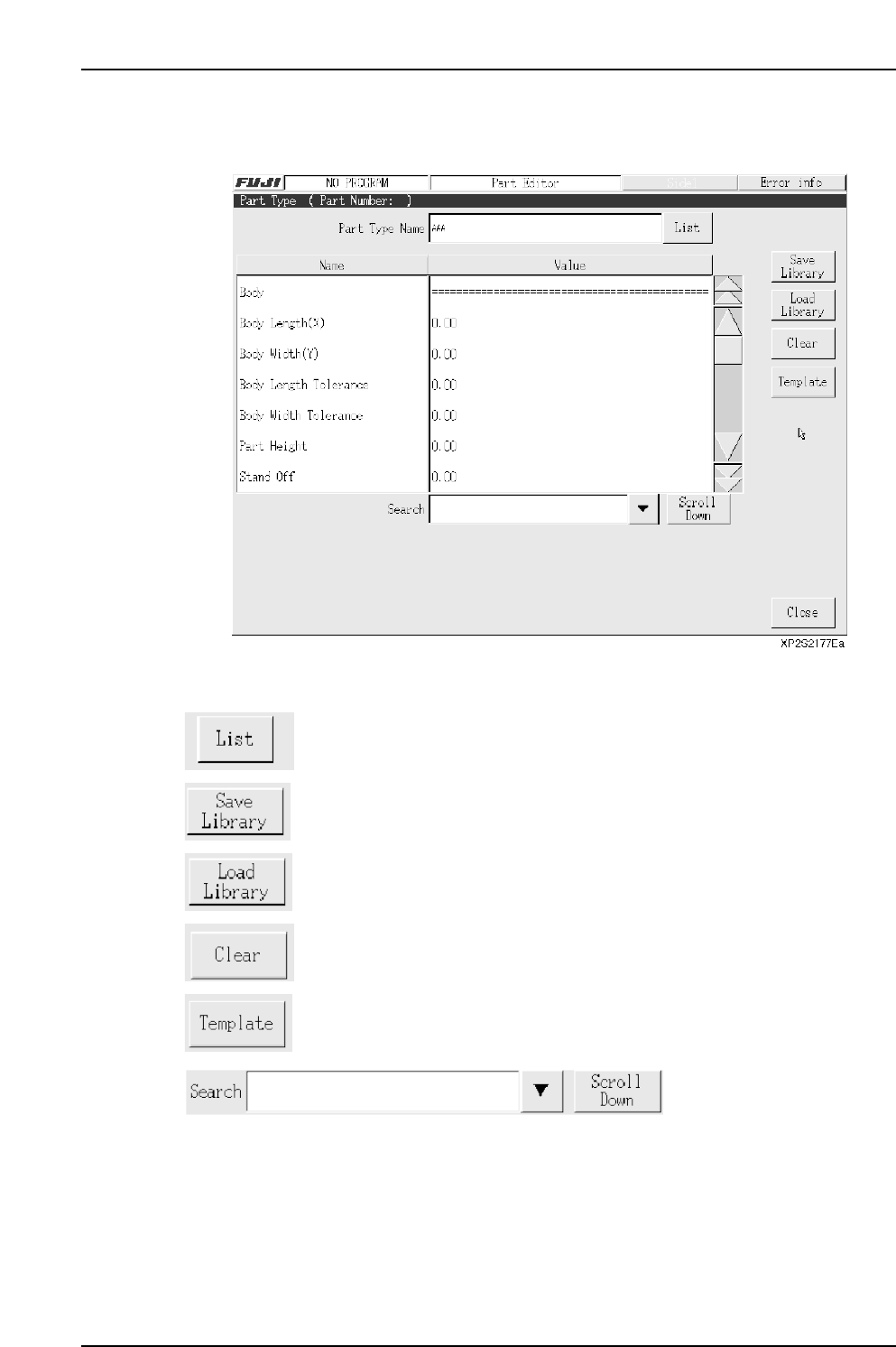
3.6.1 Part Type Editing
The part type editor is used to set part information.
Operation Button Explanations
Displays a list of part types used by the production program which is
currently opened in the editor.
Saves edited part type data to the library.
Loads a part type which is saved in the library.
Clears the setting data.
Press to perform template editing using the template editor.
Item searches display the specified data name. Press the black arrow-mark key to
display a classification list. A search can also be performed by entering the part number
name directly from the keyboard. Press the [Scroll Down] key to execute a search in the
“top to bottom” direction.
Part 3 Chapter 3 Editor
Edition 2.0 3-3-26 XP-142E System Reference