XP-142E System Reference-SYS-XP142-2.0E.pdf.pdf - 第79页
Part 2 Chapter 4 Starting the Production Edition 2.0 2-4-7 XP-142E System Reference Board Status Explanations [Production]: Production occurs in accordance with the production program. The board status can be changed fro…
(1) Global Skip Marks
The use of global skip marks can reduce cycle time when production involves a
multiboard panel. The user defines the global skip mark as a skip mark on board 0 in the
production program. The machine checks for the global skip mark first. If the operator
has put a mark at that position, the machine knows there is a board (or boards) to be
skipped on the current panel, and proceeds with the reading of all the skip marks. If the
machine does not detect a global skip mark, none of the skip mark positions are
inspected, and the machine proceeds with the placing of parts. Unnecessary inspection
of skip marks is avoided.
Refer to your host system documentation for details of how to set up global skip marks
in the current production program.
(2) Automatic Skipping of Boards
The machine will automatically skip a board if a skip mark is detected at the specified
position on the board. If you are using global skip marks, then this will be after the
machine found a global skip mark and has read the skip marks to determine which
board or boards are to be skipped. Parts are placed on the remaining boards on the
panel, and the panel is unloaded.
Refer to your host system documentation for details of how to set up skip marks in the
production program.
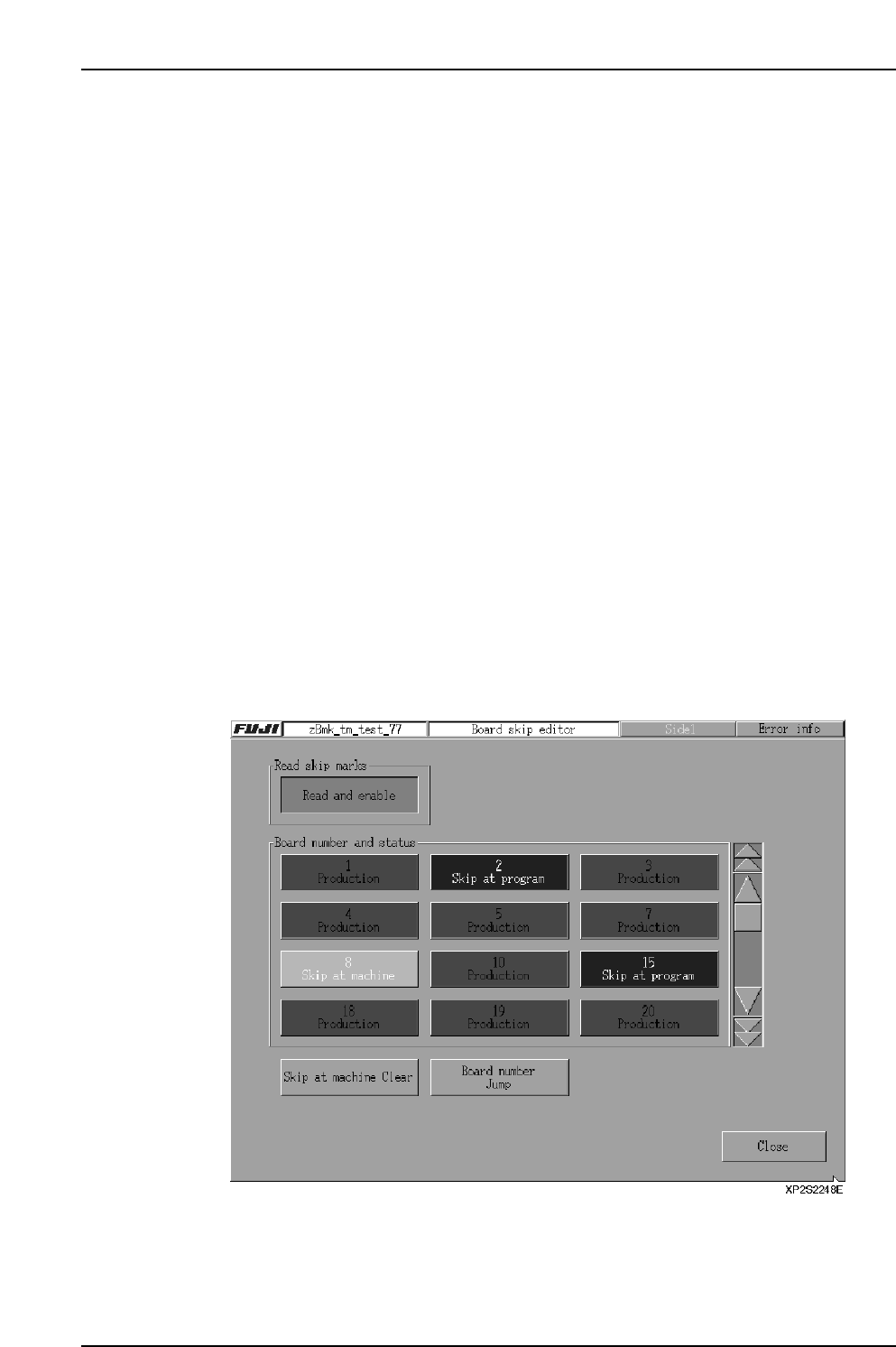
(3) Board Skips By Board Skip Editor
The board skip editor can be used to skip desired boards without changing the
production program.
Procedure
1. At the [Main] screen, select [Production] - [Auto], then select [Board Skip Editor].
Part 2 Chapter 4 Starting the Production
Edition 2.0 2-4-6 XP-142E System Reference

Part 2 Chapter 4 Starting the Production
Edition 2.0 2-4-7 XP-142E System Reference
Board Status Explanations
[Production]: Production occurs in accordance with the production
program.
The board status can be changed from the board skip
editor. When clicked, “Skip at machine” displays.
[Skip at program]: Indicates a board skip status specified by the production
program editor. The placing sequence for this board will
not be performed. The board status can be changed from
the board skip editor.
[Skip at machine]: Indicates a board skip status specified by the board skip
editor. The placing sequence for this board will not be
performed. The board status can be changed from the
board skip editor. When clicked, “Production” displays.
[BS Mark Skip]: A skip status has been established for this board due to a
board skip mark reading operation. The placing sequence
for this board will not be performed. The board status can
be changed from the board skip editor.
2. Skip mark reading enabled/disabled setting.
[Read and enable]: Skip mark reading is performed.
[Ignore]: Skip mark reading is not performed.
3. The status of each board displays at the “board number and status” area, and
these board statuses can be changed as necessary.
[Skip at machine clear]: Returns a “skip at machine” status to a “production
status”.
[Board number jump]: The board corresponding to the board number entered at
the displayed ten-key pad is moved to the head of the
“Board number and status” area.
4. When the necessary editing is completed, press [Close] to save the edited settings.
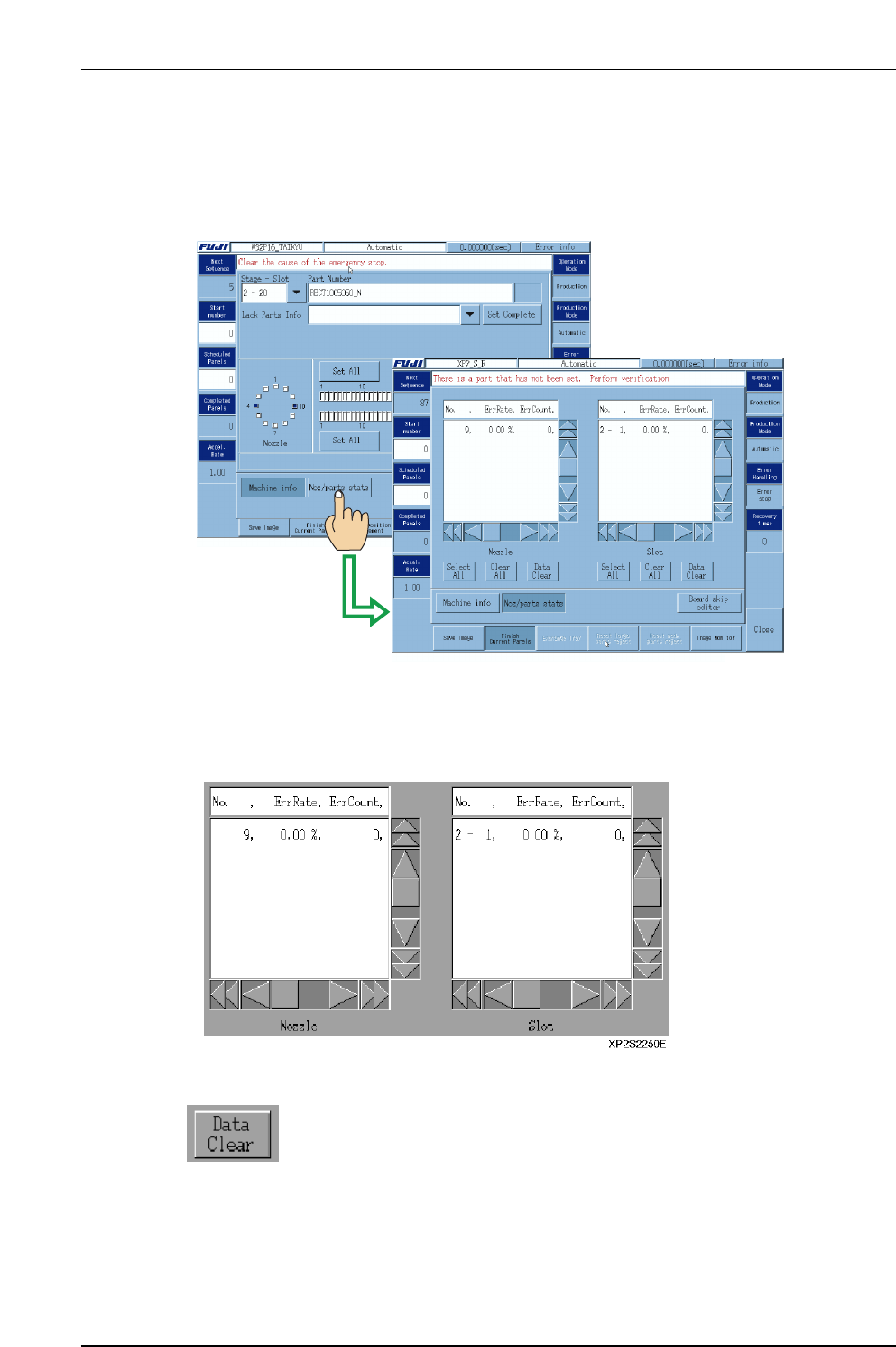
4.2.3 Nozzle/Parts Statistical Information
The “statistical information” operation setting described above permits the display of
nozzle/parts error status data which can be checked during automatic operation.
To view this data during automatic operation, select [Noz/parts stats] at the [Automatic]
screen.
[Data display list]
Error rates display for the 5 nozzles and slots with the highest error rates. (Error rates for
other nozzles and slots can be viewed by using the scroll bar to scroll down.)
The list shows the No., the error rate, the error count, and the total number of pickups.
[Manually reset statistical data]
Press to reset (clear) the statistical data for the selected nozzles/slots.
This button is disabled during automatic operation.
XP1S2249E
Part 2 Chapter 4 Starting the Production
Edition 2.0 2-4-8 XP-142E System Reference