KE2010.Instruction Manual.Ver.2.01,Rev.08.pdf - 第105页
3 − 32 − W hen you select the <CANCEL> button − W hen you click the <CANCEL> button, t he machine interr upts the cur rent operation such as PW B production. In such a case, the cur rent operat ion is interr …
3 − 31
3.7 Corrective Action for A Power Failure
When the power supply to a KE-2000 malfunctions, the power monitor function of the
UPS is activated.
If any power is not supplied to the machine for two seconds or longer, or if the system
detects an instantaneous power interruption that has occurred at the VME board, the
system assumes that a power failure has occurred.
If you do not operate the machine for the certain time of period, the machine saves
the production program, production management information, information required to
restart production, and device management information, and perform the shutdown
process.
3.7.1 Process to be performed when a power failure occurs
Step 1. Preparation for the automatic shutdown
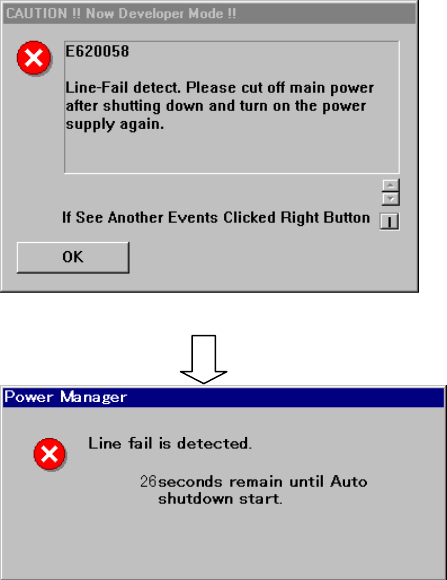
When the machine detects a power failure, the following dialog box appears on the
screen.
Figure 3.7.1.1 Dialog box displayed when the machine detects a power failure (1)
Figure 3.7.1.2 Dialog box displayed when the machine detects a power failure (2)
− If you do not perform any operation when the screen shown in Figure 3.7.1.1
appears, the screen shown in Figure 3.7.1.2 (2) appears. The machine counts
down the remaining time. When the remaining time reaches “0”, the machine
displays the automatic shutdown dialog box (see Figure 3.7.1.4).
OK: clears the error message
displayed on the screen
.
3 − 32
− When you select the <CANCEL> button
− When you click the <CANCEL> button, the machine interrupts the current
operation such as PWB production.
In such a case, the current operation is interrupted for several minutes
(approximately 3 minutes as the factory setting), so manually save data and shut
down the system.
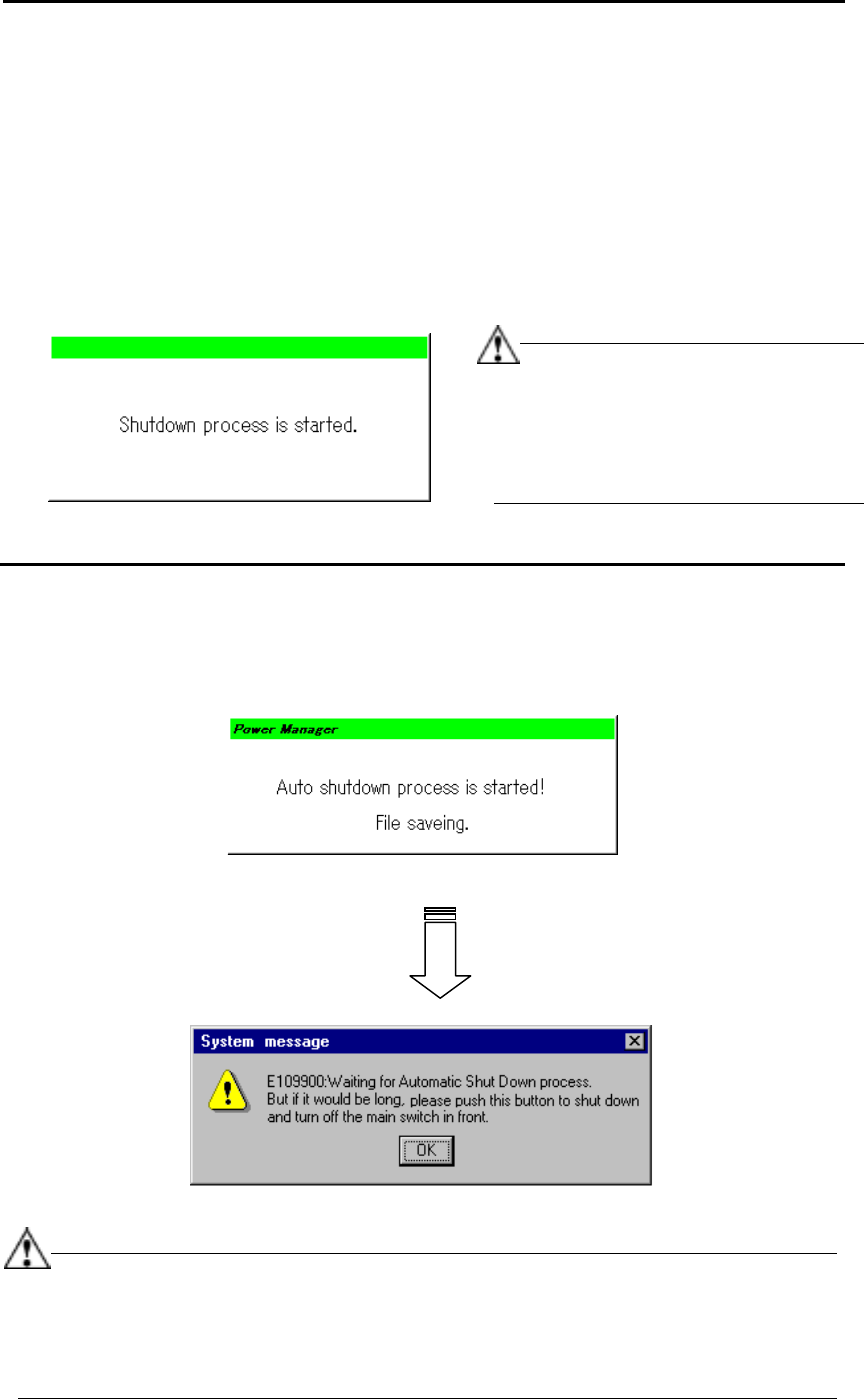
− When you do not start the shutdown process even though the preset time passes,
the machine displays the following dialog box, and then starts the shutdown
process automatically.
Figure 3.7.1.3 Shut down start dialog box
Step 2. Saving a file
After saving the information required to continue the current operation as a temporary
file, quit the application forcibly.
Figure 3.7.1.4 File saving dialog box
(Log off/on → The regulated screen appears.)
Figure 3.7.1.5 System message
−
This file saving operation does not overwrite any user data, but saves data as a
temporary file.
−
When you quit the application forcibly, the system is shut down without displaying
any inquiry message regardless the machine status.
In this case, note that the machine
does not display any message for asking
you whether to save data automatically.
After shut down, the machine operates in
the same manner as when you do not
click the <CANCEL> button.
3 − 33
Step 3. Shutdown process
①
Preparation for turning off the power supply
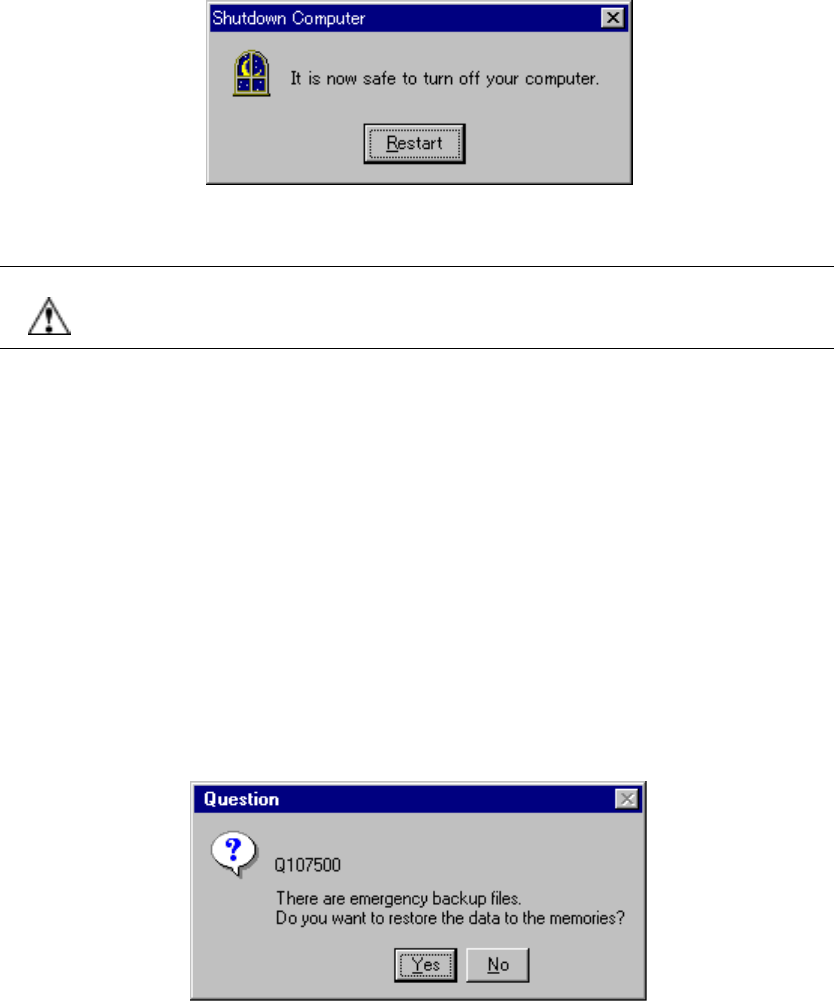
After you quit the application, the machine starts the shutdown process for
Windows NT. You can turn off the machine at this point, and the following
screen appears.
Figure 3.7.1.6 Shutdown screen
CAUTION Even though you click the <Restart> button on the screen above (Figure
3.7.1.6), the system may not start up normally. Never click the <Restart>
button.
②
Turning off the power supply from the UPS
You can turn off the main power supply (KE-2000 main unit) manually. However,
if the main power supply is not turned off at this point, the power supply from the
UPS is turned off automatically after approximately three minutes.
3.7.2 Recovering process after a power failure occurs (turning on the machine)
At start-up of the system, the machine checks the files saved at power failure, and
displays the confirmation dialog box if any file exists.
3.7.2.1 Confirmation message when the machine detects a file saved during power
failure
Figure 3.7.2.1 Emergency backup file confirmation dialog box
Yes: Recovers the data such as a production program and production
management information, and returns the system to the original status.
No: Does not recover the data used before a power failure occurs.