KE2010.Instruction Manual.Ver.2.01,Rev.08.pdf - 第1359页
276 3-3020 Any shape like a terminal is not found on the measured image. (The measurement image is dark.) − For ex ample, when a component falls off, and the system tries to measure it without picking it up, this error o…
275
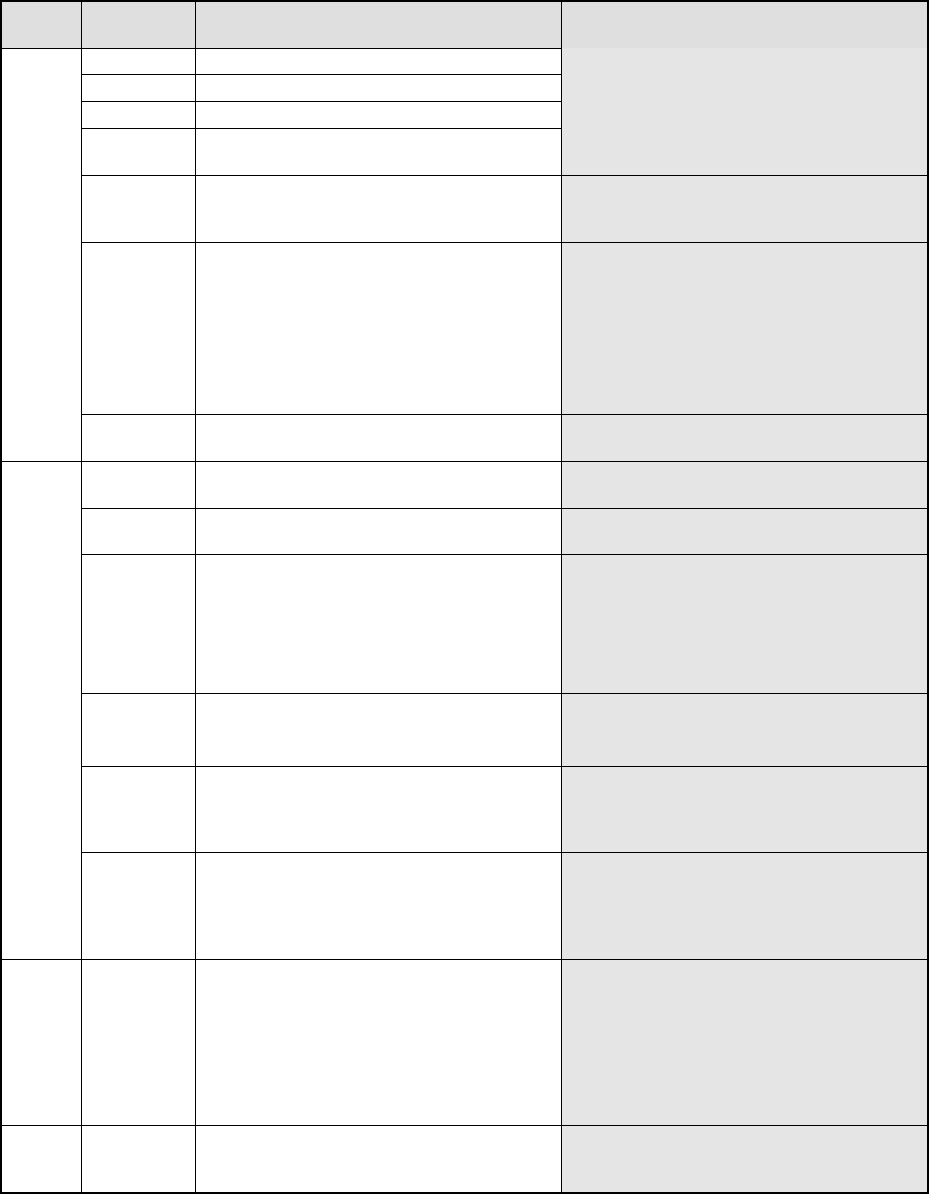
2. Detailed Explanation of the Coplanarity Errors
MJG Err
COPLA_ERROR: ErrCode
Err. Err
Code
Description of an error Cause
21-1000 Software operation environment error
15-1010 PC internal memory error
17-1060 Sensor head internal laser diode error
20-1070 Signal-processing board internal memory
error
If the system does not recovery from the
error at re-power on, the sensor may
malfunction.
18-1080 The sensor cable is not connected. Electric contact of the coplanarity sensor
cable*1 may be poor. Turn on the
system again.
19-1090 The scanner inside the sensor head does
not rotate normally.
− The sensor head is not supplied with
DC 24 V.
− The sensor scanner does not rotate.
If either of the problems above does
not occur, and the system does not
recover from the error even after
re-power on, the sensor may
malfunction.
FSYS
17-1100 Laser is turned off. Electric contact of the coplanarity sensor
cable*1 may be poor.
12-2010 The system received an illegal command
during adjustment of the sensor height.
Electric contact of the coplanarity 232C
cable*2 may be poor.
12-2030 The identifier of the command the system
sent is illegal.
− The mounter software malfunctions.
12-2040 After measurement, the system did not
recognize the measurement start signal
within 10 seconds.
− Electric contact of the coplanarity
interface cable*3 is poor.
− Any encoder pulse may not be output
from the XMP relay board.
− Any start trigger signal may not be
output from the carry relay board.
12-2050 An illegal command is issued.
A parameter that is out of the allowable
input range is set.
− The mounter software malfunctions.
12-2060 No component information is registered.
No measurement image is obtained.
− The mounter software malfunctions.
(Before finishing measurement of a
component, the software sent other
command to the sensor.)
FOPE
12-2070 The inappropriate measurement mode is
selected.
− The measurement mode you selected
is inappropriate. Check the
component and check to see if the
selected measurement mode is
appropriate for it.
FCO
P
1-3000 The measured coplanarity value exceeds
the allowable range.
− This is not a system error. Display
the obtained image with a VGA
switching device or check the check
box “Stop system on any error” on the
Production (Pause) tab invoked from
the Operation option dialog box to
display the detailed information and
check an error terminal.
FPOS 2-3010 The shifted terminal position exceeds the
allowable range.
− This error may occur when a
component slides from the regulated
position.
276
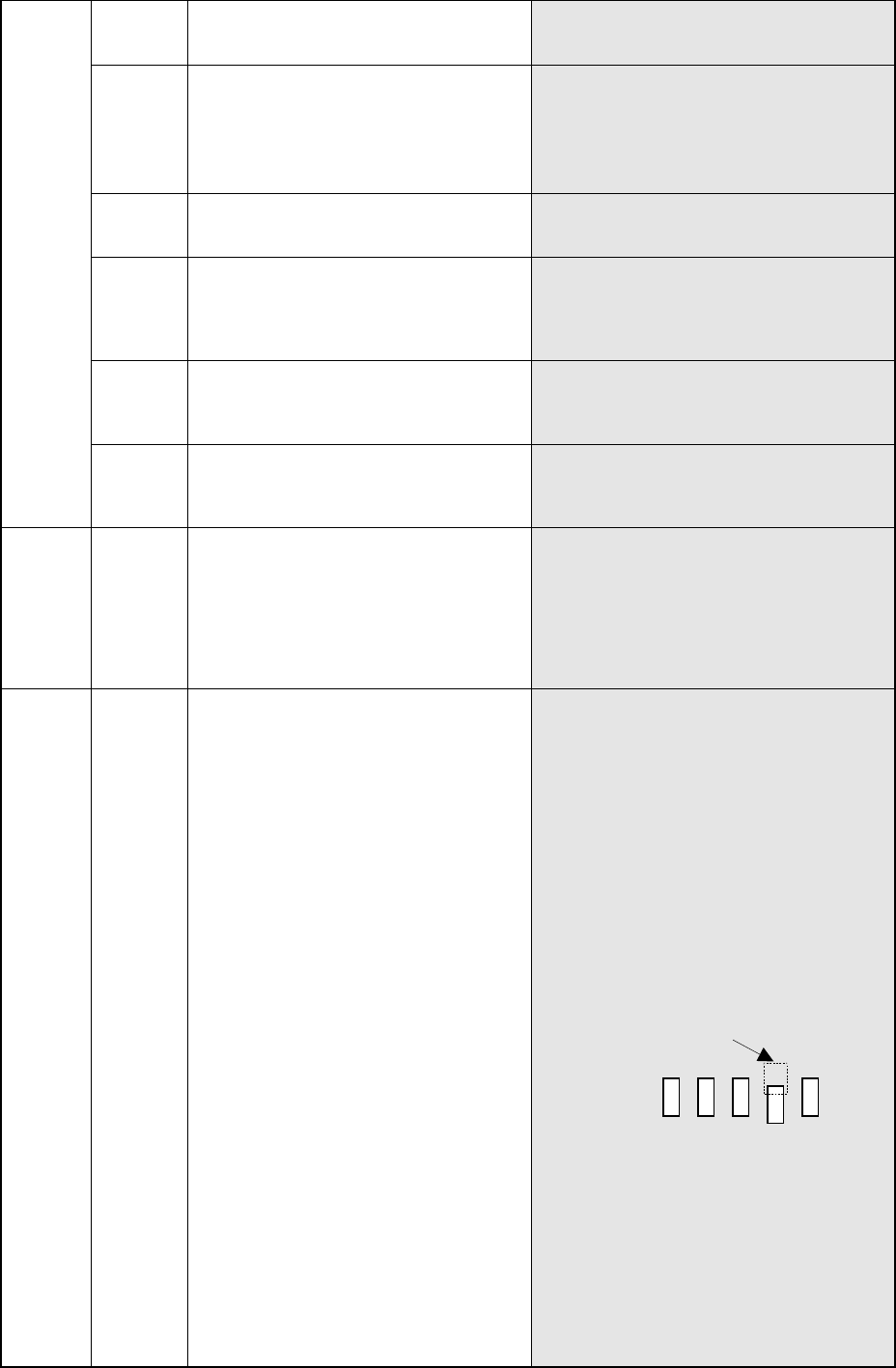
3-3020 Any shape like a terminal is not found
on the measured image.
(The measurement image is dark.)
− For example, when a component falls
off, and the system tries to measure it
without picking it up, this error occurs.
3-3030 A part of component image lies off the
measurement screen frame.
− A component may slide from the
regulated position during
transportation, so the system cannot
measure it.
− This error may occur also if you enter
the wrong component dimensions.
3-3040 The terminal position is quite different
from that stored as the component
information.
− This error occurs if the component
information indicates a value different
from the actual data.
3-3060 Installation check command
− When your use the gauge block to
adjust the assembling condition with
the MSP parameter, this error may
occur because the gauge block is not
picked up correctly.
6-3110 The component is located closer to the
sensor than regulated with the
measurable range.
− The component height entered may be
different from the actual height of the
component. Check the entered
component height.
FNUM
7-3120 The component is located farther from
the sensor than regulated with
measurable range.
− The component height entered may be
different from the actual height of the
component. Check the entered
component height.
FLIN 4-3070 The measured colinearity value exceeds
the allowable range.
− This is not a system error. Display the
obtained image with a VGA switching
device or check the check box “Stop
system on any error” on the Production
(Pause) tab invoked from the Operation
option dialog box to display the detailed
information and check an error
terminal.
FABS 5-3080 A terminal is missing.
A terminal is bent too much.
The system cannot sample effective
data from terminals (the measured
image of a terminal section is shifted.)
− Display the obtained image with a VGA
switching device or check the check
box “Stop system on any error” on the
Production (Pause) tab invoked from
the Operation option dialog box to
display the detailed information and
check an error terminal.
− If a terminal is bent by1/3 of a lead
pitch or more, or bent by the same
amount as the lead width longitudinally,
this error occurs.
Lead width: W Lead pitch: P
± P (width) ×W (length): range for
detecting a tip of a lead
− If no terminal is missing, the surface of
a terminal may prevent the system
from measuring a component normally.
Change the following parameters, and
try to measure a component again.
①
“Lead Brightness Threshold” of
“Coplanarity Check data”
②
“Scanning Offset” of “Coplanarity
Check data”
③
“Lead Gloss” of “Coplanarity Check
data”
277
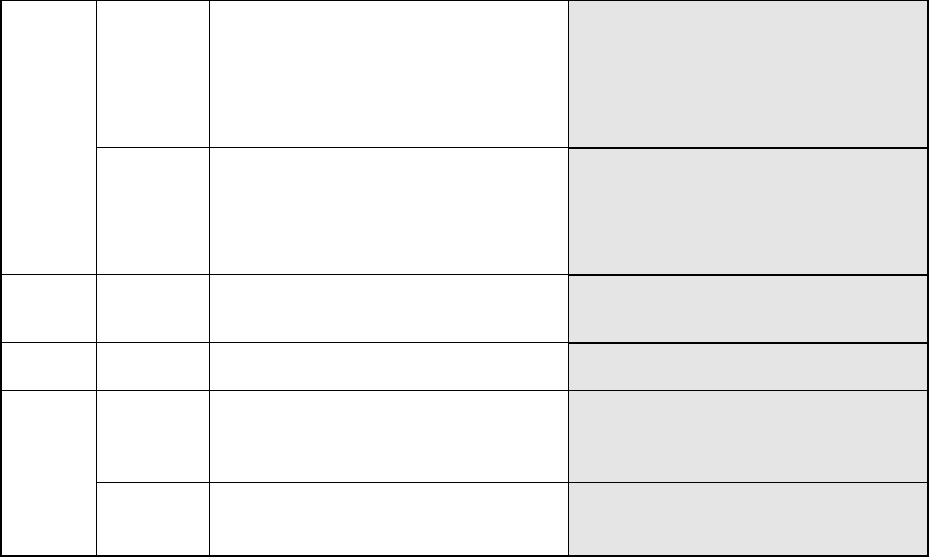
5-3130 The image of a terminal is partially
faded.
− This error may occur if the surface of
a terminal does not reflect laser
sufficiently. If you set the smaller
value to the menu item “Electrode
Brightness Threshold” on the
“COPLA CHECK DATA” screen, this
error may not occur again.
5-3140 The image of a terminal is too bright. − This error may occur if the surface of
a terminal reflects laser too much.
If you set the smaller value to the
menu item “Laser Strength” on the
“COPLA CHECK DATA” screen, this
error may not occur again.
FSLS 3-3100 The component tilts.
− This error may occur if a component
tilts due to a component pick-up
error.
FELS 14-9000 Software operation error
− The coplanarity software
malfunctions.
14-14 IP_X board time-out error
− The coplanarity software
malfunctions.
− Electric contact of the coplanarity
232C cable*2 may be poor.
None
14 Mounter time-out error − The IP_X board malfunctions.
− The coplanarity software
malfunctions.