KE2010.Instruction Manual.Ver.2.01,Rev.08.pdf - 第131页
4 − 24 4.3.3 Paste This command inser ts the dat a which w as cut or copied int o the mem ory buffer at or befor e which the cursor is located. Aft er you select the [Cut] command, the f ollowing dialog box appears on th…
4 − 23
The placement data you selected is pasted onto the line whose number you
specified. You can execute the paste operation only once (the data will be erased
from the memory buffer after you perform the paste operation).
When you click the <CANCEL> button, the system will execute neither the cut nor
paste operation.
4.3.1.2 When you select the <NO> button
The system deletes the placement data and component data. Note that the
placement data is loaded to the memory buffer and you can paste it, but you cannot
paste any component data.
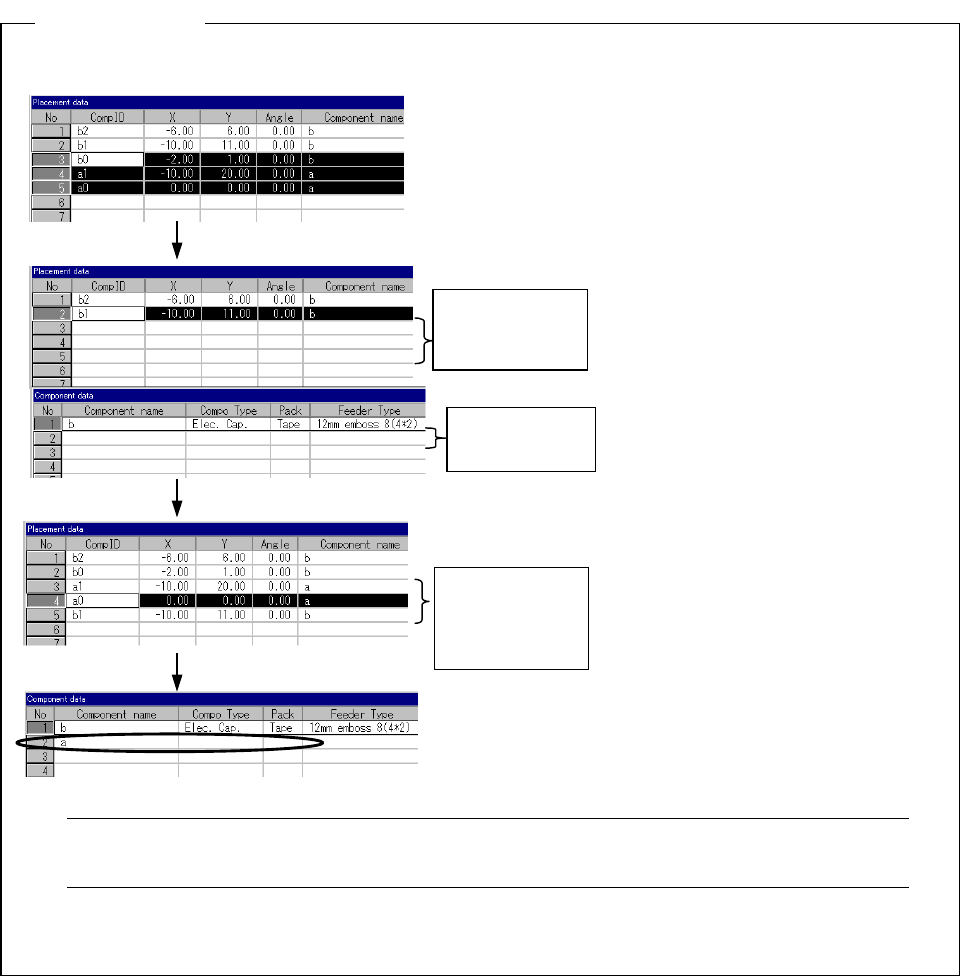
Assume that component “a” is associated with placements “a1” and “a2,” and component “b”
with “b1,” “b2” and “b3.”
Note: If you use database, the deleted component data may seem to be pasted. However,
this is not pasted, but the corresponding component data is called from the database.
4.3.2 Copy
This command loads the data which is selected and highlighted into the memory
buffer. To paste it in another data, execute the [Paste] command.
Descri
p
tion
:
Select placements as shown in the left
figure. This means the selection of:
- all the placements associated with
component “a” (“a0” and “a1”), and
- part of placements with “b” (“b0” from
amon
g
“b0
,
” “b1” and “b2”
)
.
Cut placement
data “b0,” “a1”
and “a0.”
When the [Cut] command is executed
in this condition, the system cuts the
selected placement records, and the
component record for “a.” Component
“a” is deleted since all the placements
associated with it (“a0” and “a1”) are
cut.
Deleted
component “a.”
Pasted
placements
“b0,” “a1” and
“a0.”
You can paste the placement records
you cut by selecting [Paste] (see the
left figure).
However, the data for component “a”
will be incomplete, registered only by
the component name.
4 − 24
4.3.3 Paste
This command inserts the data which was cut or copied into the memory buffer at or
before which the cursor is located.
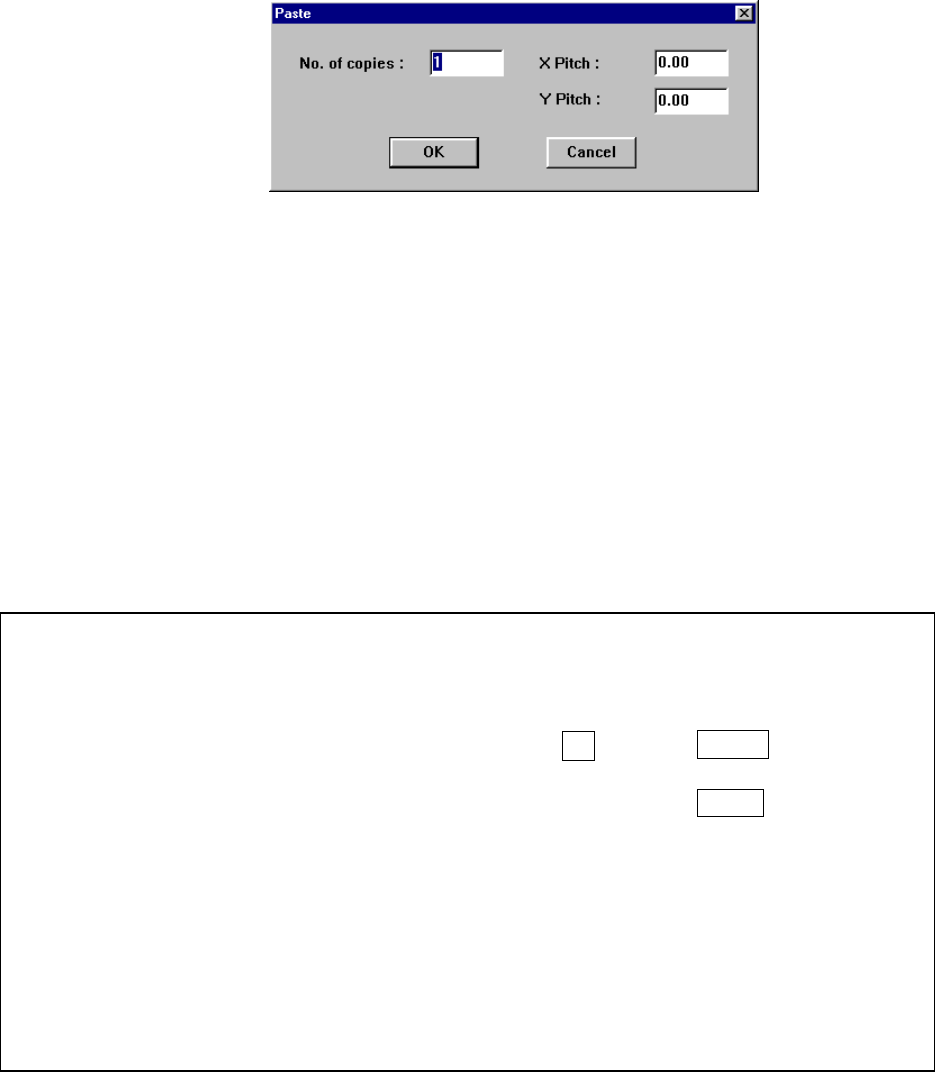
After you select the [Cut] command, the following dialog box appears on the screen.
When you specify the “X pitch” and “Y pitch”, you can execute the incremental copy
function which copies data with adding or subtracting the specified values to/from
the X placement position and Y placement position.
After executing the [Paste] function for Placement data, all of the component IDs are
set to “#” and data is pasted.
If there is no data in the memory buffer, this command is disabled.
① No. of copies: Specifies the number of times for copying data. The default
value is “1”.
② X pitch: Specifies the amount to increment or decrement the placement
position in the X direction. The default value is “0.00”.
③ Y pitch: Specifies the amount to increment or decrement the placement
position in the Y direction. The default value is “0.00”.
④ OK: Executes the “Paste” command.
⑤ Cancel: Cancels the “Paste” command.
Example of the paste result
When normally executed
例
)
Component IDs X Y Angle Component name
R1 5.00 10.00 45.00 1608-A
R2 10.00 10.00 0.00 1608-A
No. of copies 3 X Pitch: 0.50
Y Pitch: 1.00
# 5.50 11.00 45.00 1608-A
# 10.50 11.00 0.00 1608-A
# 6.00 12.00 45.00 1608-A
# 11.00 12.00 0.00 1608-A
# 6.50 13.00 45.00 1608-A
# 11.50 13.00 0.00 1608-A
• The copied block is inserted above the specified line.
• All of the Component IDs are set to “#”.
• The input focus is located at the first inserted Component ID.
4 − 25
When an error occurs
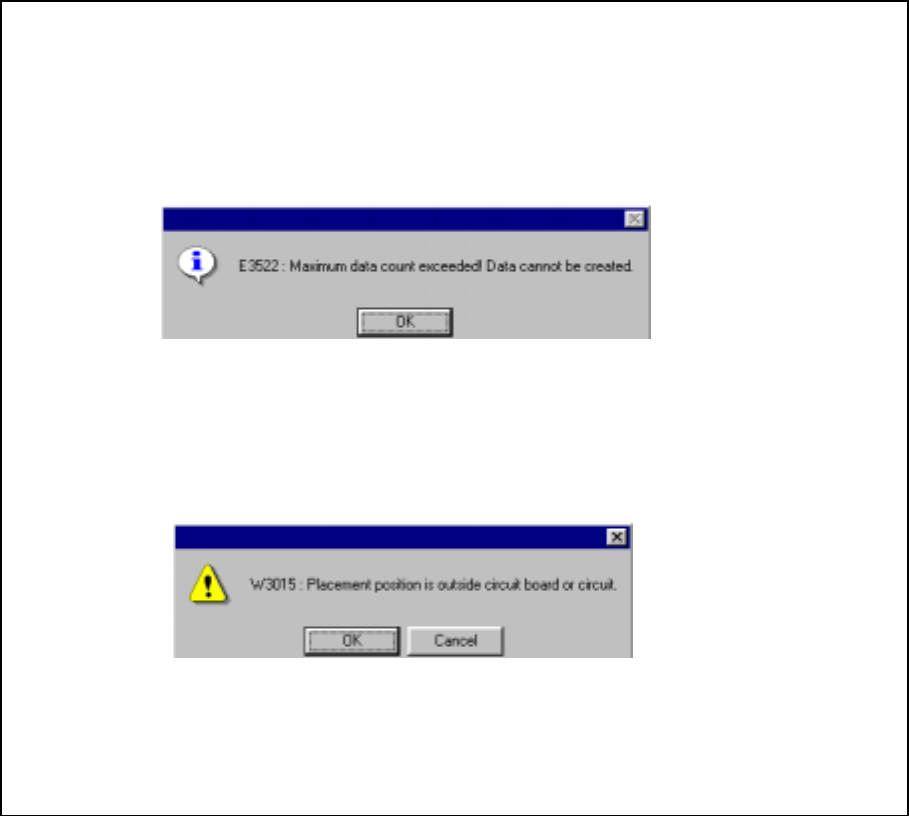
In the following cases, an error occurs, and the machine displays the respective error
dialog box as shown below.
① When the maximum number of data records exceeds the input limit
− OK: Cancels the copy operation. No data is copied.
② When the placement position exceeds the PWB or circuit layout
− OK: Continues the copy operation. The range over mark is appended to an
error data record.
− Cancel: Cancels the copy operation.