KE2010.Instruction Manual.Ver.2.01,Rev.08.pdf - 第723页
11 − 14 11.4.5 Setting the Production (Pause) option W hen y ou select the [ Options] com mand on the menu bar , then [ Option Sett ing] command on the O ptions menu, t he Operation opt ion setting dialog box appears on …
11 − 13
If any laser head is stained, the system pauses. When the system
restarts, it checks the laser heads again. If any laser head is still stained,
the dialog box appears on the screen that prompts you to select if the
system should check the laser heads again or the system continues
production forcibly.
− When you do not check this check box, the system does not check any
laser head.
③ SOT direction checked.
− Using this check box, select whether to check the direction of an SOT
component equipped with three terminals with the component picking-up
and tracking operation.
− When you check this check box, the system checks the direction of an
SOT component equipped with three terminals when it performs the
component picking-up and tracking operation.
− When you do not check this check box, the system does not check the
direction of an SOP component.
④ Auto verification after restart.
− Using this check box, select whether to execute the verification check with
the component picking-up and tracking operation.
− When you check this check box, the system executes the verification
check when it performs the component picking-up and tracking operation.
− When you do not check this check box, the system does not execute the
verification check.
⑤ Do not IN/OUT PWB sensor auto checked.
− Using this check box, select whether to check to see if there is a board on
the IN and OUT buffers at start of production after an error occurs while the
system is transporting a board between the IN and OUT buffers.
− When you check this check box, the system does not check a board at
start of production.
− When you do not check this check box, the system automatically sets a
board on the sensor if it remains between the IN and OUT buffer sensors
at start of production.
⑥ the same component manage alternative feeder.
− Using this check box, select whether to use the alternative feeder for the
same type of components.
− When you check this check box, the alternative feeder is used if the
stocked component runs out.
− When you do not check this check box, the alternative feeder is not used.
When you validate the settings of these two items, click the <OK> button. If you do
not want to make any setting of these items, click the <CANCEL> button.
11 − 14
11.4.5 Setting the Production (Pause) option
When you select the [Options] command on the menu bar, then [Option Setting]
command on the Options menu, the Operation option setting dialog box appears on
the screen.
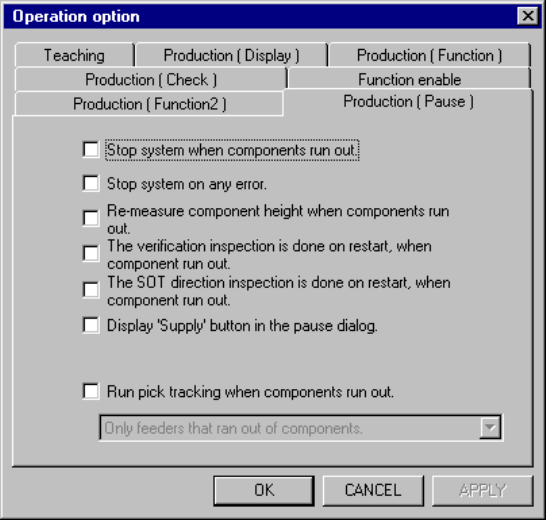
When you click the <Production (Pause)> tag, the Production (Pause) option setting
screen appears as shown in Figure 11.4.5.
Figure 11.4.5 Production (Pause) option setting screen
(1) How to set the item
① Stop system when components run out.
− Using the check box, set the operation mode when components run out.
− When this option is checked, the machine temporarily stops production
when components runs out.
− When this option is not checked, the machine continues placing
components as long as it has components which can be placed, even
when a type of components run out during production.
② Stop system on any error.
− Using the check box, set the operation mode to be entered when an error
occurs.
− When this option is checked, the machine temporarily stops production
when a productional error (including the component run-out error) occurs.
− When this option is not checked, the machine continues placing
components as long as it has components which can be placed, even
when a productional error occurs.
11 − 15
③ Re-measure components height when components run out.
− Using this check box, select whether to measure the height of a
component at restart of production after components run out..
− When you check this item, the system measures the height of a
component on restart after components run out.
− When you do not check this item, the system does not measure the height
of a component on restart after components run out.
④ The verification inspection is done on restart component run out.
− Using this check box, specify whether to perform a verify check at start of
production after the stocked components run out.
− When you check this check box, the system performs a verify check at
start of production after the stocked components run out.
− When you do not check this check box, the system does not perform a
verify check at start of production after the stocked components run out.
⑤ The SOT direction inspection is done on restart, when component run out.
− Using this check box, specify whether to check the direction of an SOT
component at start of production after the stocked components run out.
− When you check this check box, the system checks the direction of an
SOT component at start of production after the stocked components run
out.
− When you do not check this check box, the system does not check the
direction of an SOT component at start of production after the stocked
components run out.
⑥ Display 'Supply' button in the pause dialog.
− Use the check box to set the function for supplying components while the
system temporarily stops a production operation because components run
out.
− When you check this option, the <Supply> button is applied to the "Pause"
dialog box. This <Supply> button is not displayed on the Pause dialog box
which appears when components run out or when a mark recognition error
occurs
− When you click this <Supply> button, the system replenishes a feeder
(tape, stick or bulk feeder) with components when its stocked components
run out.
− When you do not check this option, the <Supply> button is not displayed
on the Pause dialog box.
⑦ Run pick tracking when components run out.
− Using this check box, you can select whether to perform a component
picking-up and tracking operation before retry operation if you select the
retry operation and press the <START> switch when the system pauses
due to a component run-out error or laser retry over error.