KE2010.Instruction Manual.Ver.2.01,Rev.08.pdf - 第273页
4 – 166 Comp Type A A A Comp Type B B B Comp Type C C C Comp Type A Comp Type B Comp Type C A B C A B C When “Group trays with sam e component t ype toget her” is s elected When “Arrange trays to opti mize supply t ime” …
4 – 165
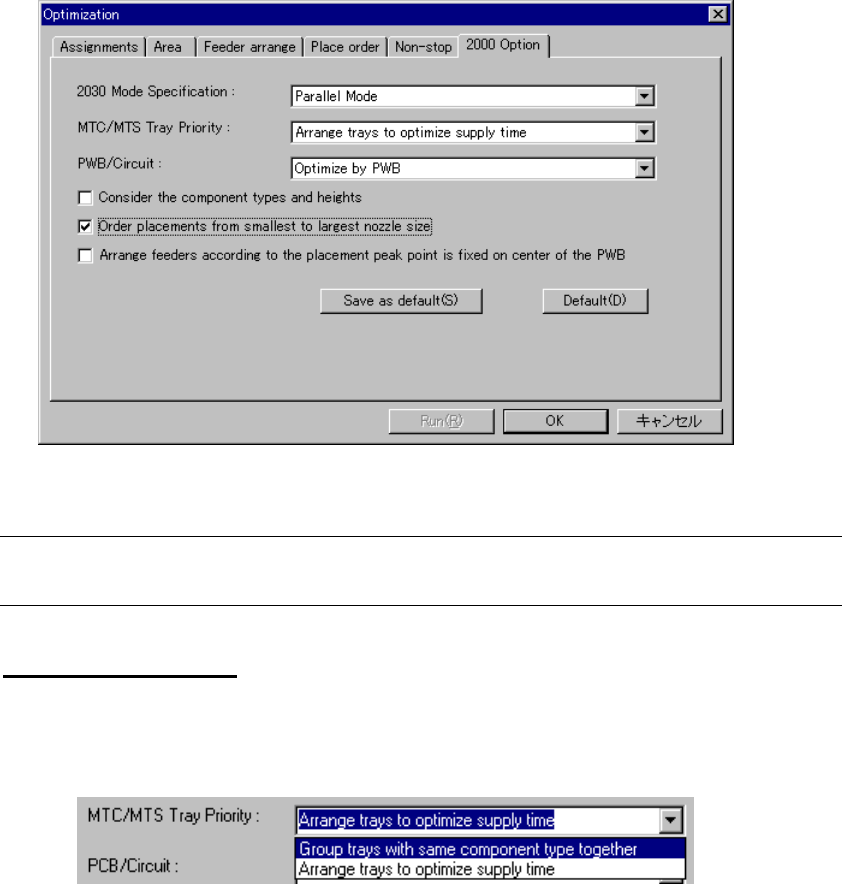
(6) 2000 Option
Specify KE-2000 series specific optimization option. Click the “2000 Option” tab to
display the following dialog box:
Figure 4.10.1.13 2000 Option
Note: The "2000 Option" is an option common to the KE-2000 series of products.
Therefore, this option is invalid for this model, but it provides selectable options
MTC/MTS Tray Priority
Specify whether the same type of components are to be assigned to an MTC or
MTS or assigned with giving the components feeding speed the highest priority.
Figure 4.10.1.14 MTC/MTS Tray Priority
• Group trays with same component type together:
Assigns the same type of components to an MTC or MTS.
• Arrange trays to optimize supply time:
Assigns components to an MTC or MTS with giving the component feeding
speed the highest priority.
4 – 166
Comp Type A
A
A
Comp Type B
B
B
Comp Type C
C
C
Comp Type A
Comp Type B
Comp Type C
A
B
C
A
B
C
When “Group trays with same
component type together” is selected
When “Arrange trays to optimize
supply time” is selected
Figure 4.10.1.15 Example of MTC/MTS Tray Priority
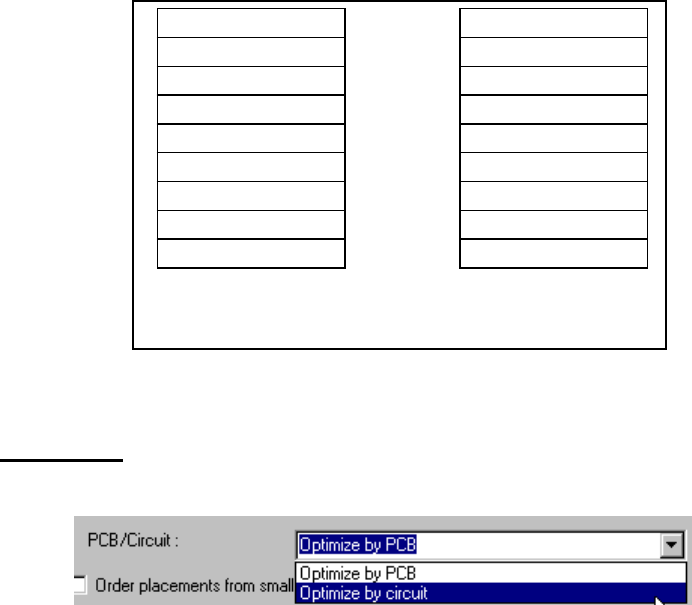
PCB/Circuit
Specify whether to optimize the entire board or a circuit.
Figure 4.10.1.16 PCB/Circuit
When you select “Optimize by circuit”, the system optimizes a circuit one by one.
When you select “Optimize by PCB”, the system optimizes each circuit as if
components are assigned on a single plane board.
• Consider the component types and heights
Specify whether to place a component in advance according to the component
type and/or component height. When you check this option, the system
performs optimization so that it can place components according to the
component type and/or component height.
• Order placements from smallest to largest nozzle size
Specify whether to start placing components from a component that requires
the smallest diameter of nozzle. When you check this option, the system
performs optimization so that it can place components from a component that
uses the nozzle whose diameter is the smallest.
• Arrange feeders according to the placement peak point is fixed on center of the
PWB
Specify the calculation method of the component placement peak point to
assign feeders.
When this option is checked, the system assigns feeders so that the center of a
board can be the component placement peak point.
When this option is not checked, the option selected in the “Placement peak”
pull-down box displayed in the “Feeder arrange” dialog box is activated.
4 – 167
(7) Non-stop operation
You can use the Optimization function to specify a station that is to perform the
Non-stop operation. When you use this option, you can replace components
without stopping the current production.
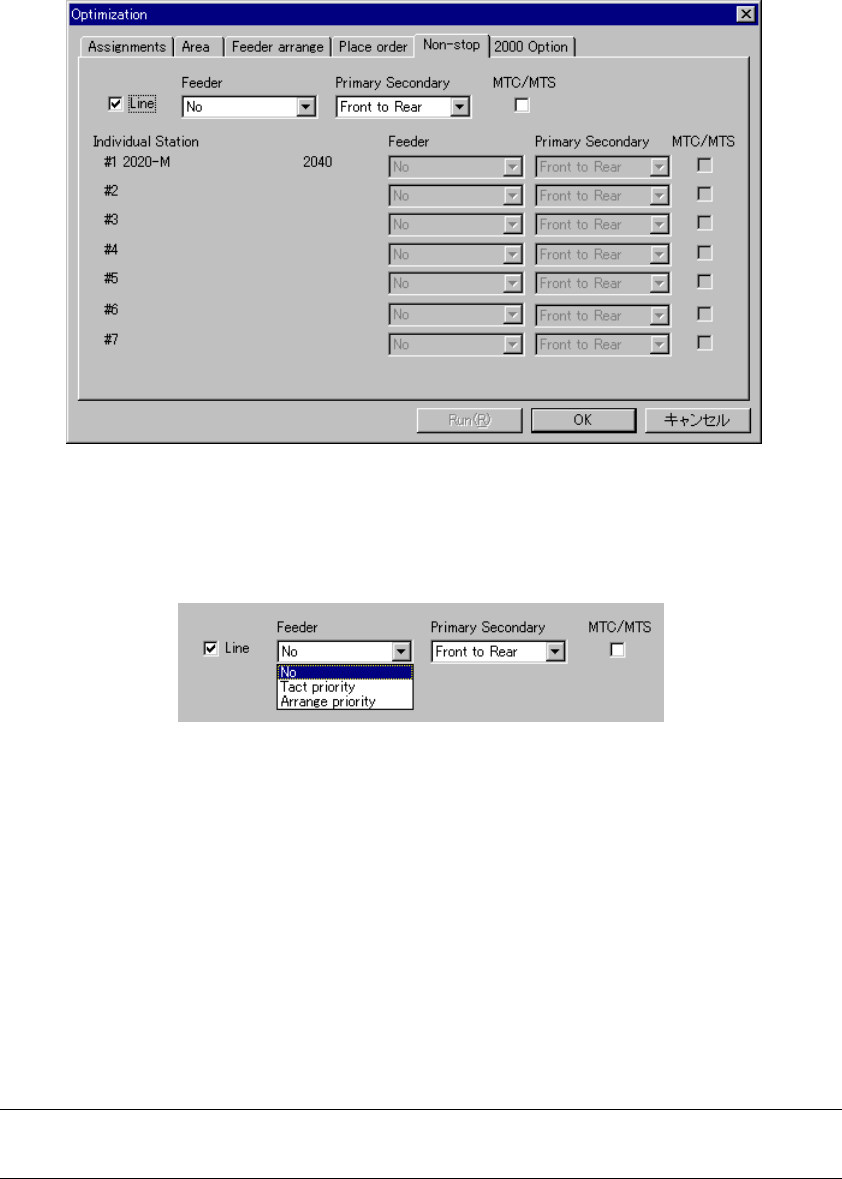
When you select the “Non-stop” tab, the following dialog box appears on the
screen.
Figure 4.10.1.17 “Non-stop” option tab
− When you check the check box “Line”, you can specify the Non-stop operation.
Figure 4.10.1.18 Specifying the Non-stop operation
− Feeder
Set the Non-stop operation of a feeder.
• No: The Optimization utility does not perform the Non-stop
operation.
• Tact priority: The Optimization utility assigns components with considering
the tact first.
• Arrange priority: The Optimization utility assigns components with considering
the feeder changeover first.
When you select “Arrange priority” with a KE-2020, an error occurs if the
system executes the line coherence check.