KE2010.Instruction Manual.Ver.2.01,Rev.08.pdf - 第516页
6 − 140 1) Component of meas. ( measurement ) Set one of the radio butt ons to check only component s which satisfy the certain condition f rom Component data. ① All compo.: Checks all component s specif ied in component…
6 − 139
6.7.2.5.2 Continuous laser position inspection
• When you select the [Laser check] command on the [Check] menu invoked
from the [Tool] menu, the "Continuation inspection" dialog box appears on the
screen.
• Set the "Component of meas." and "Bounds of meas." menu items on the
"Continuation inspection" dialog box.
• When you click the <INSP.> button or press the <START> switch on the
"Continuation inspection" dialog box, the system starts checking the laser
height within the range specified.
• When the system centers a component successfully, the result of the check
operation is displayed on the "Inspection" screen, but the system does not
pause temporarily.
• The system repeats a check of a component until it finishes checking the last
component within the specified range, then returns to the "Continuation
inspection" dialog box.
• If the system detects an error during check, it enters Single check mode.
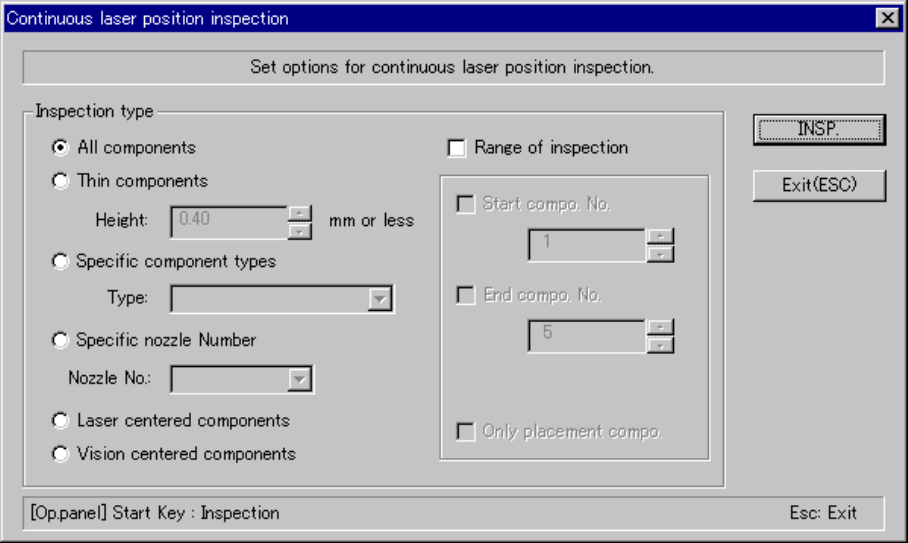
(1) "Continuous laser position inspection" dialog box
When you select the [Check] command on the [Tool] menu, then the [Laser
check] command, the following "Continuation inspection" dialog box, which
allows you to set the conditions for checking components continuously,
appears on the screen.
Figure 6.7.2.5.2.1 "Continuation inspection" dialog box
6 − 140
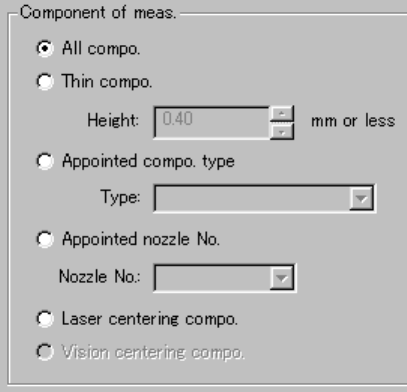
1) Component of meas. (measurement)
Set one of the radio buttons to check only components which satisfy the
certain condition from Component data.
① All compo.:
Checks all components specified in component data.
② Thin compo.:
Checks only components whose height is the value you specified in
the edit box or lower.
③ Appointed compo. type:
Checks only components whose types are specified with the combo
box.
④ Appointed nozzle No.:
Checks only components which are to be picked by the nozzle whose
number is specified with the combo box.
⑤ Laser centering compo.
Checks only components which are centered with laser.
⑥ Vision centering compo.
Checks only components which are centered with the VCS (not
available to a KE-2030/KE-2010).
6 − 141
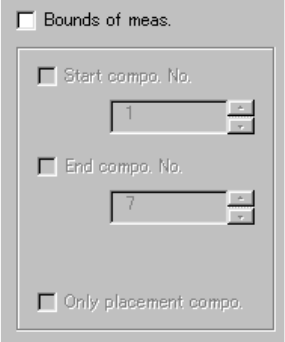
2) Bounds of meas. (measurement)
Check this check box if you want to check components whose number are
specified here among the components already selected with the setting
item "Component of meas." above. When you check this check box, you
can set the following items.
① Start compo. No.:
Check this check box to specify the first component number in
Component data to be checked. Then, change the first component
number displayed in the edit box.
② End compo. No.:
Check this check box to specify the last component number in
Component data to be checked. Then, change the last component
number displayed in the edit box.
③ Only placement compo:
Check this check box to check components specified in Component
data which are also specified in Placement data.