KE2010.Instruction Manual.Ver.2.01,Rev.08.pdf - 第734页
12 − 4 12.3 Replacement of the Stick Feeder CA UTION Do not replace the stic k feeder with another one while the X- or Y-axis, or head is operating. It m ay cause a serious injury to the operator or dam age the mac hine …
12 − 3
12.2 Replacement of the Bulk Feeder
CAUTION
Do not replace the bulk feeder with another one while the X- or Y-axis, or
head is operating. It may cause a serious injury to the operator or damage
the machine itself since the bulk feeder touches the operating parts.
Do not dismount the bulk feeder while the X- or Y-axis or head is operating.
After you mount the feeders required for producing boards at the position
specified with a production program, mount feeders, which are not used for
production, such as 8-mm tape feeders where no feeders are mounted to
prevent any gap from being generated between the already mounted
feeders. This operation secures your safety since it prevents your finger
or hand from accidentally being slid into such a gap.
Mounting
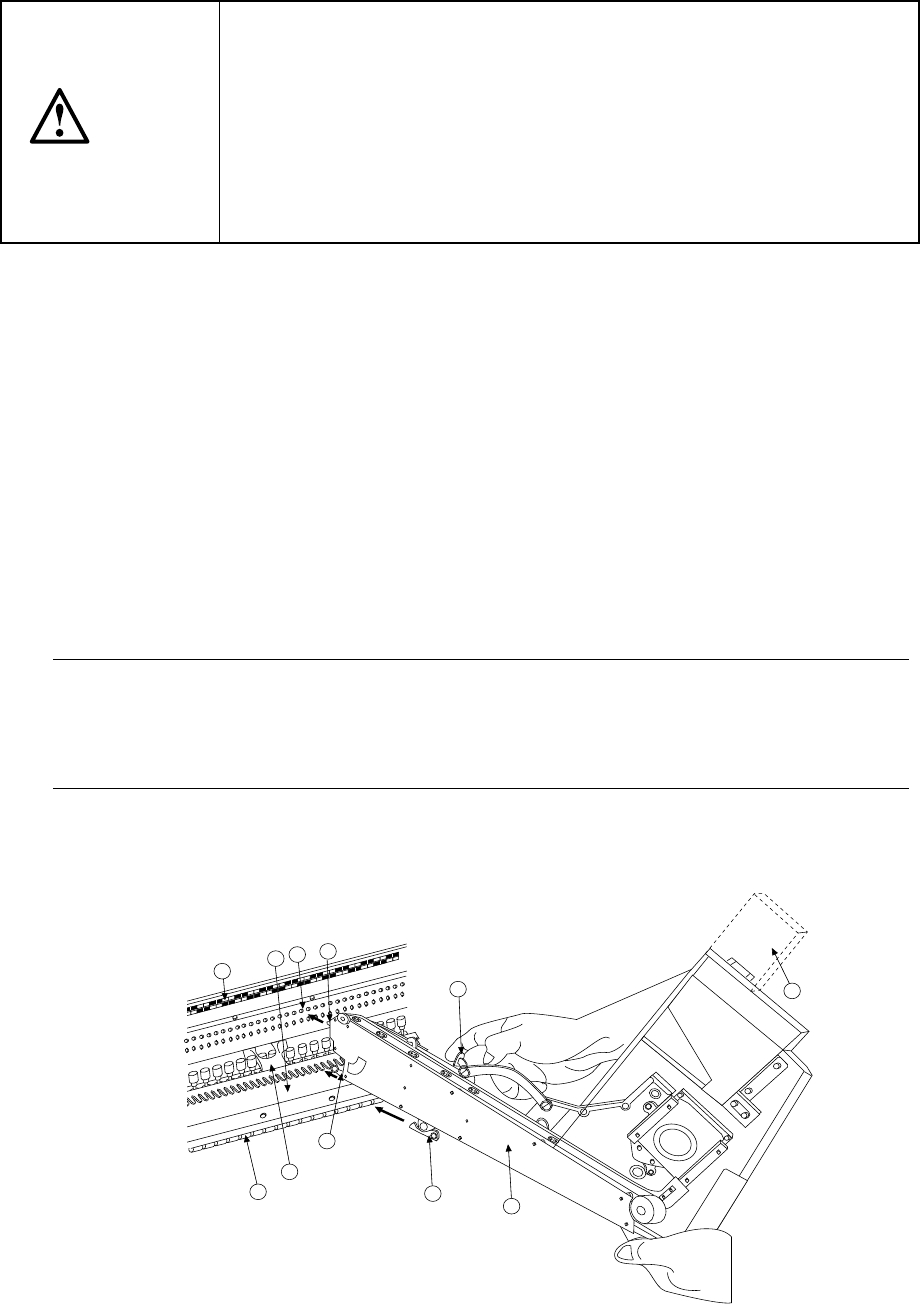
1) Place the bottom of the bulk feeder ① on the feeder bank ①.
2) Slide the bulk feeder ① toward the positioning hole of the fixing plate ③, and
align the guide pin located on the bottom of the bulk feeder with the fixing plate B
⑦ as a guide. Fit the positioning pin on the front of the bulk feeder into the
positioning hole of the fixing plate ③. To do so, while pulling the lock release
lever 10 to release the toggle clamp to align the lock holder ⑨ with the V-shaped
groove of the lock shaft ⑧, push the front of the bulk feeder against the fixing
plate. Use the lock release lever to clamp the lock holder and lock shaft by the
toggle clamping method and fix the bulk feeder.
In this case, the number of the position label ④ pasted just above the hole into
which the positioning pin on the front of the bulk feeder is fit indicates the position
at which the bulk feeder is mounted.
Note: 1) Check to see if the bulk feeder is off the feeder bank or not upright.
2) Be sure to fix the case holder on the rear side.
3) Do not mount a bulk feeder on the rear side bank without removing the EIAJ
case
⑪
.
Dismounting
1) Use the lock release lever ⑩ to release the toggle clamp, then pull back the bulk
feeder ① to remove it.
9
6
7
8
2
4
10
5
3
1
11
Figure 12.2.1
12 − 4
12.3 Replacement of the Stick Feeder
CAUTION
Do not replace the stick feeder with another one while the X- or Y-axis, or
head is operating. It may cause a serious injury to the operator or damage
the machine itself since the stick feeder touches the operating parts.
Do not dismount the stick feeder while the X- or Y-axis or head is operating.
After you mount the feeders required for producing boards at the position
specified with a production program, mount feeders, which are not used for
production, such as 8-mm tape feeders where no feeders are mounted to
prevent any gap from being generated between the already mounted
feeders. This operation secures your safety since it prevents your finger
or hand from accidentally being slid into such a gap.
Mounting
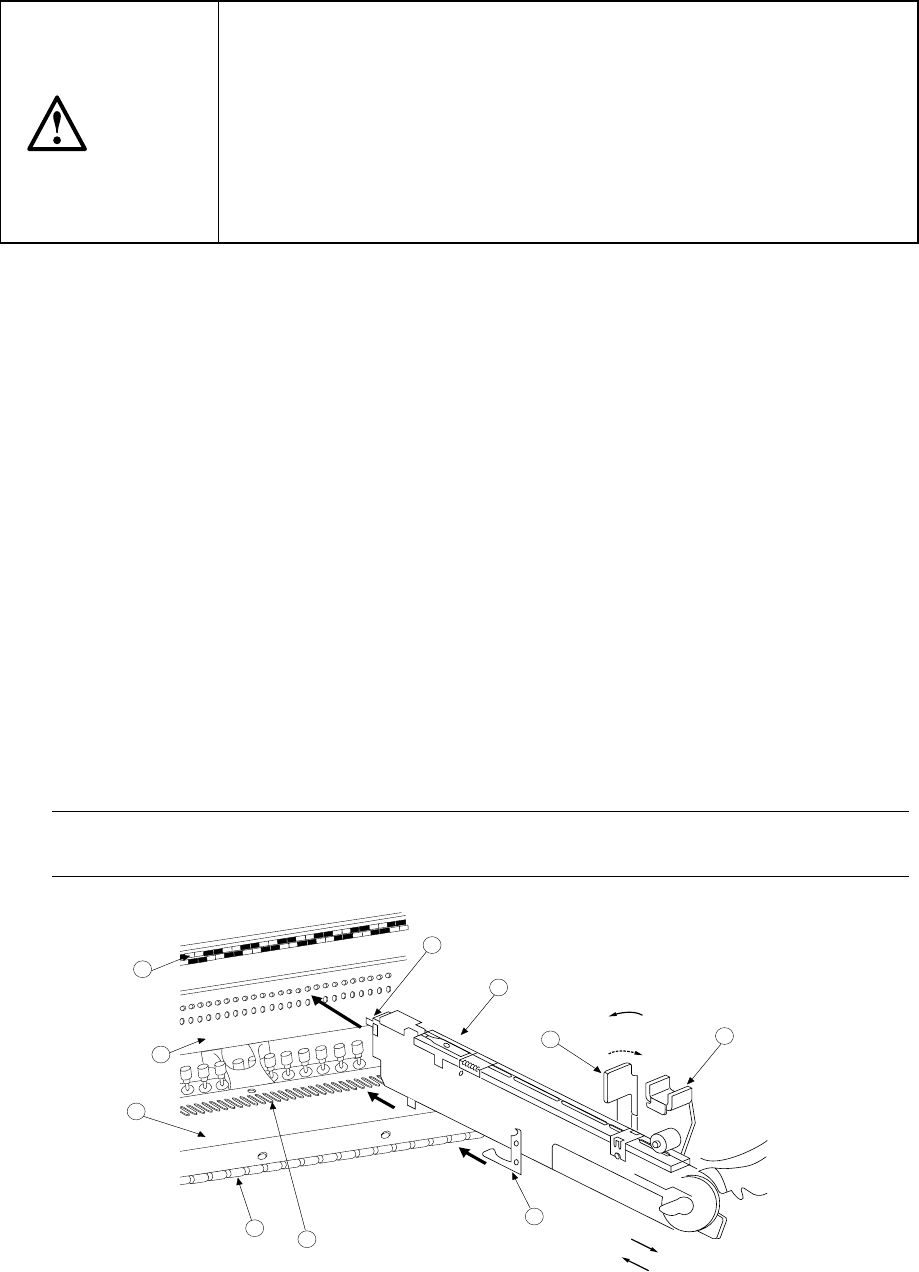
1) Place the bottom of the stick feeder ①on the feeder bank ②.
2) Slide the stick feeder ① toward the positioning hole of the fixing plate ③, and
align the guide pin located on the bottom of the stick feeder with the fixing plate B
⑦ as a guide. Fit the positioning pin on the front of the stick feeder into the
positioning hole of the fixing plate ③. To do so, with releasing the toggle clamp
⑩ to align the lock holder ⑨ with the V-shaped groove of the lock shaft ⑧,
push the front of the stick feeder against the fixing plate. Fix the stick feeder
with the toggle clamp ⑩.
In this case, the number of the position label ④ pasted just above the hole into
which the positioning pin on the front of the stick feeder is fit indicates the position
at which the stick feeder is mounted.
3) Face the power cord plug ⑪ toward the power supply unit ⑬ of the connector
bracket ⑫ (the white dot should be located on the right side), then insert the
plug into the power supply unit until it clicks.
Dismounting
1) Pull the sliding section of the power cord plug toward yourself to disconnect the plug.
2) Release the toggle clamp, then pull back the stick feeder ① straight to remove it.
Note: Be sure to hold the bottom of the stick feeder main unit.
If you hold the upper part of the feeder only, it may damage the spring plate.
5
4
2
3
8
7
1
9
11
10
For detachment
For installation
Fix.
Release.
Figure 12.3.1
12 − 5
12.4 Procedure for Mounting the Matrix Tray Holder on the Feeder
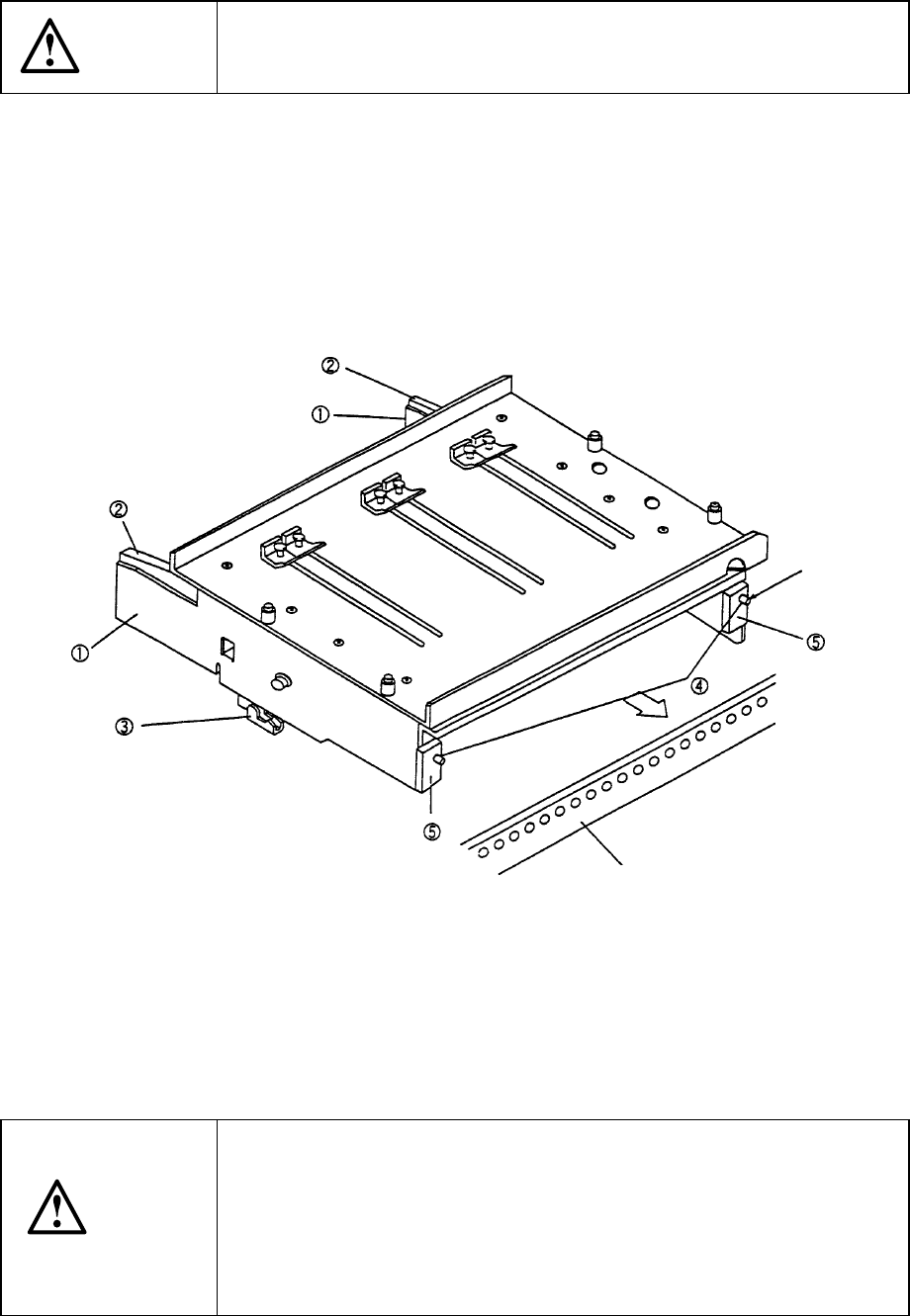
Bank (See Figure 12.4.1.)
CAUTION
To avoid any accident caused by sudden activation of the machine,
turn off the power.
1) Grip the side plate ① and lock lever ② to open the lock holder ③.
2) Insert the front pin ④ into the fixing plate of the rear bank.
3) Release the side plate ① and lock lever ② when the front plate ⑤ into which
the pin ④ is inserted is in contact with the fixing plate, then lock these plates with
the lock holder ③.
4) To detach the matrix tray holder, follow this procedure in the reverse order.
① Side plate
② Tray lock lever
③ Lock holder
④ Pin
⑤ Front plate
Figure 14.4.1
CAUTION
To prevent your body from injury and to avoid damage to the machine,
mount a tray on the matrix tray holder only after you remove the matrix
tray holder from the feeder bank or after you check to see if the main
unit completely stops.
If you mount a tray on the matrix tray holder although the matrix tray
holder is being installed on the feeder bank, be sure to check your
environment before mounting a tray so that the machine cannot start
unexpectedly when another operator operates the machine by mistake.
Reference pin
Fixing plate