KE2010.Instruction Manual.Ver.2.01,Rev.08.pdf - 第230页
4 – 123 ④ Lane In case of a DTS, specif y the level on which tray components are stor ed. The component pick-up posit ion on the DT S is calculated, then displayed based on the tray specif ications of Component dat a. Fi…
4 – 122
4.8.2.3.2 Dual tray server (DTS)
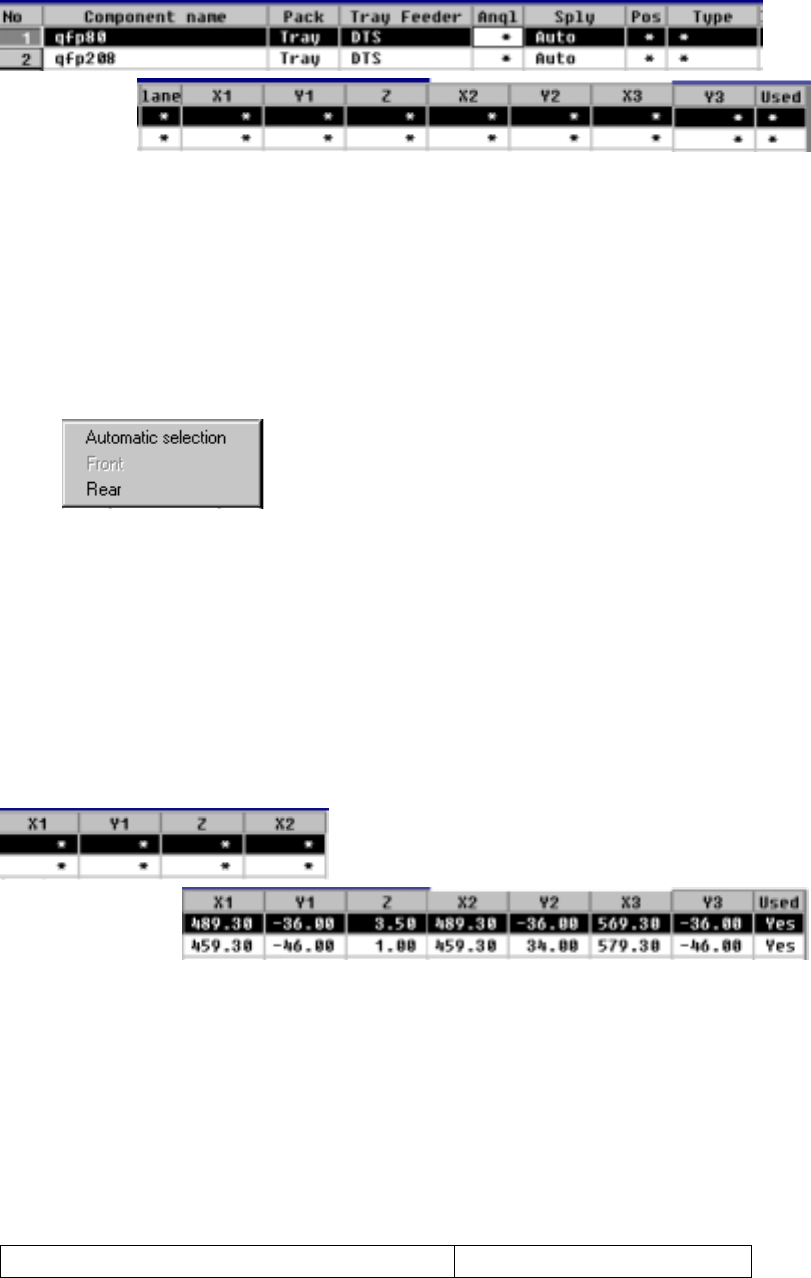
When you select "DTS", the following screen is displayed.
− The parameters "Pack" and "Tray Feeder" set as Component data appear
here: you cannot change any of them. To change either one, change the
setting of Component data.
① Sply (Supply)
Specify whether a tray is automatically selected or set on the rear side.
The Optimization utility automatically assigns trays to the machine.
Trays are assigned to the rear side.
• When you select "Automatic selection", the Optimization utility automatically
assigns trays to the machine, so you do not have to enter any data to other
items.
• When the Optimization utility is executed, items at which an asterisk mark
"*" is displayed (excluding the parameter "Lane") are automatically set.
• When you select "Rear", you can enter data to items at which an asterisk
mark is displayed (excluding the parameter "Lane").
① Angl (Angle)
See the description of the parameter "Angl" for a tape/bulk feeder.
② Pos (Position)
Specify the feeder mounting hole number which is indicated with the DTS
mounting marker.
Number of occupied feeder mounting holes 48
4 – 123
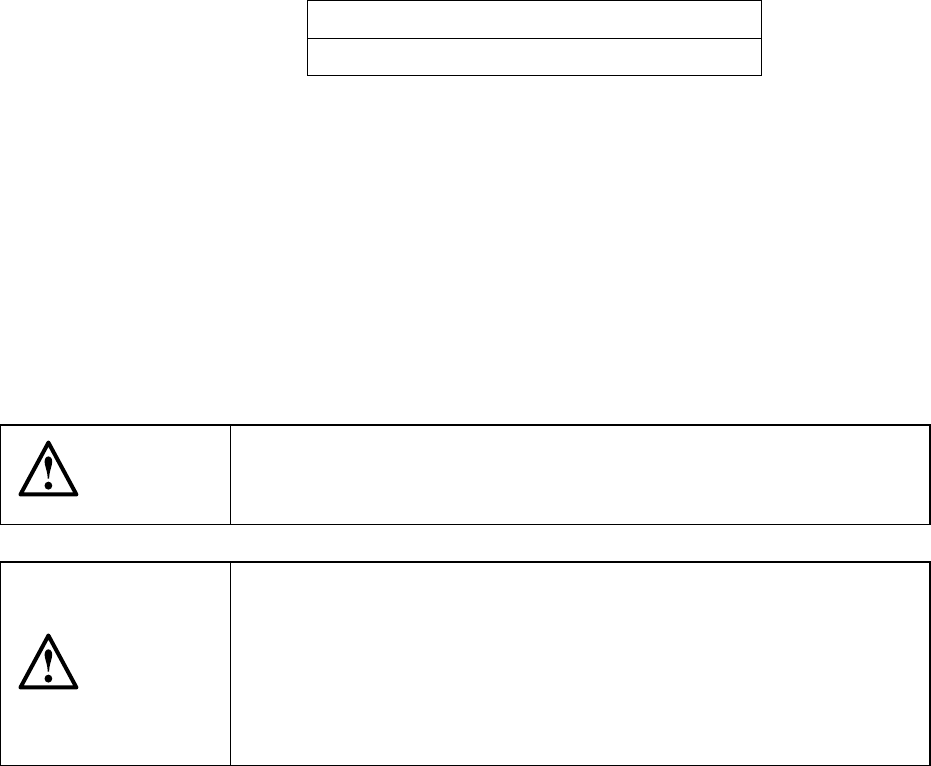
④ Lane
In case of a DTS, specify the level on which tray components are stored.
The component pick-up position on the DTS is calculated, then displayed
based on the tray specifications of Component data.
First level
Second level
●
The top level of the DTS is handled as the "first level", and the
bottom level is as the "second level".
⑤ X1, Y1, Z, X2, Y2, X3, Y3
When the parameters "Sply" and "Lane" are set, the component pick-up
position is automatically calculated, then displayed based on the tray
specifications of Component data.
Once a value is entered to each coordinate, you can change the value
separately (by teaching also).
CAUTION
To avoid a risk of injury, do not place your hand in the machine, nor
move your face or head close to the machine while the machine is
performing teaching operation.
CAUTION
If the bank is never recognized (since the machine zeroes, or the bank
moves down then up), it may be recognized automatically before the
machine moves to the pick position. Since the head moves across the
feeder while the feeder bank is being recognized, do not place your
hand in the machine, nor move your face or head to the machine.
Especially, take care when the feeder bank is recognized not from the
menu but during teaching or tracking a pick position.
⑥ Used
See the description of the "Used" parameter for a tape/bulk feeder.
4 – 124
4.8.2.3.3 Matrix tray changer/Matrix tray server (MTC/MTS)
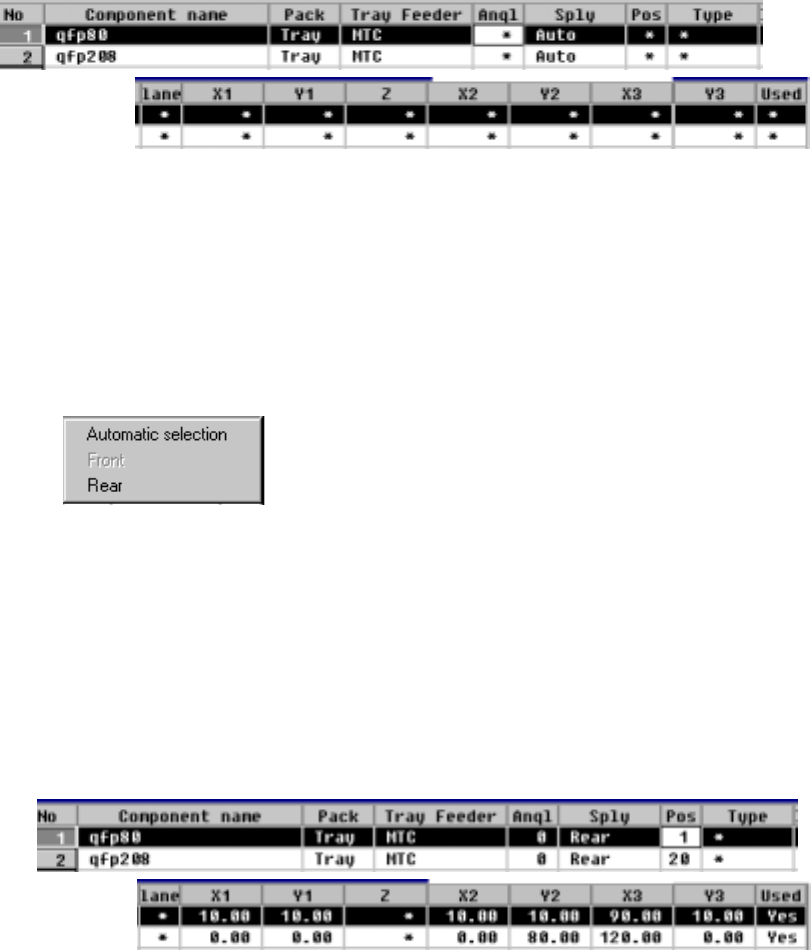
When you select an MTC/MTS, the following screen is displayed.
− The parameters "Pack" and "Tray Feeder" set as Component data appear
here: you cannot change any of them. To change either one, change the
setting of Component data.
① Sply (Supply)
Specify whether a tray is automatically selected or set on the rear side.
The Optimization utility automatically assigns trays to the machine.
Trays are assigned to the rear side.
• When you select "Automatic selection", the Optimization utility automatically
assigns trays to the machine, so you do not have to enter any data to other
items.
• When the Optimization utility is executed, items at which an asterisk mark
"*" is displayed (excluding the parameter "Lane") are automatically set.
When you select "Rear", you can enter data to the items at which an
asterisk mark is displayed (excluding the parameter "Lane").
② Angl (Angle)
See the description of the parameter "Angl" for a tape/bulk feeder.