KE2010.Instruction Manual.Ver.2.01,Rev.08.pdf - 第678页
9 − 24 − T he machine operat ion varies depending on whether the HMS option is installed on the machine or not : • If t he HMS is installed on the machine, t he machine uses the HMS to detect whether a nozzle is located …
9 − 23
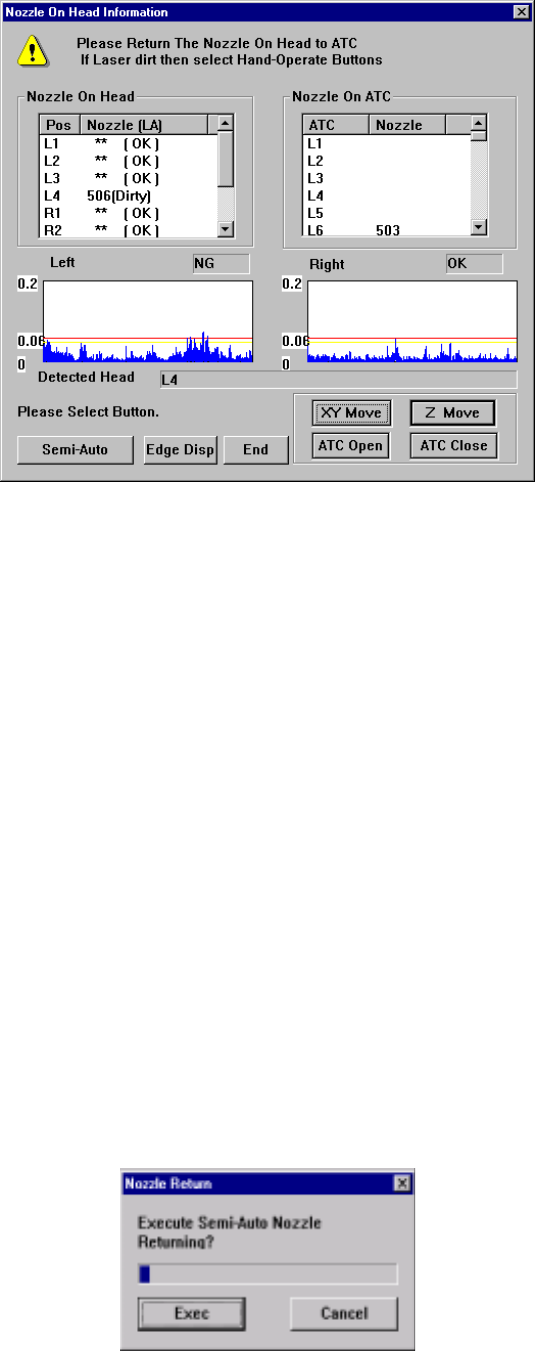
− Return the nozzle attached on the head to the ATC on this screen.
Figure 9.5.1.2 “Nozzle On Head Information” screen
− There are two ways for returning a nozzle to the ATC: “Semi-Auto Nozzle
Returning” and “Manual Nozzle Returning”.
“Semi-Auto Nozzle Returning”: Press the <Semi-Auto> button.
“Manual Nozzle Returning”: Press the <XY Move>, <Z Move>, <ATC
Open> and/or <ATC Close> buttons to move
a nozzle where you can remove it with your
hands, remove the nozzle from the head, and
then return it to the ATC.
9.5.1.1 Semi-Auto nozzle returning
When no stained laser head information appears on the screen, you can return a
nozzle semi-automatically in safety.
Step 1. Click the <Semi-Auto> button on the screen shown in Figure 9.5.1.2.
Step 2. The screen that asks you whether to return a nozzle semi-automatically
appears (see Figure 9.5.1.1.1).
Step 3. Click the <Exec> button to start returning a nozzle semi-automatically.
Figure 9.5.1.1.1 “Nozzle Return” screen
9 − 24
− The machine operation varies depending on whether the HMS option is installed
on the machine or not:
• If the HMS is installed on the machine, the machine uses the HMS to detect
whether a nozzle is located on the ATC.
• Otherwise, the machine uses the head on which any nozzle is not attached to
detect every nozzle of the ATC.
− If the HMS option is installed on the machine, a nozzle is automatically
returned to the original position.
− Otherwise, a not-occupied head on which any nozzle is not attached is
required.
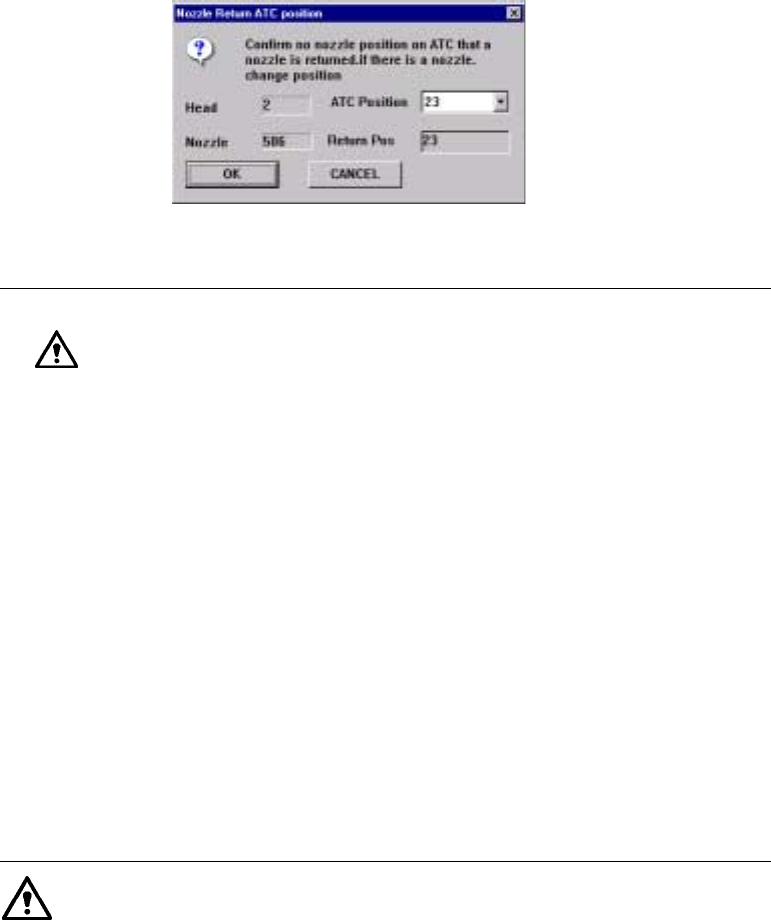
Therefore, if nozzles are attached on all of the heads the machines asks you
whether to return only a nozzle attached on one head to the ATC before returning
nozzles automatically. Specify the position of the ATC on which no nozzle is set.
Figure 9.5.1.1.2 “Nozzle Return ATC Position” screen
CAUTION
•
When you click the <OK> button, a camera moves to the ATC
position to which a nozzle is returned, and the nozzle is
displayed on the VCS monitor.
•
When HLC performs the operation described above, it
displays the confirmation dialog box on the screen.
Operations of this dialog box are described below.
•
If a circular image is displayed on the monitor, it indicates that
a nozzle is located on the ATC. Therefore, the nozzle cannot
be returned to the ATC. Be sure to click the <CANCEL>
button.
•
If you happen to specify the ATC position on which a nozzle is
already set, a nozzle attached on the head crashes into the
nozzle set on the specified ATC position, and a Z-axis
overload error occurs to unlock the servo
•
Click the <OK> button. The machine returns a nozzle to the
specified ATC position. After the machine returns one nozzle,
it returns all of the remaining nozzles to the ATC automatically.
(However, since there are two heads on the left and right
sides of a KE-2030, the machine asks you whether to return a
nozzle per head.)
Information on each nozzle such as the length and vacuum level is
automatically stored on the Setup data.
9 − 25
9.5.1.2 Manual nozzle returning
If the laser head is stained, manually return nozzles.
To return nozzles manually, as described before, move a head manually where you
can remove a nozzle from it, and then remove the nozzle actually to return it onto the
ATC.
Step 1. Click the corresponding button for moving a head or opening/closing the
ATC.
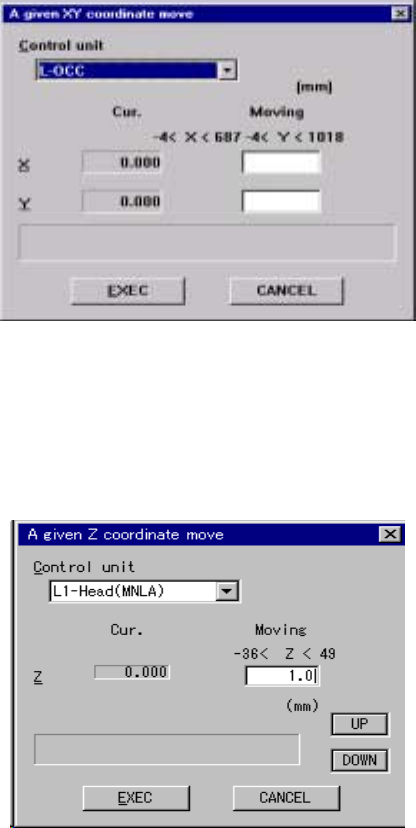
1. When you click the <XY Move> button on the screen shown in Figure 9.5.1.2,
the following screen appears. The origin of the XY-coordinates (0, 0) is the
left edge of the front side on which the operation panel is located.
Figure 9.5.1.2.1 “A given XY coordinate move” screen
2. When you click the <Z Move> button on the screen shown in Figure 9.5.1.2,
the following screen appears. The origin of the Z-axis (0, 0) is the PWB height,
and the top side is regarded as the positive direction while the bottom side is
as the negative direction.
Figure 9.5.1.2.2 “A given Z coordinate move” screen