KE2010.Instruction Manual.Ver.2.01,Rev.08.pdf - 第795页
2 If you press the <ORIGIN> key w hen the system enters Resume Pause mode, the “Orig inating” dialog box appears on the screen as shown in Figur e 1.3. Figure 1.3 “O riginating” di alog box W hen y ou click t he &l…
1
SPECIFICATIONS FOR A CE MACHINE
1. Resume Production
If the Maintenance switch is set to “Auto Mode”, and one of the following events occur
during production: the cover is opened, the bank moves down, and the area sensor is
activated, the servo power supply is turned off and the system enters Resume Pause
mode.
In “Resume Pause” mode, if you recover the system from the error condition causing
this mode: the cover is opened or the bank moves down, and press the <START>
switch, the system can resume the current production.
Since a board remains clamped in Resume Pause mode, you can continue the
suspended production without recognizing marks again.
If the system cannot resume the production easily by picking up, recognizing or placing
a component, it discards the component that has not been used for production
completely, and resumes the production by picking up a new component. When the
system does not find any difficulty, it resumes the suspended production.
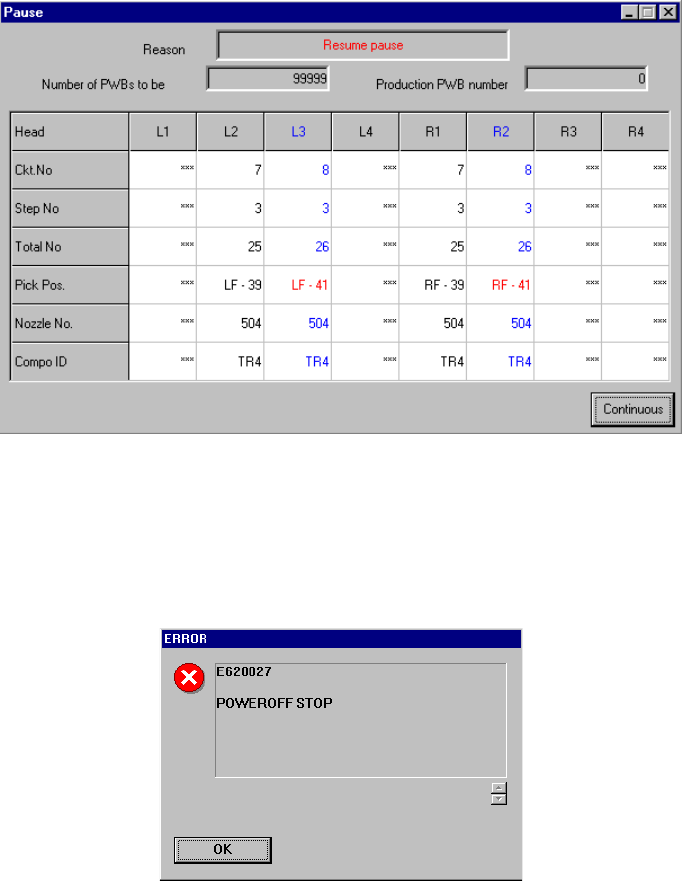
Figure 1.1 “Resume pause” dialog box
If an event causing the system to enter Resume Pause mode occurs when the system
already pauses due to other event, the system enters Resume Pause mode also.
However, the dialog box shown above does not appears, and the “POWEROFF”
message appears as shown in Figure 1.2.
Figure 1.2 POWEROFF message
2
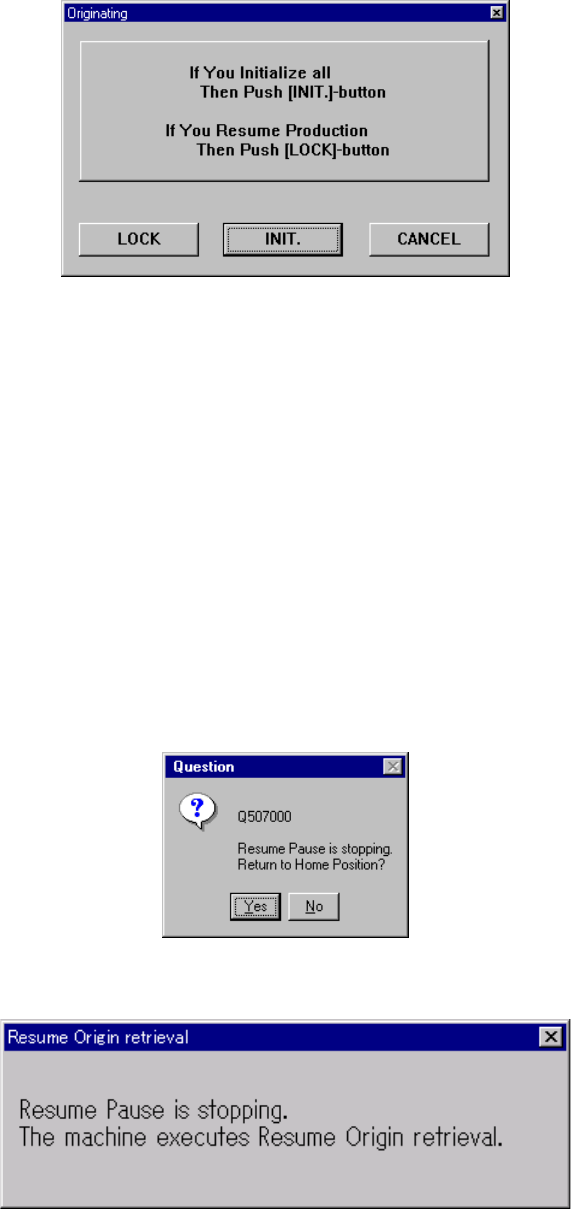
If you press the <ORIGIN> key when the system enters Resume Pause mode, the
“Originating” dialog box appears on the screen as shown in Figure 1.3.
Figure 1.3 “Originating” dialog box
When you click the <LOCK> button on the “Originating” dialog box shown in Figure 1.3,
the system returns to the home position without moving any axis. When you click the
<INIT.> button, the system returns to the home position with moving axes to the
calibration block. In either case, the system does not return any MTC/MTS to its
home position.
If you press the <START> switch when the system enters Resume Pause mode, the
“Question” dialog box that asks you to return axes to their home positions respectively
appears on the screen as shown in Figure 1.4. When you click the <Yes> button, the
“Resume Origin retrieval” dialog box appears on the screen as shown in Figure 1.5,
and the system performs the same operation as it does when you click the <LOCK>
button on the “Originating” dialog box shown in Figure 1.3 to resume the suspended
production. When you click the <No> button, the system returns to the condition you
pressed the <START> switch.
Figure 1.4 “Question” dialog box for confirming the returning-to-home-position operation
Figure 1.5 “Resume Origin retrieval” dialog box
3
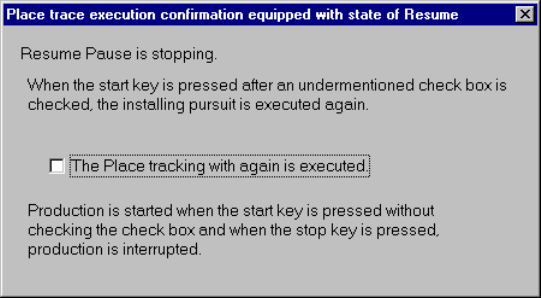
If the system enters Resume Pause mode as the result of the placement tracking
operation that is started from the continuous production or trial or blank production
operation, the system displays the “Place trace execution confirmation equipped with
state of Resume” dialog box as shown in Figure 1.6.
1.6 “Place trace execution confirmation equipped with state of Resume” dialog box
When you check the check box “The Place tracking with again is executed.” displayed
on the dialog box shown in Figure 1.6 and press the <START> switch, the system
resumes the suspended production after tracking a placement operation again.
When you press the <START> switch without checking this check box, the system
resumes the suspended production without tracking any placement operation. When
you press the <STOP> button, the system displays the “Abort” dialog box and starts
interrupting the current production.
If the system has not returned to the home position yet until you press the <START>
button, the “Question” dialog box for confirming the returning-to-home-position
operation appears on the screen as shown in Figure 1.4.
If the system has not returned to the home position yet until you interrupt the current
production in Resume Pause mode, the system automatically performs the same
operation as that to be executed when you click the <LOCK> button on the “Question”
dialog box shown in Figure 15.1.4, before interrupting the production.
1.1 Events preventing the system from entering Resume Pause mode
1.1.1 When the system cannot enter Resume Pause mode
• When the servo is unlocked while a nozzle is operating on an ATC, the system
generates a nozzle replacement error, and aborts the suspended production without
resuming it since the machine may be damaged.
• When the servo is unlocked while an axis is moving, the limit error occurs, and the
current production is aborted without allowing the system to enter Resume Pause
mode. If the limit error occurs, detach the axis from the limit switch, and return it to
its home position.
1.1.2 Events preventing the system from resuming the suspended production
• If the system enters Resume Pause mode while it is picking up, recognizing or
placing a long connector, the connector may drop off the system.
• When the system enters Resume Pause mode while the Z-axis is moving down to
palace a component on a board, the regulated precision of component placement
cannot be guaranteed.