KE2010.Instruction Manual.Ver.2.01,Rev.08.pdf - 第447页
6 − 71 (1) Tr acking and com ponent pick -up position corr ection of a f eeder t hat caused an error T he system operates in t he same manner when the stock ed components run out . CA UTION The head starts to move immedi…
6 − 70
6.4.2 When an error occurs
When you check the check box “Stop system on any error.” displayed on the
“Production (Pause)” option setting screen, the system pauses if an error such as a
retry over error, LA recognition error and VCS error, which is to be displayed on the
Retry list, occurs.
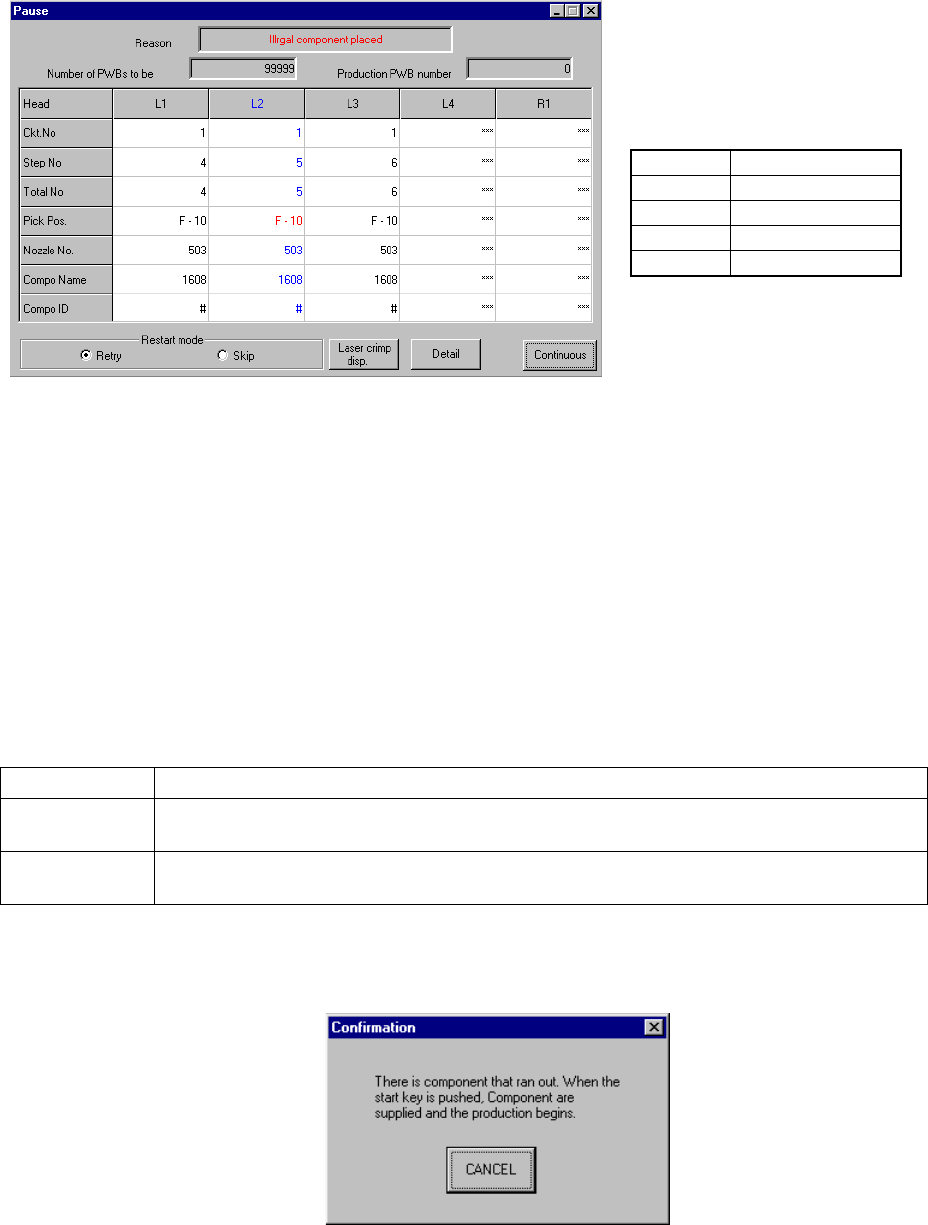
Figure 6.4.2.1 Dialog box indicating that an error occurs
(Screen example when you use a KE-2020)
When you press the <START> switch, the system restarts production, and when you
press the <STOP> switch, the production stop dialog box appears on the screen, then
the system starts aborting the current production.
① Production Restart mode
Depending on your selection of the radio button displayed on the dialog box,
the system restart-operation to be performed when you press the <START>
switch varies as shown below:
Restart mode Operation to be performed when the system restarts production
Retry The system restarts production from the pick-up/placement cycle of the component which
caused an error.
Skip The system skips the pick-up/placement cycle of the component which caused an error, and
restarts production from the next pick-up cycle.
When you select “Retry”, the following message appears on the screen if the
stocked components run out at the feeder that caused an error.
• The actually displayed names
under the caption “Head” vary
depending on the model you use.
Model
Head name
KE-2010
L1 to L4
KE-2020
L1 to L4, R1
KE-2030
L1 to L4, R1 to R4
KE-2040
L1, R1
6 − 71
(1) Tracking and component pick-up position correction of a feeder that caused an
error
The system operates in the same manner when the stocked components run out.
CAUTION
The head starts to move immediately after the "Retry" button is selected
or the "Skip" button is selected, and the <START> switch is pressed.
Then the machine restarts PWB production.
To avoid a risk of injury, do not place your hand in the machine, nor
move your face or head close to the machine during operation.
Before pressing the <START> switch, check that there is no one who is
working in the machine.
Before pressing the <START> switch check that there is no one who
can be injured when the head starts to move.
Before pressing the <START> switch, check that there are no obstacles
(tools and jigs) attached or left in the machine.
Even when "Stop production after ejecting PWB" is selected, X and Y
axes and the head continue to move to replace nozzles.
To avoid a risk of injury, do not place your hand in the machine, nor
move your face or head close to the machine even after stopping the
production.
(2) Detailed information
The system operates in the same manner as it does when the stocked
components run out.
(See (4) of Section 6.4.1 “Run-out of component stock”.)
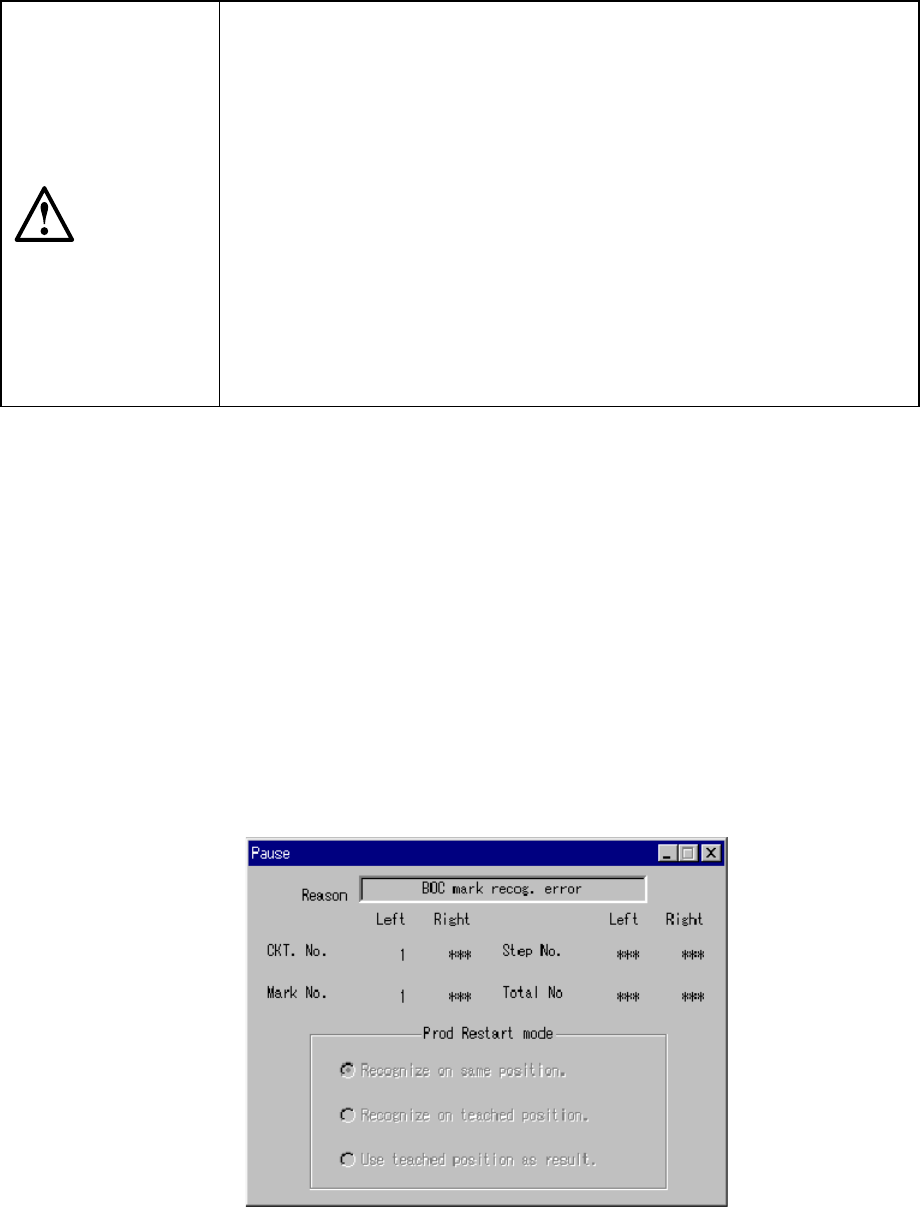
6.4.3 Mark recognition error
When a BOC or IC mark recognition error occurs during BOC or IC mark recognition
operation, the dialog box appears as shown in Figure 6.4.3.1 and the machine is set
in the pause status. Note that the radio button "Recognize on same position" is
checked and displayed in the lighter color in Production restart mode, which cannot be
changed.
Figure 6.4.3.1 BOC mark recognition error dialog box
When the machine pauses due to a mark recognition error, recognize marks or use
6 − 72
the taught coordinates which are checked with your eyes as the mark coordinates in
order to restart the next production. Otherwise, the machine cannot place a
component on a board correctly.
When pressing the CAMERA key of the HOD, and the camera device at the station
which causes an error, the camera’s view moves to the mark coordinates displayed
on the dialog box, and the mark coordinates can be taught.
When finishing teaching using the ENTER key of the HOD, the color of the radio
button displayed changes to deep black. Here, production can be continued by
performing the mark recognition at the taught coordinates or checking the mark with
your eyes.
However, when the left and right BOC recognition causes an error, you cannot select
the radio button unless you finish the teaching operation for the left and right BOC
marks.
If you perform teaching operation again, but click the <CANCEL> button to abort it
after you perform teaching operation once and the radio button is displayed in dark
black, the machine condition returns to the state before you performed teaching
operation first (in this case, perform teaching operation again).
The teaching here is effective only for the subject board. If a mark recognition error
occurs again and again with the other boards, finish production once. Then, perform
coordinate and recognition teaching of the mark again on the Program Editing menu.
Pressing the <START> switch on the panel of the main unit restarts the production,
and pressing the <STOP> switch stops the production while displaying the production
stop dialog box.
CAUTION
To avoid a risk of injury, do not place your hand in the machine, nor
move your face or head close to the machine when operating the HOD.
Even though you abort production, do not place your hand in the
machine or move your face or head close to the machine to avoid a risk
of injury.
Note: Teaching here is effective only for the subject board. If an error occurs during
continuous production, correct the PWB data.