KE2010.Instruction Manual.Ver.2.01,Rev.08.pdf - 第645页
8 − 56 8.6.2 Signal light control W hen you select the [Others] command on the [Ctrl] menu, then the [Signal li ght control] com mand, t he following “ Signal light control” dialog box appears on the screen. Figure 8.6.2…

8 − 55
3) Nozzle remove
This item returns the nozzle to the ATC.
When the control item “Nozzle return” is checked, select the <EXEC>
button, or press the F3 key to control the nozzle return operation.
- When the nozzle has been returned successfully, the head mark
displayed with the ATC number of the status display disappears.
- The state display is updated when the control is completed.
(5) State display
The state of each unit is displayed when the unit is controlled completely.
8 − 56
8.6.2 Signal light control
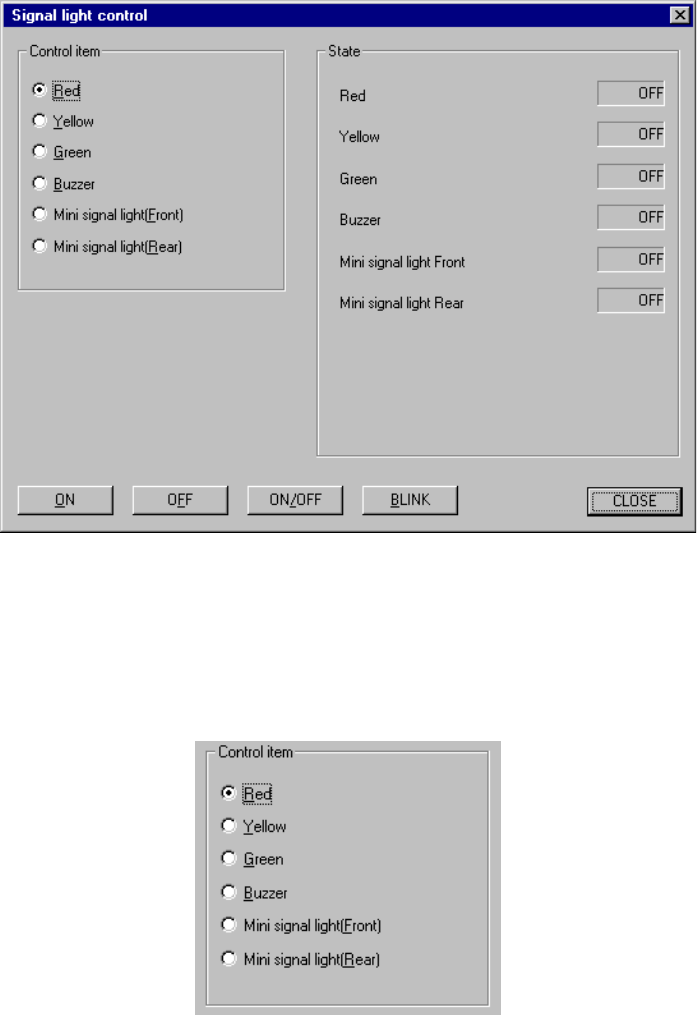
When you select the [Others] command on the [Ctrl] menu, then the [Signal light
control] command, the following “Signal light control” dialog box appears on the
screen.
Figure 8.6.2 Signal light control screen
(1) Control item
Select a control item with the corresponding radio button.
(2) Control button
Each control item can be executed with the control button.
The display of the control buttons varies depending on the control items you
selected.
8 − 57
1) Red
This item turns on/off or flashes the red signal light.
- When the control item “Red” is checked, select the <ON>, <OFF>,
<ON/OFF> or <BLINK> button, or press the F3, F4, F5 or F6 key or
ALT + 4 keys to control the red signal light.
The state display is updated when the red signal is controlled
completely.
2) Yellow
This item turns on/ off or flashes the yellow signal light.
- When the control item “Yellow” is checked, select the <ON>, <OFF>,
<ON/OFF> or <BLINK> button, or press the F3, F4, F5 or F6 key or
ALT + 4 keys to control the yellow signal light.
The state display is updated when the yellow signal light is controlled
completely.
3) Green
This item turns on/off or flashes the green signal light.
- When the control item “Green” is checked, select the <ON>, <OFF>,
<ON/OFF> or <BLINK> button, or press the F3, F4, F5 or F6 key or
ALT + 4 keys to control the green signal light.
The state display is updated when the green light is controlled completely.
4) Buzzer
This item turns on and/or off the buzzer.
- When the control item “Buzzer” is indicated with a check mark, select
the <ON>, <OFF> or <ON/OFF> button or press the F3, F4or F5 key to
control the buzzer.
The state display is updated when the buzzer is controlled completely.
5) Mini signal light (Front)
This item turns on and/or off the front mini signal light.
- When the control item “Mini signal light (Front)” is checked, select the
<ON>, <OFF> or <ON/OFF> button or press the F3, F4or F5 key to
control the front mini signal light.
The “State” display is updated when the front mini signal light is
controlled completely.
6) Mini signal light (Rear)
This item turns on and/or off the rear mini signal light.
- When the control item “Mini signal light (Rear)” is checked, select the
<ON>, <OFF> or <ON/OFF> button or press the F3, F4or F5 key to
control the rear mini signal light.
The “State” display is updated when the rear mini signal light is
controlled completely.
(3) State display
The state display of each unit is updated when the unit is controlled completely.