KE2010.Instruction Manual.Ver.2.01,Rev.08.pdf - 第665页
9 − 11 9.4.2.2 Sett ing up each it em of Nozzle Operat ion Informati on W hen y ou select the [ Tool] com mand on the m enu bar, the [ Exchange fr equency setup] command on the displayed menu, t hen the [Each nozzle] com…
9 − 10
9.4.2 Nozzle operation information
9.4.2.1 Operation Information of each nozzle
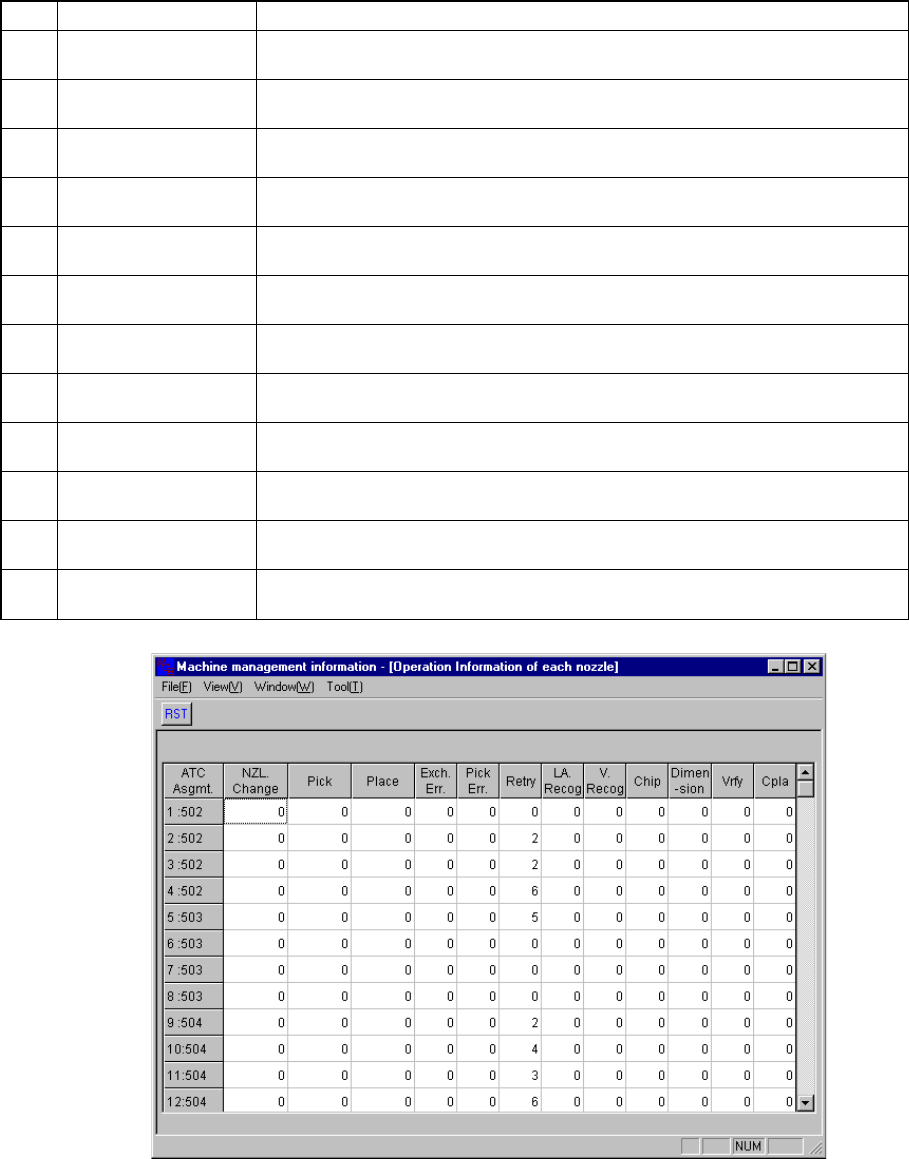
When you select the [Windows] command on the menu bar, then the [Operation
Information of each nozzle] command on the displayed menu, the screen appears as
shown in Figure 9.4.2.1.1.
No. Item Description
1 NZL Change
Counts how many times the nozzle (specified with the ATC number) was
replaced.
2 Pick
Counts how many times the nozzle (specified with the ATC number) picked a
component totally.
3 Place
Counts how many times the nozzle (specified with the ATC number) placed a
component totally.
4 Exch. Err.
Counts how many times a replacement error occurred per a nozzle (specified
with the ATC number).
5 Pick Err.
Counts how many times a pick-up error occurred per a nozzle (specified with
the ATC number).
6 Retry
Counts how many times the nozzle (specified with the ATC number) performed
a retry.
7 LA Recog
Counts how many times an LA recognition error occurred at the nozzle
(specified with the ATC number).
8 V. Recog
Counts how many times a vision recognition error occurred at the nozzle
(specified with the ATC number).
9 Chip
Counts how many times a chip rise error occurred at the nozzle (specified with
the ATC number).
10 Dimension
Counts how many times an odd-shaped component error occurred at the nozzle
(specified with the ATC number).
11 Vrfy
Counts how many times a verify error occurred at the nozzle (specified with the
ATC number).
12 Cpla
Counts how many times a coplanarity error occurred at the nozzle (specified
with the ATC number).
Figure 9.4.2.1.1. Nozzle Operation Information
9 − 11
9.4.2.2 Setting up each item of Nozzle Operation Information
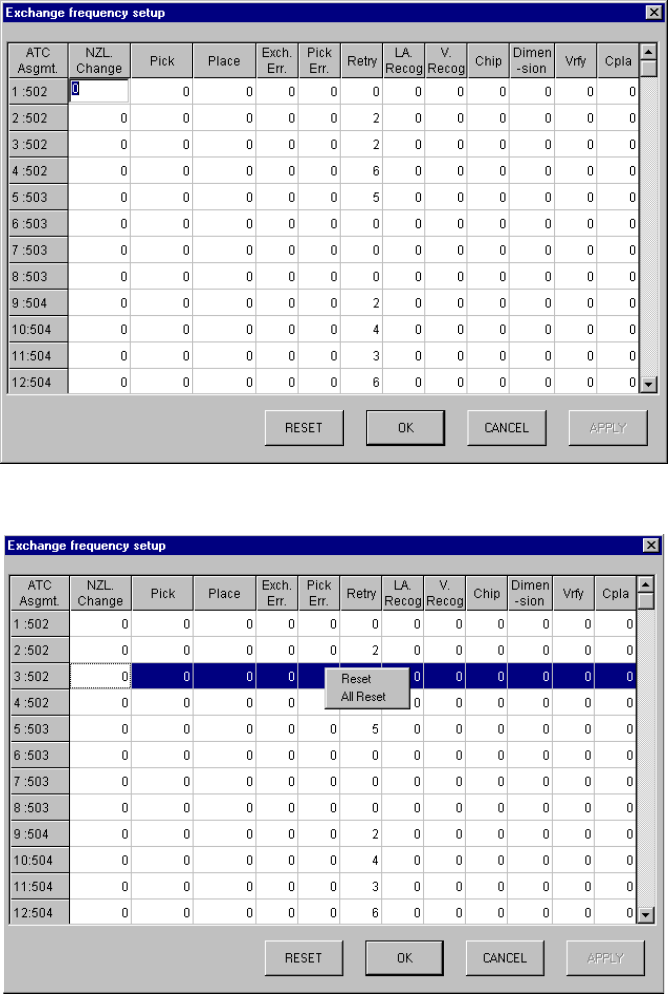
When you select the [Tool] command on the menu bar, the [Exchange frequency
setup] command on the displayed menu, then the [Each nozzle] command, the screen
appears as shown in Figure 9.4.2.2.1.
If you manually change the ATC nozzle assignment, you can change data on each
nozzle.
Figure 9.4.2.2.1 Exchange frequency setup dialog box
Figure 9.4.5.2.2 Exchange frequency setup dialog box
9 − 12
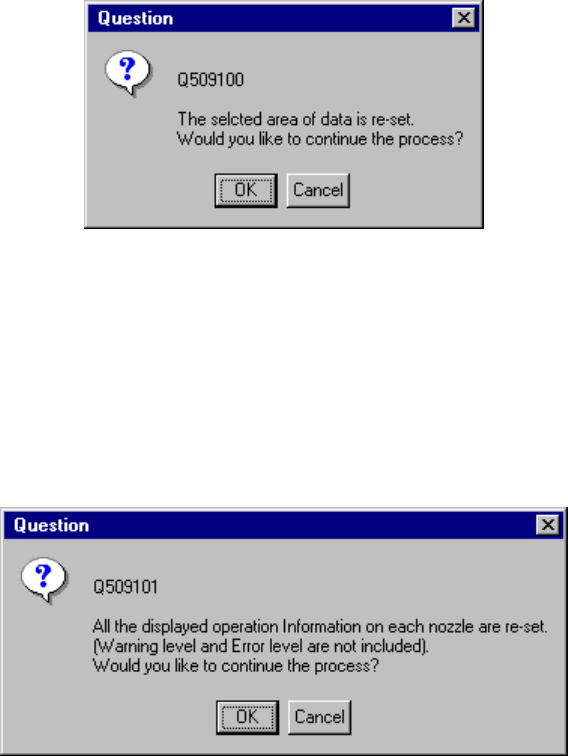
− The "Exchange frequency setup dialog box" above allows you to select data to be
reset with a keyboard or mouse, then select the [Reset] on the pop-up menu
which is displayed by your clicking the right button to reset the selected data.
- When you click the <Reset> button displayed on the bottom of the dialog box
above, the system allows you to reset data also, then the following dialog box
appears on the screen.
Figure 9.4.2.2.3 Frequency resetting confirmation dialog box
- When you click the <OK> button, the selected data is reset. When you click the
<Cancel> button, the system does not reset the selected data.
When you click the [All Reset] on the pop-up menu shown in Figure 9.4.2.2.2, the
following dialog box appears on the screen.
Figure 9.4.2.2.4 All frequency data resetting confirmation dialog box
- When you click the <OK> button on the dialog box above, the system resets all of
the operation information of each nozzle. When you click the <Cancel> button,
the system does not reset any data.