KE2010.Instruction Manual.Ver.2.01,Rev.08.pdf - 第731页
12 − 1 CHA PTER 12 HA NDLING THE FEEDERS A ND OPTIONS 12.1 Replacement of the Tape Feeder 12.1.1 Replacement of th e tape feeder (8 mm, 12 mm, 16 mm, 24 mm, and 32 mm) CA UTION Do not replace the tape f eeder with anothe…
11 − 21
⑨ Alternate (MTS) [Not available for a KE-2030]
− When you enable the “Non-stop operation [MTS]” function, this check box
is enabled. When enabled, check this check box to execute the alternate
production mode function in MTS Non-stop operation mode.
− When you check this check box, MTS Alternate Production mode is
enabled.
− The status of this check box, checked or not checked, is not affected by
the setting of the “Non-stop operation [MTS]”, enabled or disabled.
⑩ Non-stop operation (DTS) (Not available for a KE-2030)
− Using this check box, set whether to perform the Non-stop operation (DTS)
or not.
− When you check the check box of this option, the non-stop operation
function is enabled.
− Automatically setting the number of DTS components when replenished
If you press the <SUPPLY> switch to replenish components, then press
the <SUPPLY> switch again to release Component Supplying mode while
the system is producing a PWB in Non-stop mode, this function
automatically sets the number of components that are located on the level
you replenished so that it can indicate the level is fully replenished.
− This item is enabled only if “DTS” is enabled on the “Device enable” menu
invoked form the Machine Setup menu.
⑪ Enable Auto Compo. presence check of MTC (Not available for a KE-2030)
− Using the combo box, select the check operation of MTC components
when picked up (“a.” is selected as the default).
a. Do not check: the system does not check any component.
b. Read file the system checks components when a production
program file is changed.
c. Supply component: the system checks components when components
finish being replenished by your pressing the
Supply key of an MTC.
− When you select “Read file” or “Supply component”, the system checks to
see if there is any component on a tray with the HMS located inside an
MTC when it picks up a component from a tray of the MTC that is
replenished fully. Then, the system starts picking up a component from
where a component is actually located.
− When you select “Do not check”, the system always starts picking up
components from the first component of a tray when the tray is replenished
fully.
− This item is enabled only if “TR6D” is selected as an MTC on the “Device
When you validate the selected item(s), click the <OK> button. If you do not want to
set any option, click the <CANCEL> button.
12 − 1
CHAPTER 12 HANDLING THE FEEDERS AND
OPTIONS
12.1 Replacement of the Tape Feeder
12.1.1 Replacement of the tape feeder
(8 mm, 12 mm, 16 mm, 24 mm, and 32 mm)
CAUTION
Do not replace the tape feeder with another one while the X- or Y-axis, or
head is operating. It may cause a serious injury to the operator or damage
the machine itself since the tape feeder touches the operating parts.
Do not dismount the tape feeder while the X- or Y-axis or head is operating.
After you mount the feeders required for producing boards at the position
specified with a production program, mount feeders, which are not used for
production, such as 8-mm tape feeders where no feeders are mounted to
prevent any gap from being generated between the already mounted
feeders. This operation secures your safety since it prevents your finger
or hand from accidentally being slid into such a gap.
Mounting
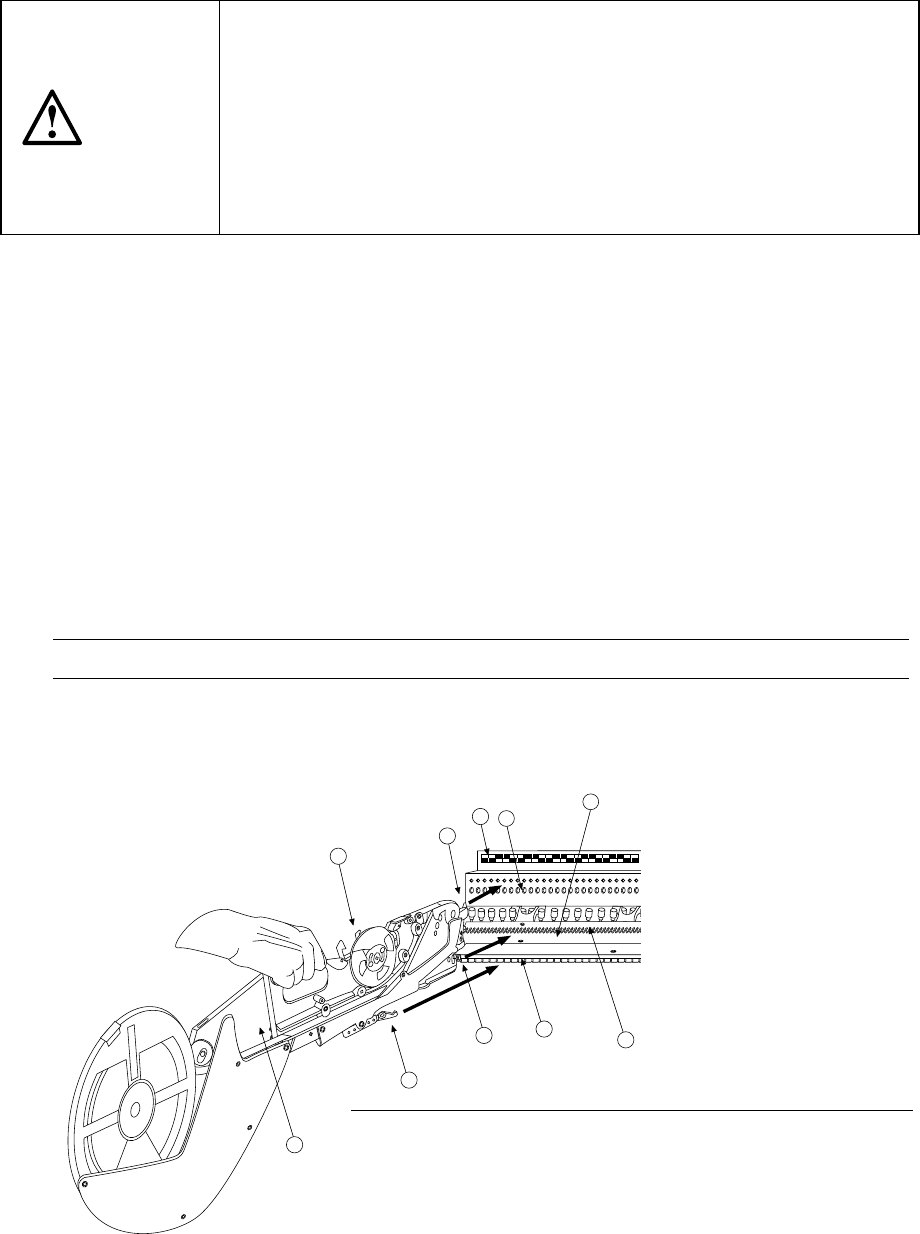
1) Place the bottom of the tape feeder ① on the feeder bank ②
2) Slide the tape feeder ① toward the positioning hole of the fixing plate ③, and
align the guide pin located on the bottom of the tape feeder with the fixing plate
B7 as a guide. Fit the positioning pin on the front of the tape feeder into the
positioning hole of the fixing plate ③. To do so, while pulling the lock release
lever ⑩ gently, align the lock holder ⑨ with the V-shaped groove of the lock
shaft ⑧, then push the front of the tape feeder against the fixing plate. Release
the lock release lever to clamp the lock shaft with the lock holder and fix the tape
feeder.
In this case, the number of the position label ④ pasted just above the hole into
which the positioning pin on the front of the tape feeder is fit indicates the position
at which the tape feeder is mounted.
Note: Check to see if the tape feeder is off the feeder bank or not upright.
Dismounting
1) Hold the tape feeder ① and pull it back to you while pulling the lock release lever
⑩.
10
5
8
2
9
6
3
4
7
1
Figure 12.1.1.1
Note: When the used paper tape (which is ejected from a tape
feeder after a component is supplied from the tape)
warps upward, it may catch in the support section or
other part, then it may cause a tape feeder feeding
error. Check to see if the used tape is ejected
properly.
12 − 2
12.1.2 Replacement of 32-mm adhesive tape feeder
CAUTION
Do not replace the tape feeder with another one while the X- or Y-axis, or
head is operating. It may cause a serious injury to the operator or damage
the machine itself since the tape feeder touches the operating parts.
Do not dismount the tape feeder while the X- or Y-axis or head is operating.
After you mount the feeders required for producing boards at the position
specified with a production program, mount feeders, which are not used for
production, such as 8-mm tape feeders where no feeders are mounted to
prevent any gap from being generated between the already mounted
feeders. This operation secures your safety since it prevents your finger
or hand from accidentally being slid into such a gap.
Mounting
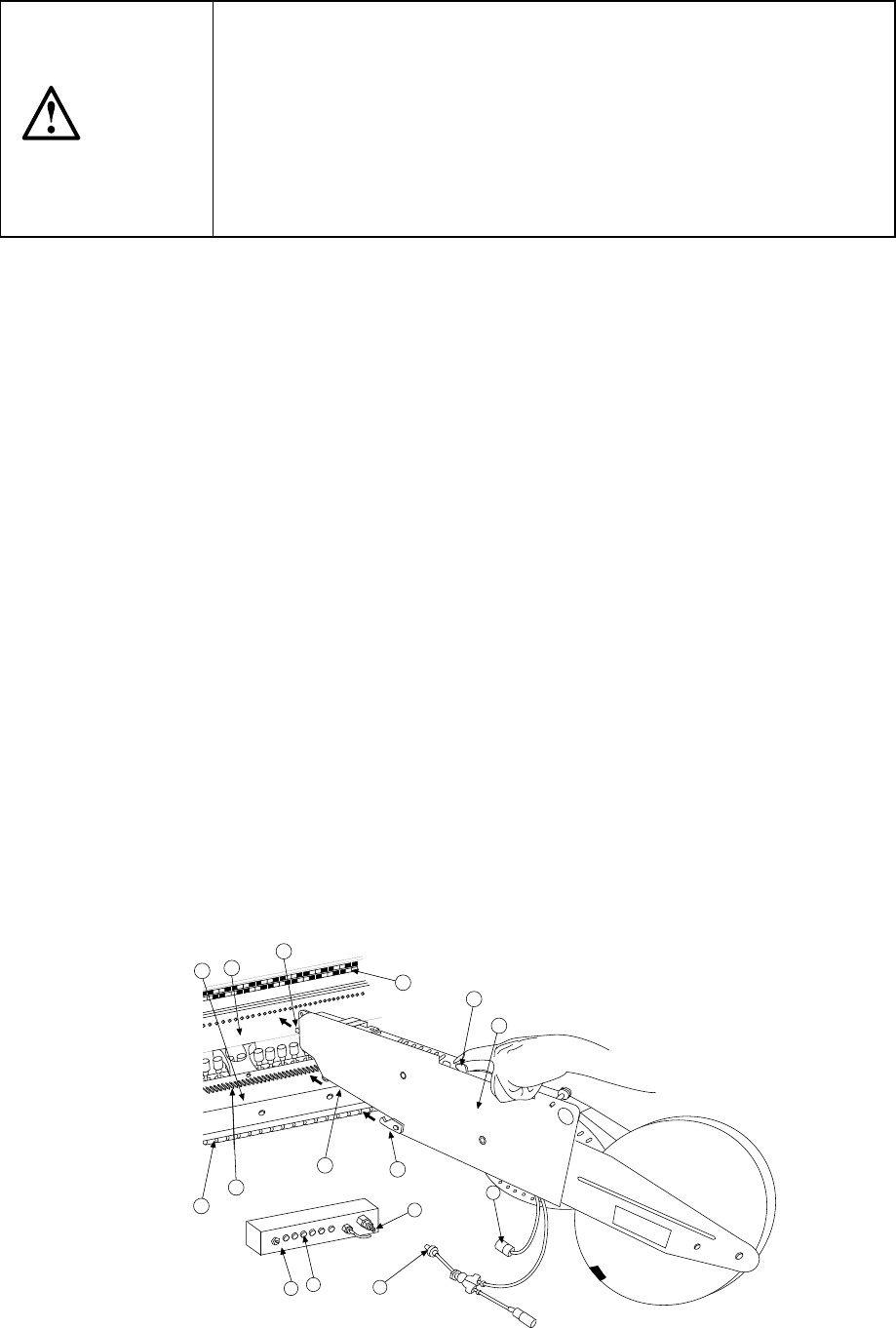
1) Place the bottom of the tape feeder ① on the feeder bank ②.
2) Slide the tape feeder ① toward the positioning hole of the fixing plate ③, and
align the guide pin located on the bottom of the tape feeder with the fixing plate
B7 as a guide. Fit the positioning pin on the front of the tape feeder into the
positioning hole of the fixing plate ③. To do so, while pulling the lock release
lever ⑩ gently, align the lock holder ⑨ with the V-shaped groove of the lock
shaft ⑧, then push the front of the tape feeder against the fixing plate. Release
the lock release lever to clamp the lock shaft with the lock holder and fix the tape
feeder.
In this case, the number of the position label ④ pasted just above the hole into
which the positioning pin on the front of the tape feeder is fit indicates the position
at which the tape feeder is mounted.
3) Match the index of the power cord connector ⑪ with the power supply part ⑬ of
the connector bracket ⑫ (place the white dot to the right), and insert the
connector until you hear a click sound of the click stop.
4) Insert the air coupler ⑮ into the female union ⑭ until you hear a click sound of
the click stop.
5) Set the feeder float sensor that is located on the side a 32-mm adhesive tape
feeder (NF3SN) is installed so that it cannot be used: you uncheck the check
box “Front feeder float detection” or “Rear feeder float detection” on the “Std
Device enable” menu invoked from the Machine Setup menu.
Dismounting
1) Push forward the slide part of the female union ⑭, to detach the air coupler ⑮.
2) Pull the slide part of the power cord connector ⑪ toward your side, and
disconnect the connector.
3) With pulling the lock release lever ⑩, pull back the tape feeder ① to remove it
5
11
14
13
15
12
6
7
8
9
2
1
3
10
4
Figure 12.1.2.1