KE2010.Instruction Manual.Ver.2.01,Rev.08.pdf - 第610页
8 − 21 2) Z adjust ment The contr ol item “Z adj ustment ” controls t he Z coordinate of the head selected. This control is necessar y to pick up component s using the nozzle. W hen “Z adjustment” of the cont rol item s …
8 − 20
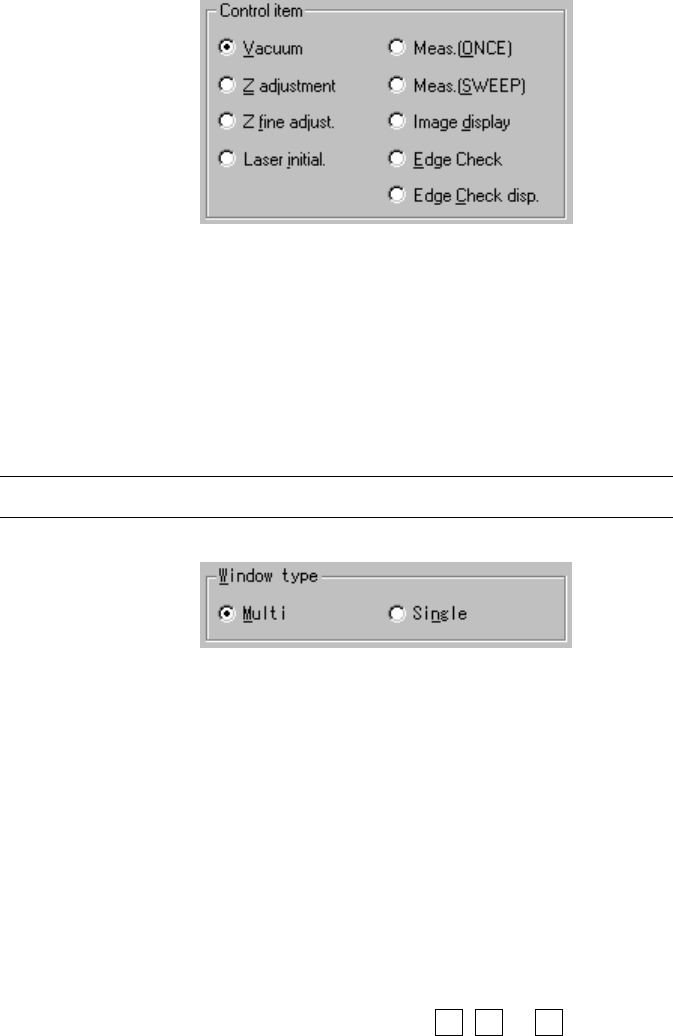
(3) Control item
Select the control item with a radio button.
(4) Window type
Select the window type which is to be used during measurement with the
corresponding radio button.
If you do not select “Meas. (ONCE)” or “Meas. (SWEEP)” as the control item,
you cannot set the window type here.
Note: You can set the window type only for the MNLA head.
(5) Control button
Each control item can be executed with the corresponding control button.
The display of the control button differs among the control items.
1) Vacuum
The control item “vacuum” turns on and / off of the vacuum of the head
selected.
When “Vacuum” of the control items is checked, select the <ON>, <OFF>,
or <ON/OFF> button or press the F3, F4 or F5 key to control the vacuum
level.
The display of the vacuum level is updated when the control has been
completed.

8 − 21
2) Z adjustment
The control item “Z adjustment” controls the Z coordinate of the head
selected.
This control is necessary to pick up components using the nozzle.
When “Z adjustment” of the control items is checked, select the <UP>,
<DOWN>, <UP/DOWN> button or press the F3, F4 or F5 key to control
the Z-axis.
The display of the coordinates is updated when the movement has been
completed.
3) Z fine adjustment
The control item “Z fine adjustment” controls finely the Z coordinate of the
head selected.
This control is necessary to move the picked component to the laser
measurement height.
When the control items “Z fine adjustment” is checked, select <UP>,
<DOWN>, <LA control> button or press the F3, F4 or F5 key to control
finely the Z axis.
The display of the coordinates is updated when the control has been
completed.
4) Laser initial
This item initializes the laser sensor of the head selected.
When the control item “Laser initialization” is checked, select the <EXEC>
button, or press the F3 key to control the laser initialization.
5) Meas. (ONCE)
This item executes the laser measurement (ONCE) of the head selected.
The laser measurement (ONCE) is the function for obtaining the
information on the shadow shot with the sensor currently. The
measurement result is displayed in the “First” field of the item
“Measurement result” on the Laser control dialog box. (See Figure 8-2-4)
When the control item “Measurement (ONCE)” is checked, select the
<EXEC>, <LA control> button or press the F3 key or F5 key to control the
measurement.
The display of the measurement result is updated when the control has
been completed.
8 − 22
6) Meas. (SWEEP)
This item executes the laser measurement (SWEEP) of the head selected.
The laser measurement (SWEEP) is the function for detecting the smallest
shadow of a component according to the specified algorithm by rotating the
target component within the detection area. The minimum shadow width
detected for the first time is displayed in the “First” field of the item
“Measurement result”, and that for the second time is displayed in the
“Second” field. (See Figure 8-2-4)
When the control item “Measurement (SWEEP)” is checked, select the
<EXEC>, <LA control> button or press the F3 key or F5 key to control the
measurement.
The measurement result status is updated when the machine finishes
measuring.
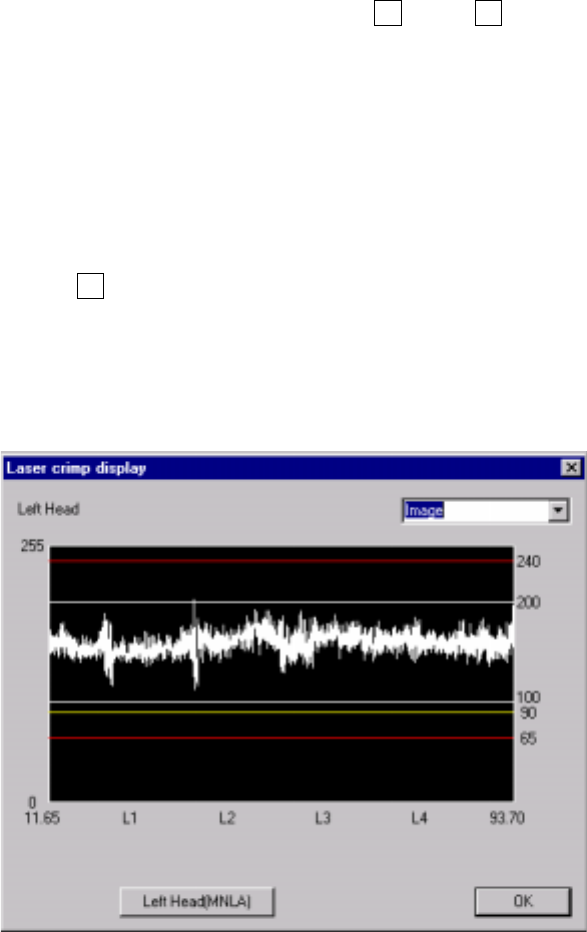
7) Image display
This item displays the image data from the laser sensor of the selected
head.
When the control item “Image display” is checked, click the <EXEC> button
or press the F3 key.
Check to see if the laser level is within the range between 70 and 240, and
each value spreads evenly on the graph. If any value is lowered abruptly or if
any value is extremely low (65 or lower), clean the laser surface side of the
head.
Figure 8.2.5 Image display dialog box
− Laser level value: brightness of laser light transmitted from the
phototransmitter and received with the photoreceptor, that is indicated with
a figure between 0 (darkest) and 255 (brightest).
If a laser head is stained, this value decreases.