KE2010.Instruction Manual.Ver.2.01,Rev.08.pdf - 第493页
6 − 1 17 ② Changing point s of placem ent In the st op status, t he point of placement can be t aught by the CAMERA key of t he HOD. It is also possible to chang e the point of placem ent directly by numeric k eys on the…
6 − 116
CAUTION
After trial run, tracking by the camera continues. To avoid a risk of
injury, do not place your hand in the machine, nor move your face or
head close to the machine during operation of the machine.
①
To stop the camera
To temporarily stop the camera, press the PAUSE key (on the HOD). The
camera pauses at the next point of placement when the camera is moving, or
stops at the current position when the camera pauses there.
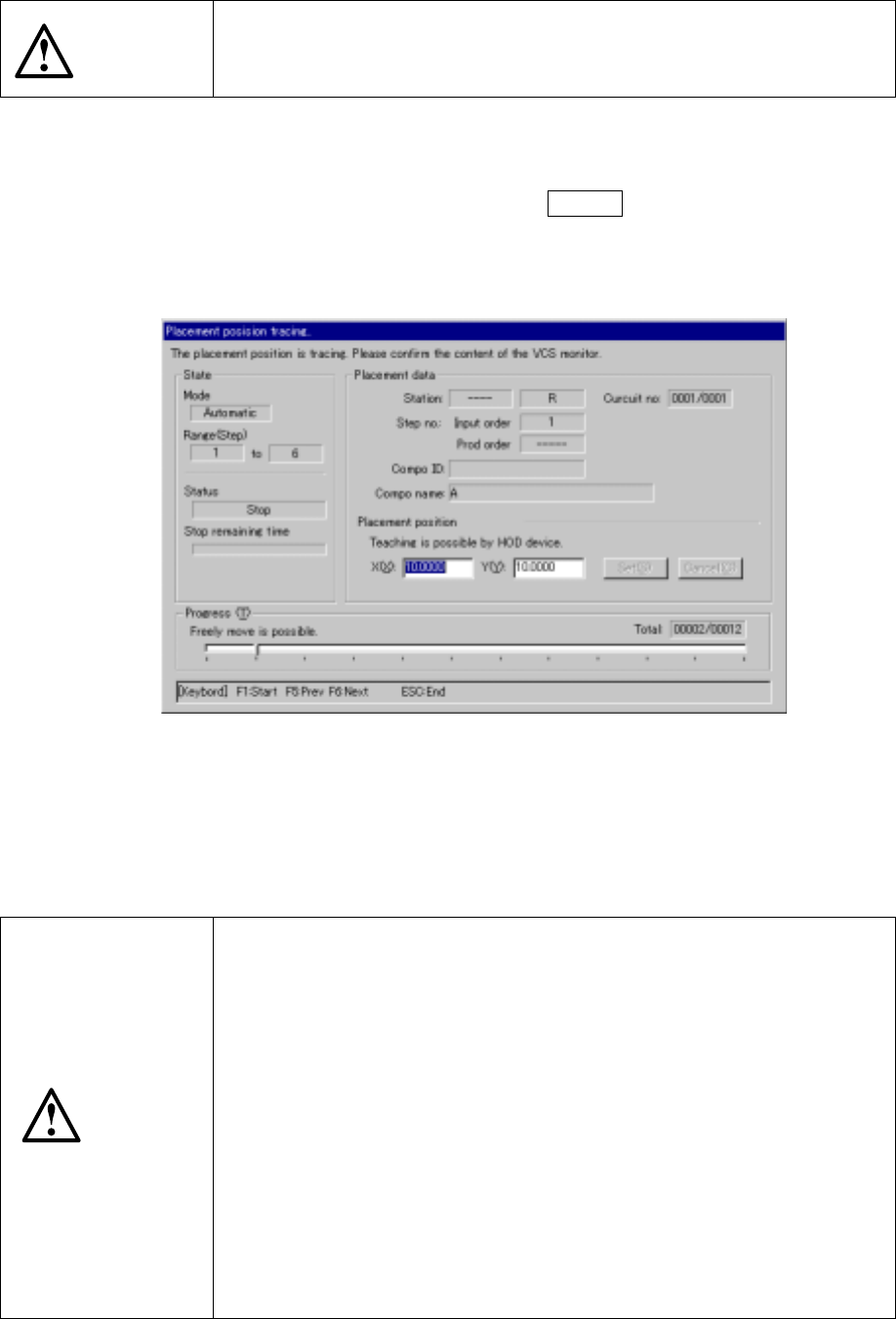
Figure 6.5.3.1 shows the “Place camera tracking” dialog box.
Figure 6.5.3.1 Place camera tracking dialog box
To cancel the pause status, press the <START> switch to restart operation,
and press the <STOP> to terminate operation. When you press the <STOP>
switch, the confirmation dialog box appears on the screen.
CAUTION
The head starts to move immediately after the <START> switch is
pressed, and then tracking restarts.
To avoid a risk of injury, do not place your hand in the machine, nor
move your face or head close to the machine during operation.
Before pressing the <START> switch, check that there is no one who is
working in the machine.
Before pressing the <START> switch, check that there is no one who
can be injured when the head starts to move.
Before pressing the <START> switch, check that there are no obstacles
(tools and jigs) attached or left in the machine.
Even when the <STOP> switch is pressed to stop tracking, X and Y
axes and the head continue to move to replace nozzles.
To avoid a risk of injury, do not place your hand in the machine, nor
move your face or head close to the machine even after stopping
tracking.
6 − 117
② Changing points of placement
In the stop status, the point of placement can be taught by the CAMERA key
of the HOD.
It is also possible to change the point of placement directly by numeric keys
on the ten-key pad.
Value correction can be made manually. The input range is limited within the
software range. After a new value is entered, note that the head moves
when the setting button is pressed.
CAUTION
To avoid a risk of injury, do not place your hand in the machine, nor
move your face or head close to the machine during operation of the
HOD. Note that the head moves to the X and Y coordinates you
entered when the cursor is moved.
③ Returning to the previous point of placement
In the stop status, you can return to the previous point of placement by
pressing the PREVIOUS key of the HOD.
The stop status is still held even after the camera returns to the previous point
of placement.
CAUTION
The head starts to move immediately after the PREVIOUS key is
pressed.
To avoid a risk of injury, do not place your hand in the machine, nor
move your face or head close to the machine during operation of the
HOD.
Before pressing the PREVIOUS key, check that there is no one who is
working in the machine.
Before pressing the PREVIOUS key, check that there is no one who
can be injured when the head starts to move.
Before pressing the PREVIOUS key, check that there are no obstacles
(tools and jigs) attached or left in the machine.
④ Going to the next point of placement
In the pause status, you can go to the next point of placement by pressing the
NEXT key of the HOD.
The stop status is still held even after the camera goes to the next point of
placement.
CAUTION
The head starts to move immediately after the NEXT key is pressed.
To avoid a risk of injury, do not place your hand in the machine, nor
move your face or head close to the machine during operation of the
HOD.
Before pressing the NEXT key, check that there is no one who is
working in the machine.
6 − 118
(2) Manual run
When "Manual" is selected in the "Place tracking" field, the monitoring camera
moves over the first point of placement after trial run, shoots the component
placed circuit, outputs it to the monitor screen, and pauses there.
CAUTION
After trial run has been completed, the camera continues to move to the
first point of trial placement. To avoid a risk of injury, do not place your
hand in the machine, nor move your face or head close to the machine
during operation of the machine.
6.5.4 Pickup tracking
(1) Automatic run
When "Automatic" is selected in the "Pick tracking" field, the pickup monitor
camera moves over a pickup point after trial run, shoots the picked-up component,
and outputs the result to the monitor screen.
The camera stops over the point for a time period set by the item "Automatic
interval", then automatically goes to the next pickup point.
CAUTION
If the feeder bank is never recognized (since the machine is zeroed, or
the bank moves down then up), it may be recognized automatically
before the machine moves to the pick position. Since the head moves
across the feeder while the feeder bank is being recognized, do not
place your hand in the machine, nor move your face or head close to
the machine. Especially, take care when the feeder bank is
recognized not from the menu but during teaching or tracking a pick
position.
① To stop the camera temporarily
To temporarily stop the camera, press the PAUSE key (on the HOD). The
camera pauses at the next pickup point when the camera is moving, or at the
current position when the camera rests there.
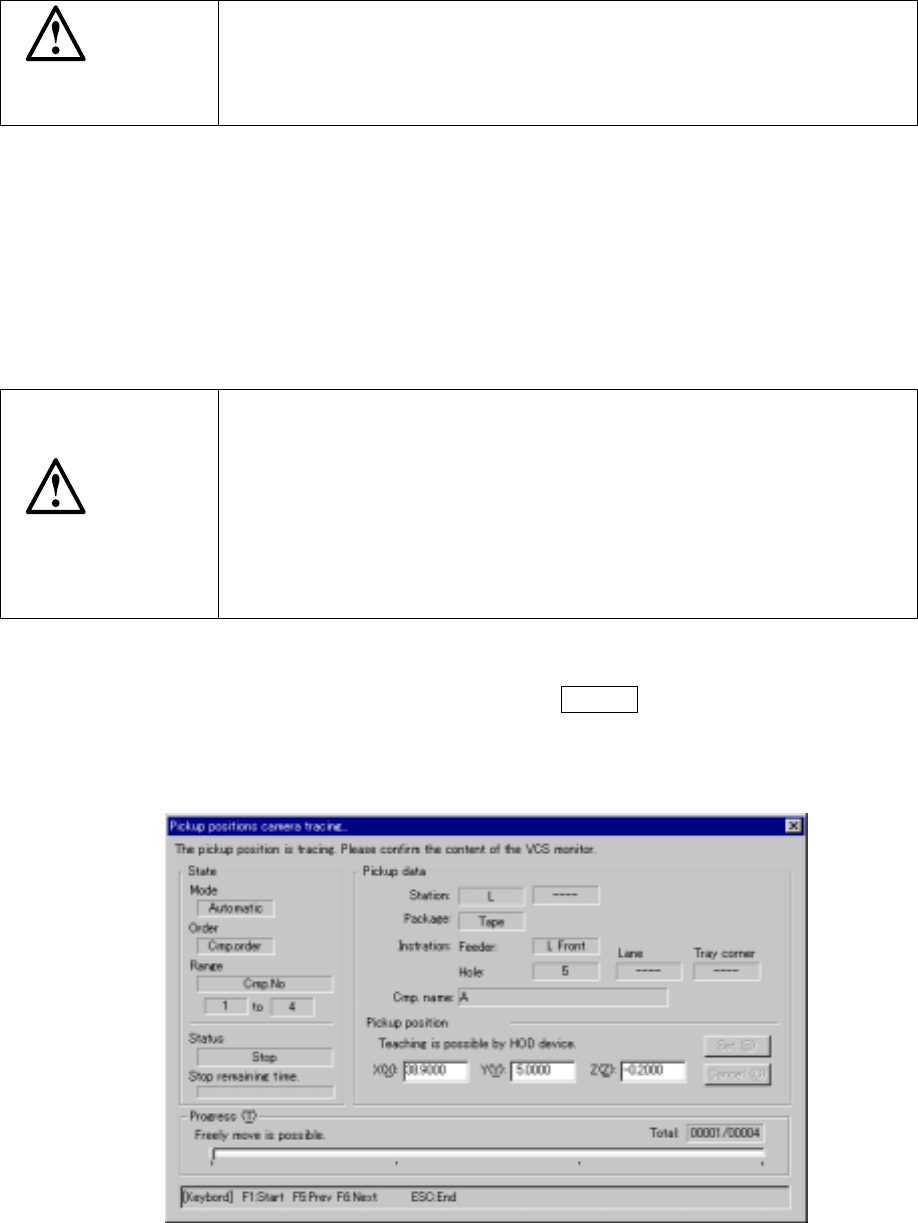
Figure 6.5.4.1 shows the Pick camera tracking dialog box.
Figure 6.5.4.1 Pick camera tracking dialog box