KE2010.Instruction Manual.Ver.2.01,Rev.08.pdf - 第602页
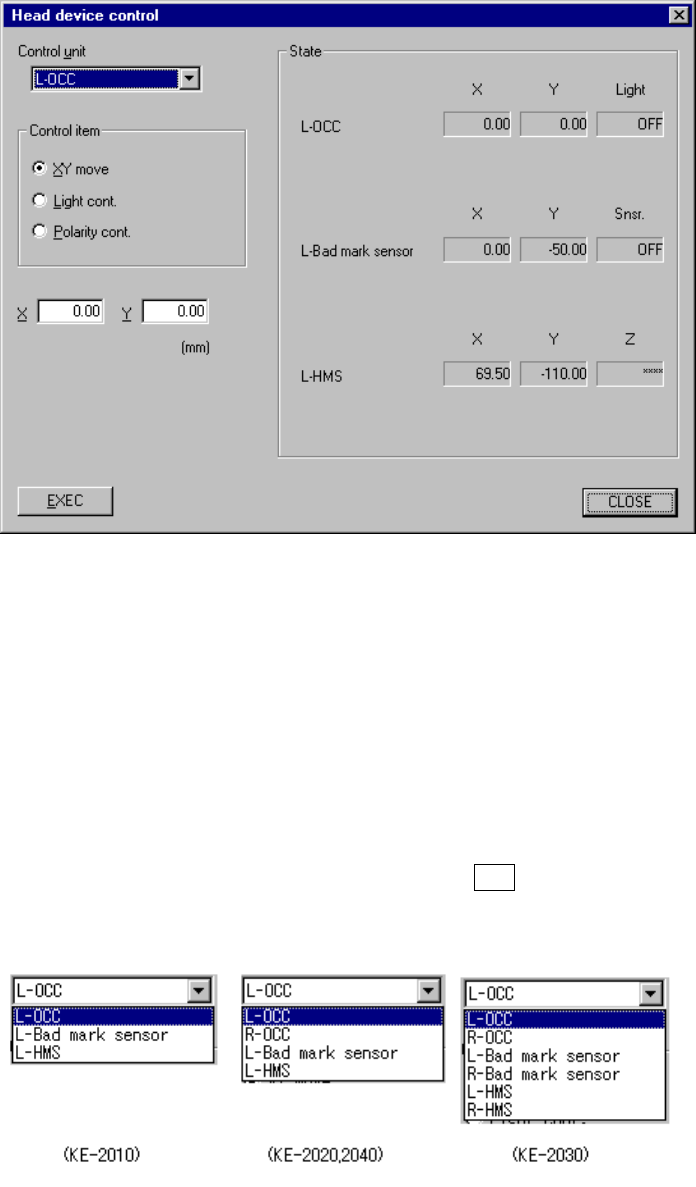
8 − 13 8.2.2 Head device cont rol W hen y ou select t he [Head] command on t he [Ctrl] menu, t hen the [Head device control] com mand, t he following Head device control dialog box appears on the screen. Figure 8.2. 2 He…

8 − 12
5) Controlling the blow
This item turns on and off of the blow of the head selected.
When the control item “Blow cont.” is checked, click one of the <ON)>,
<OFF> and <ON/OFF> buttons, or press one of the F3, F4 and F5 keys.
The display of the vacuum level is updated when the control has been
completed.
(4) State display
X and Y coordinates, Z coordinate, θ coordinate, and pressure value are
displayed when the control has been completed.
The pressure value is always displayed during monitoring.
8 − 13
8.2.2 Head device control
When you select the [Head] command on the [Ctrl] menu, then the [Head device
control] command, the following Head device control dialog box appears on the
screen.
Figure 8.2.2 Head device control dialog box
(1) Control unit
Select the unit to be controlled from the combo box.
You cannot select any unit which is not checked (not installed) at the “Option”
setting of the MS parameters.
This selection does not affect the setting of the “Device enable” menu invoked
from the Machine Setup menu. (This means that the units not checked (not
used) can be used.)
The following list appears when you press the ALT key and the down arrow key
at the same time.
8 − 14
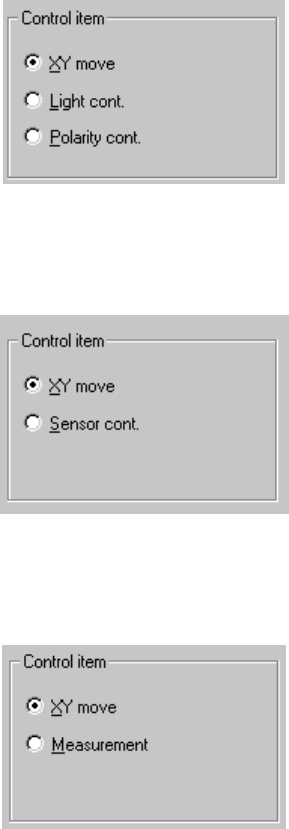
(2) Control item
Select the control item with the corresponding radio button.
The available radio buttons used for selecting control items vary depending on
the control unit you selected.
① OCC
② Bad mark sensor
③ HMS
(3) Control button
Each control item can be executed with the corresponding control button.
The display of the control button varies depending on the selected control item.
① Operation when you select “OCC” as the control unit
1) XY move
Operate the XY axes in the same manner as described under the
section “Head control”.