KE2010.Instruction Manual.Ver.2.01,Rev.08.pdf - 第791页
13 − 35 Black (-) Red (+) Figure 13.5.2. 1

13 − 34
13.5.2 Replacing Batteries
The following steps explain how to replace the batteries. Consider all warnings,
cautions, and notes before replacing batteries.
WARNING
Batteries can present a risk of electrical shock or burn from high short
circuit current.
The following precautions should be observed :
1) Remove watches, rings or other metal objects.
2) Use tools with insulated handles.
3) Do not lay tools or metal parts on tip of batteries.
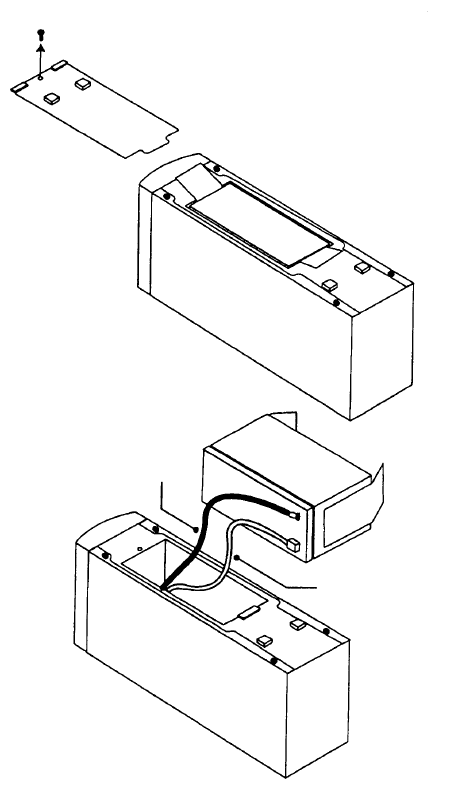
1. Place the UPS on its side, and remove the screw that fixes the lid of the battery
located on the bottom of the UPS. Slide the lid to remove it (see Figure
13.5.2.1).
2. Hold the disconnect tabs to pull down the battery slowly.
3. Disconnect two lead lines connecting the battery to the UPS.
4. Connect the lead lines to a new battery: connect the red line to the (+) side
and the black line to the (-) side. Put a new battery into the case gently.
5. Slide the battery lid to fit it to the case, and fix it with the screws that were
removed at Step 3.
13 − 35
Black (-)
Red (+)
Figure 13.5.2.1

13 − 36
13.5.3 Recycling the Used Battery
Contact your recycling or hazardous waste center for information on proper disposal
of the used battery. We accept your battery for return at cost to you.
WARNING
• Do not dispose of battery or batteries in a fire. Batteries may
explode. Proper disposal of batteries is required. Refer to your local
codes for disposal requirements.
• Do not open or mutilate the battery or batteries. Released electrolyte
is harmful to the skin and eyes. It may be toxic.
CAUTION
• Do not discard the UPS or the UPS batteries in the trash. This
product contains sealed, local recycling or hazardous waste center.