KE2010.Instruction Manual.Ver.2.01,Rev.08.pdf - 第140页
4 − 33 Example of the [ Matrix Copy] command result When this command is successfull y executed (For Placement data) Component IDs X Y Angle Component name (Screen image) R1 5.00 10.00 45.00 1608-A R2 10.00 10. 00 0.00 1…
4 − 32
4.3.14 Matrix Copy
For Placement data, this command inserts the data read into the memory buffer
with the [Cut] or [Copy] command at or before the cursor position.
For Pick data, this command copies the line at which the cursor is located, then
inserts the copied line to the next line. After this command is executed, the cursor
moves to the leftmost input field of the newly copied line.
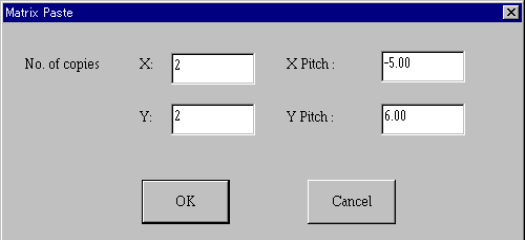
When you specify the items “No. of copies X”, “No. of copies Y”, “X Pitch”, and “Y
Pitch”, the machine copies the data in a matrix with adding or subtracting the
entered valued to/from the placement position in the X direction and that in the Y
direction respectively.
After the [Matrix Copy] command is executed, all of the component IDs are
changed to “#”.
If there is no data in the memory buffer, this command is disabled.
For Pick data, this command can be executed for tray components (fed with a tray
holder or ATS only).
For Pick data, you cannot execute this command by selecting two or more data
records.
① No. of copies X: specifies the number of times for copying in the X direction.
The default value is “1” for both Placement data and Pick data.
② No. of copies Y: specifies the number of times for copying in the Y direction.
The default value is “1” for both Placement data and Pick data.
③ X Pitch: sets the amount to increment or decrement the placement or pick
position in the X direction.
The default value is “0.00” for both Placement data and Pick data.
④ Y Pitch: sets the amount to increment or decrement the placement or pick
position in the Y direction.
The default value is “0.00” for both Placement data and Pick data.
⑤ OK: executes the paste operation.
⑥ Cancel: cancels the paste operation.
4 − 33
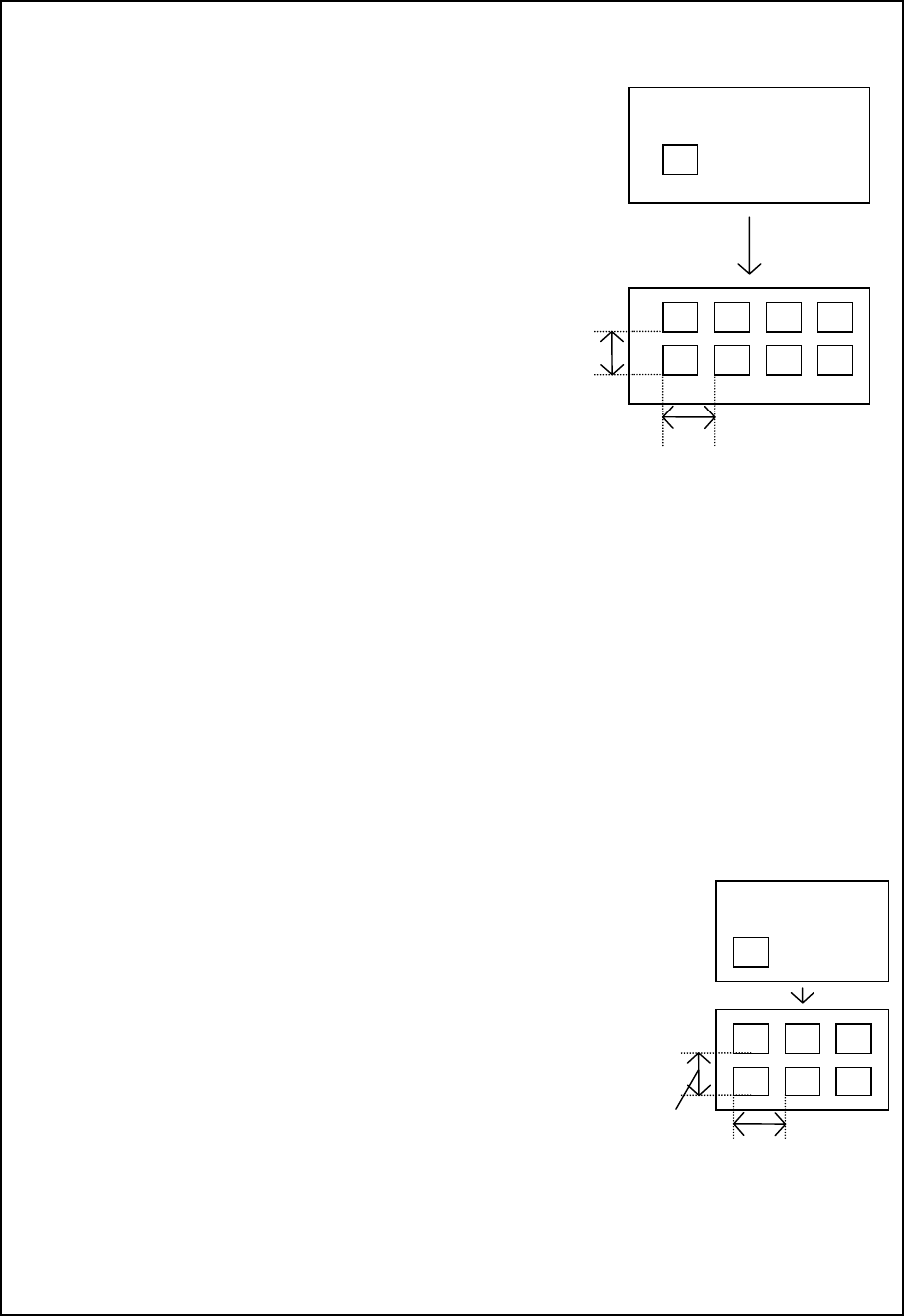
Example of the [Matrix Copy] command result
When this command is successfully executed
(For Placement data)
Component IDs X Y Angle Component name
(Screen image)
R1 5.00 10.00 45.00 1608-A
R2 10.00 10.00 0.00 1608-A
No. of copies
X: 3
X Pitch:
0.5
No. of copies
Y: 1
Y Pitch:
1
R 5.00 10.00 45.0 1608-A
R2 10.00 10.00 0.00 1608-A
# 5.50 10.00 45.00 1608-A
# 10.50 10.00 0.00 1608-A
# 6.00 10.00 45.00 1608-A
# 11.00 10.00 0.00 1608-A
# 6.50 10.00 45.00 1608-A
# 11.50 10.00 0.00 1608-A
# 5.00 11.00 45.00 1608-A
# 10.00 11.00 0.00 1608-A
# 5.50 11.00 45.00 1608-A
# 10.50 11.00 0.00 1608-A
# 6.00 11.00 45.00 1608-A
# 11.00 11.00 0.00 1608-A
# 6.50 11.00 45.00 1608-A
# 11.50 11.00 0.00 1608-A
− The copied block is inserted above the specified line.
− All of the component IDs become “#”.
− The input focus moves to the first component ID of the inserted block.
(For Pick data)
Component Pack Tray feeder Angl Sply Pos Type lane X1 Y1 Z X2 Y2 X3 Y3
name
R1 Tray ATS 0 Rear 50 * 1 436.30 -47.70 5.00 436.30 -27.70 456.30 -47.70
(Screen image)
No. of copies
X: 2
X Pitch:
100
No. of copies
Y: 1
YPitch:
: 50
R1 Tray ATS 0 Rear 50 * 1 436.30 -47.70 5.00 436.30 -27.70 456.30 -47.70
R1 Tray ATS 0 Rear 50 * 1 536.30 -47.70 5.00 536.30 -27.70 556.30 -47.70
R1 Tray ATS 0 Rear 50 * 1 636.30 -47.70 5.00 636.30 -27.70 656.30 -47.70
R1 Tray ATS 0 Rear 50 * 1 436.30 2.30 5.00 436.30 22.30 456.30 2.30
R1 Tray ATS 0 Rear 50 * 1 536.30 2.30 5.00 536.30 22.30 556.30 2.30
R1 Tray ATS 0 Rear 50 * 1 636.30 2.30 5.00 636.30 22.30 656.30 2.30
− Only when “Tray” is selected as the package and the “Holder” or “DTS” is selected as the “Tray Feeder”,
you can execute the [Matrix Copy] command.
− You cannot copy two or more records.
− The copied block is inserted above the specified line.
− The input focus moves to the beginning of the inserted block.
Y Pitch:
O
X Pitch:
O
X Pitch:
Y Pitch:
4 − 34
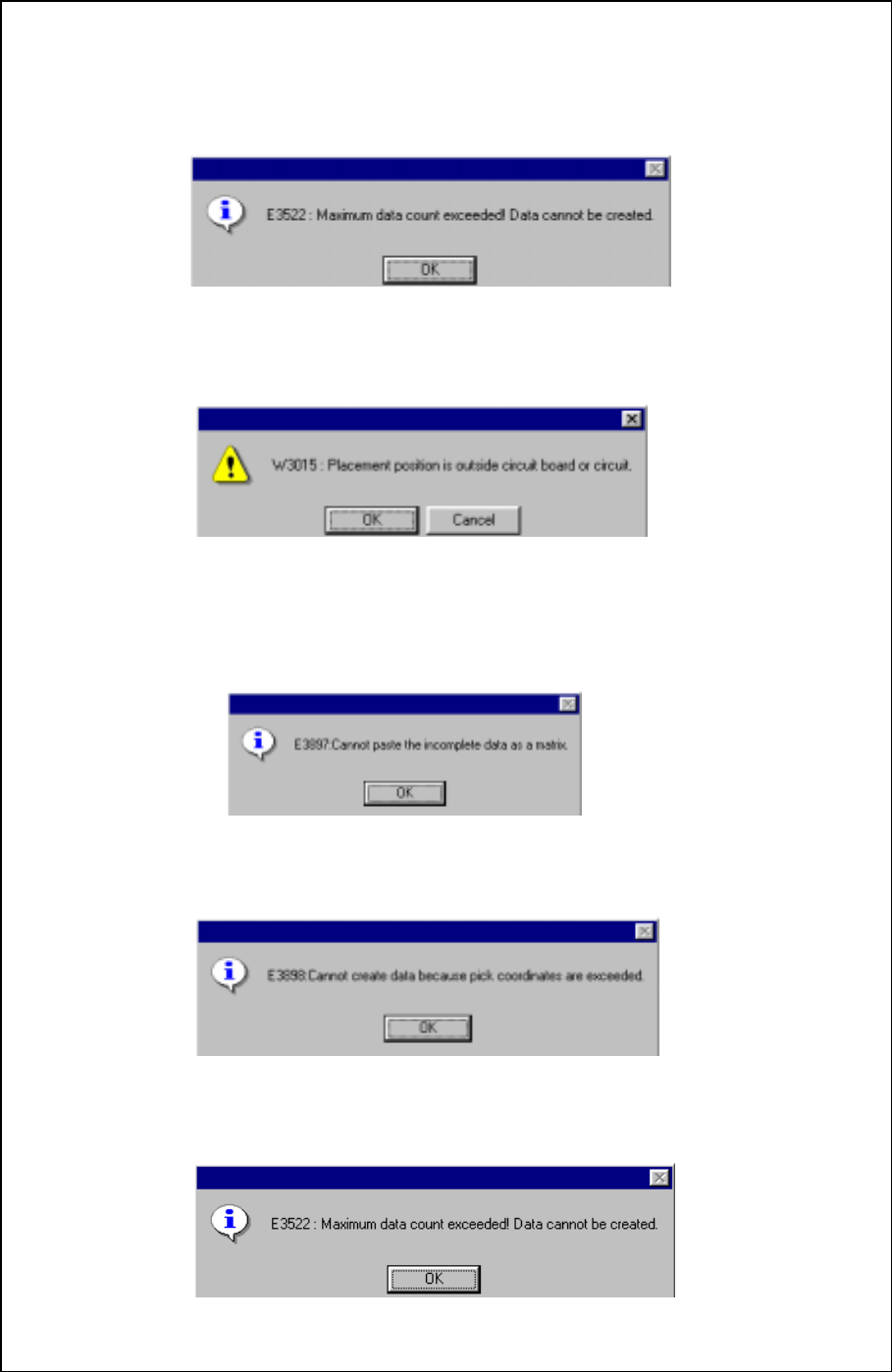
When an error occurs
In the following cases, an error occurs, then the corresponding error dialog box
appears on the screen.
① When the number of data records exceeds the maximum number of records which
can be entered
• OK: terminates the copy operation. No data is copied.
② When the placement position is outside the PWB or circuit layout
• OK: Continues copying data. An range over mark is appended to the
copied data.
• Cancel: Cancels the copy operation.
③ When Pick data is not completed
• OK: Cancels the copy operation. No data is copied.
④ When the pick position is beyond the specified pick coordinates
• OK: Cancels the copy operation. No data is copied.
⑤ When the number of pick points exceeds the maximum pick points of a tray
component
• OK: Cancels the copy operation. No data is copied.