Omron V-TS Teaching Manual.pdf.pdf - 第109页
Chapter 2 Inspecti on Programm ing 2- 82 9. By clicking the [Reference Level Model Automatic Setup] b utton, the reference level m odel is adjusted aut omaticall y. Use this button to reduce the m anual adjustm ent time …
2.5 Registering the Component Number Model
2-81
書式変更: フォント : (日) MS ゴシッ
ク, 10 pt, 文字間隔広く /文字間隔狭く
(なし)
削除: Registering the Component Numbe
r Model
6.
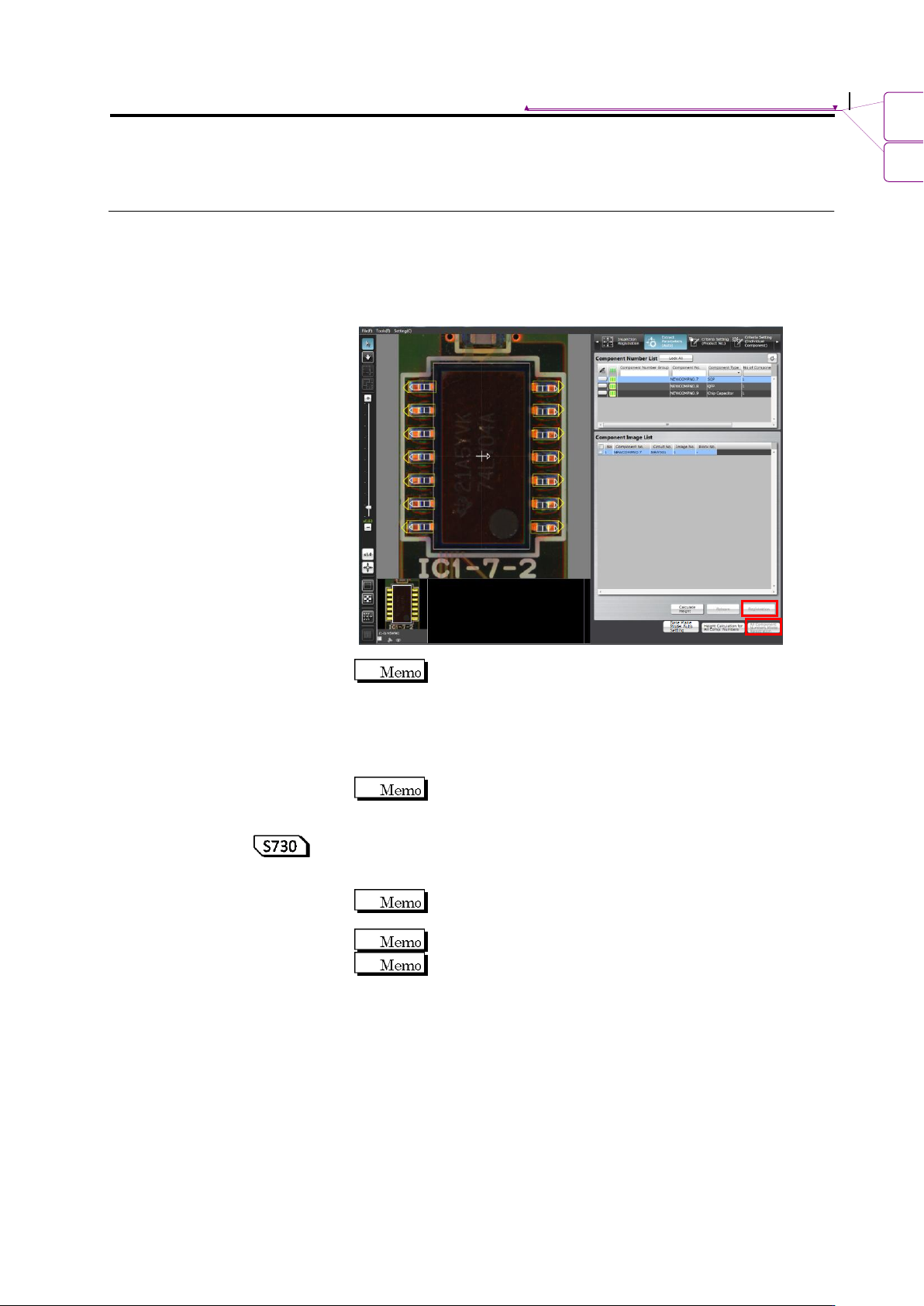
Click [All Component Numbers Model Registration]. Model
calculation will be automatically performed and models will be
registered to the library.
When performing model registration for one component number
displayed on the screen, click [Registration].
When the image is not selected, the [Registration] and
[All Component Numbers Model Registration] are not
available.
7.
To learn with more model images as in mass production images,
click [Learn Again].
Pay attention that re-learning overwrites information already
configured, such as a color.
8.
To learn height again, clicking [Calculate Height] automatically
calculates the height again. To learn the height again for all
component numbers, click [Calculate Height for All Component #].
[Calculate Height] does not affect information already
configured, such as a color.
Use this function when learning height to use the 3D logic.
Perform the PCB test to calculate the height of the component
number. The median of the PCB test result is used to calculate
height.

Chapter 2 Inspection Programming
2-82
9.
By clicking the [Reference Level Model Automatic Setup] button,
the reference level model is adjusted automatically. Use this button
to reduce the manual adjustment time of editing a reference level
model when learning has not been performed yet on the existing
reference level model.
In addition, by pressing this button after learning of component
numbers is performed and settings of component block unit are
made, it is able to set the most appropriate base plane partitioning
and the base plane approximation method automatically.
For settings of component block unit, refer to Section 2.7.1
“Component Block Unit Setting.” For editing of the reference
level model, refer to Section 2.16.4 “Editing a Reference Level
Model.”
2.6 Specifying Inspection Criteria
2-83
2.6 Specifying Inspection Criteria
This section explains the procedure to specify inspection criteria for individual inspection
windows.
2.6.1 Criteria Setting (Product No.)
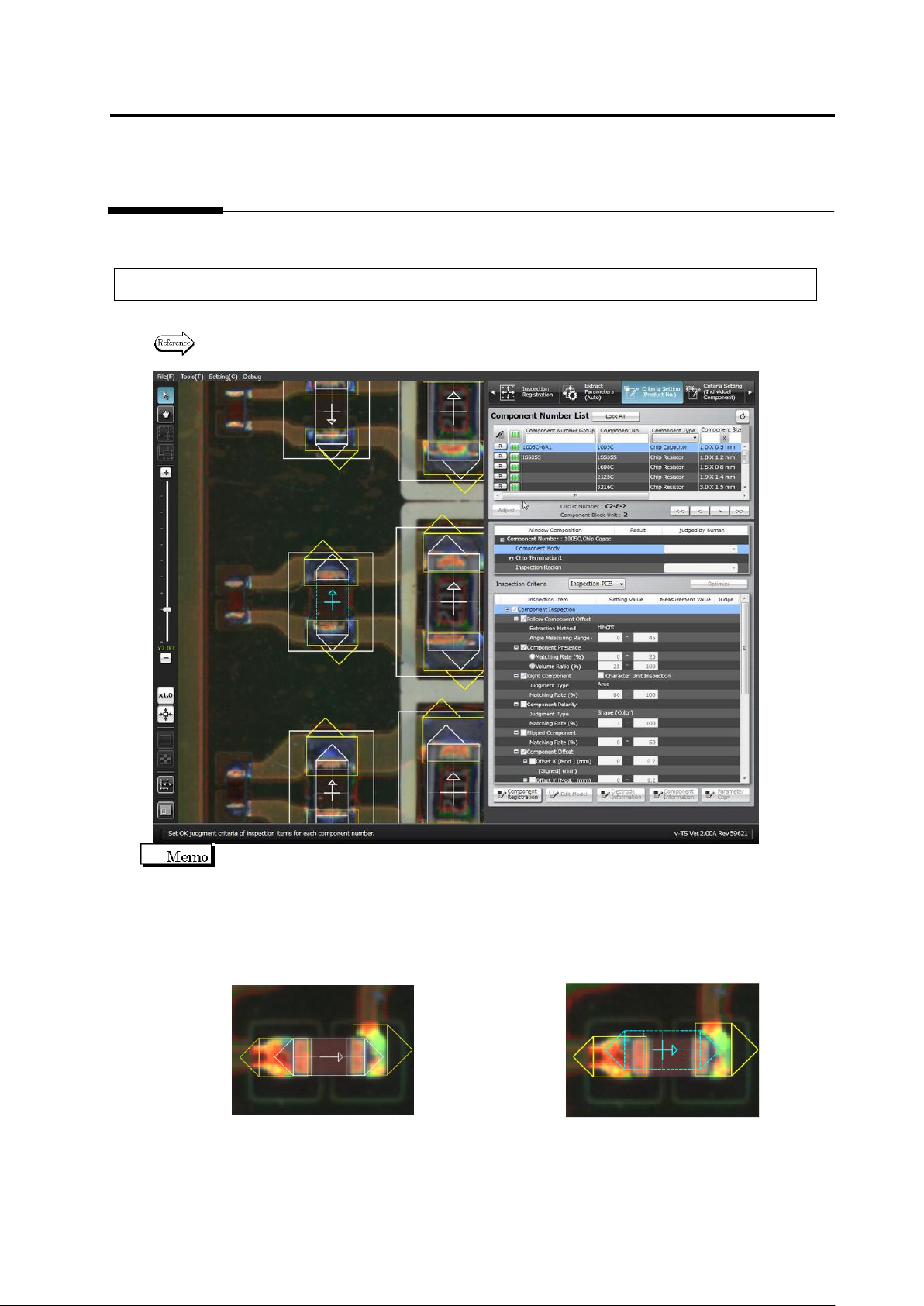
Specify inspection criteria for each component number.
Refer to "2.6.2 Criteria Setting (Individual Component)" for the criteria setting for individual
components.
On the Criteria Setting screen, the center position of the component is aligned to the reference
position for component offset inspection (the center of the minimum bounding rectangle for land
and electrode windows).
The component window must be aligned to the component image to teach the component colors
before registering the component number model. However, once the component number model
is registered, the alignment of the component window to the image is not required.
<Before Component Number Model Registration> <After Component Number Model Registration>