Omron V-TS Teaching Manual.pdf.pdf - 第11页
10 T able of Content s Before Y ou Begin ................................................................ ............................................. 1 Precautions fo r Correct U se ....................................…
9
How to Read This Manual
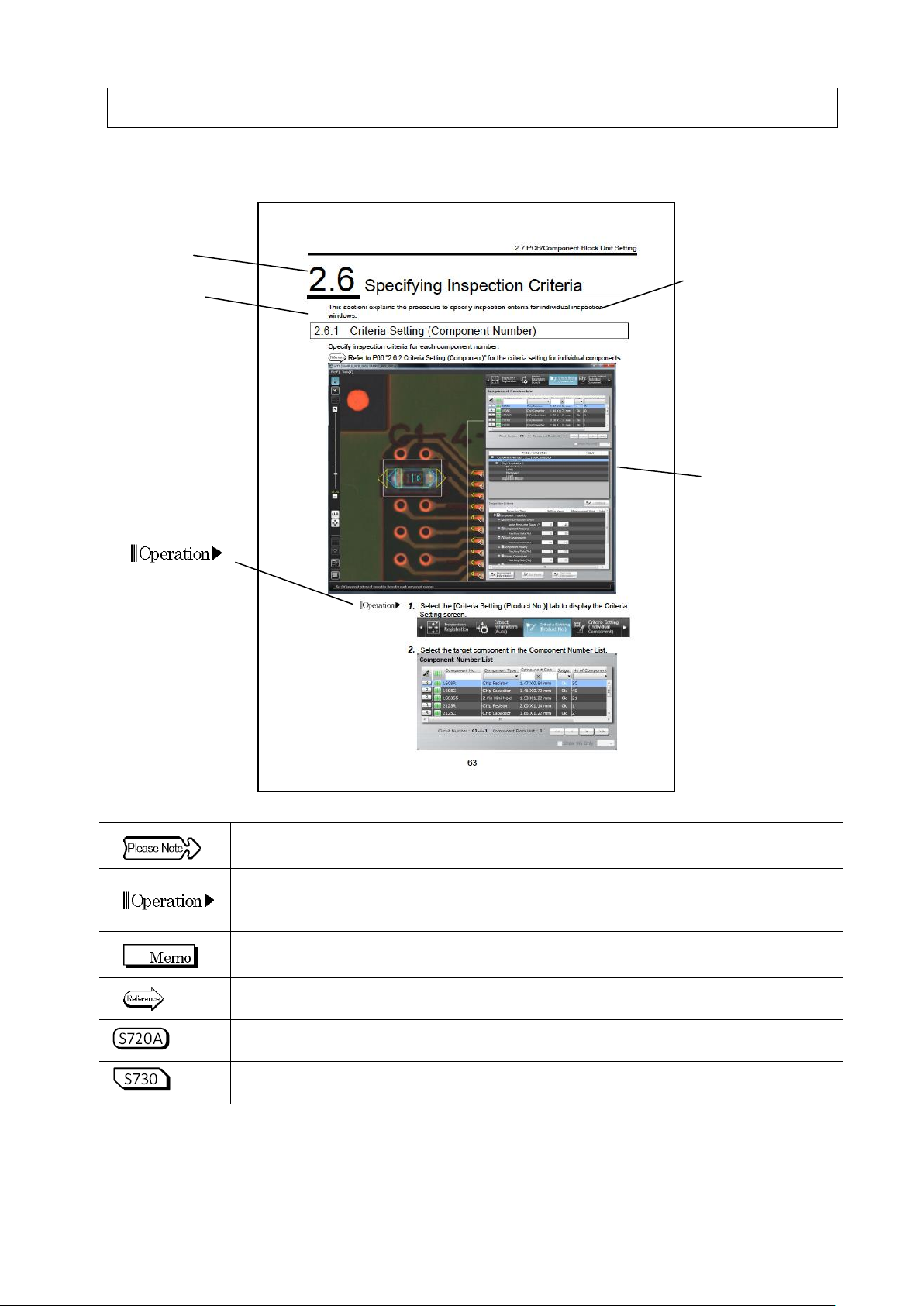
Below is an explanation of the layout and messages.
This area explains some rules to abide in order to avoid losing data or damaging the machine.
Please be sure to read this section and follow its instruction.
This area lists the operation procedures in order by number.
When indicating a switch on the screen, this section will surround it with the marks
<and>, while menus, any buttons in a dialog box, or other things selected by the touch
panel will be surrounded by the marks [ and ].
This area lists some information that is useful to know.
This area lists the page number and length of sections with related information.
This area describes an inspection program of VT-S720A.
This area describes an inspection program of VT-S730.
Section Title
Paragraph Title
Outline
The content explained
in this section
This area lists the
operation
procedures in
order by number.
Dialog Box
An example of
screen display

10
Table of Contents
Before You Begin ................................................................ ............................................. 1
Precautions for Correct Use ................................................................ ............................. 5
Related Manuals and Their Content ................................................................................. 7
Operation Manual Layout ................................................................................................. 8
How to Read This Manual ................................................................................................ 9
Table of Contents ........................................................................................................... 10
1 Before Getting Started ....................................................................................... 1-1
1.1 Overview ............................................................................................................................. 1-2
1.1.1 Overview of Teaching System ............................................................................... 1-2
1.1.2 System Configuration ............................................................................................ 1-2
1.1.3 PC Specifications for v-TS .................................................................................... 1-3
1.2 Basic Operations................................................................................................................. 1-4
1.2.1 Using the Mouse ................................................................................................... 1-4
1.2.2 Using the Keyboard ............................................................................................... 1-6
1.3 Startup & Termination of the System .................................................................................. 1-7
1.3.1 System Startup ...................................................................................................... 1-7
1.3.2 System Termination ............................................................................................... 1-8
1.4 Switching Languages .......................................................................................................... 1-9
1.5 Login and Logout .............................................................................................................. 1-10
1.5.1 Login .................................................................................................................... 1-10
1.5.2 Logout .................................................................................................................. 1-12
1.6 Menu Layouts ................................................................................................................... 1-13
2 Inspection Programming .................................................................................... 2-1
2.1 Basics of Teaching ................................................................................................................ 2-3
2.1.1 Basic Knowledge of Teaching ............................................................................... 2-3
2.1.2 Configuration of the Editing Screen .................................................................... 2-10
2.1.3 Image Display Area Operation ............................................................................ 2-17
2.2 Creating a New Inspection Program .................................................................................. 2-25
2.3 Opening an Inspection Program ......................................................................................... 2-33
2.4 Registering for Inspection ................................................................................................... 2-37
2.4.1 Registering Position Adjustment Marks .............................................................. 2-38
2.4.2 Selecting Mount Data .......................................................................................... 2-41
2.4.3 Mount Alignment .................................................................................................. 2-46
2.4.4 Inspection Registration ........................................................................................ 2-50
2.4.5 Component Registration ..................................................................................... 2-53
2.4.5.1 Component Setting ................................................................................................ 2-53

11
2.4.5.2 Land Setting .......................................................................................................... 2-59
2.4.5.3 Electrode Group Setting ........................................................................................ 2-68
2.4.5.4 Electrode Setting ................................................................................................... 2-71
2.4.6 Setting Component Number Group .................................................................... 2-75
2.4.6.1 Create New Component Number Group ............................................................... 2-76
2.4.6.2 Adding to Component Number Group ................................................................... 2-77
2.4.6.3 Deleting from Component Number Group ............................................................ 2-78
2.5 Registering the Component Number Model ............................................................................ 2-79
2.6 Specifying Inspection Criteria ............................................................................................. 2-83
2.6.1 Criteria Setting (Product No.) .............................................................................. 2-83
2.6.2 Criteria Setting (Individual Component) .............................................................. 2-88
2.7 PCB/Component Block Unit Setting ................................................................................... 2-91
2.7.1 Component Block Unit Setting ............................................................................ 2-91
2.7.2 Mark Setting ........................................................................................................ 2-95
2.8 PCB Testing/Result Check ............................................................................................... 2-99
2.8.1 Testing Using PCBs............................................................................................. 2-99
2.8.2 Interpreting PCB Test Result ............................................................................. 2-103
2.8.3 Saving Inspection Result ................................................................................... 2-105
2.8.4 Displaying Inspection Detailed Result ............................................................... 2-106
2.8.5 Modifying Inspection Criteria ............................................................................. 2-107
2.9 Setting Oblique Inspection ................................................................................................ 2-109
2.9.1 Setting Oblique Inspection Target Component Number ................................... 2-109
2.9.2 Setting Criteria for Oblique Inspection Items ..................................................... 2-111
2.9.3 Specifying Oblique Inspection Component and Direction ...........................................2-113
2.9.4 Including Oblique Inspection in PCB Test ..........................................................2-114
2.10 Setting Secondary Reflection Inspection.........................................................................2-116
2.10.1 Setting a target component for the secondary reflection inspection ..................2-116
2.11 Saving an Inspection Program .........................................................................................2-118
2.11.1 Saving an Inspection Program ...........................................................................2-118
2.11.2 Saving an Inspection Program Under a New File Name ...................................2-118
2.11.3 Releasing an Inspection Program ......................................................................2-119
2.12 Reloading an Inspection Program .................................................................................. 2-121
2.12.1 Reloading an Inspection Program Recently Used ............................................ 2-121
2.12.2 Reloading Inspection Program Being Edited .................................................... 2-122
2.13 Outputting Inspection Coverage ..................................................................................... 2-123
2.14 Quitting Program Editing ................................................................................................ 2-130
2.15 Modifying an Inspection Program ................................................................................... 2-131
2.15.1 Modifying an Inspection Window ...................................................................... 2-131
2.15.2 Changing Component and Electrode Information............................................. 2-133
2.15.3 Editing a Model .................................................................................................. 2-135