Omron V-TS Teaching Manual.pdf.pdf - 第128页
2.8 PCB Tes ting/Result Check 2- 101 3. Check the test result. Refer to the next page for how to interpret the test result. 4. Select the com ponent number check box and click [Optim ize Criteria]. The criteria optim iza…
Chapter 2 Inspection Programming
2-100
2.
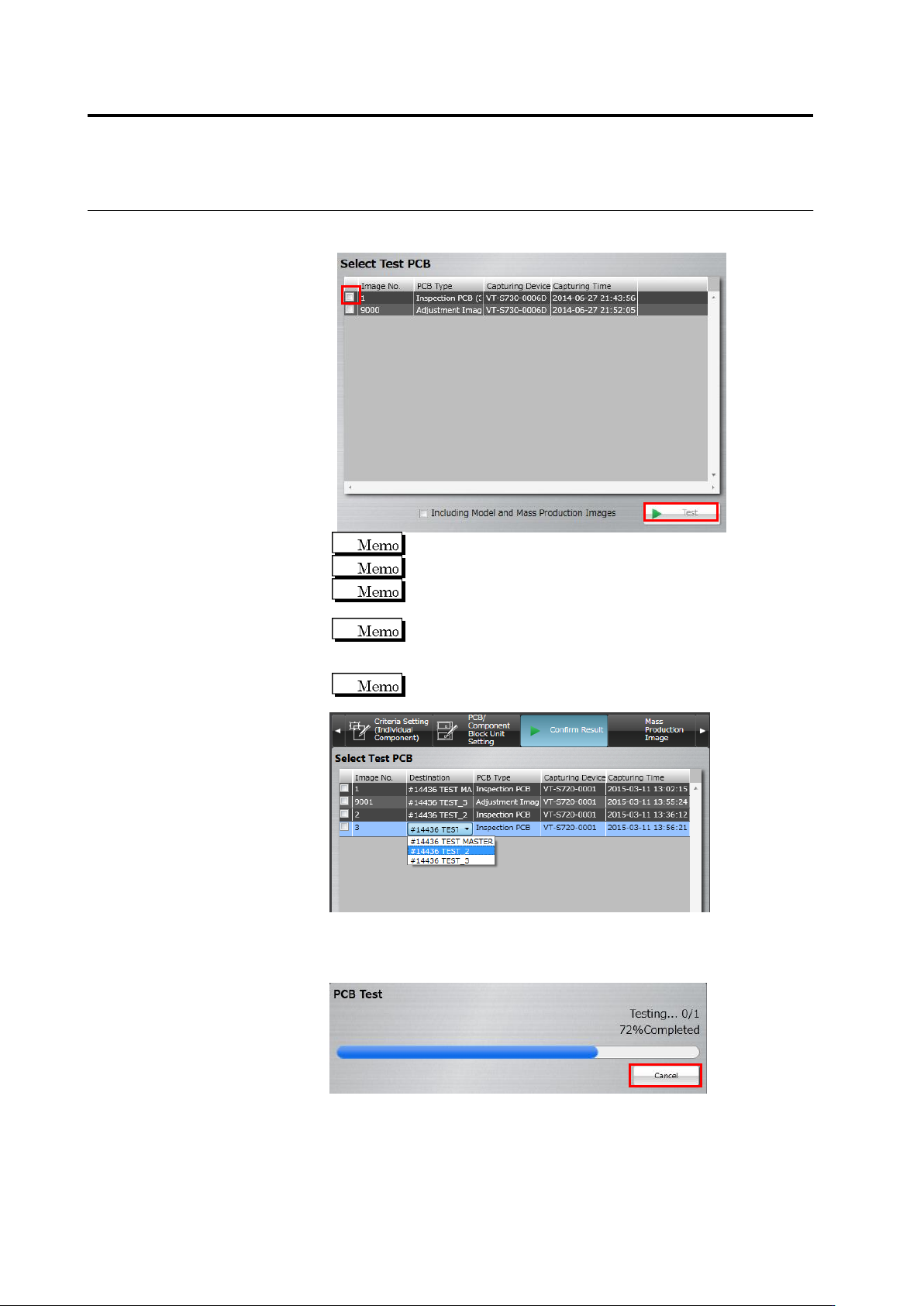
Click to select the checkbox for the PCB to use for test inspection,
and click [Test].
Up to 3 PCBs can be selected.
The master PCB is displayed at the top.
If inspection has been already done in the adjustment mode,
you can select the adjustment image.
To include a model and/or mass-production image in the test,
select the [Include Model and Mass-Production Image] check
box.
If there are settings for destination, inspection can be
performed for each destination.
The test starts and the progress is shown in the progress bar.
Click [Cancel] to abort testing.
2.8 PCB Testing/Result Check
2-101
3.
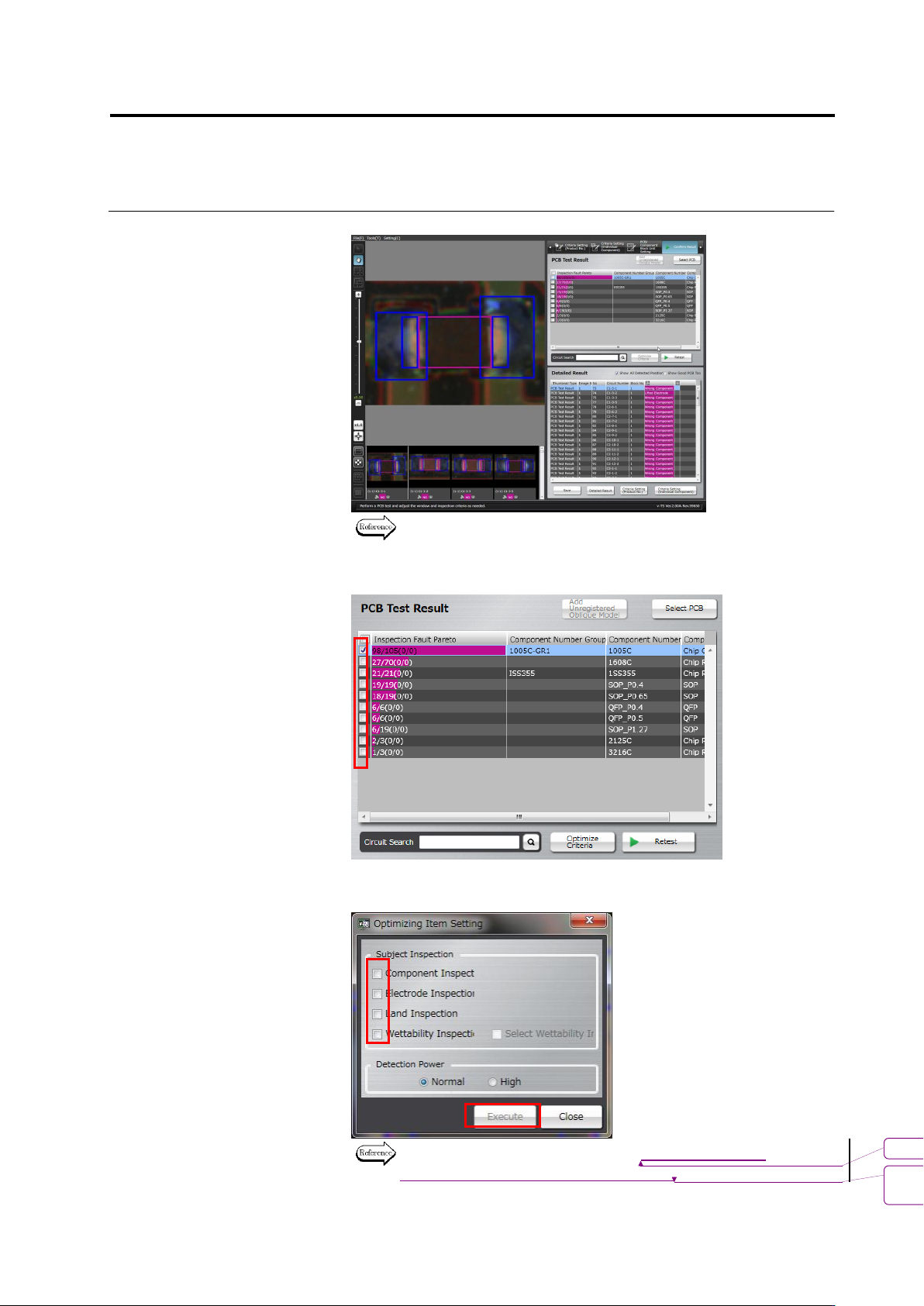
Check the test result.
Refer to the next page for how to interpret the test result.
4.
Select the component number check box and click [Optimize
Criteria].
The criteria optimization screen appears. Configure inspection items
and outputs to optimize, and click [Execute].
For details of optimization, see 2.15.4 “Optimizing Boolean
Expressions and Inspection Criterion Values.”
書式変更: フォント : 9 pt
削除
: Optimizing Boolean Expressions
and Inspection Criterion Values
Chapter 2 Inspection Programming
2-102
By clicking [Execute], an inspection criterion value is selected from
the distribution of the measured values of the selected target
inspection so that the number of undetected faults and false call
faults becomes minimal.
The inspection criteria can also be optimized by the method of
Step 4 of Section 2.8.1 “Testing Using PCBs.” However, there
are two differences as follows:
- On the inspection criteria setup screen of Section 2.15.4 “Optimizing
Boolean Expressions and Inspection Criterion Values,” inspection criterion
value must be set up by selecting a component number one by one. On the
other hand, when using the method of Step 4 of Section 2.8.1 “Testing
Using PCBs,” inspection criterion values for all component block numbers
whose checkbox is ON can be set up in block.
- When criteria are optimized, the optimization results of all the checked
component numbers are applied forcedly. So, save the inspection program
before executing optimization. To cancel application, open the inspection
program saved before optimizing the criterion.
5.
Click [Retest] to perform PCB test.
Up to 3 PCBs can be selected.
書式変更: フォント : Arial, 9 pt
削除: Optimizing Boolean Expressions and
Inspection Criterion Values
書式変更: フォント : Arial, 9 pt
削除: Testing Using PCBs