Omron V-TS Teaching Manual.pdf.pdf - 第110页
2.6 Specif ying Inspection Criteria 2- 83 2.6 Specifying Inspection Criteria This section explains the procedure to specif y ins pection criter ia for individual inspection windows. 2.6.1 Criteria Se tting (Produc t No.)…

Chapter 2 Inspection Programming
2-82
9.
By clicking the [Reference Level Model Automatic Setup] button,
the reference level model is adjusted automatically. Use this button
to reduce the manual adjustment time of editing a reference level
model when learning has not been performed yet on the existing
reference level model.
In addition, by pressing this button after learning of component
numbers is performed and settings of component block unit are
made, it is able to set the most appropriate base plane partitioning
and the base plane approximation method automatically.
For settings of component block unit, refer to Section 2.7.1
“Component Block Unit Setting.” For editing of the reference
level model, refer to Section 2.16.4 “Editing a Reference Level
Model.”
2.6 Specifying Inspection Criteria
2-83
2.6 Specifying Inspection Criteria
This section explains the procedure to specify inspection criteria for individual inspection
windows.
2.6.1 Criteria Setting (Product No.)
Specify inspection criteria for each component number.
Refer to "2.6.2 Criteria Setting (Individual Component)" for the criteria setting for individual
components.
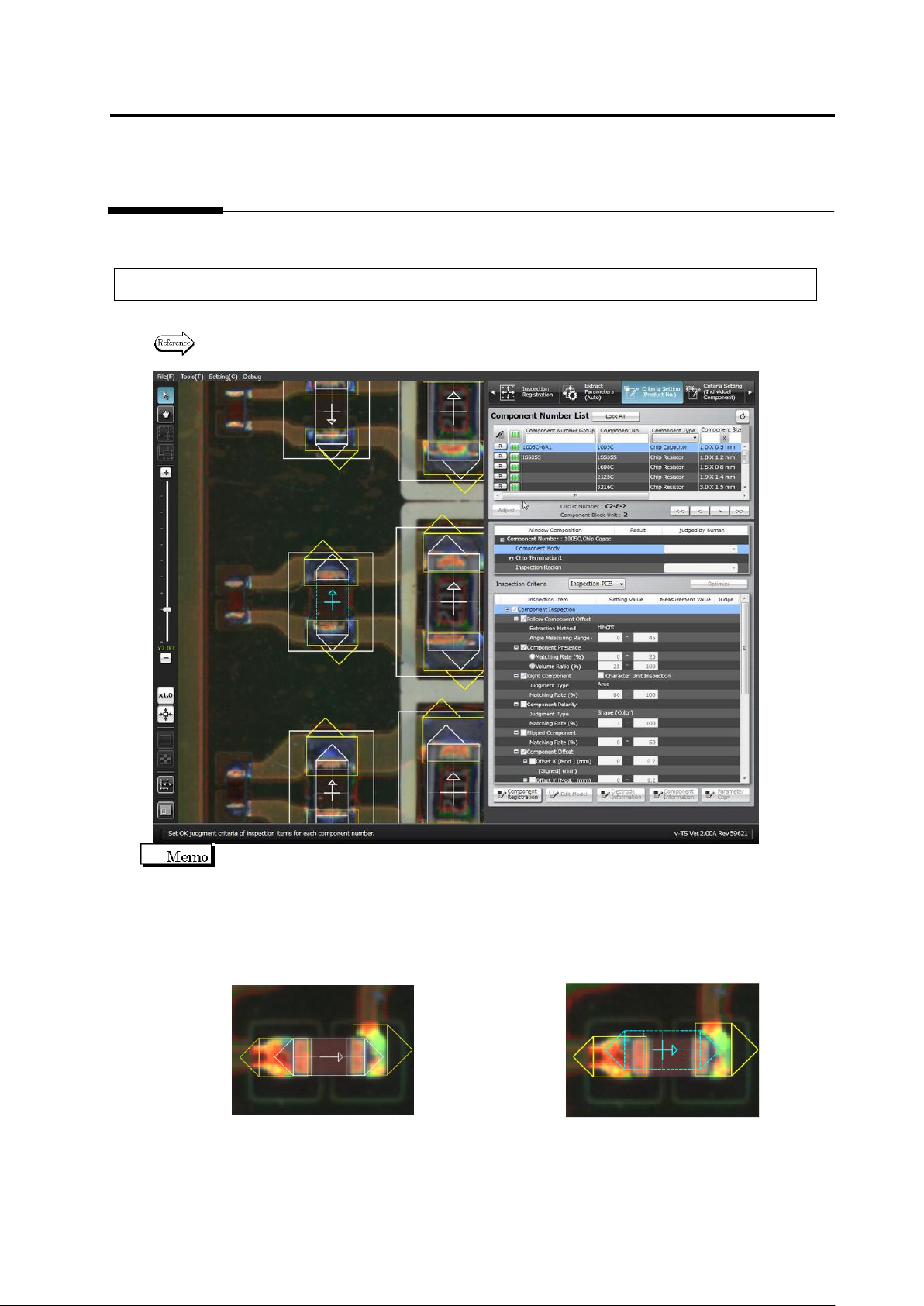
On the Criteria Setting screen, the center position of the component is aligned to the reference
position for component offset inspection (the center of the minimum bounding rectangle for land
and electrode windows).
The component window must be aligned to the component image to teach the component colors
before registering the component number model. However, once the component number model
is registered, the alignment of the component window to the image is not required.
<Before Component Number Model Registration> <After Component Number Model Registration>
Chapter 2 Inspection Programming
2-84
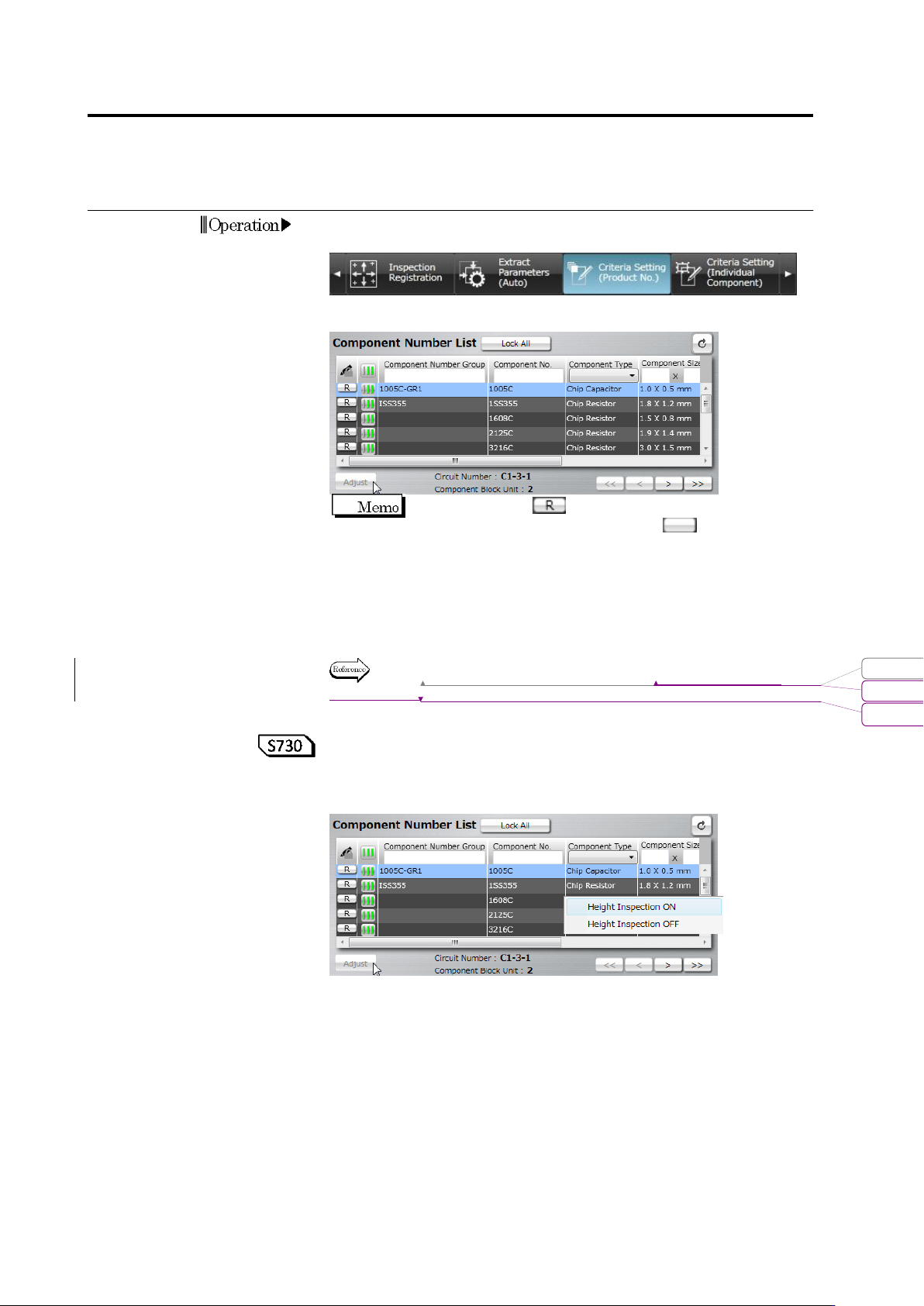
1.
Select the [Criteria Setting (Product No.)] tab to display the Criteria
Setting screen.
2.
Select the target component in the Component Number List.
When the status is (locked), click it to change the
component number status to not locked .
If you select a component number belonging to a component
number group, all the component numbers in the component
number group are included in the adjustment.
To automatically adjust individual inspection windows, select the
target component number in the component number list, and click
[Auto Adjustment].
Refer to (5) Information Display Area of "2.1.2 Configuration of the
Editing Screen".
<Setting ON/OFF height inspection based on the component
number>
By selecting and right-clicking a component number from the
component number list, height inspection can be set ON/OFF.
This function switches the inspection ON/OFF checkboxes of height
inspection of the selected component number in block.
For example, use this function when setting ON height inspection in
block for the inspection programs which were created in and before
version 1.55 which did not have any height inspection functions or
setting OFF height inspection in block due to the influence of
shadow.
Operation
変更されたフィールド コード
書式変更: フォント : Arial, 9 pt
削除: Configuration of the Editing Screen