Omron V-TS Teaching Manual.pdf.pdf - 第161页
Chapter 2 Insp ection Progr amming 2- 134 3. The Com ponent Registration sc reen is displayed. Click the [R] (Read-o nly) button for the targ et compone nt number to cancel the Read-On ly mode. “ R ” disappears when canc…
2.15 Modifying an Inspection Program
2-133
2.15.2 Changing Component and Electrode Information
This section explains the procedure to change component information and electrode information.
When you change the information on component or electrode, these changes will be reflected to
all the components of the same component number or component number group within the
inspection program.
When you make a change such as changing the angle or electrode group that affects the model,
adjust the component color and electrode color on model editing.
The Criteria Setting (Product No.) screen also can be used to only change the electrode height.
Refer to Step 5 on “2.6.1 Criteria Setting (Product No.)” for the procedure to change electrode
height.
The Criteria Setting (Product No.) screen also can be used to only change the component height.
Refer to Step 5 on “2.6.1 Criteria Setting (Product No.)" for the procedure to change component
height.
1.
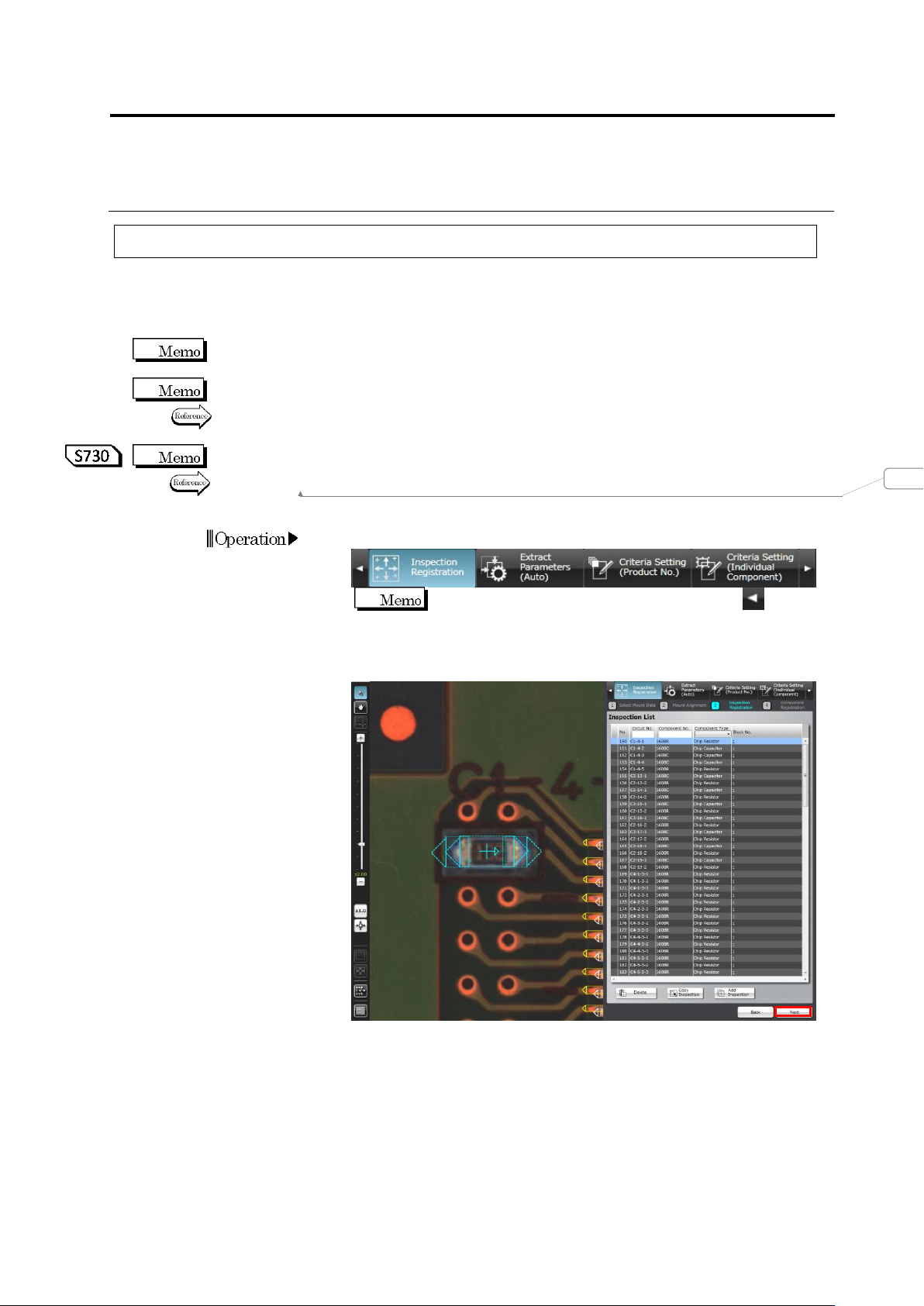
Select the [Inspection Registration] tab.
If the [Inspection Registration] tab is hidden, click at the
left to display it.
2.
The display moves to the Inspection Registration screen. Click
[Next].
変更されたフィールド コード
Chapter 2 Inspection Programming
2-134
3.
The Component Registration screen is displayed.
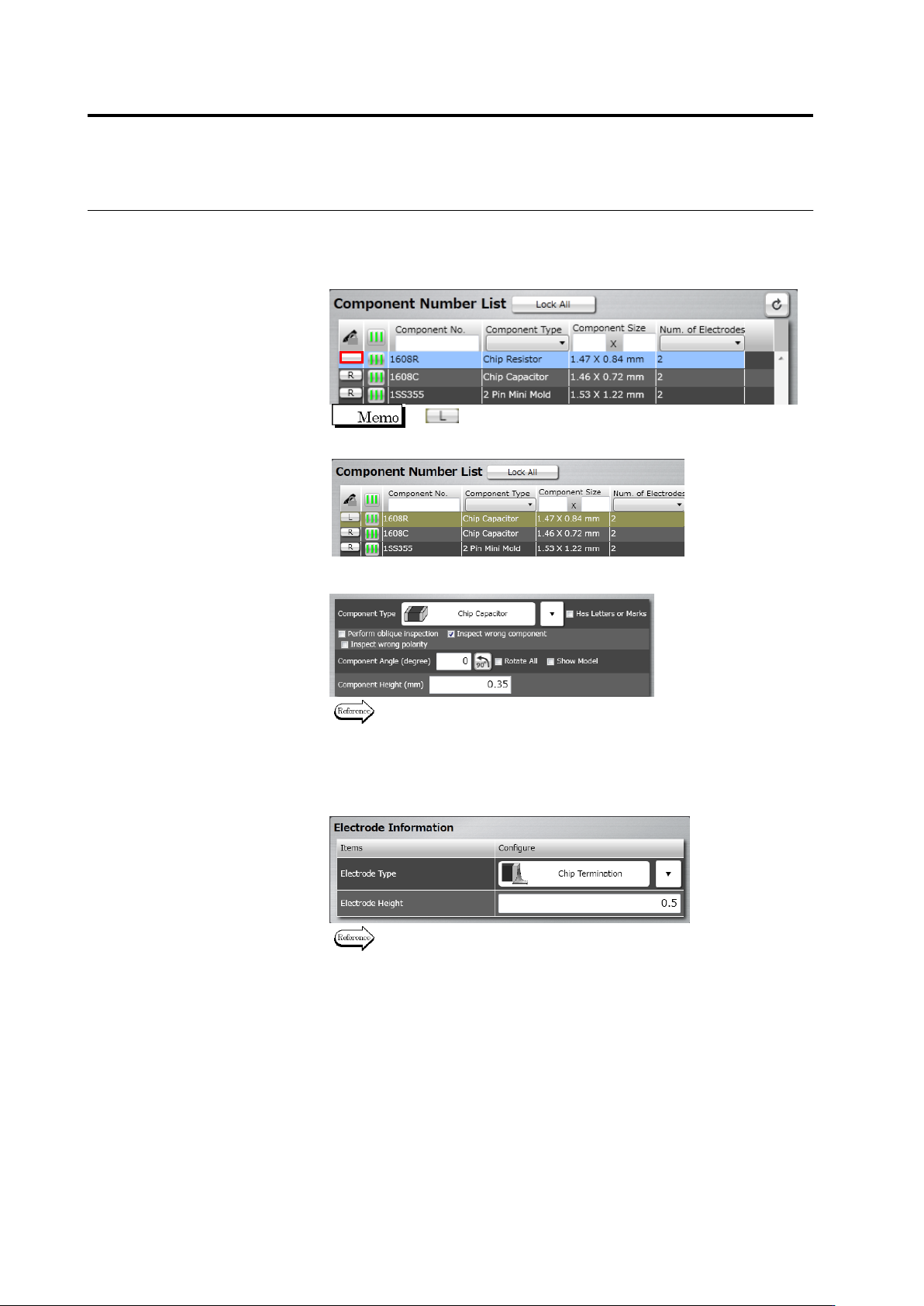
Click the [R] (Read-only) button for the target component number to
cancel the Read-Only mode. “R” disappears when canceling
Read-Only mode.
If (Locked) is displayed, editing is not possible since
other user is currently editing the component number.
4.
Edit the component information.
Refer to "2.4.5.1 Component Setting" for the editing procedure.
5.
Click [Next] several times until the Electrode Setting screen
appears.
6.
Specify electrode information for individual electrode groups.
Refer to "2.4.5.4 Electrode Setting" for the electrode setting
procedure.
7.
Click [Component Number Registration] after all the groups are
specified with the electrode information.
2.15 Modifying an Inspection Program
2-135
2.15.3 Editing a Model
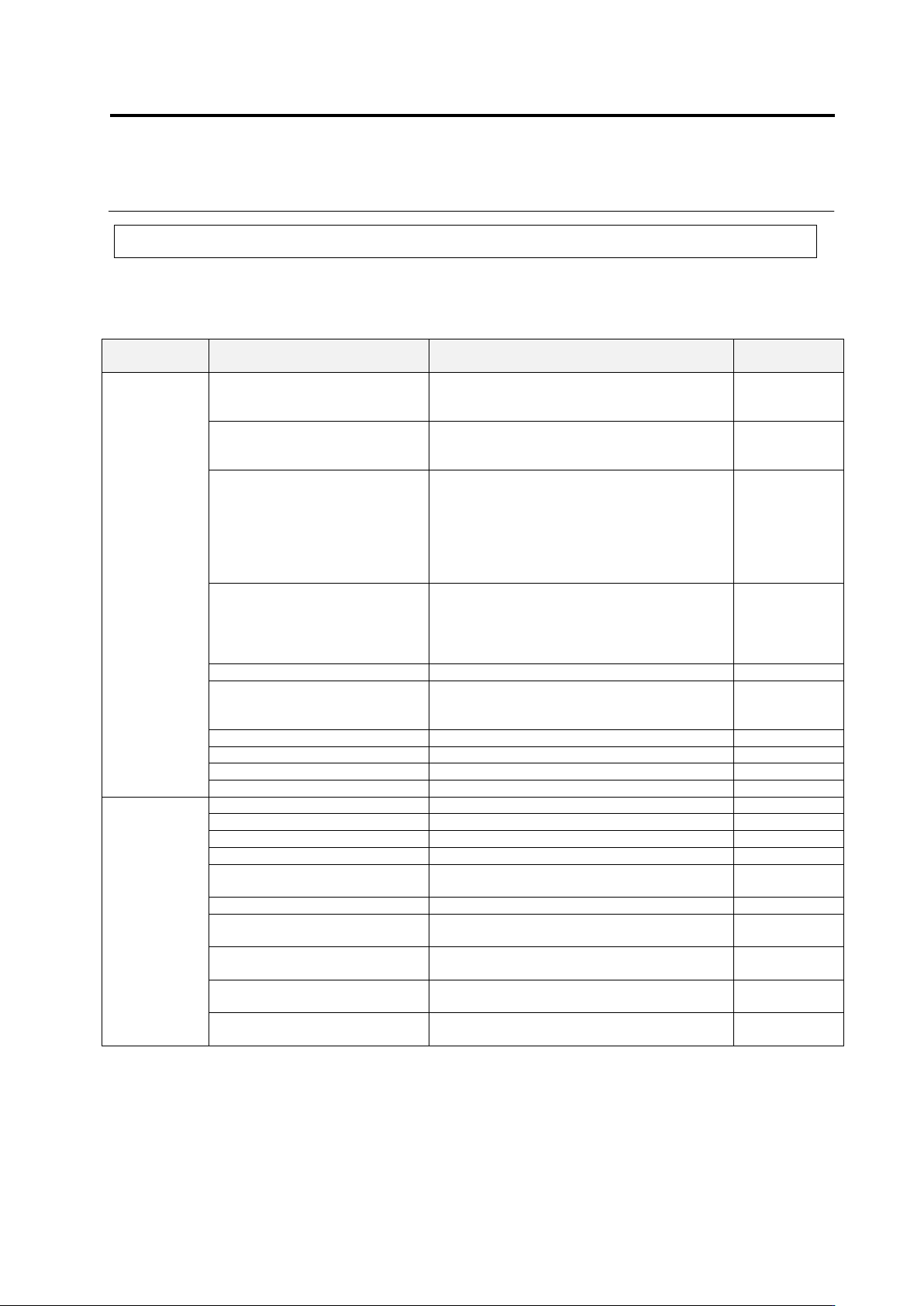
The color information of the feature parameters auto specified by model calculation is registered
in the color table in the library, which can be adjusted manually.
Feature Parameters Adjustable in Model Editing
Window
Composition
Inspection Item
Feature Parameter
(Mask)
Window
Component
Body
Component Body Extraction
Component body top color + electrode color
Component
extraction
mask
Missing Component
(PCB color + exposed land color + solder
color)
– Missing component excluded color
Missing mask
Component Difference
Available if character/mark exists
Shape (Brightness): Mask, Brightness
Available if no character/mark exists
Area (Color): Component Difference Color
Always Available
Shape (Color): Mask, Component Difference
Color
-
Polarity Difference
Available if character/mark exists
Shape (Brightness): Mask, Brightness
Always Available
Shape (Color): Mask, Component Difference
Color
-
Polarity Difference - Height
None
Height window
Reversed Top/Bottom
Component bottom color
Reversed
Top/Bottom
Mask
Component Offset (PCB)
Component body top color + electrode color
-
Component Offset (Component)
Component body top color + electrode color
Component Height
None
Lifted Window
Lifted Component
None
Lifted Window
Electrode
Group
Electrode Horizontal Extraction
Component body top color + electrode color
Electrode Toe Extraction
Component body top color + electrode color
-
Electrode Offset
Component body top color + electrode color
-
Electrode Presence
Electrode Color
Electrode Posture - Lifted
Electrode
Electrode Color
Electrode Posture - Coplanarity
Electrode Color
Electrode Posture - Electrode
Protrusion
Component body top color + electrode color
-
Electrode Posture - Electrode
Area
Component body top color + electrode color +
electrode lift color
-
Electrode Posture - Exposed
Electrode Toe
Component body top color + electrode color
Electrode Posture - Electrode
Variation
Component body top color + electrode color