Omron V-TS Teaching Manual.pdf.pdf - 第57页
Chapter 2 Inspecti on Programm ing 2- 30 ■ W idth (mm) Enter the horizonta l PCB size (Unit: mm ).) A value in the range of 50.00 to 510.00, up to tw o decimal places can be entered. The width can not be changed once spe…
2.2 Creating a New Inspection Program
2-29
書式変更: フォント : (日) MS ゴシッ
ク, 10 pt
削除: Creating a New Inspection Progra
m
Be careful about the following after setting ON/OFF this function:
Since the FOV is changed, teaching which uses adjustment
images, such as PCB test or reference face model editing, might
not be performed correctly due to the following phenomena:
[Phenomena]
1) A false call occurs (during the PCB test)
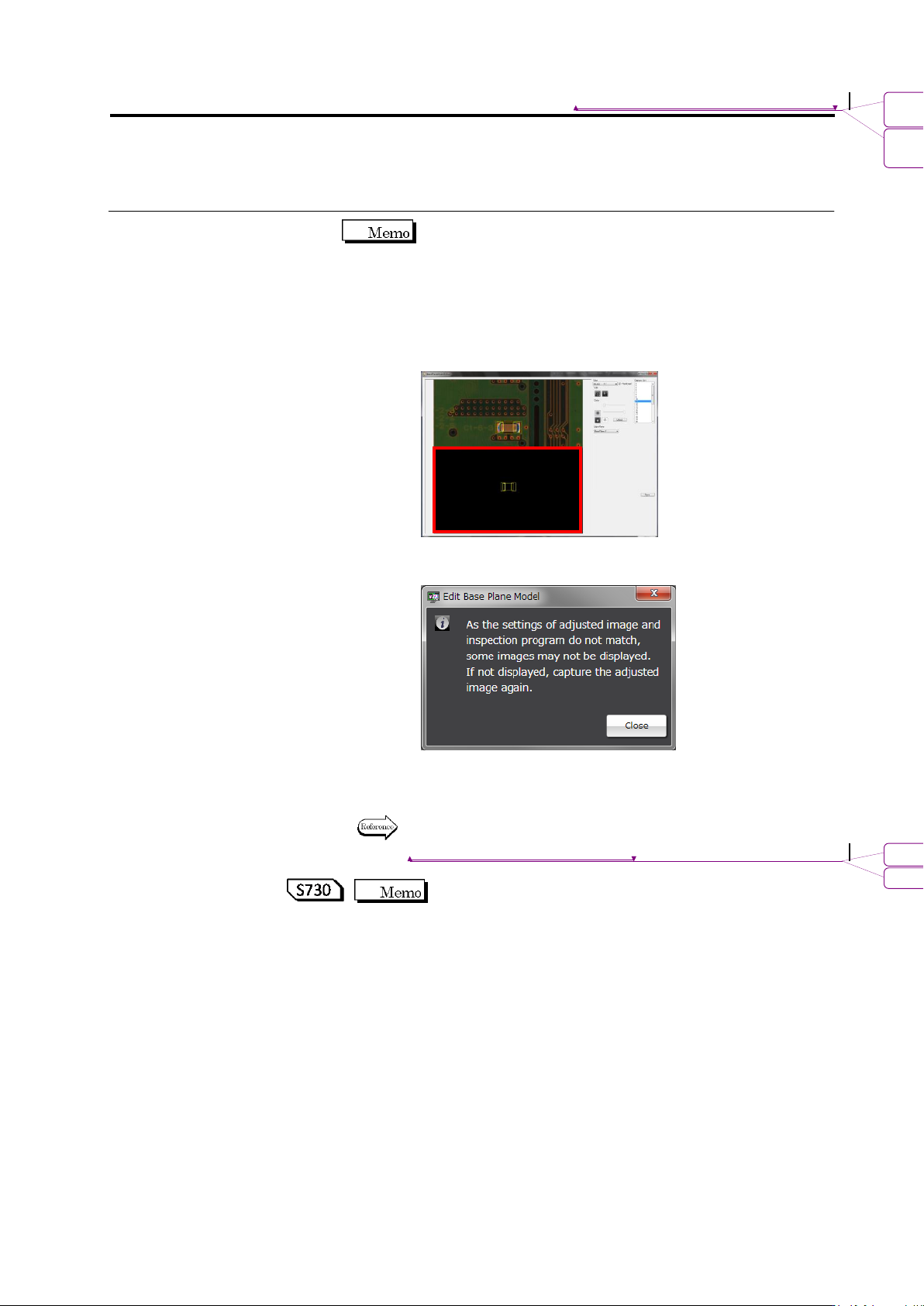
2) A black image is displayed (when a reference level model is
edited)
(Ex.: Reference level model editing screen inside the red frame)
3) A warning dialog is displayed.
(when starting up reference level model editing)
For the countermeasures, obtain the adjustment image again
after switching ON and OFF.
For editing of a reference level model, refer to Section 2.16.4
“Editing a Reference Level Model.”
Editing of a reference face model is effective for S730 only.
書式変更: フォント : (英) Arial
削除: Editing a Reference Level Model
Chapter 2 Inspection Programming
2-30
■ Width (mm)
Enter the horizontal PCB size (Unit: mm).)
A value in the range of 50.00 to 510.00, up to two decimal
places can be entered.
The width cannot be changed once specified.
■ Height (mm)
Enter the vertical PCB size (Unit: mm).
A value in the range of 50.00 to 460.00, up to two decimal
places can be entered.
The height cannot be changed once specified.
The offset value can be changed after it is set, depending on
the PCB variations. The offset value can be specified up to the
first decimal place within the range from -0.5 to 0.5, which is
retained in individual inspection programs.
Refer to "2.18.5 Renaming an Inspection Program" for
the procedure to change the value.
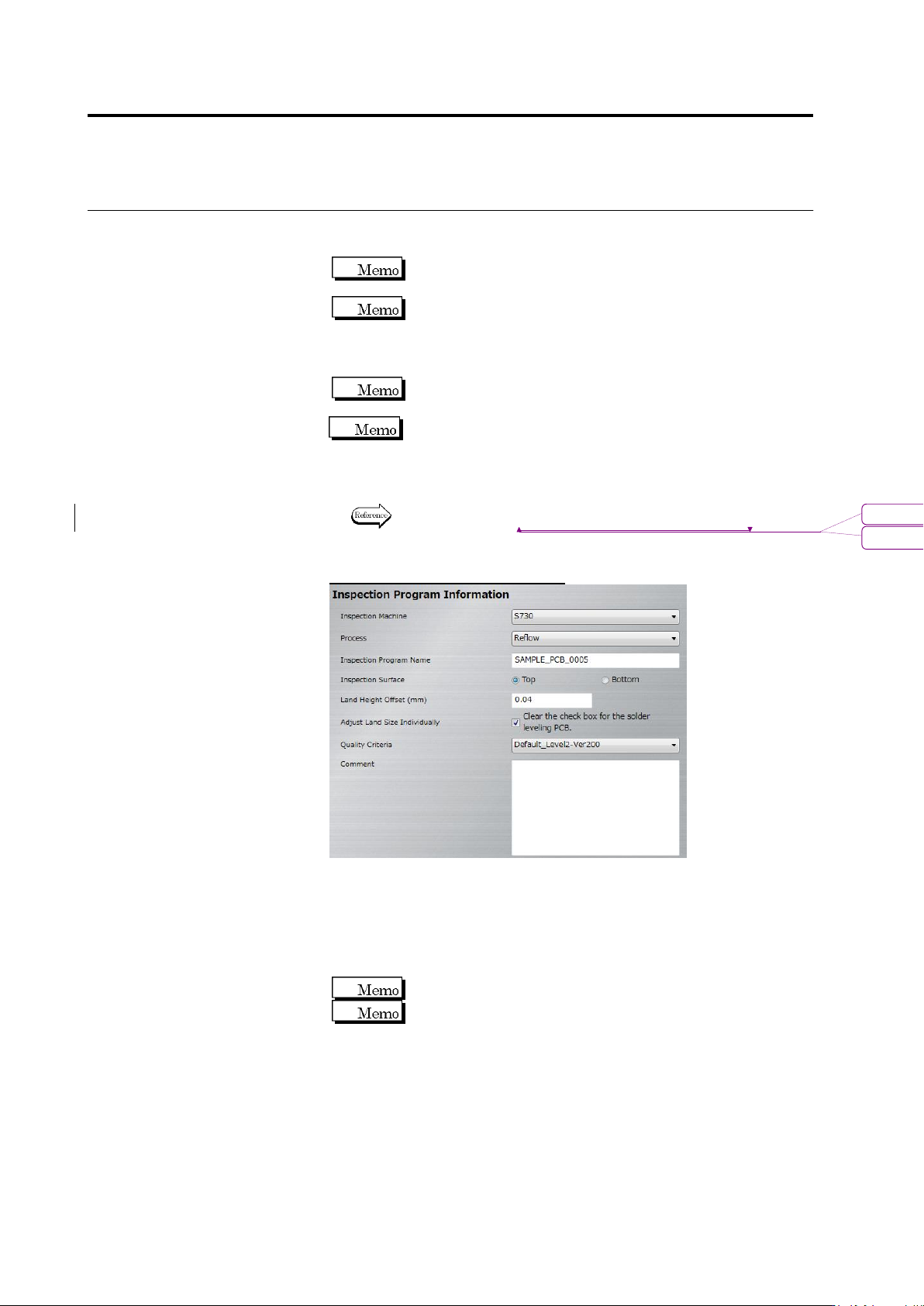
Inspection Program Information
■ Inspection Machine
Select the inspection machine to use for capturing the PCB image
in the pull-down menu.
■ Inspection Program Name
Enter the name of a new inspection program within 48 single-byte
alphanumeric characters/symbols.
Symbols that can be used: ! # $ % & ' ( ) - = ^
~
@`[ { ;+ } ] ,._␣
Both upper and lower case alphabet characters can be used.
However, they are not distinguished.
書式変更: フォント : Arial
削除: Renaming an Inspection Program
2.2 Creating a New Inspection Program
2-31
書式変更: フォント : (日) MS ゴシッ
ク, 10 pt
削除: Creating a New Inspection Progra
m
■ Inspection Surface
Select the inspection PCB surface.
■ Land height offset (mm)
Enter the height difference between the land and wiring pattern.
The reference surface is generated using the wiring
pattern height. So, register an offset value to set the land surface
height to zero.
■ Adjust Land Size Individually
Select the checkbox to enable the auto adjustment of the land
windows individually when windows are positioned to multiple
components of the same component number for component
registration.
If the checkbox is not selected, the land windows of the same size
as those positioned on the sample component are placed on all
the components with the same component number.
The checkbox is selected by default.
Deselect the checkbox if the land color teaching is difficult as
in e.g. solder leveled PCB teaching.
■ Quality Criteria
Select the criteria rule book to use in the pull-down menu.
By default, one of the following two can be selected:
・Default Level1-Ver200E: Preference for direct pass rate
・Default Level2-Ver200E: Preference for fault detection
Refer to P3-4 "3.3 Configuring Quality Criteria Setting" for the details
and editing method on criteria rule books.
■ Comment
Enter comments such as supplemental information regarding the
inspection program within 256 characters. (This is not
case-sensitive.)
Alphanumerical characters and symbols can be used.