MR8740、MR8741_user_manual_eng_20191016H.pdf - 第103页
4.2 Saving Data 91 4 Chapter 4 Saving/Loading Dat a & Managing Files Auto Save Operations (When setting the save destination to the recording media) Save T o: USB:\HIOKI_MR 8740 Save method: Normal Save Folder to sav…
4.2 Saving Data
90
7
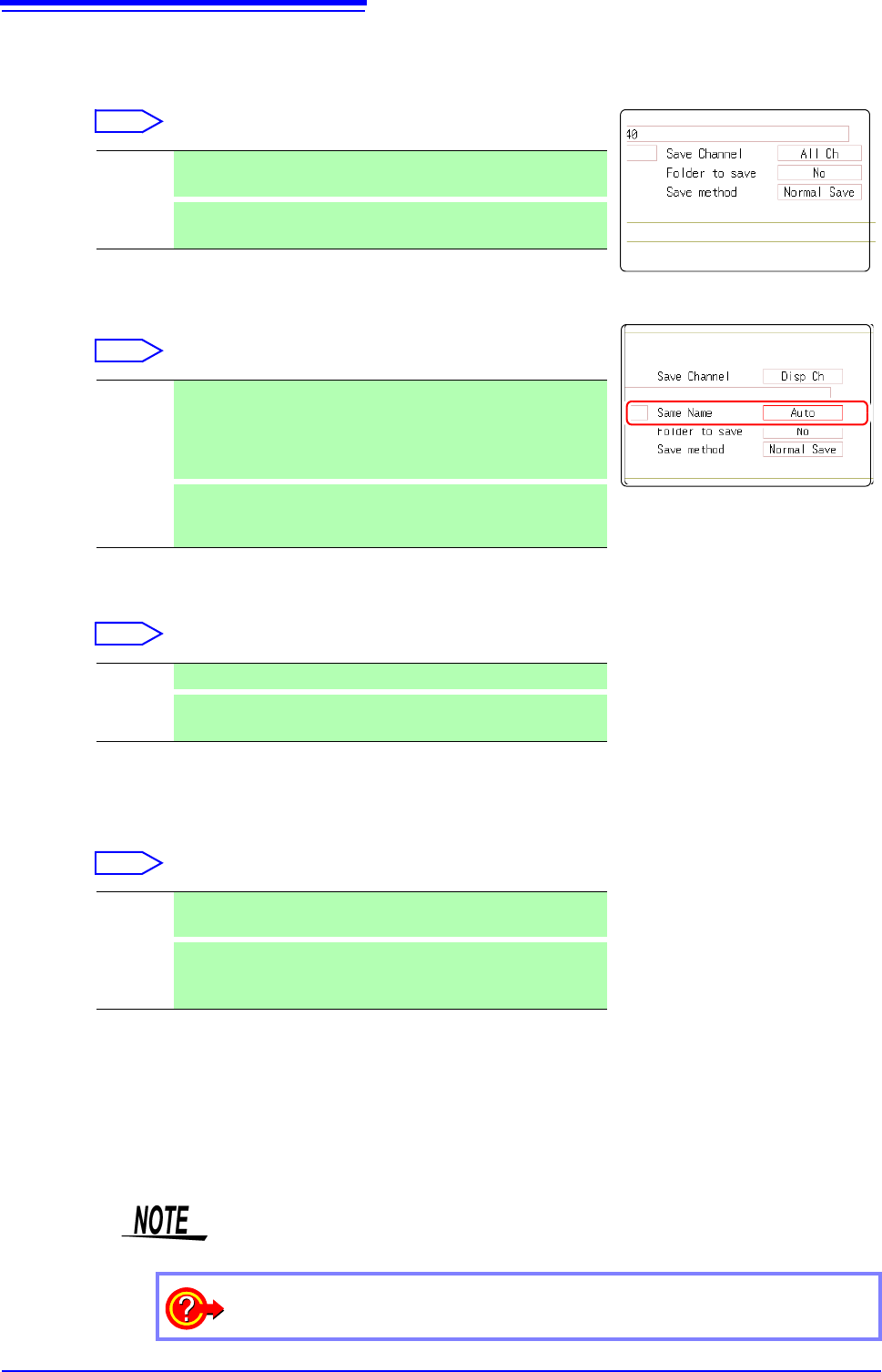
Select the channel to save.
Move the flashing cursor to the [Save Channel]
item.
Select
8
Specify the action if a file with the same name exists in the
target folder.
Move the cursor to [Same Name].
Select
9
Set whether to create folders.
Move the flashing cursor to the [Folder to save] item.
Select
When [LAN] is set as the save destination, [New Folder] setting is ignored and
the folder named with the current date is created.
10
Set the save method for when the storage media runs out of space.
Move the flashing cursor to the [Save method] item.
Select
When [LAN] is set as the save destination, [Save Name] setting is ignored and
the files to be saved are named in the previously-determined format.
See:
"Save Operations (When setting the save destination to [LAN])"
(p.92)
11
Confirm the measurement configuration and other settings,
then start measurement ([START]).
After the data is acquired, the screen image is saved automatically to the specified
storage media.
Disp Ch Saves the channels of all sheets for which waveform display is set
to [On]. (default setting)
All Ch
Saves all measured channels (in the case of the memory function,
channels has been set as [Used Ch] on the Status settings screen).
Auto If no files with the same name exist, saves the file with the desig-
nated name. Otherwise, a 4-digit number is automatically added to
the beginning of the file name (default setting).
If the first character of the file name is a numeral, the added num-
ber will continue sequentially from that number.
Serial
Unconditionally, a 4-digit number is automatically added to the be-
ginning of the file name. If a file with the same name exists, saves
the file, adding the 4-digit number that is increased by 1.
No A folder is not created when measurement starts.
Yes
A folder is created automatically when measurement starts and
files are saved in the folder.
Normal
Save
Automatic saving stops when the storage media becomes full.
Delete
Save
Old files are deleted and automatic saving is performed when the
storage media becomes full. (Waveform files only.)
The [Folder to save] setting is set automatically to [Yes].
7
8
9
7
9
10
Maximum number of files per folder
The combined maximum for files and folders created in one folder is 5,000.
See: "Save Operations (When setting the save destination to [LAN])"(p.92)
To clear the Auto Save dialog box
Click [SAVE] to turn the dialog box display on and off.
4.2 Saving Data
91
4
Chapter 4 Saving/Loading Data & Managing Files
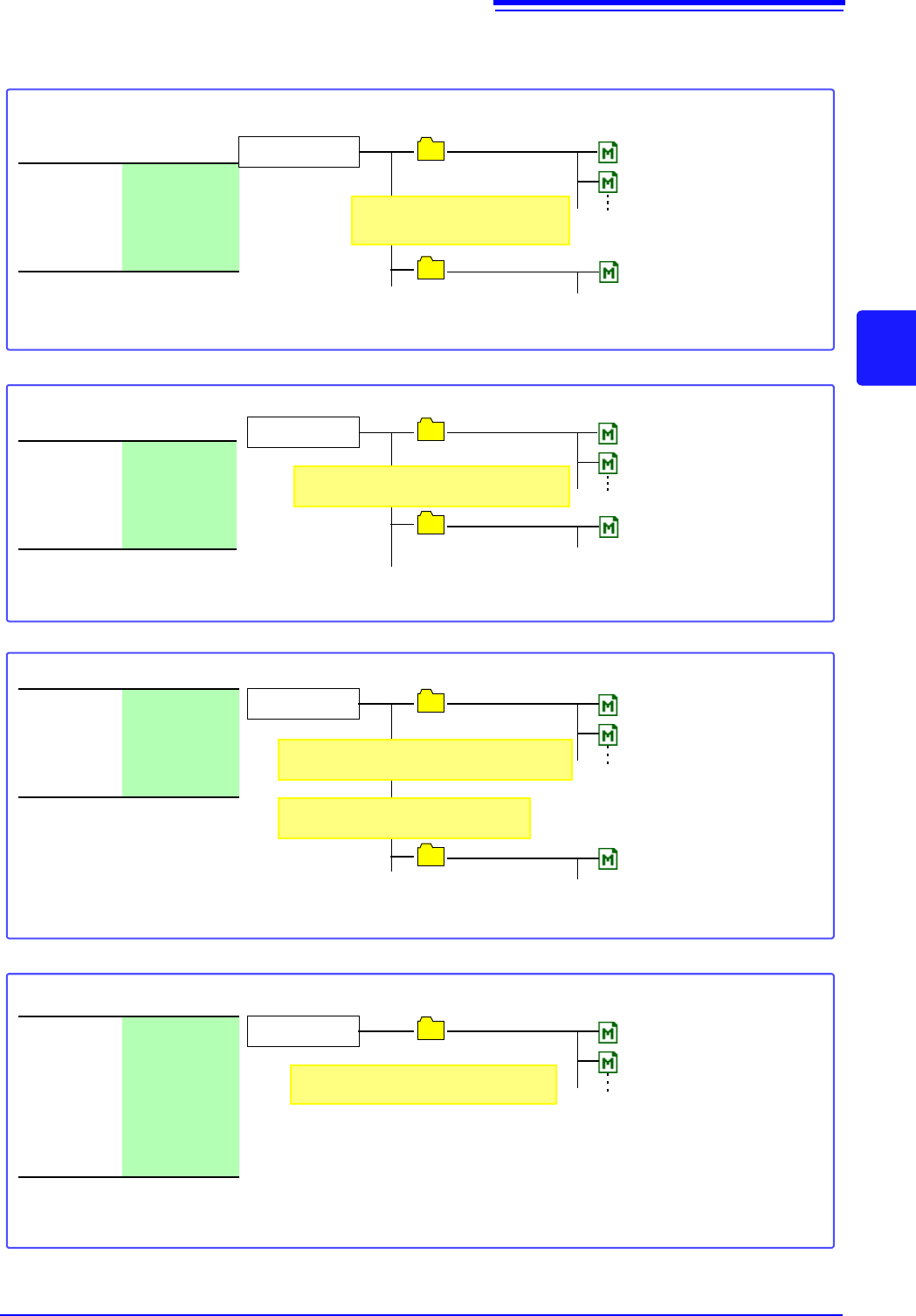
Auto Save Operations (When setting the save destination to the recording media)
Save To:
USB:\HIOKI_MR
8740
Save method:
Normal Save
Folder to
save:
No
HIOKI_MR8740
0000AUTO.MEM
0001AUTO.MEM
0001HIOKI_MR8740
(A new folder is created automatically when 5,000 files have
been saved in the HIOKI_MR8740 folder.)
Up to 5,000 files
Example 1: Saving Files to the Topmost Directory of the Storage Media
(A folder named "HIOKI_MR8740 " is created and file is saved there)
0000AUTO.MEM
When the storage media becomes full:
Automatic saving stops.
USB
File name will be "4-digit number
+ file name".
Create a folder named "TEST" on the USB mem-
ory stick beforehand.)
Save To:
USB:\HIOKI_MR
8740 \TEST
Save method:
Normal Save
Folder to
save:
No
HIOKI_MR8740
TEST
0000AUTO.MEM
0001AUTO.MEM
0001TEST
(A new folder is created automatically when 5,000 files have
been saved in the TEST folder.)
Up to 5,000 files
Example 2: Saving Files to a Folder on Storage Media
0000AUTO.MEM
When the storage media becomes full: Automatic saving stops.
Folder name created automatically will be
"4-digit number + folder name".
Save To:
USB:\HIOKI_MR
8740
Save method:
Normal Save
Folder to
save:
Yes
HIOKI_MR8740
AUTO014530
0000AUTO.MEM
0001AUTO.MEM
0001AUTO014530
(A new folder is created automatically when 5,000 files have been
saved in the AUTO014530 folder.)
Up to 5,000 files
Example 3: Create folder on media automatically and save data there
0000AUTO.MEM
"AUTO + hours/minutes/seconds" is created
automatically. (Example: 1:45:30)
Folder name created next will be "4-dig-
it number + folder name".
When the storage media becomes full:
Automatic saving stop.
Save To:
USB:\HIOKI_MR
8740 or specified
folder in
"HIOKI_MR8740"
folder
Save method:
Delete Save
Folder to
save:
No
HIOKI_MR8740
AUTO014530
0000AUTO.MEM
0001AUTO.MEM
Up to 5,000 files
Example 4: Using Delete/Save to Automatically Save Data
Folder name will be "AUTO + hours/min-
utes/seconds". (Example: 1:45:30)
When the number of files in the folder has reached 5,000, or when the storage media has become full, files in the
AUTO014530 folder (or specified folder) will automatically be deleted in sequence, starting from the oldest file, and
replaced by new files. (Only waveform files are deleted.)
4.2 Saving Data
92
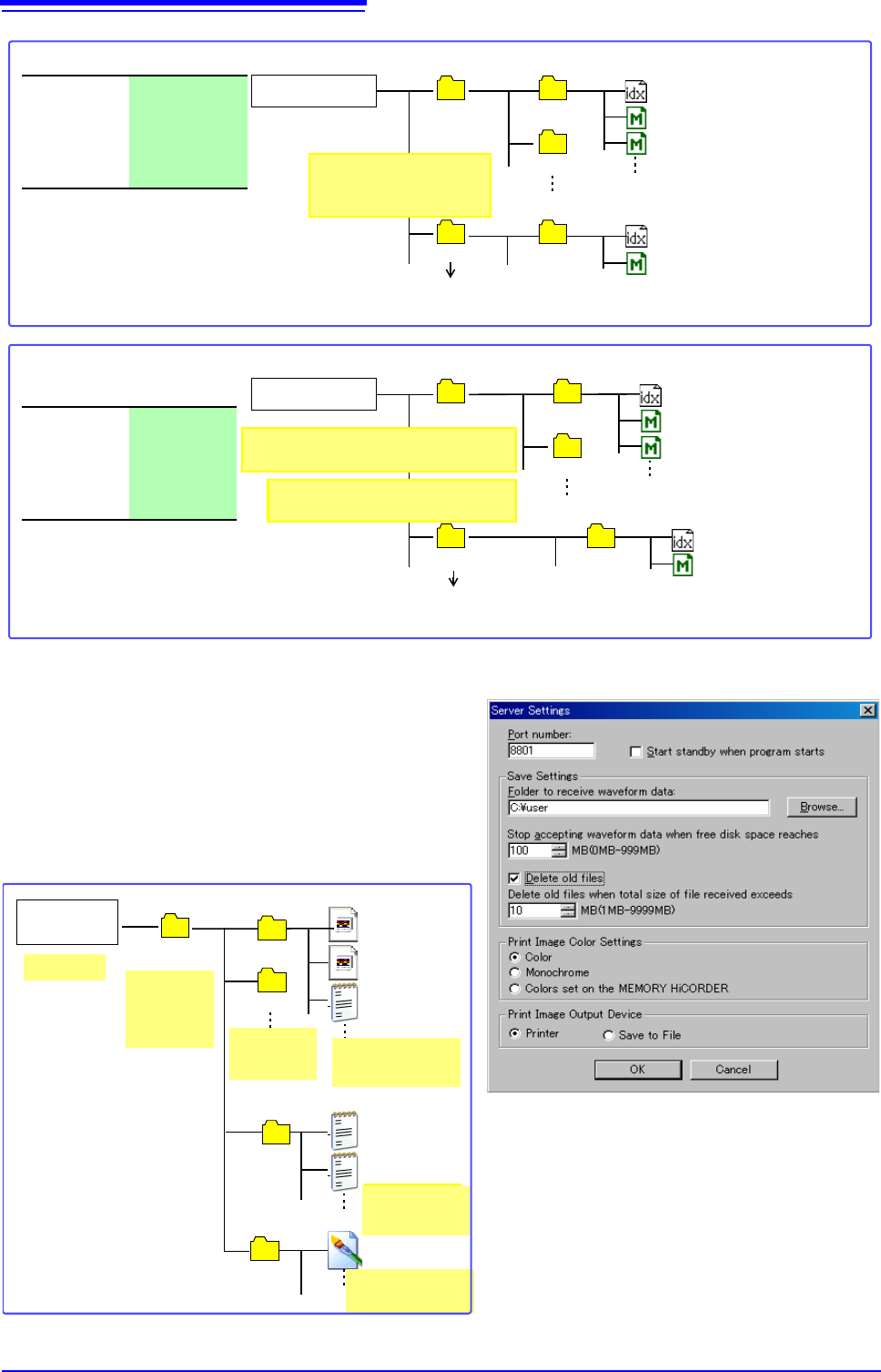
Save Operations (When setting the save destination to [LAN]) _________
The file is saved according to the method (on the right fig-
ure) specified under [Save Settings] by using Model 9333
LAN Communicator.
For more information about how to configure the save set-
tings, see the instruction manual of Model 9333 LAN Com-
municator.
The destination folders and files are named in the previ-
ously-determined formats as follows:
Create a folder named "TEST" on the
USB memory stick beforehand.)
Save To:
USB:\HIOKI_MR
8740\TEST
Save method:
Normal Save
Folder to
save:
No
HIOKI_MR8740
TEST
0000AUTO.IDX
0001AUTO.MEM
0001TEST
Up to 5,000 files
Example 5: Saving data in an existing folder on the media using divided saving
0000AUTO.IDX
When the storage media becomes full:
Automatic saving stops.
0000AUTO
0001AUTO
Up to 5,000 folders
0000AUTO.MEM
0000AUTO.MEM
Folder name created au-
tomatically will be "4-digit
number + folder name".
0000AUTO
(A new folder is created automatically when 5,000 folders have
been saved in the TEST folder.)
Save To:
USB:\HIOKI_M
R8740
Save method:
Normal Save
Folder to
save:
Yes
HIOKI_MR8740
AUTO014530
0000AUTO.IDX
0001AUTO.MEM
0001AUTO014530
(A new folder is created automatically when 5,000 folders have been
saved in the 0001AUTO folder.)
Up to 5,000 files
Example 6: Saving data in an automatically created folder on the media using divided saving
0000AUTO.IDX
When the storage media becomes full:
Automatic saving stop.
0000AUTO
0001AUTO
Up to 5,000 folders
0000AUTO.MEM
0000AUTO.MEM
"AUTO + hours/minutes/seconds" is
created automatically. (Example: 1:45:30)
Folder name created next will be "4-
digit number + folder name".
0000AUTO
192.168.1.1 14-01-10
14-01-11
HIOKI 9333
Folder name will be
"WAVE + hours/
minutes/seconds".
14-01-20
14-01-21
Folder name will be
"WAVE + hours/
minutes/seconds".
WAVE124012.BMP
Numerical calculation files
PARAMETER.TXT
PARAMETER_1.TX
WAVE123015.MEM
WAVE123245.MEM
WAVE123245.TXT
Specified
folder
Folder name
will be Model
MR9947 IP
address.
File names will be
"PRAMETER_ +
number".
Folder names
will be "YY-
MM-DD".
Waveform files