MR8740、MR8741_user_manual_eng_20191016H.pdf - 第242页
10.1 Waveform Calculation Workf low 230 When specif ying a waveform ran ge for calculation : Before executing a calculation, specify th e calculation range using the A/B cursors (div or Trace cursors) on the Waveform scr…
10.1 Waveform Calculation Workflow
229
9
Chapter 10 Waveform Calculation Functions
10
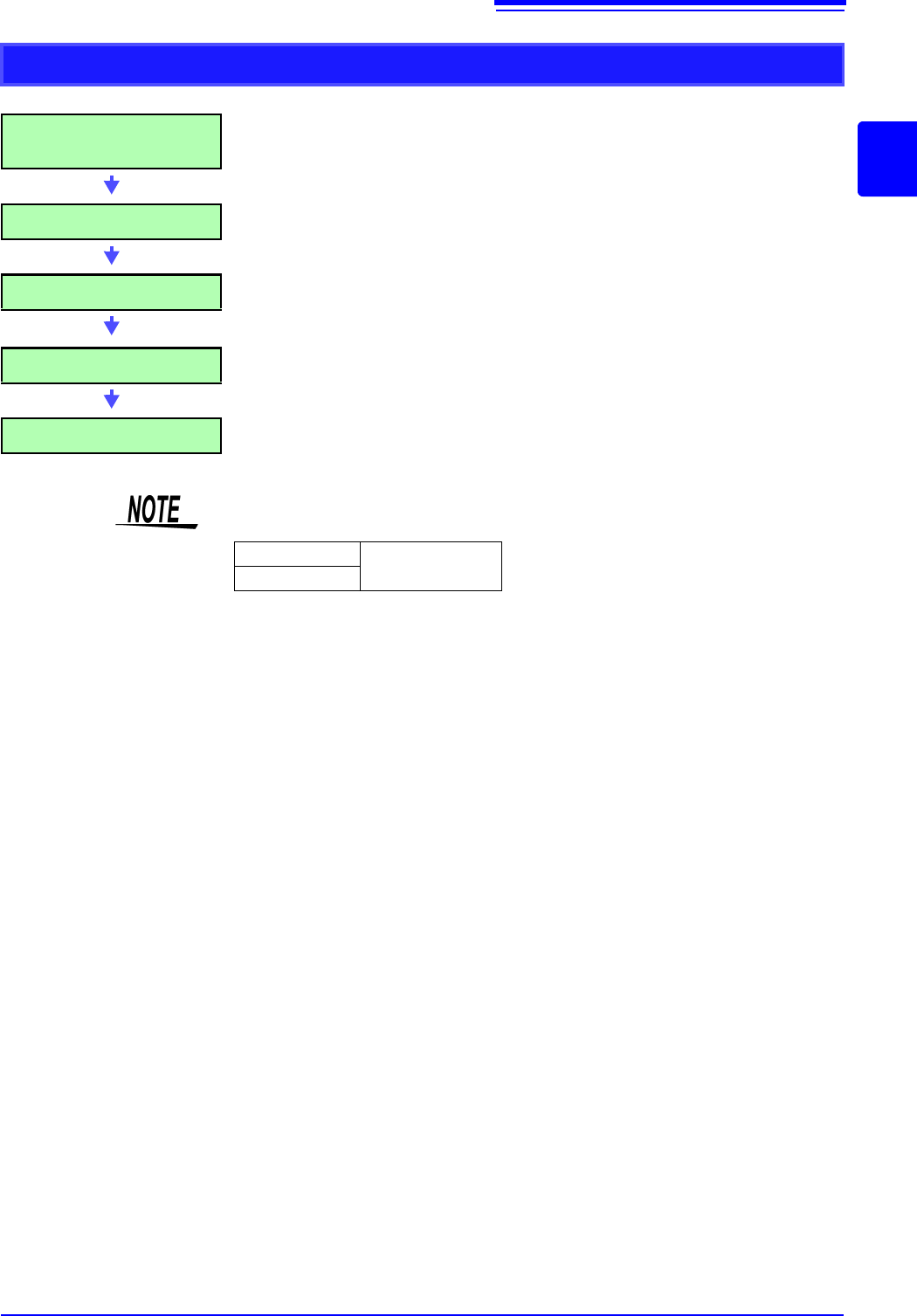
Applying Calculations to Existing Data
After measurement with calcula-
tion OFF (Or with data loading)
(To load measurement data from storage media for calcu-
lation)
(p.99)
Make Calculation Settings Make calculation settings on the Waveform Calculation
sheet ([Wave Calc] sheet)
(p.231)
Execute Calculation Select [Exec] to execute calculations.
(To interrupt calculations, click [STOP].)
Display Calculation Results Results are displayed on the Waveform screen.
(p.232)
(Save) Save calculation results as occasion demands.
•Save: [SAVE]
• The maximum record length that can be calculated is as follows.
To perform calculation for waveforms measured at longer record lengths, save
to files in sections at a range shorter than maximum record length, reload to
this instrument and then calculate.
• When memory division is not used, it is possible to reference the last 16 mea-
sured waveforms. However, when waveform calculation is performed for this
waveform, waveform data other than that of the currently referenced blocks
(the blocks in the data to be calculated) is deleted.
MR8740
2,000div
MR8741
10.1 Waveform Calculation Workflow
230
When specifying a waveform range for calculation:
Before executing a calculation, specify the calculation range using the A/B cursors
(div or Trace cursors) on the Waveform screen. Set the calculation range on the
[Wave Calc] sheet to [A-B Wave].
• Range cursors cannot be used to specify the range.
• When one cursor is used, the calculation range is from the cursor to the end of
the data.
Post-measurement waveform calculation cannot be performed for waveforms mea-
sured in excess of the maximum recording length, even if a range is specified with
the A and B cursors. To perform waveform calculation for a waveform with a longer
recording length, save a subset of the waveform that is shorter than the maximum
recording length to a separate file, load that file back into the instrument, and then
perform the calculation.
See: "6.2 Specifying a Waveform Range (A/B Cursor)" (p.124)
"10.2 Settings for Waveform Calculation" (p.231)
Changing calculation settings while measuring:
Changes made to calculation settings while measuring are applied after measure-
ment is finished.
To change calculation settings and recalculate:
Make changes to calculation contents on the [Wave Calc] sheet, and execute the
calculation.
See: "10.2 Settings for Waveform Calculation" (p.231)
To not display a calculation waveform, or to display only the desired waveform:
The displayed sheet and calculation waveform to be displayed can be selected on
the [Wave Calc] sheet.
See: "10.2.3 Changing the display method for calculated waveforms" (p.235)
10.2 Settings for Waveform Calculation
231
9
Chapter 10 Waveform Calculation Functions
10
10.2 Settings for Waveform Calculation
1
Procedure
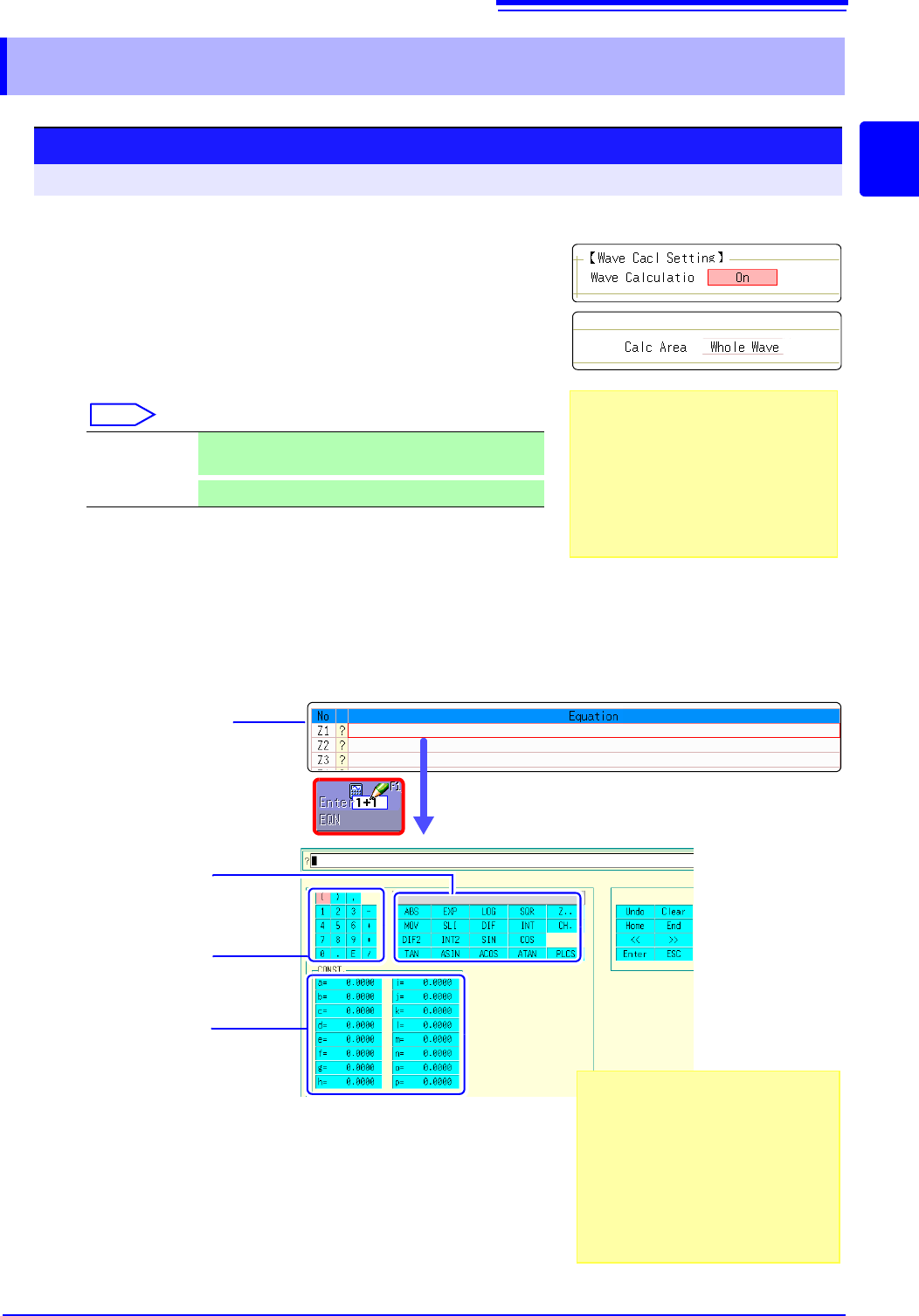
To open the screen: Right-click and select [STATUS] [Wave Calc] sheet
1
Enable the Waveform Calculation function.
Move the flashing cursor to the [Wave Calculation] item,
and select [On].
2
Specify the waveform calculation range.
Move the flashing cursor to the [Calc Area] item.
Select
See: "6.2 Specifying a Waveform Range (A/B Cursor)" (p.124)
3
Perform calculation settings.
Move the flashing cursor to the [Equation] column of the
calculation to be set and select [Enter EQN].
A dialog is displayed for entering a calculation equation.
4
Select a calculation equation.
See: "Waveform Calculation Example" (p.236)
Whole Wave Applies calculations to the whole waveform. (default
setting)
A-B Wave
Applies calculations to the data between A/B cursors.
.Calculation No.
Enter constants
Constants must have been previ-
ously entered on the [CONST.]
(
p.234)
Enter numerical
values and symbols
Enter calculation
operators
When selecting [A-B Wave], specify the
calculation range using the A/B cursors on
the Waveform screen.
If no measurement data has been ac-
quired by the instrument, first measure
once so that the range can be specified for
calculations to be applied to subsequent
measurements.
If "=" is displayed
The entered calculation equation is syn-
tactically correct.
If "?" is displayed
The equation has a syntax error.
The cursor is placed at the location of the
error to facilitate correction.
• Are parentheses correctly matched?
• Has a multiplication operator "
" been
omitted?
2