MR8740、MR8741_user_manual_eng_20191016H.pdf - 第209页
8.4 Triggering by Logic Sign als (Logic Trigger) 197 7 Chapter 8 T rigger Settings 8 The steps for making settings and selecting t he type of logic trigger are described below. The Trigger settings window ( [Logic T rig]…
8.3 Triggering by Analog Signals
196
Description About period range settings
The period range settings for period triggering depend on the sampling period
(sampling rate). (Changing the timebase also changes the period setting range.)
The sampling rate setting can be verified on the Status screen - Status sheet.
The upper threshold of the period range cannot be set below the lower threshold,
and vice-versa.
Lower threshold: can be set either to zero, or to at least five times the sampling
period.
Upper threshold: can be set to no more than 2,000 times the sampling period.
To apply a trigger when the frequency increases (shorter period) above the
upper threshold:
Set the period trigger type to [Per.I], and the lower threshold to [0]. The lower
threshold is ignored, and triggering occurs when the frequency exceeds that cor-
responding to the upper threshold.
To apply a trigger when the frequency decreases (longer period) below the upper
threshold:
Set the period trigger type to [Per.O], and the lower threshold to [0]. The lower
threshold is ignored, and triggering occurs when the frequency drops below that
corresponding to the upper threshold.
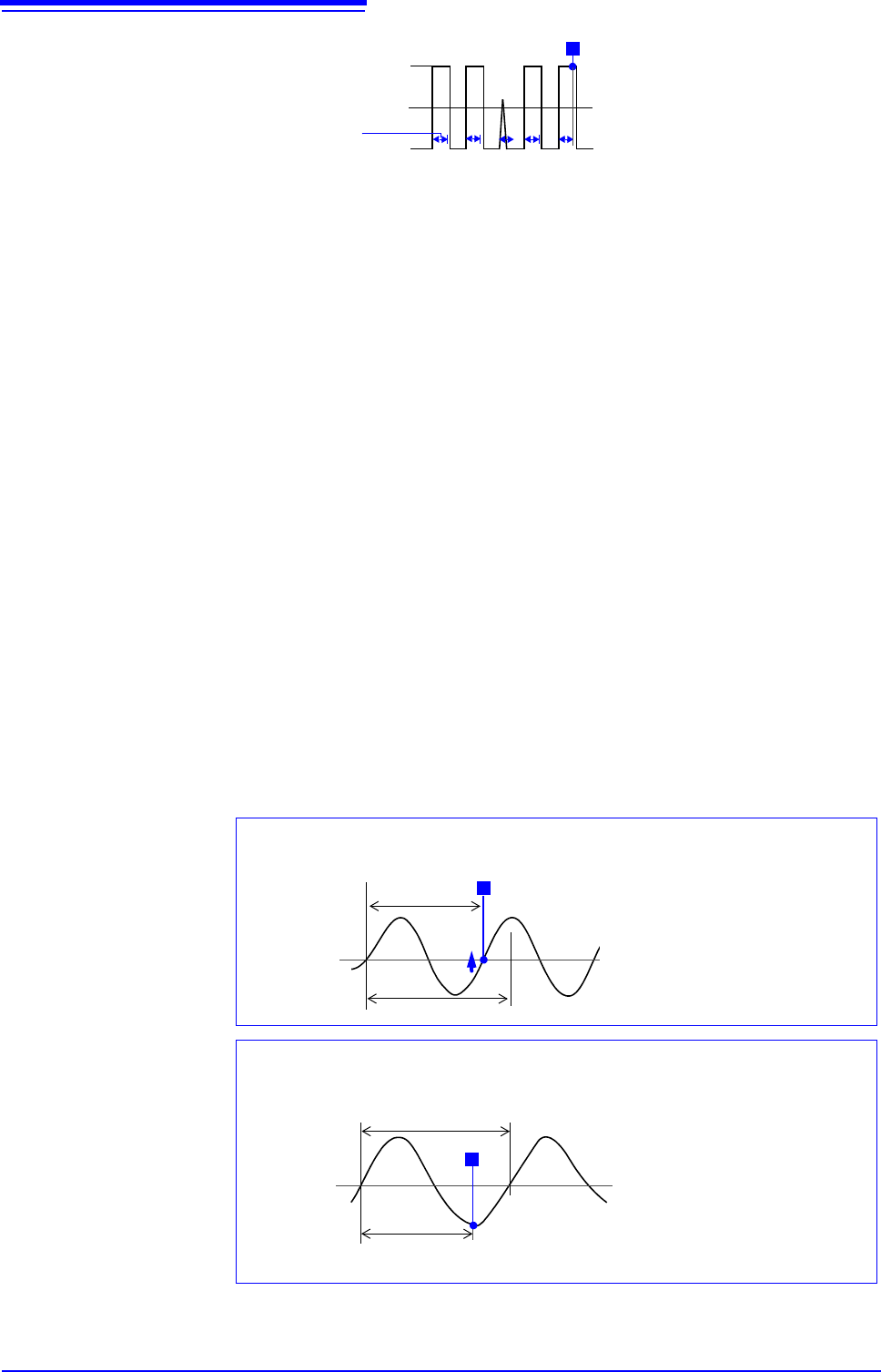
About the trigger point of the Out-of-Period trigger
Triggering occurs when the period of sequential crossings of the specified refer-
ence voltage exceeds the period range.
The point at which triggering occurs depends on the specified period range and
the period of the measured signal.
2.5 V
5 V
0 V
Trigger Level
T
12 34
Event Count
x
Filter Width
Reference
Voltage Level
Lower Threshold
Input Signal
Period
T
Triggering occurs when the rising
edge ( trigger slope) of the input
signal crosses the reference volt-
age level, before reaching the low-
er period threshold.
When the input signal period is shorter than the specified lower threshold
(Trigger Slope:
)
Reference
Voltage Level
Upper Threshold
Input Signal
Period
T
Triggering occurs when the upper
threshold period is reached, be-
fore the rising edge ( trigger
slope) of the input signal crosses
the reference voltage level.
Therefore, the trigger point is de-
termined by the upper threshold
of the period range.
When the input signal period is longer than the specified upper threshold
(Trigger Slope:
)
8.4 Triggering by Logic Signals (Logic Trigger)
197
7
Chapter 8 Trigger Settings
8
The steps for making settings and selecting the type of logic trigger are described below.
The Trigger settings window ([Logic Trig] sheet) is used.
• Input signals on logic channels serve as the trigger source. Triggering occurs
when the specified trigger pattern and logical probe combining criteria (AND/
OR) are met.
• The trigger detection method can be selected according to whether a trigger is
applied or not when the criteria are already met at the start of measurement.
• By using the trigger filter, triggering can be limited so as to occur only when
trigger criteria are met for at least the specified filter width.
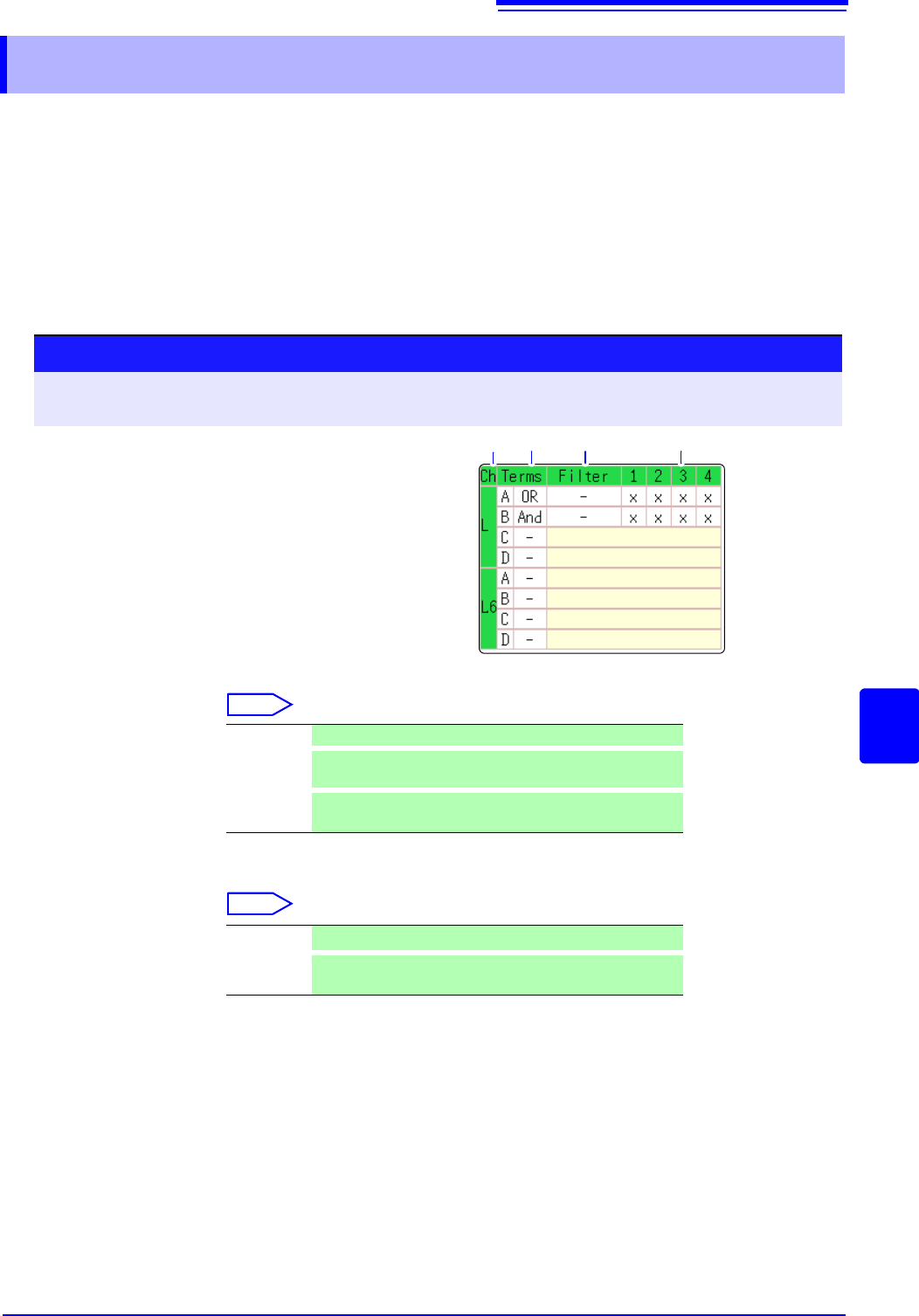
1. Trigger Sets the trigger probe combining logic (AND/OR).
Select
2. Filter Sets the filter width (trigger filter) for triggering. (as occasion demands)
Suppresses triggering from noise.(p.195)
Select
8.4 Triggering by Logic Signals (Logic Trigger)
Procedure
To open the screen: Right-click and select [DISP] Waveform screen Right-click and select [TRIG.SET]
Trigger settings window ([Logic Trig] sheet)
1
Move the flashing cursor to the channel you want
to set.
2
Make the setting from the GUI displayed on the
screen.
1. 2. 3.
Logic Channels
Off Logic triggering is disabled. (default setting)
OR
Triggering occurs when input signal logic matches any set-
ting in the trigger pattern.
AND
Triggering occurs only when input signal logic matches all
settings in the trigger pattern.
Off
Trigger filtering is disabled. (default setting)
0.1 to 10
Trigger filtering is enabled.
The filter width is set as a number of divisions.
8.4 Triggering by Logic Signals (Logic Trigger)
198
3. Trigger Pattern Make the settings of the logic trigger pattern.
Select
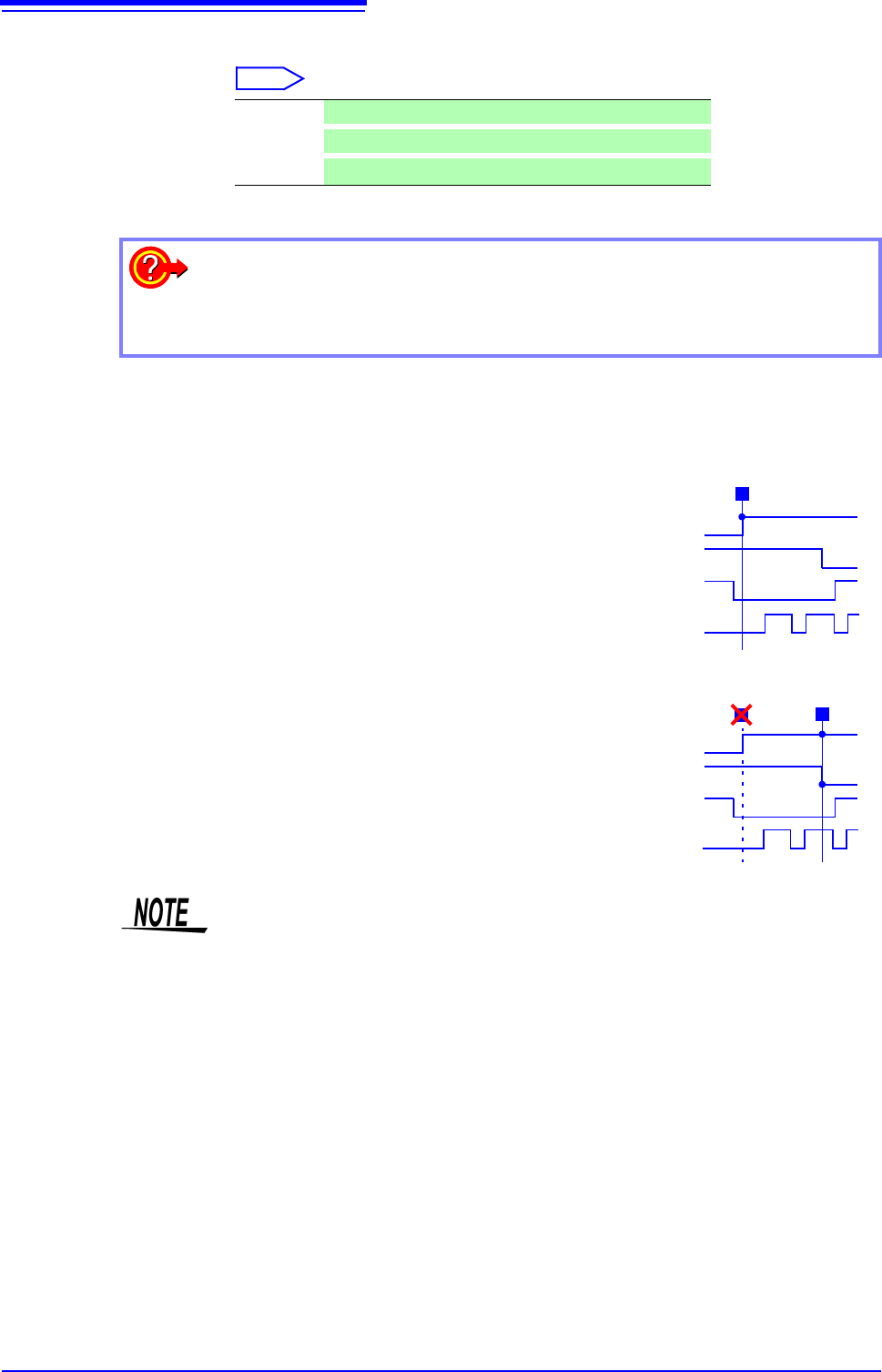
Setting Example Example 1: Trigger when the input signal matches any of the following cri-
teria:
Channel 1 (LA1): HIGH level
Channel 2 (LA2): LOW level
Trigger: OR
LA [1, 2, 3, 4]: [1 0 X X ]
Triggering occurs when the LA1 or LA2 trig-
ger criteria are met.
Example 2: Triggering occurs when the
input signal matches both of the following criteria:
Channel 1 (LA1): HIGH level
Channel 2 (LA2): LOW level
Trigger: AND
LA [1, 2, 3, 4]: [1 0 X X ]
X
Ignore signal. (default setting)
0
Trigger at LOW signal level.
1
Trigger at HIGH signal level.
To copy the setting to another channel
The Trigger settings window ([Logic Trig] sheet) can be used to copy a setting.
See:"7.8 Copying settings to other channels (calculation No.) (Copy function)" (p.160)
Trigger Pattern
T
LA1 1
LA2 0
LA3 X
LA4 X
Trigger Pattern
T
LA1 1
LA2 0
LA3 X
LA4 X
T
• If the conditions are met already when measurement is started (AND: all trig-
ger patterns are met, OR: one trigger pattern is met), triggering does not occur.
Triggering only occurs if the conditions are removed and then met again.
• Triggers for standard logic channels (LA and LB) are enabled regardless of the
logic waveform display or unit type.