MR8740、MR8741_user_manual_eng_20191016H.pdf - 第257页
11.2 Display Settings 245 10 Chapter 1 1 Memory Division Function 11 Getting Det ails on Each Block: The trigger time and measurement status of each block can be viewed on the list. Move the flashing cursor to the [Map/L…
11.2 Display Settings
244
11.2 Display Settings
Procedure
To open the screen: Right-click and select [STATUS] [Memory Div] sheet
1
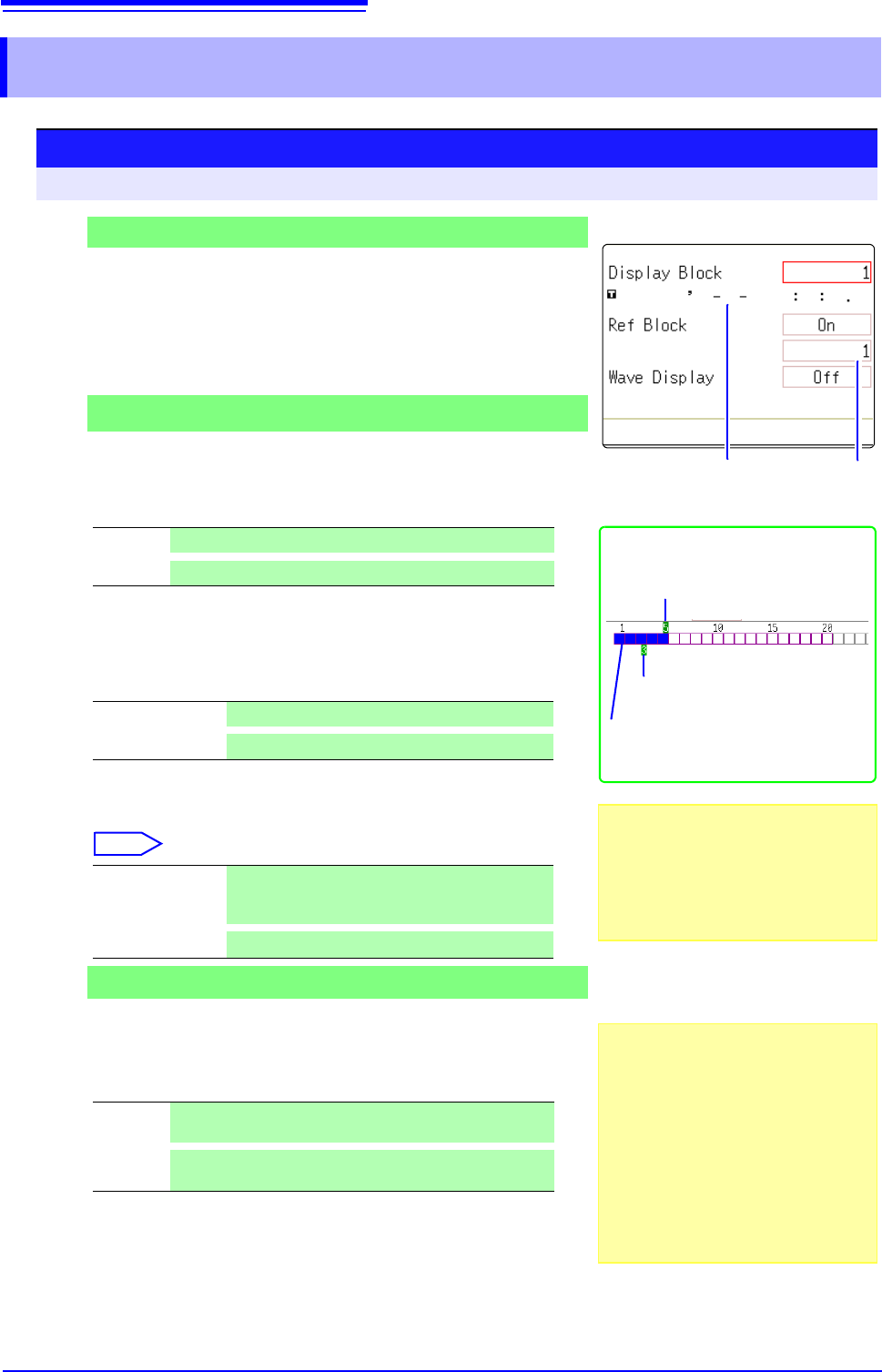
To display any block on the Waveform screen
Set the display blocks
Set after measurement is complete.(This can also be set on the
Waveform screen (p.136).)
Move the flashing cursor to the [Display Block] item.
Set the number of blocks to display on the Waveform screen.
2
To display multiple blocks as overlaid waveforms
Enable the Reference Block function
Move the flashing cursor to the [Ref Block] item.
Select [On].
3
(When Reference Blocks are enabled [On])
Select whether to reference every block
To overlay all waveforms, select [All Blks On].
To overlay selected waveforms, move the flashing cursor to the num-
ber column of the reference block and select the block number.
Select
4
To display every block as its waveform is acquired
Enable tracking waveform display.
Move the flashing cursor to the [Wave Display] item.
Select [On].
Viewing Memory Division waveforms on the Waveform screen
See: "6.8 Seeing Block Waveforms" (p.136)
Off
Reference Blocks are not displayed (default setting)
On
Reference Blocks overlay Display blocks on the display.
All Blks Off
Set reference to all blocks to Off.
All Blks On
Set reference to all blocks to On.
Ref On-Off
Set On or Off. If [On] is selected, the block frame
of the selected block number is displayed as a
green square.
Select a block.
Off
The waveform of only the last block is displayed after re-
cording up to the number of used blocks. (default setting)
On
Waveforms are displayed one block at a time as they are
acquired at each trigger event.
Display Block (Green)
Reference Block (Light Green)
Measurement data is recorded at the
colored positions.
When the Display Block is 5 and the Ref-
erence Block is 3
Reference Block No.
Enabling the Trace Waveform display
lengthens dead time.
About Dead Time:
See: "Difference Between Dead Times
During Normal and Memory Division
Recording" (p.246)
Even if the Roll Mode is enabled (other
than Off), it is not usable when the Trace
Waveform display is disabled.
Reference Block Selection
Reference Blocks can also be selected
and deselected in the [Ref Block] item on
the [List] display.
See: "Getting Details on Each Block:"
(p.245)
2
4
1
Trigger time
11.2 Display Settings
245
10
Chapter 11 Memory Division Function
11
Getting Details on Each Block:
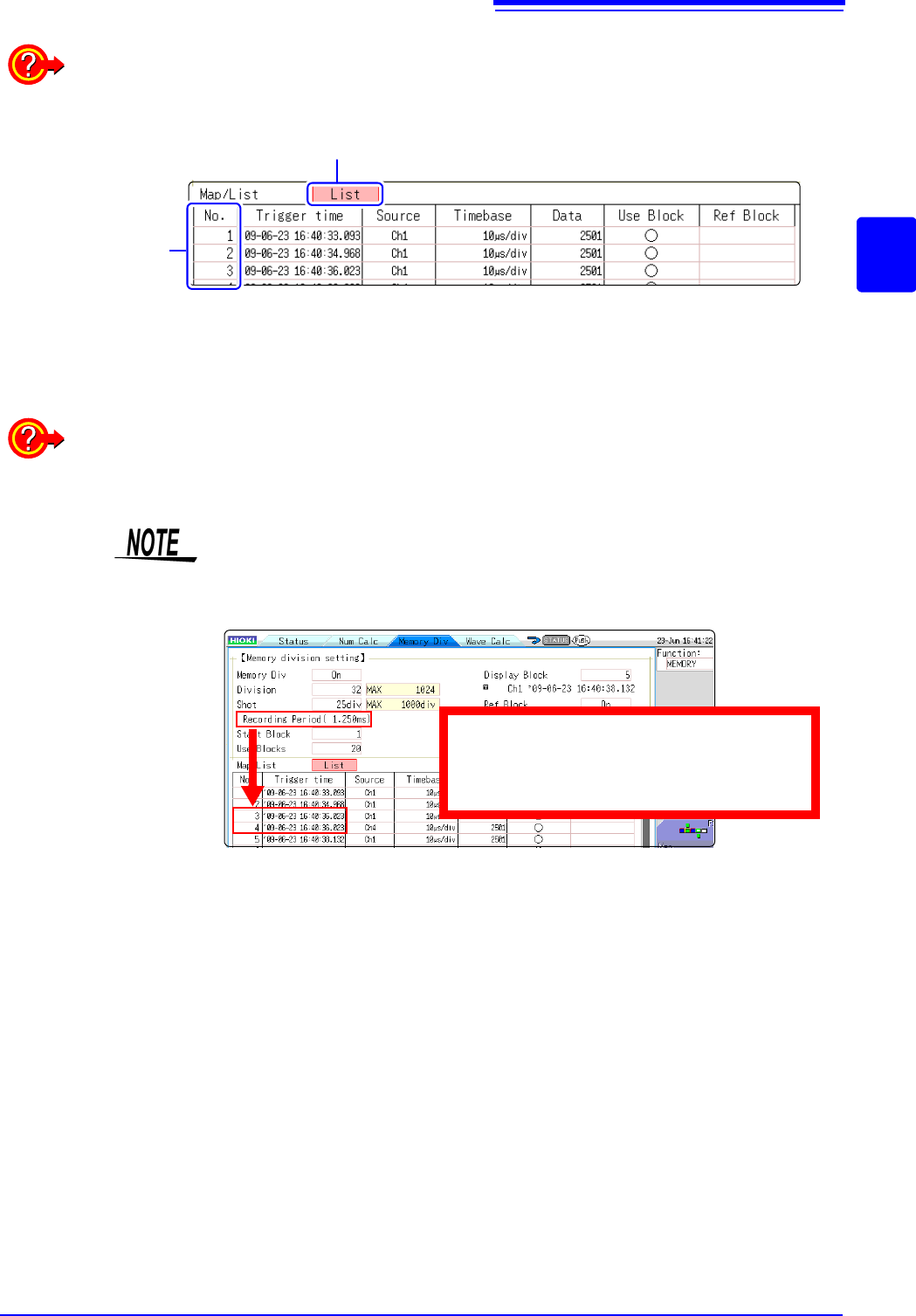
The trigger time and measurement status of each block can be viewed on the list.
Move the flashing cursor to the [Map/List] , and select [List].
Block No.
A block can be selected with the mouse.
You can move the flashing cursor to the Reference Block column to set a block’s on/off state as a
Reference Block.
To switch block waveforms on the Waveform screen:
To be able to select the block you want to see, click [WAVE] in the right-click menu at the Wave-
form screen and switch Pos to Block.
See: "6.8 Seeing Block Waveforms" (p.136)
• When displaying memory division blocks as a list, blocks may have the same
trigger times. This occurs because the minimum resolution of the clock used
by this unit is 1/128th of a second (7.8125 ms) and measurement occurs dur-
ing this interval.
• If triggers occur continuously within an interval shorter than 500 s, the
displayed trigger time may indicate a time slower than reality.
Example:
The recording time is 1.25 ms and the trigger
times of No. 3 and No. 4 blocks may be the
same.
11.2 Display Settings
246
Difference Between Dead Times During Normal and Memory Division
Recording
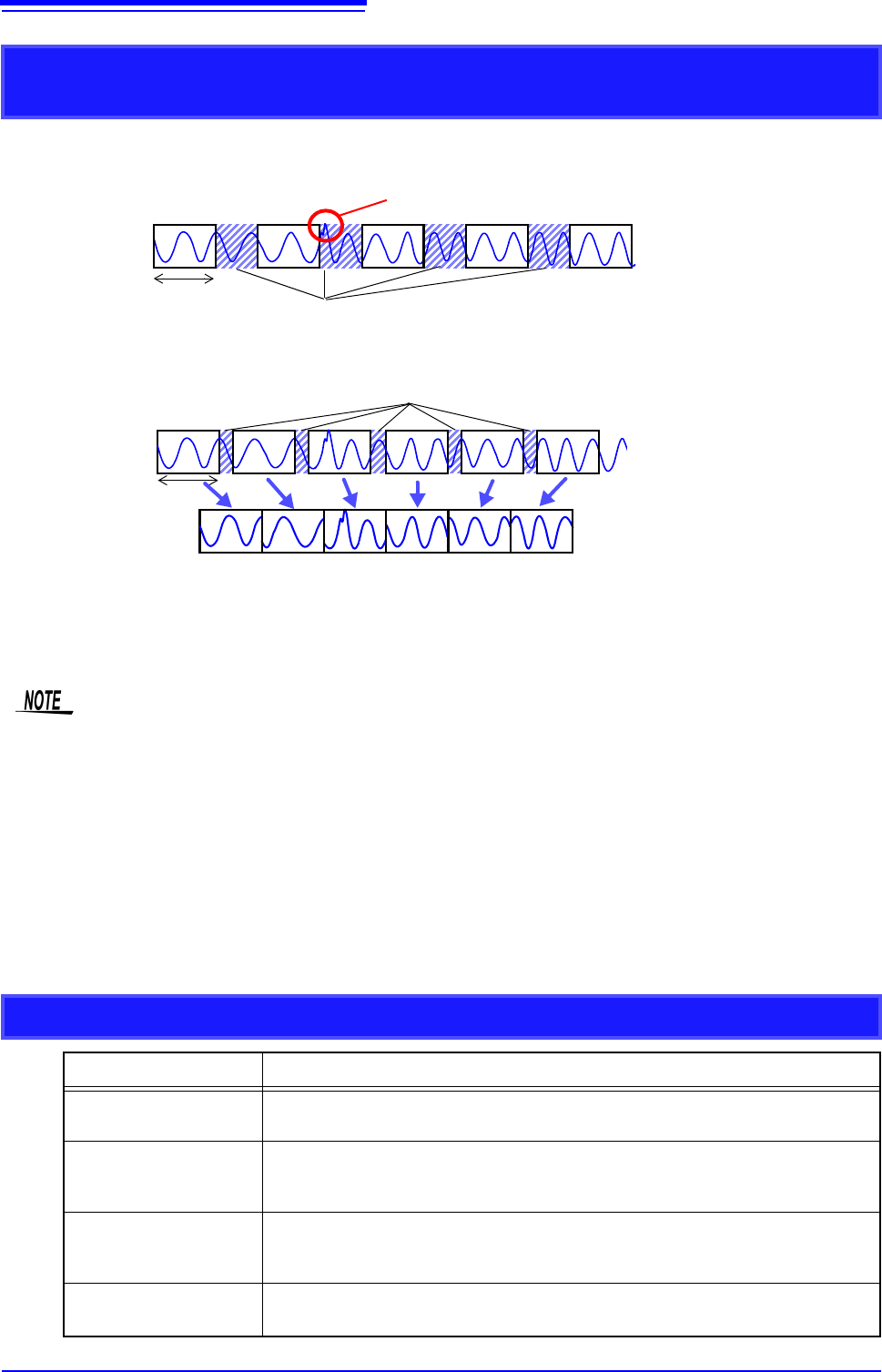
When Auto Save is set for continuous triggering [Repeat]
Dead Times
Times during which sampling is inhibited due to internal processing or saving
Recording
Length
Anomalous phenomena occurring during dead times are not detected.
When the Trace Waveform Display is disabled (Off) during Memory Division
recording
12 34 56
Recording
Length
Dead Times
The waveform data of each recording length is recorded in one block.
When recording with Memory Division, dead time is shorter than with normal recording.
• The dead time (time where no sampling occurs between blocks) of memory division is as follows.
5 s/div to 20 s/div: 1 to 8 samples
Time axis slower than 50 s/div: 1 samples
Note: Dead time lengthens during numerical calculation or waveform calculation, or when the
time axis is 5 to 20 s/div and tracking waveform display is [On].
• When measuring with an 8970 Freq Unit, dead time is approximately 230 ms. When measuring
in integral value ([Count]) mode, there are cases when the last data in the previous block
remains in the first part of the block.
• When tracking waveform display is [Off], the roll mode function cannot be used, even when roll
mode is enabled (not Off).
• When triggering occurs very often, clicking [STOP] may not stop measurement until enough data
has been acquired to fill the blocks specified for use.
Auto Save for Memory Division Recording
Measuring conditions Auto Save
With Numerical calcula-
tion ON
Auto Save is performed every time one block is measured. When Tracking wave
display is ON, Waveform is also displayed.
When time axis is 5 to 20
s/div with Tracking wave
display ON.
Auto Save and Waveform Display are performed every time one block is measured.
When time axis is 5 to 20
s/div with Tracking wave
display OFF.
Auto Save is performed after all blocks are measured.
Other than above
Auto Save is performed simultaneously with measuring. When Tracking wave dis-
play is ON, Waveform is also displayed.