MR8740、MR8741_user_manual_eng_20191016H.pdf - 第254页
242 • Waveforms can be recorded into individua l blocks by d ividing memory spac e into multiple block s. • You can record wave forms beginning at any block (Start Block), choose which blocks to display (Display Block), …
241
10
Chapter 11 Memory Division Function
11
Memory division function can only be used with the Memory function.
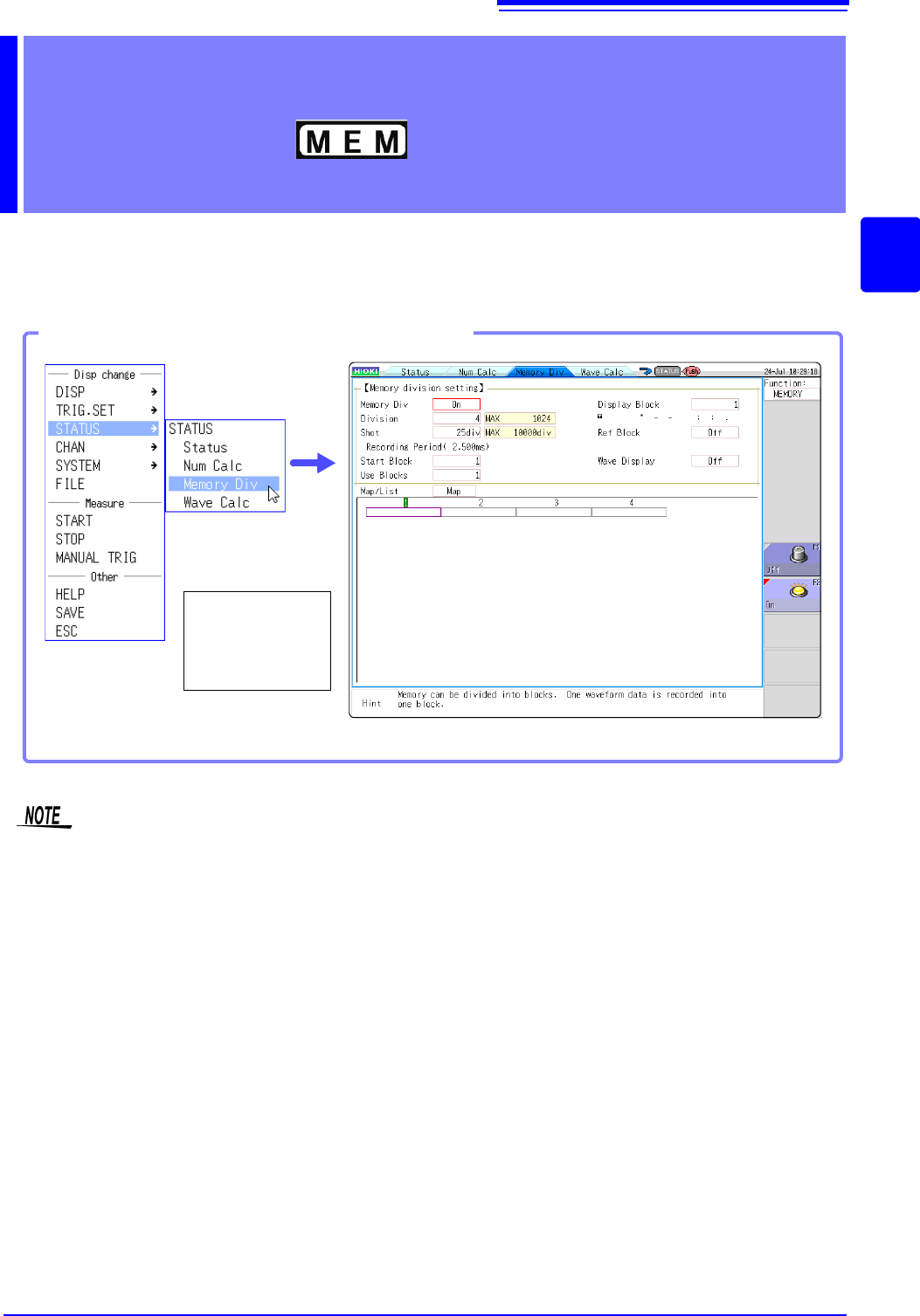
Memory division settings are made on the Status screen - [Memory Div] sheet.
Blocks to be displayed can also be selected on the Waveform screen (p.136).
Memory Division
Function Chapter 11
Opening the [Memory Div] sheet
Select [STATUS]
and then [Memory
Div] from the right-
click menu.
When using memory division, synchronization between blocks may not be possible in the following
conditions.
(MR8740 only)
When using memory division, the trigger output (TRIG_OUT terminal output) may output the Low
level or output erratically in the following conditions.
(MR8741 only)
• The time axis range is 5 s/div to 100 s/div
• The record (measurement) time is 5 ms or less
• Tracking wave display is [OFF].
242
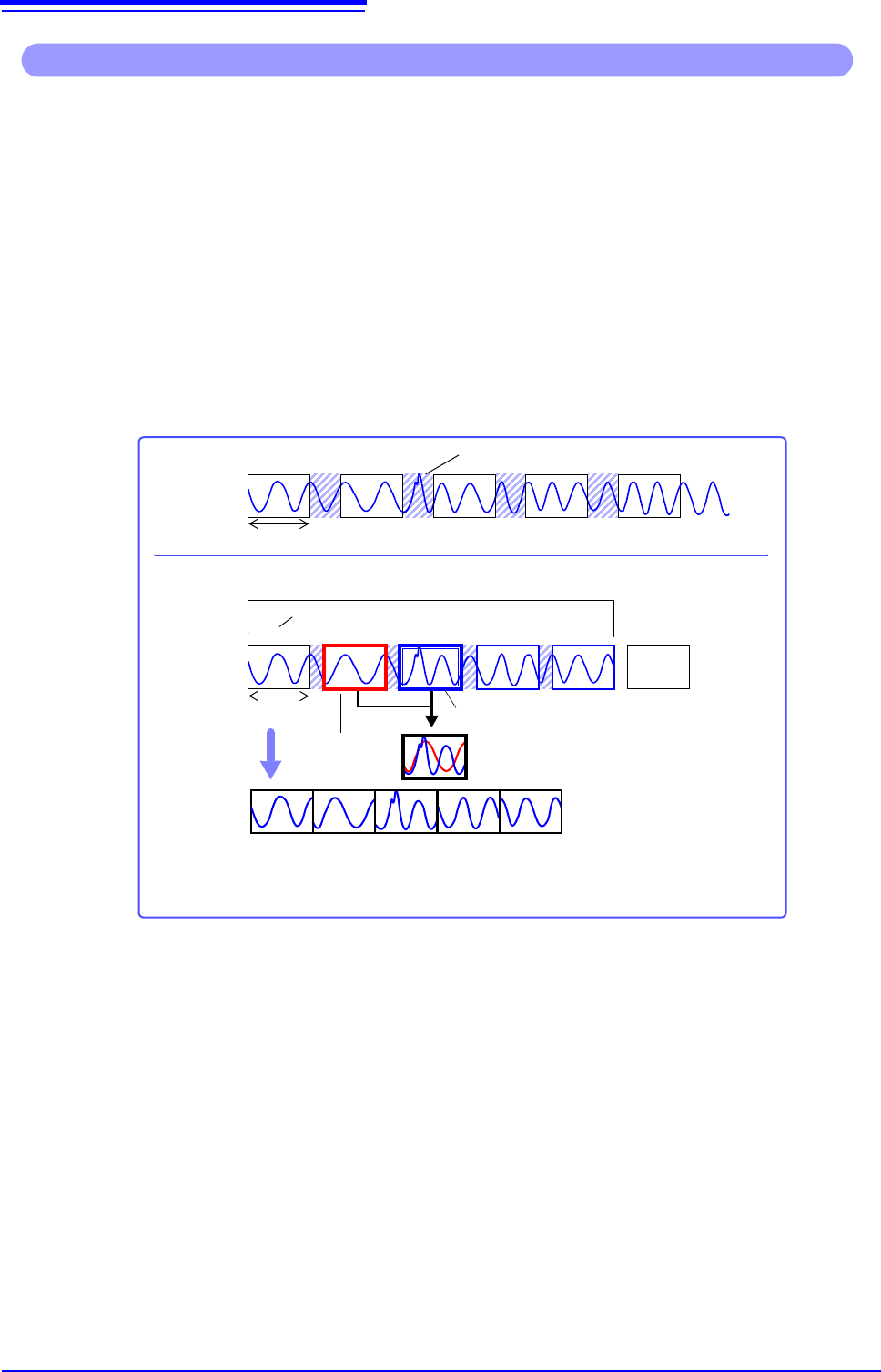
• Waveforms can be recorded into individual blocks by dividing memory space into multiple blocks.
• You can record waveforms beginning at any block (Start Block), choose which blocks to display (Display
Block), or display multiple overlaid blocks (Reference Block).
• The maximum number of blocks for memory division depends on the installed memory board and recording
length (up to 1024 divisions).
• Triggered waveform data can be acquired continuously and recorded sequentially in specified blocks (at
the Start Block, for the specified Used Blocks). Dead time while displaying (during which triggers are
ignored) can be minimized.
• Even if the Memory Division function is not used, up to 16 blocks of data (depending on the specified
recording length) can be saved to each block, so that previously recorded data can be selected for display
on the Waveform Screen.
See:"6.8 Seeing Block Waveforms" (p.136)
Operations available from the [Memory Div] sheet
Normal
Memory Division
12345 6
Reference Block
Display Block
The Reference Block can be displayed as an
overlay.
Dead time (not recorded)
Recording length
Recording length
Blocks
When the number of Used Blocks = 5
Start Block
When saving manually, select whether to save all used blocks,
or just the displayed block. (p.93)
12 34 5
When batch saving, an index
file (SEQ) is created. When
reloading this file, all saved
blocks can be read at once.
Auto Save
Used Blocks
11.1 Recording Settings
243
10
Chapter 11 Memory Division Function
11
11.1 Recording Settings
Procedure
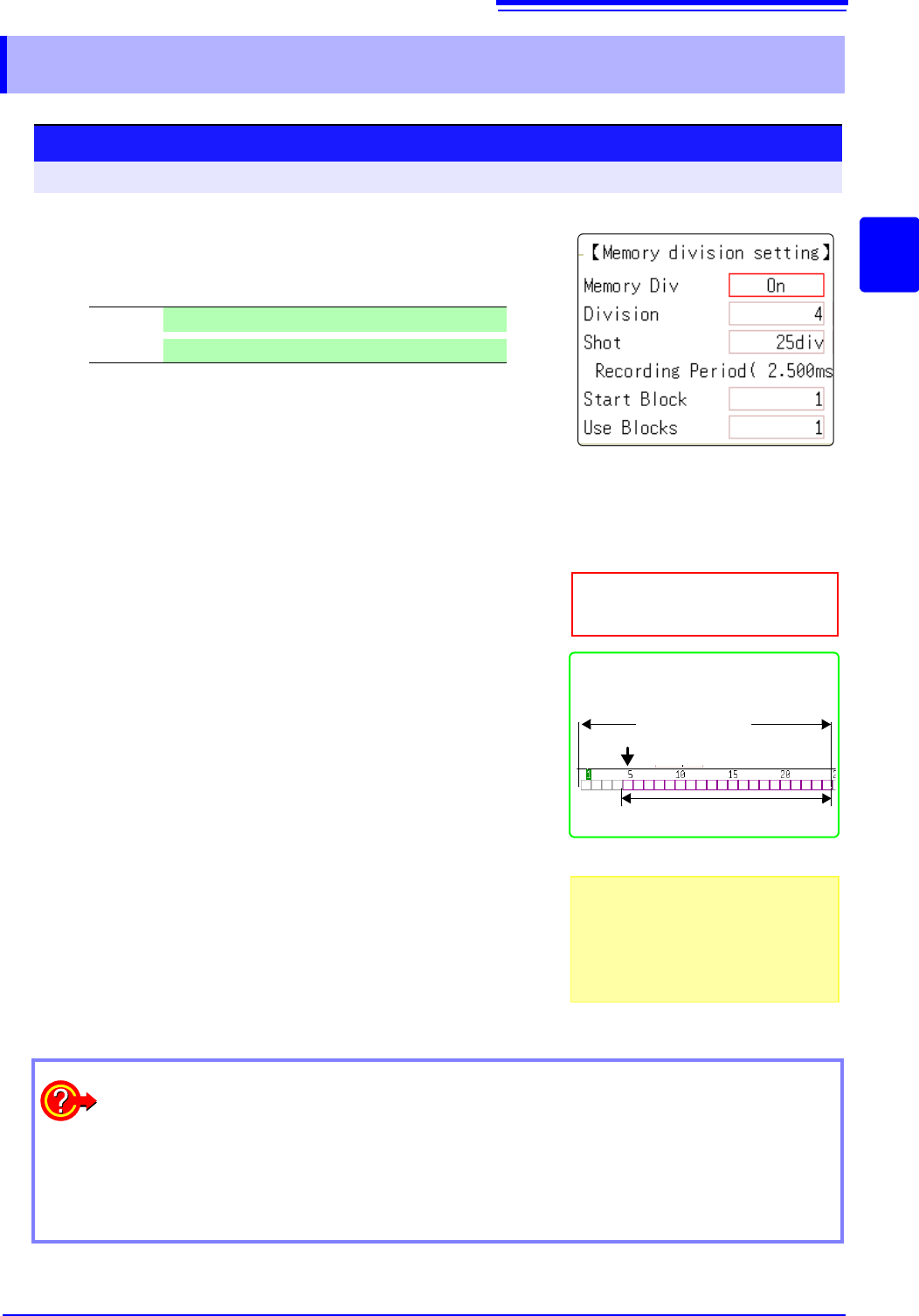
To open the screen: Right-click and select [STATUS] [Memory Div] sheet
1
Enable the Memory Division function.
Move the flashing cursor to the
[Memory Div] item.
Select [On].
2
Set the number of divisions.
Move the flashing cursor to the [Division] item.
Set the number of blocks for division.
Default setting: 4
3
Set the recording length.
(This is linked to the recording length setting on the [Status]
sheet.)
Move the flashing cursor to the [Shot] item.
Set the recording length.
The maximum recording length and number of divisions are determined
automatically according to memory capacity and the number of chan-
nels used.
Setting range: "Appendix 2.4 Maximum record length and number of di-
visions (Memory division function)"(p.A7)
4
Set the start block.
Move the flashing cursor to the [Start Block] item.
Set the block number at which to start recording.
Default setting: 1
5
Set the Used Block number.
Move the flashing cursor to the [Use Blocks] item.
Set the number of blocks to use.
Default setting: 1
Off
Memory Division is disabled.(default setting)
On
Memory Division is enabled.
About Recording
When a fast timebase is selected, display-
ing and saving operation are not available
while measuring.
Selecting the display screen for auto sav-
ing lengthens dead time.
Use Blocks (Purple)
Memory Division, Waveform Calcula-
tion, and Roll Mode cannot be enabled
at the same time.
When the number of divisions is 32, the
Start Block is 5 and the Used Block num-
ber (number of blocks to use) is 20
No. of Divisions
Start Block
3
1
2
4
5
To display any block on the waveform screen when finished measuring:
Set the number of blocks to display (p.244).
(This can also be set on the Waveform screen (p.136).)
To display overlaid waveforms:
Set the number of blocks for reference (p.244).