MR8740、MR8741_user_manual_eng_20191016H.pdf - 第190页
7.9 Setting Details of Modules 178 When Of f Sets the output terminal sta tus when the output is OFF. Select Output Turns waveform output On /Off. Select Control Sets the waveform output. Select Method Selects the contro…
7.9 Setting Details of Modules
177
6
Chapter 7 Utility Functions
7
Channels installed with Model MR8790 cannot be measured.
See: "Opening the [Each Ch] sheet, Making a Channel Selection" (p.161)
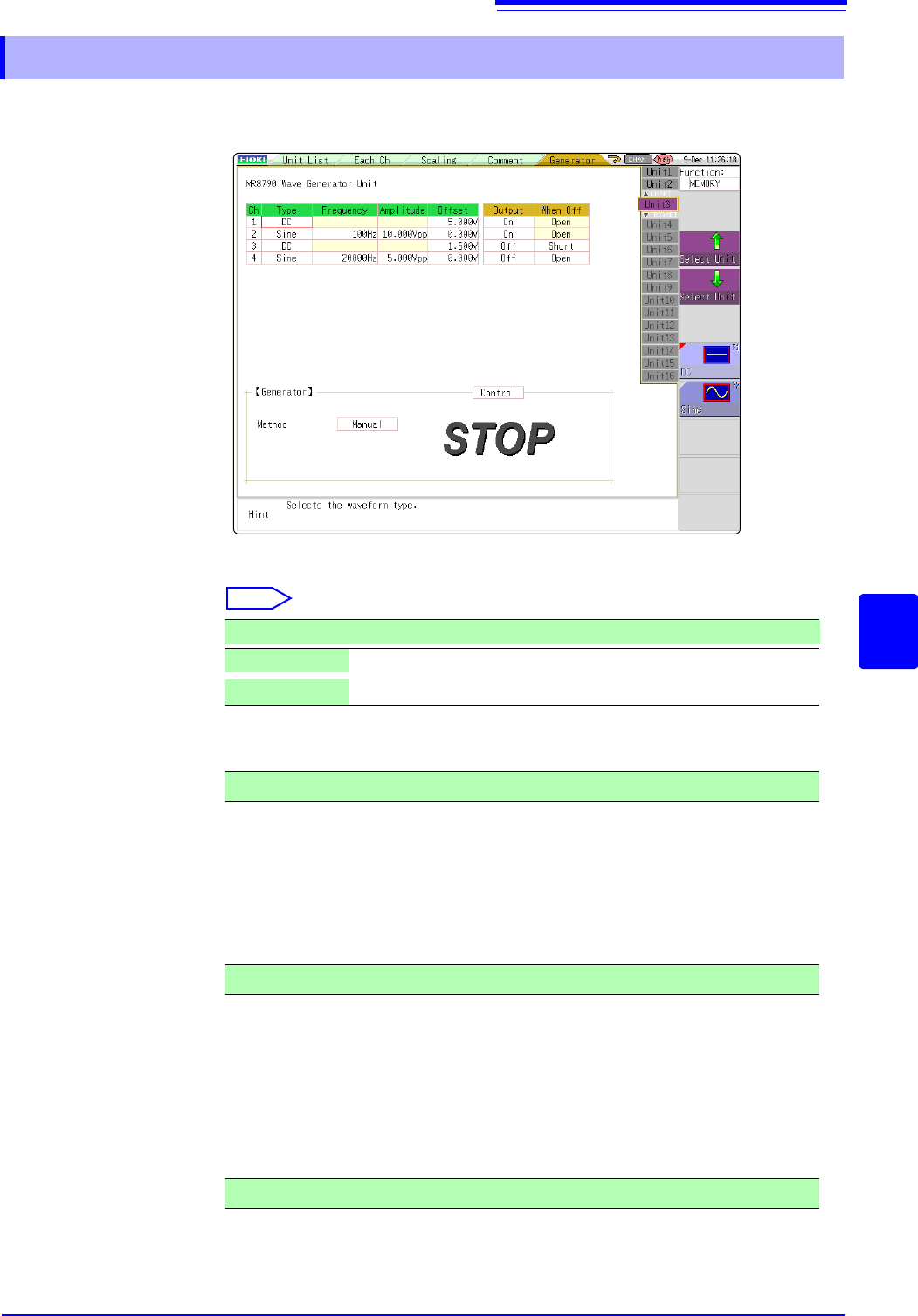
Type Selects the waveform type.
Select
Frequency Sets the frequency of output signal.
Amplitude Sets the amplitude of output signal.
The output voltage with guaranteed accuracy is the sum of the amplitude and the
offset, between -10 V and +10 V. If the sum of the amplitude and the offset is set
outside the guaranteed accuracy range, parts of the waveform will be clamped to
the upper limit, approximately +14 V and the lower limit, approximately -14 V.
Offset For DC output: Sets DC voltage.
For sine wave output: Sets the offset voltage.
The output voltage with guaranteed accuracy is the sum of the amplitude and the
offset, between -10 V and +10 V. If the sum of the amplitude and the offset is set
outside the guaranteed accuracy range, parts of the waveform will be clamped to
the upper limit, approximately +14 V and the lower limit, approximately -14 V.
7.9.11 Setting Model MR8790 Waveform Generator Unit
Selections Description
DC
DC output (Default setting)
Sine
Sine wave output
0 Hz to 20000 Hz
0.000 V p-p to 20.000 V p-p
-10 V to +10 V

7.9 Setting Details of Modules
178
When Off Sets the output terminal status when the output is OFF.
Select
Output Turns waveform output On/Off.
Select
Control Sets the waveform output.
Select
Method Selects the control method for waveform output.
Select
For details, see the instruction manual of Models U8793, MR8790, and
MR8791.
Selections Description
Open
Opens the output terminals, separating them from internal circuits.
Short
Short-circuits the output terminals, separating them from internal
circuits.
Selections Description
On
Outputs waveform.
Off
Does not output the waveform.
Selections Description
RUN
Starts output.
PAUSE
Pauses output. While output is paused, the output at the time
[PAUSE] was pressed will be output.
STOP
Stops output.
Selections Description
Manual
Restricts control of signal output to Signal Generation screen.
Sync.
Augments manual control with signal output in synchronization with
the start and end of measurement.
START key: Starts output when measurement starts.
STOP key: Stops output when measurement stops
Keys
Augments manual control by allowing signal output to be manipu-
lated using the instrument’s keys.
START key:Starts output.
STOP key: Stops output.
Manual Trigger key: Pauses output.
7.9 Setting Details of Modules
179
6
Chapter 7 Utility Functions
7
Channels installed with Model MR8791 cannot be measured.
See: "Opening the [Each Ch] sheet, Making a Channel Selection" (p.161)
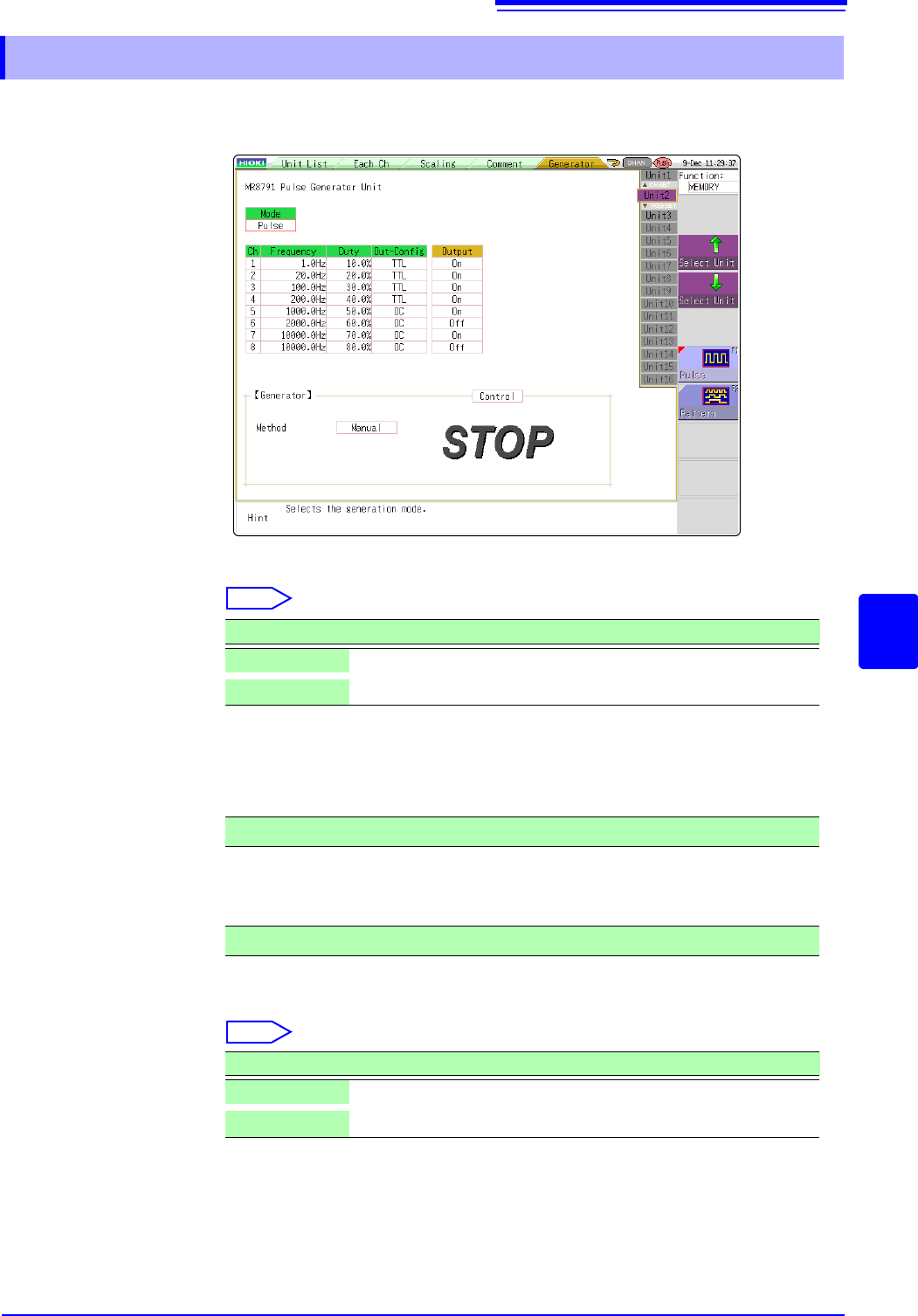
Mode Select the type of output.
Select
Refer to the instruction manual of Models U8793, MR8790, and MR8791 regard-
ing the detailed settings for pattern output.
Frequency Sets the frequency for pulse output.
Duty Sets the pulse duty.
Out-Config Sets the output status.
Select
7.9.12 Setting Model MR 8971 Pulse Generator Unit
Selections Description
Pulse
Pulse output (Default settings)
Pattern
Pattern output
0 Hz to 20000 Hz
0% to 100%
Selections Description
TTL
TTL output
OC
Open collector output