MR8740、MR8741_user_manual_eng_20191016H.pdf - 第212页
8.5 Trigger by Timer or Time Intervals (Timer Trigger) 200 Description About st art and stop times • S tart and S top times should be set as times elapsed sin ce the measurement was star ted. • When th e trigger mode is …
8.5 Trigger by Timer or Time Intervals (Timer Trigger)
199
7
Chapter 8 Trigger Settings
8
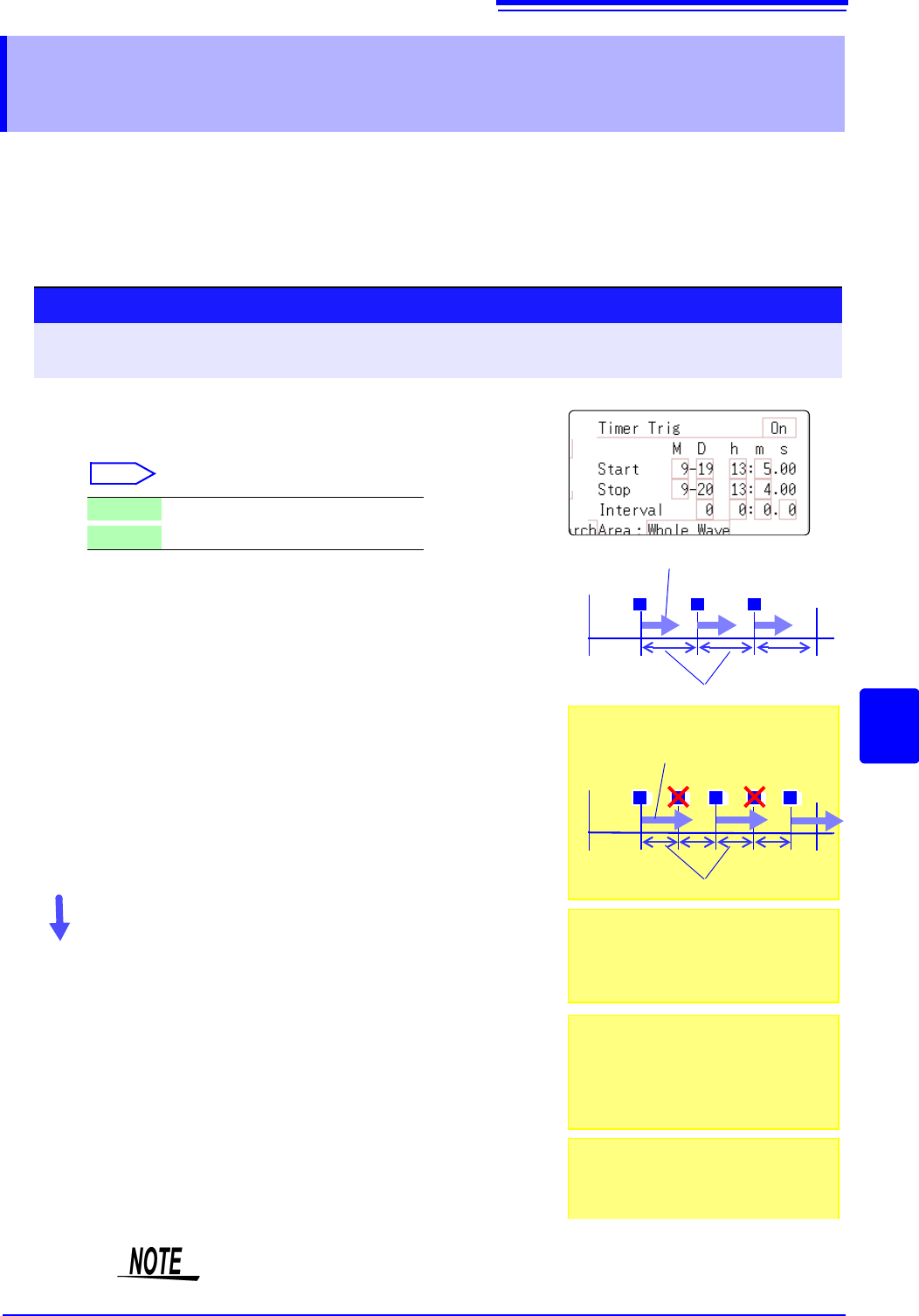
Set this to record at fixed times.
• Triggering occurs at the specified interval from the specified Start time until the
Stop time.
• Before setting, verify that the clock is set to the correct time. If not, set the
clock on the System screen - Init sheet. (p.57)
8.5 Trigger by Timer or Time Intervals
(Timer Trigger)
The timer trigger time and the time at which the trigger is actually fired may differ
by up to 3 sample times.
1
2
3
Procedure
To open the screen: Right-click and select [DISP] Waveform screen Right-click and select [TRIG.SET] Trigger
settings window
1
Enable or disable the timer trigger.
Move the flashing cursor to the [Timer Trig] item.
Select
2
(When [On] is selected)
Set Start and Stop times.
Move to cursor to the [M], [D], [h] and [m] items to set
recording Start and Stop times.
Set the date and time.
To set the current date and time:
Select [Present Time].
3
(To apply a trigger through the specified interval, from
Start to Stop)
Set the Interval.
Move to cursor to the [D], [h], [m] and [s] items of [Interval].
Set the recording interval.
Recording starts at the specified Start time.
To stop recording early:
Click [STOP] in the right-click menu.
Off
Timer triggering is disabled.
On
Timer triggering is enabled.
Start Time
Stop Time
T T T
Interval
Records the specified recording length
START
Start Time
Stop Time
T T T
Interval
Records the specified recording length
T T
When the specified interval is shorter
than the specified recording length:
START
When the interval is set to zero
If the [Repeat] trigger mode is selected, or
REC&MEM function is used, recording is
repeated from Start to Stop times.
When the recording length exceeds the
specified interval
The next trigger is not applied until the
data for the specified recording length has
been acquired.
When the recording length exceeds the
stop time
Recording time depends on the operating
function.
"About Stop Time and Recording Length"
(
p.200)
8.5 Trigger by Timer or Time Intervals (Timer Trigger)
200
Description About start and stop times
• Start and Stop times should be set as times elapsed since the measurement
was started.
• When the trigger mode is [Single] and the timer trigger is [On], only one timer
trigger specified as the Start trigger is recognized. Interval and Stop time trig-
gers are ignored.
To record an interval with specified Start and Stop times
Set the trigger mode to [Repeat], and set all other trigger sources [Off].
However, triggering is disabled during processing (auto save, waveform display
processing and calculation) from the end of recording to the next Trigger Wait
state, so depending on measurement settings, recording may not occur within
the specified interval.
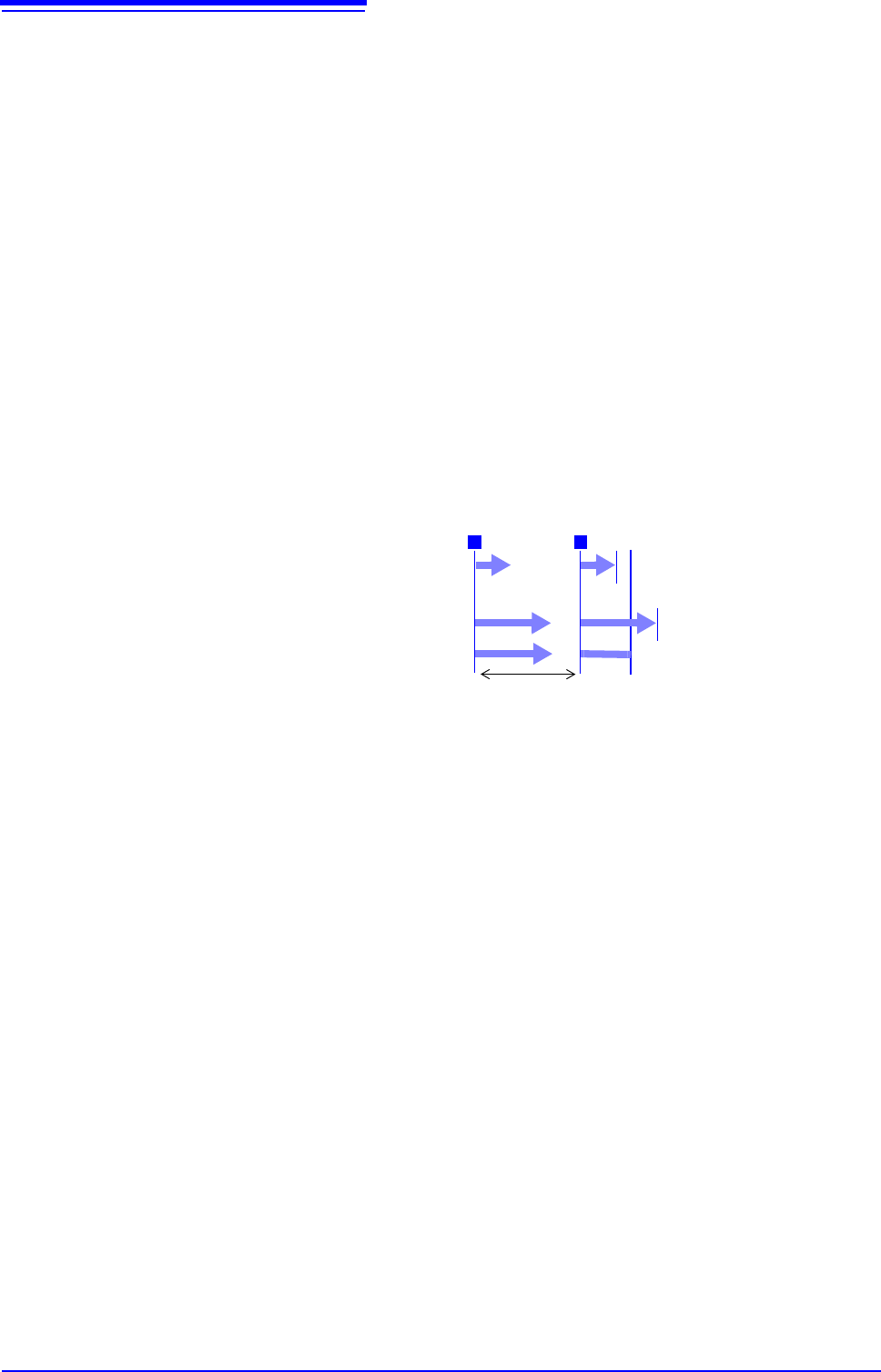
About Stop Time and Recording Length
The stop time is function-dependent:
Memory function: Measurement data is acquired for the specified recording
length, then recording stops.
Recorder function: Measurement data continues to be acquired until the speci-
fied Stop time.
Recording
Length
Recorder Function
Memory Function
Recording stops at Stop Time
Recording stops after
Recording Length
TT
Stop Time
Interval
Recording stops after
Recording Length
Relationship Between Last Recording Length and Stop
Time
8.5 Trigger by Timer or Time Intervals (Timer Trigger)
201
7
Chapter 8 Trigger Settings
8
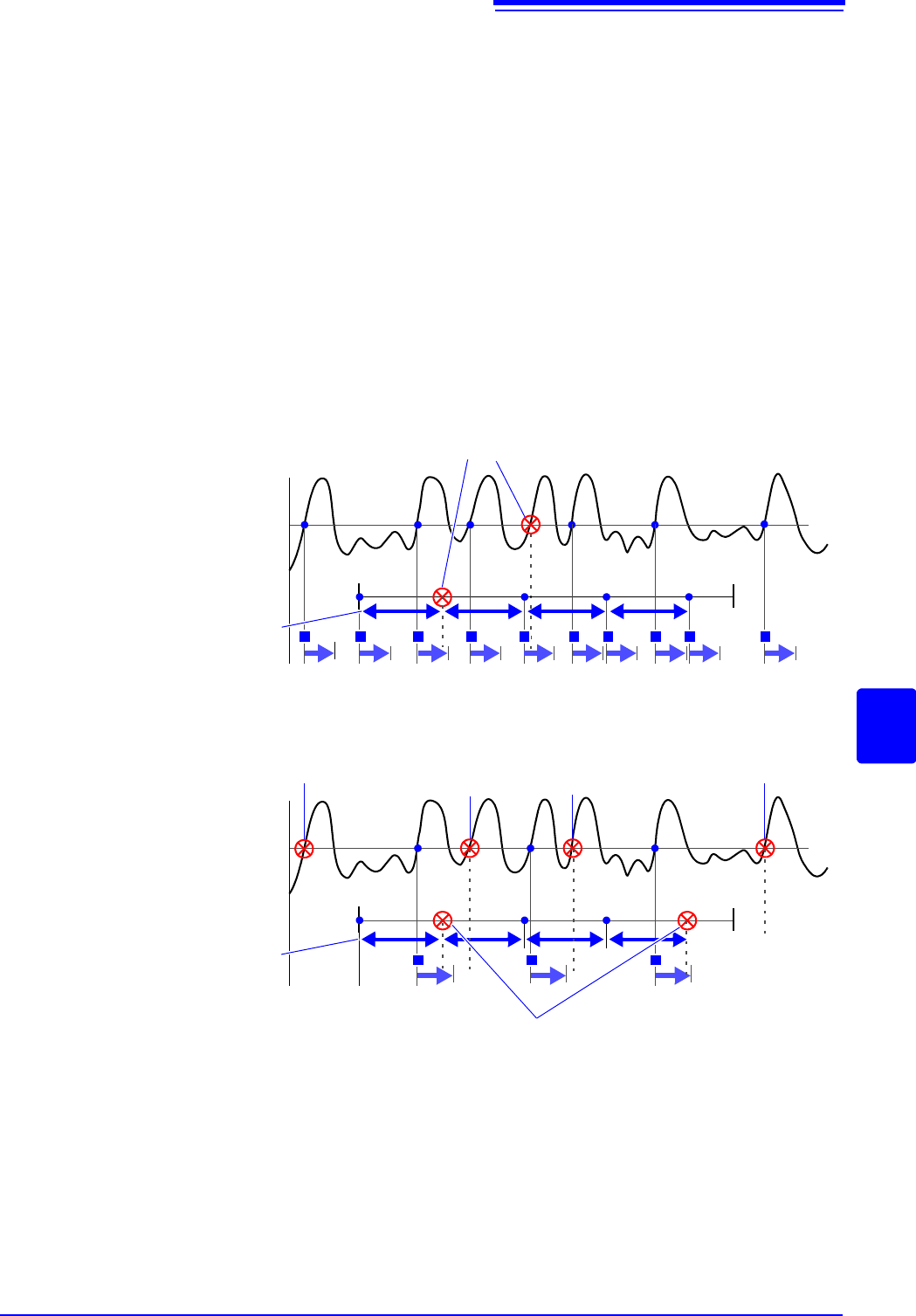
When a trigger is applied from a trigger source other than a timer trigger
Trigger sources set to On are all enabled.
However, trigger timing depends on the trigger source settings.
• When trigger criteria are ORed together (Trigger Source: OR)
Depending on the other trigger sources, triggering can occur before the speci-
fied trigger Start time, after the specified Stop time, or outside of the specified
Interval.
• When trigger criteria are ANDed together (Trigger Source: AND)
Triggering occurs between the specified Start and Stop times when criteria for
all trigger sources set within the specified interval are satisfied.
If the interval is set to zero, triggering occurs when criteria for all trigger
sources set between specified Start and Stop times are satisfied.
Example: measuring when both timer trigger and level triggers (Slope:
) are
enabled.
When trigger criteria are ORed together (Trigger Source: OR)
Start Measurement
Start Time Stop Time
Level Trigger
Timer Trigger
Recording
T T T T T T T T T T
Interval
Ignored because they occur while recording
When trigger criteria are ANDed together (Trigger Source: AND)
Start Measurement
Start Time
Stop Time
Recording
T
Interval
T T
Outside of Timer Time
Timer Trigger is not
applied, so ignored
Trigger was applied only once
within the interval, so ignored
Outside of
Timer Time
Measurement ends
at Stop time
Level Trigger
Timer Trigger
Ignored because they occur while recording