MR8740、MR8741_user_manual_eng_20191016H.pdf - 第240页
10.1 Waveform Calculation Workf low 228 There are two different ways of performing calculation. • Calculating the data automatically af ter the measurement: Settings for waveform calcula tion must be made before the m ea…
227
9
Chapter 10 Waveform Calculation Functions
10
Waveform calculations can only be used with the Memory function.
A pre-specified calculation equation is applied to acquired waveform data, and the calculation
results are displayed as a waveform on the Waveform screen.
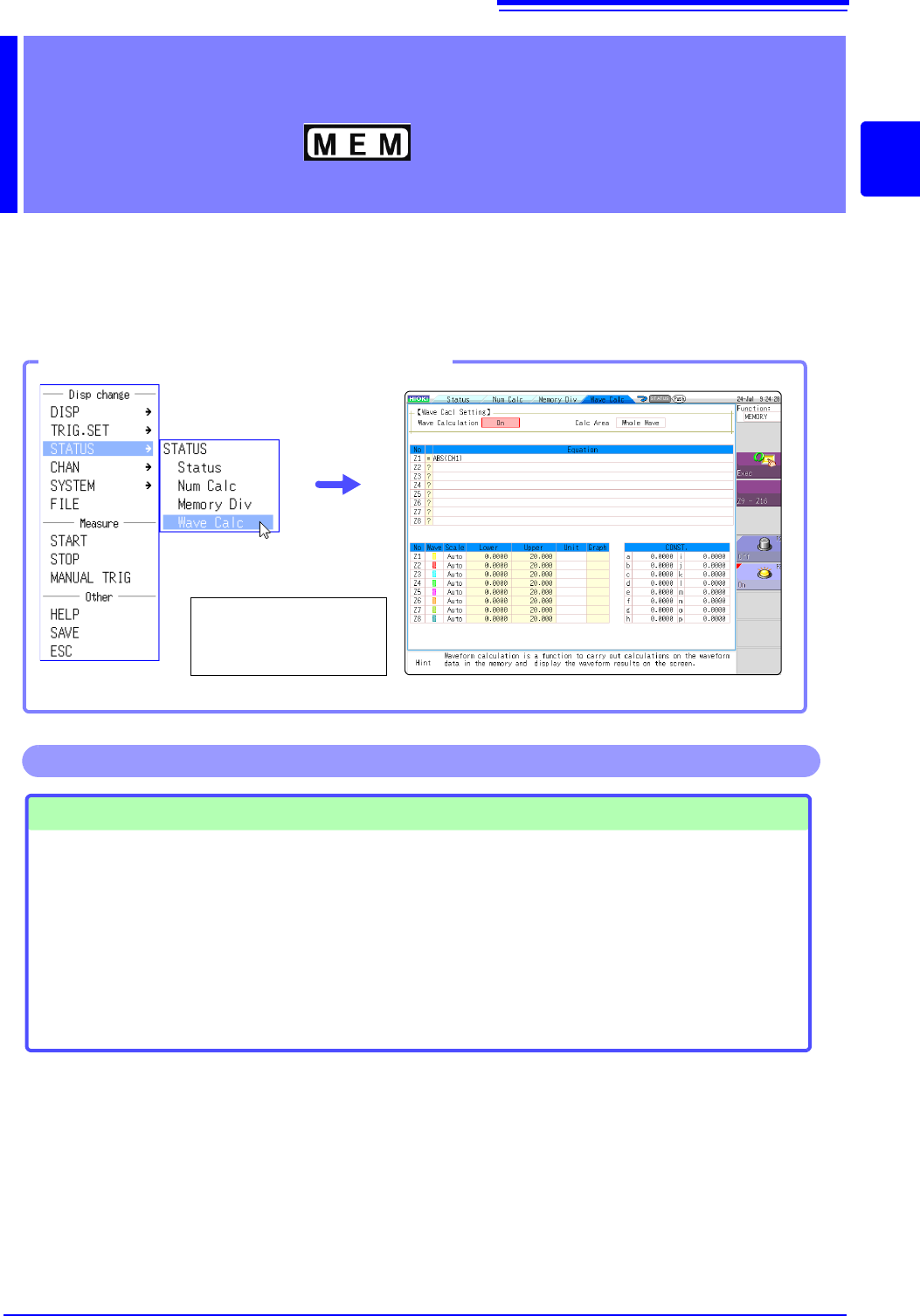
Waveform calculation settings are made on the Status screen - [Wave Calc] sheet.
Waveform Calculation
Functions Chapter 10
Opening the [Wave Calc] sheet
Select [STATUS] and
then [Wave Calc] from
the right-click menu.
Waveform Calculations
• Four Arithmetic Operators
(+, -,
, /)
• Absolute Value (ABS)
• Exponent (EXP)
• Common Logarithm (LOG)
• Square Root (SQR)
• Moving Average (MOV)
• Slide along the time axis
• Differential Calculus: 1
st
deriva-
tive (DIF), 2
nd
derivative (DIF2)
• Integral Calculus: 1
st
integral
(INT), 2
nd
integral (INT2)
• Trigonometric functions (SIN,
COS TAN)
• Inverse Trigonometric functions
(ASIN, ACOS ATAN)
• Digital Voltmeter Unit PLC delay
time shift (PLCS)
(Total 12 types)
• Specified calculation between
A/B cursors
Waveform calculations can be lim-
ited to data within the range speci-
fied by A/B cursors.
Calculation operator details:
"10.3 Waveform Calculation Operators
and Results" (p.237)
In addition to the four arithmetic operators, 10 types of functions can be used. It is possible to set up
to 16 calculation formulas.
When Scaling is enabled, numerical calculations are performed on scaled values.
Operations available from the [Wave Calc] sheet
10.1 Waveform Calculation Workflow
228
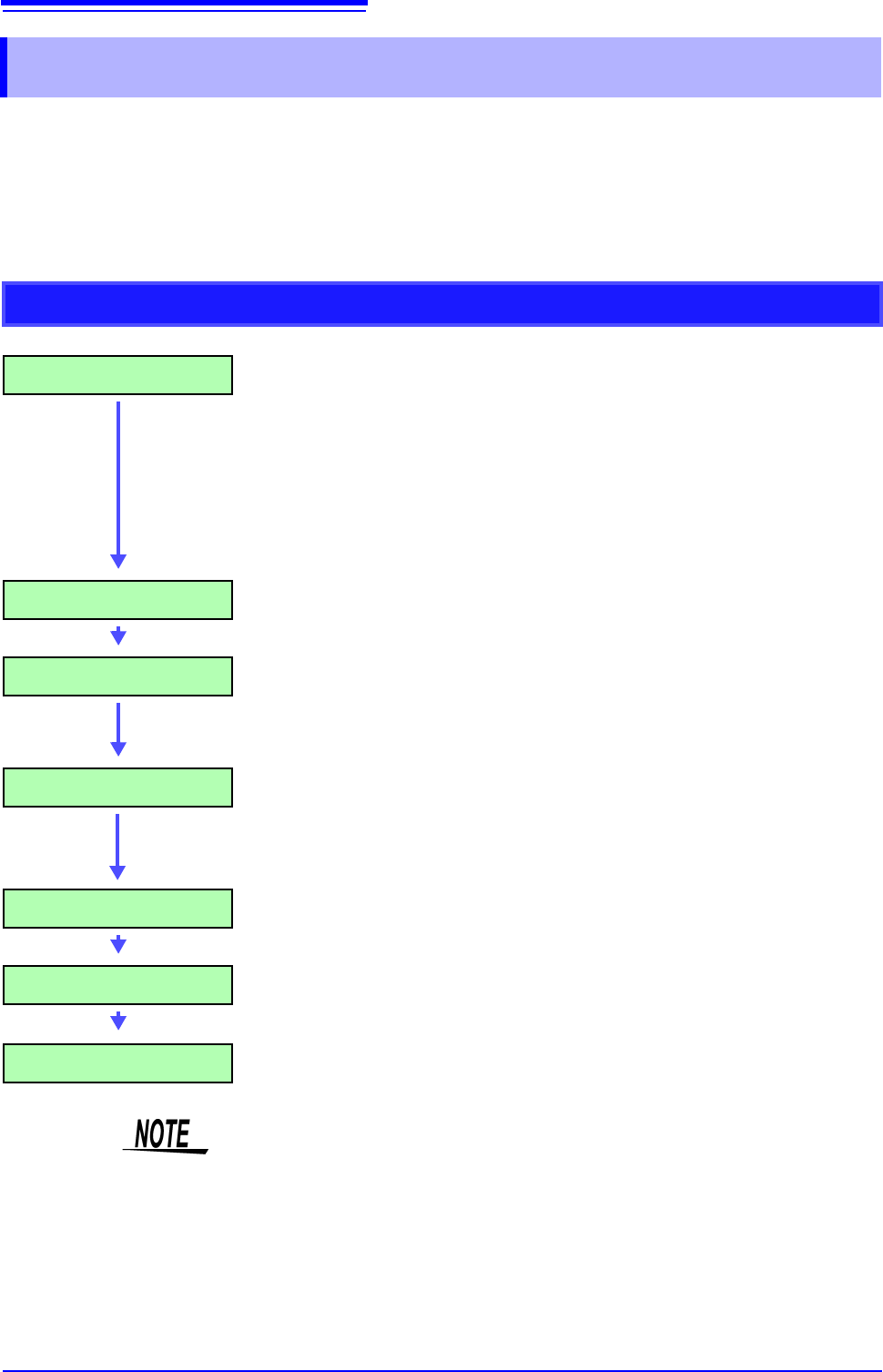
There are two different ways of performing calculation.
• Calculating the data automatically after the measurement: Settings for waveform calculation must be made
before the measurement.
• Calculating the existing data: Calculation is possible for waveform data after measurement is completed,
and for data saved on media.
10.1 Waveform Calculation Workflow
Calculating While Measuring
Make Calculation Settings Make calculation settings on the [Wave Calc] sheet. (p.231)
To automatically save calculation results: make saving settings
before measuring.
• Saving calculation results automatically
(p.88)
Start Measurement
Acquire Data The instrument acquires data when the trigger criteria are
met.
(If triggering is not enabled, the instrument acquires data when
measurement is started.)
Calculate [Calculating...] appears on the screen.
Calculations are performed sequentially from No. 1 to No. 16.
(To interrupt calculations, click [STOP] to abort.)
Display Calculation Results Results are displayed on the Waveform screen. (p.232)
(Save) (if auto saving are enabled)
Calculation results are automatically saved.
Stop Measurement
• Waveform calculation is not available when using Roll Mode.
• If waveform calculation is performed while measuring and is forcibly exited dur-
ing calculation, the result at that time of exit is displayed. To re-calculate, select
the [Exec] button at the waveform calculation sheet.
10.1 Waveform Calculation Workflow
229
9
Chapter 10 Waveform Calculation Functions
10
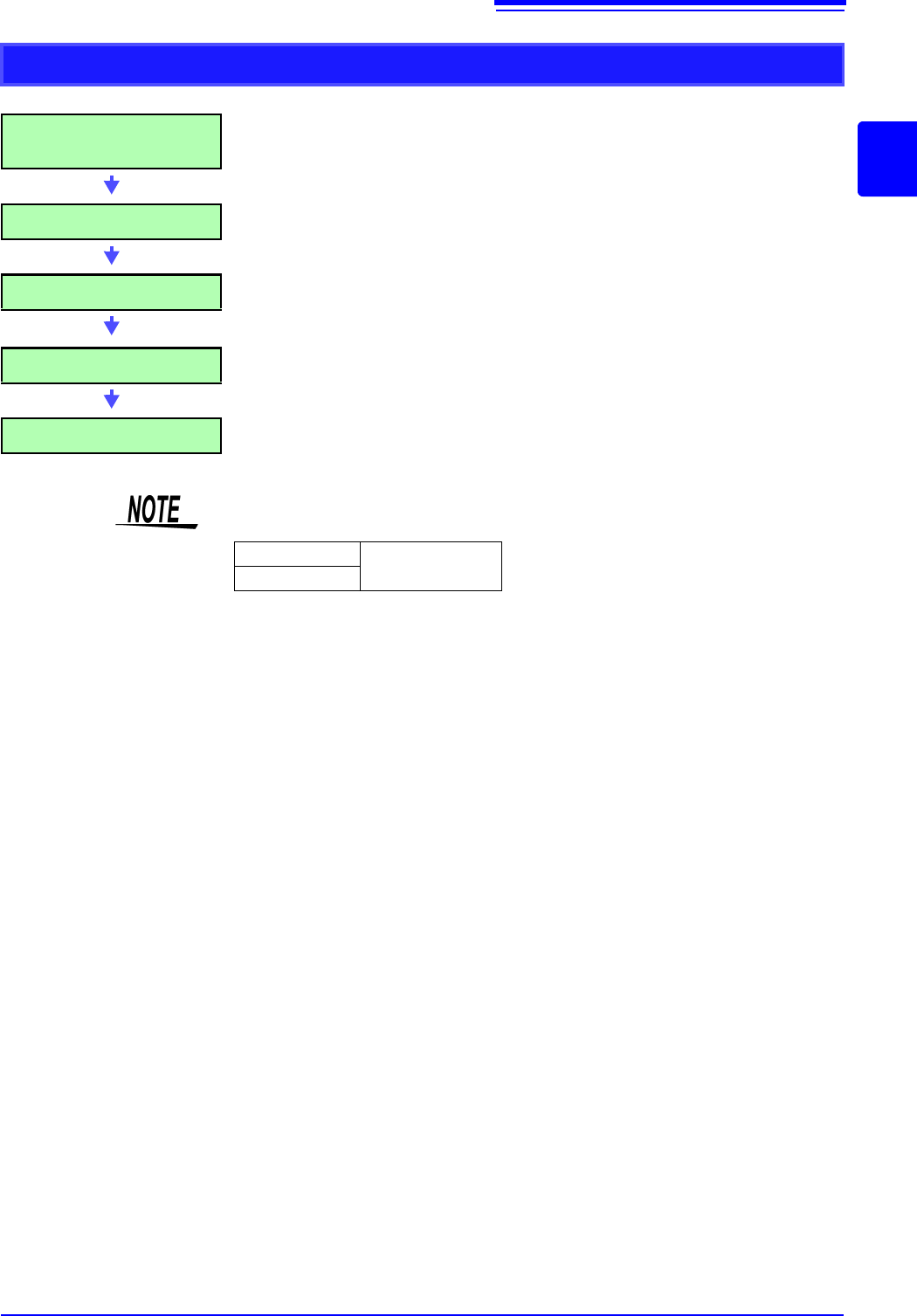
Applying Calculations to Existing Data
After measurement with calcula-
tion OFF (Or with data loading)
(To load measurement data from storage media for calcu-
lation)
(p.99)
Make Calculation Settings Make calculation settings on the Waveform Calculation
sheet ([Wave Calc] sheet)
(p.231)
Execute Calculation Select [Exec] to execute calculations.
(To interrupt calculations, click [STOP].)
Display Calculation Results Results are displayed on the Waveform screen.
(p.232)
(Save) Save calculation results as occasion demands.
•Save: [SAVE]
• The maximum record length that can be calculated is as follows.
To perform calculation for waveforms measured at longer record lengths, save
to files in sections at a range shorter than maximum record length, reload to
this instrument and then calculate.
• When memory division is not used, it is possible to reference the last 16 mea-
sured waveforms. However, when waveform calculation is performed for this
waveform, waveform data other than that of the currently referenced blocks
(the blocks in the data to be calculated) is deleted.
MR8740
2,000div
MR8741