MR8740、MR8741_user_manual_eng_20191016H.pdf - 第135页
6.1 Reading Measurement Values (Using the A/B Cursors) 123 5 Chapter 6 W aveform Screen Monitoring and Analysis 6 <Screen display (X axis measurement value )> Reading Measurement V alues on W aveform Screen (for X-…
6.1 Reading Measurement Values (Using the A/B Cursors)
122
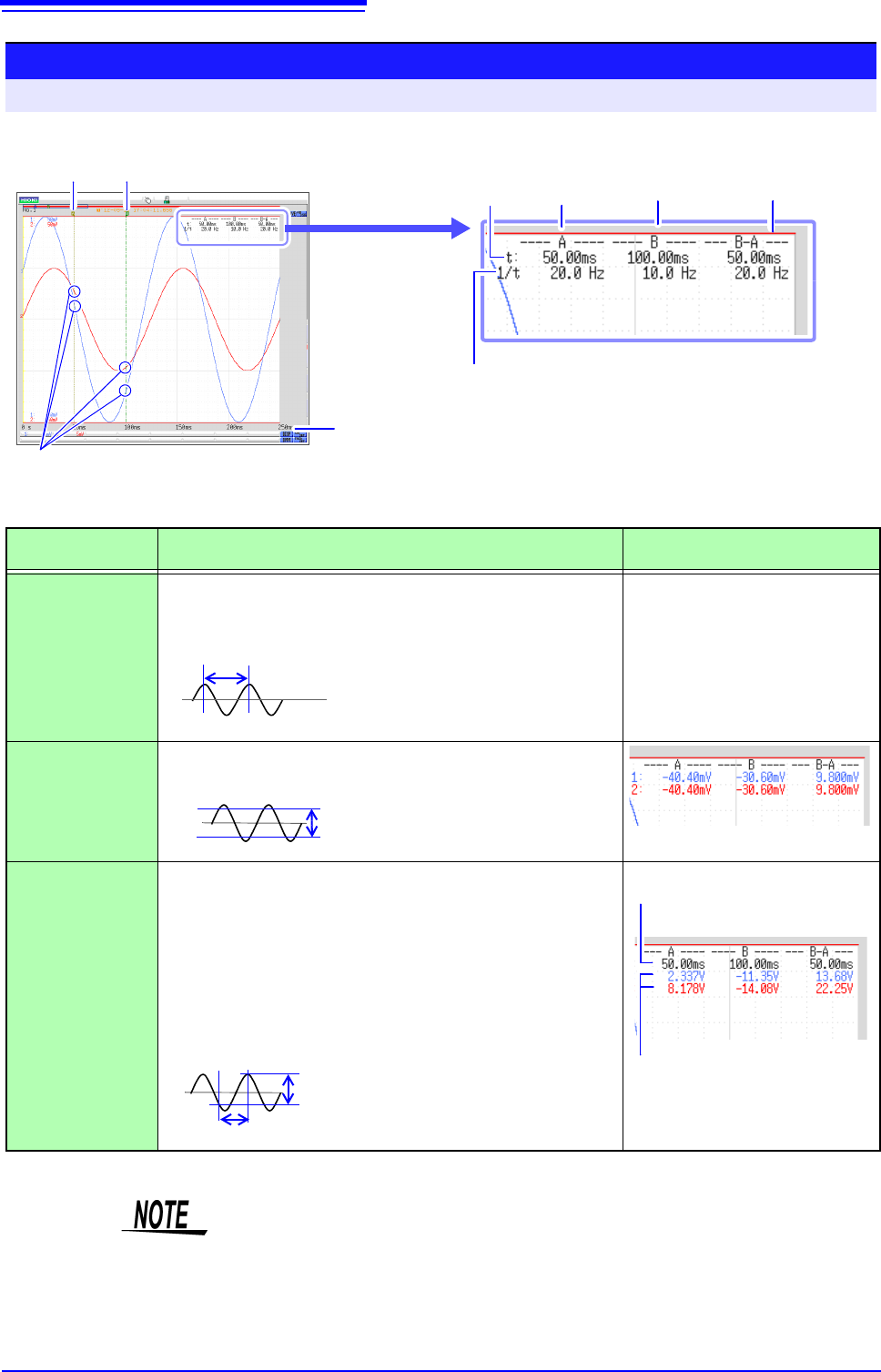
<Screen display (time axis cursor)>
You can click [DISP] to display the waveform and cursor values separately.
See: "6.7.3 Switching the Waveform Display Width" (p.135)
Reading Measurement Values on Waveform Screen (for 1, 2, 4, 8, 16 screens)
To open the screen: Right-click and select [DISP] Waveform screen
A Cursor B Cursor
Frequencies
Time Values
Waveform values at the intersection with
each cursor are displayed.
Values Between
A/B cursors
Time Value
To change the display type:
"Time Value" (p. 310)
How cursor values are
displayed depends on
the selected cursor type.
Cursor A
Values
Cursor B
Values
<Cursor Value>
Cursor Type Cursor Value
Cursor Value Display Example
(with two cursors)
div
(Time Value and
Frequency)
t: A, B each cursor value: Time from trigger point or recording
start
B-A value: Time difference between A/B cursors
See "Screen display" above
1/t: Frequency for which t is 1 cycle
Range
(Measurement
Values)
A, B each cursor value: Measured value of channel
B-A value: Difference between measured values at A/B cursors
Trace
(Time and Mea-
surement Values)
Time Values
A, B each cursor value: Time from trigger point or recording start
B-A value: Time difference between A/B cursors
Measurement Values
A, B each cursor value: (Memory function) measurement value
(Recorder function) maximum, mini-
mum values
B-A value: Difference between measured values at A/B cursors
AB
B-A
B-A
A
B
Time Values
Measurement Values
A
B
B-A
B-A
(Time difference)
(Difference between measured values)
• When Using External Sampling: Value t is the number of samples.
• The data measured with MR8990 Digital Voltmeter Unit is updated at each of
the two movement points of the A and B cursors.
• When the voltage range is changed during measurement by the recorder func-
tion: Trace measurement values are acquired at the range settings when mea-
surement was stopped.
6.1 Reading Measurement Values (Using the A/B Cursors)
123
5
Chapter 6 Waveform Screen Monitoring and Analysis
6
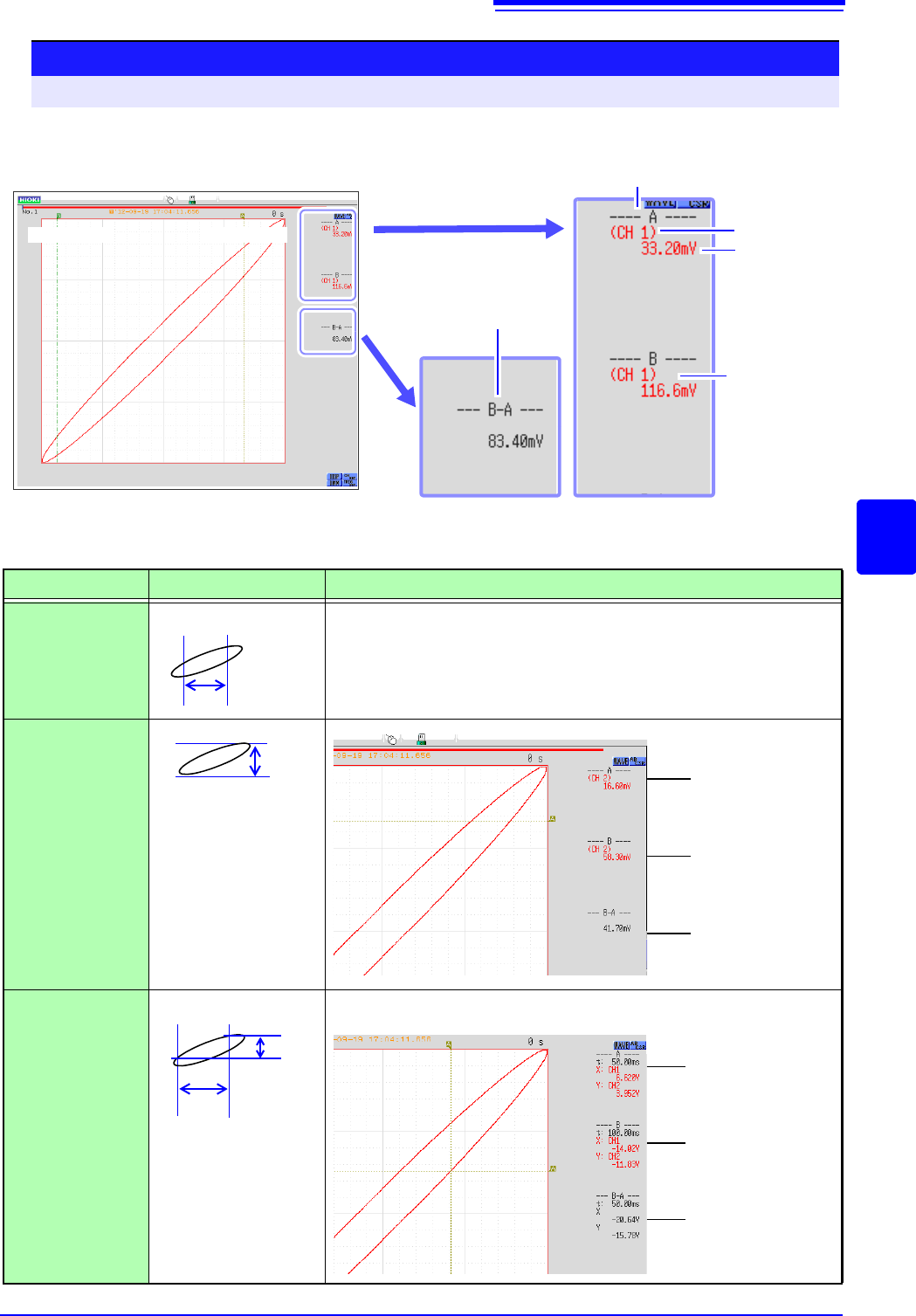
<Screen display (X axis measurement value)>
Reading Measurement Values on Waveform Screen (for X-Y1, 4 screens)
To open the screen: Right-click and select [DISP] Waveform screen
B Cursor A Cursor
X-Y synthesis of channel 1 and channel 2 waveform
Channel
Measure-
ment Value
Cursor A Value
Cursor B
Value
Difference between
measured values at
A/B cursors
<Cursor Value>
Cursor Type
Cursor Value
Cursor Value Display Example (with two cursors)
X
(X axis measure-
ment value)
See "Screen display" above
Y
(Y axis measure-
ment value)
Trace
(Time and X axis,
Y axis measure-
ment value)
AB
B-A
A
B
B-A
Cursor A
measurement
value
Cursor B
measurement
value
Difference
between mea-
sured values at
A/B cursors
(Y axis channels)
A
B
B-A
B-A
(Y axis)
(X axis)
Cursor A time and
measurement value
Cursor B time and
measurement value
Time and measure-
ment value differen-
tial between cursor
A and B
(X axis and Y axis channels)
6.2 Specifying a Waveform Range (A/B Cursor)
124
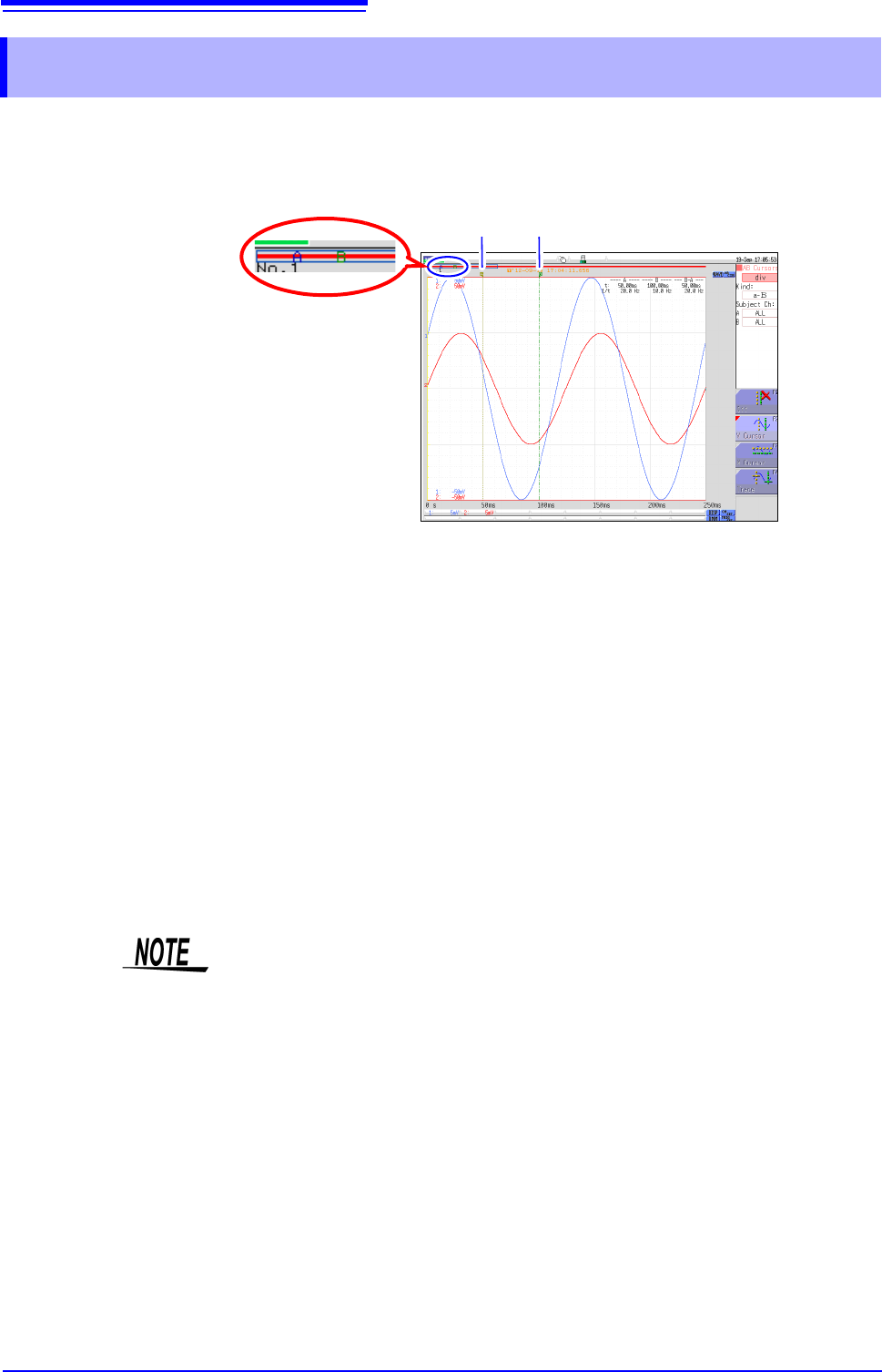
When the waveform is shown as a time display, the range can be specified with the div cursor or
Trace cursor.
The specified range will be used for file saving, X-Y synthesis, and numerical calculation. The range
selection will be retained also when the waveform display format is changed.
The general procedure is as follows.
1. Set A/B cursors
See: "A/B Cursor Settings" (p. 120)
2. Specify a range
• For file saving:
System screen - [File Save] sheet - [Save Area] item: Select [A-B Wave].
See:"4.2.2 Automatically Saving Waveforms" (p.88)
"4.2.3 Saving Data Selectively (SAVE)" (p.93)
• For X-Y synthesis:
Status screen - [Status] sheet - [Combo Area] item: Select [A-B Wave].
See:"6.4 Performing Waveform X-Y Synthesis" (p.127)
• For numerical calculation:
Status screen - [Num Calc] sheet - [Calc Area] item: Select [A-B Wave].
See:"9.2 Settings for Numerical Value Calculation" (p.214)
6.2 Specifying a Waveform Range (A/B Cursor)
Cursor position can be
verified.
A Cursor B Cursor
About reading measurement values and cursor types:
See: "6.1 Reading Measurement Values (Using the A/B Cursors)" (p.120)
Available range for A/B cursor
The available range depends on the function.
• Memory function: Recorded measurement data for one measurement
• Recorder function: Up to the range of measurement data recorded during one mea-
surement, or up to the range of measurement data that can be recorded internally,
starting at the point at which measurement ended and going backwards in time.
The following measurement data can be recorded internally: max. 80,000div
When the MR8990 Digital Voltmeter Unit is installed
There may be one data item more than the range (number of data items) speci-
fied with the A/B cursors.