MR8740、MR8741_user_manual_eng_20191016H.pdf - 第337页
15.2 Performing Remote Operations on the Instrument (Use an Internet Browser) 325 12 Chapter 15 Connection to a Computer 14 15 Acquiring dat a by communicati on commands ___ ___________________ T ransferring storage dat …
15.2 Performing Remote Operations on the Instrument (Use an Internet Browser)
324
Use any of the following operating procedures to acquire the data.
• Use the FTP function
• Use communication commands
Acquiring data by FTP __________________________________________
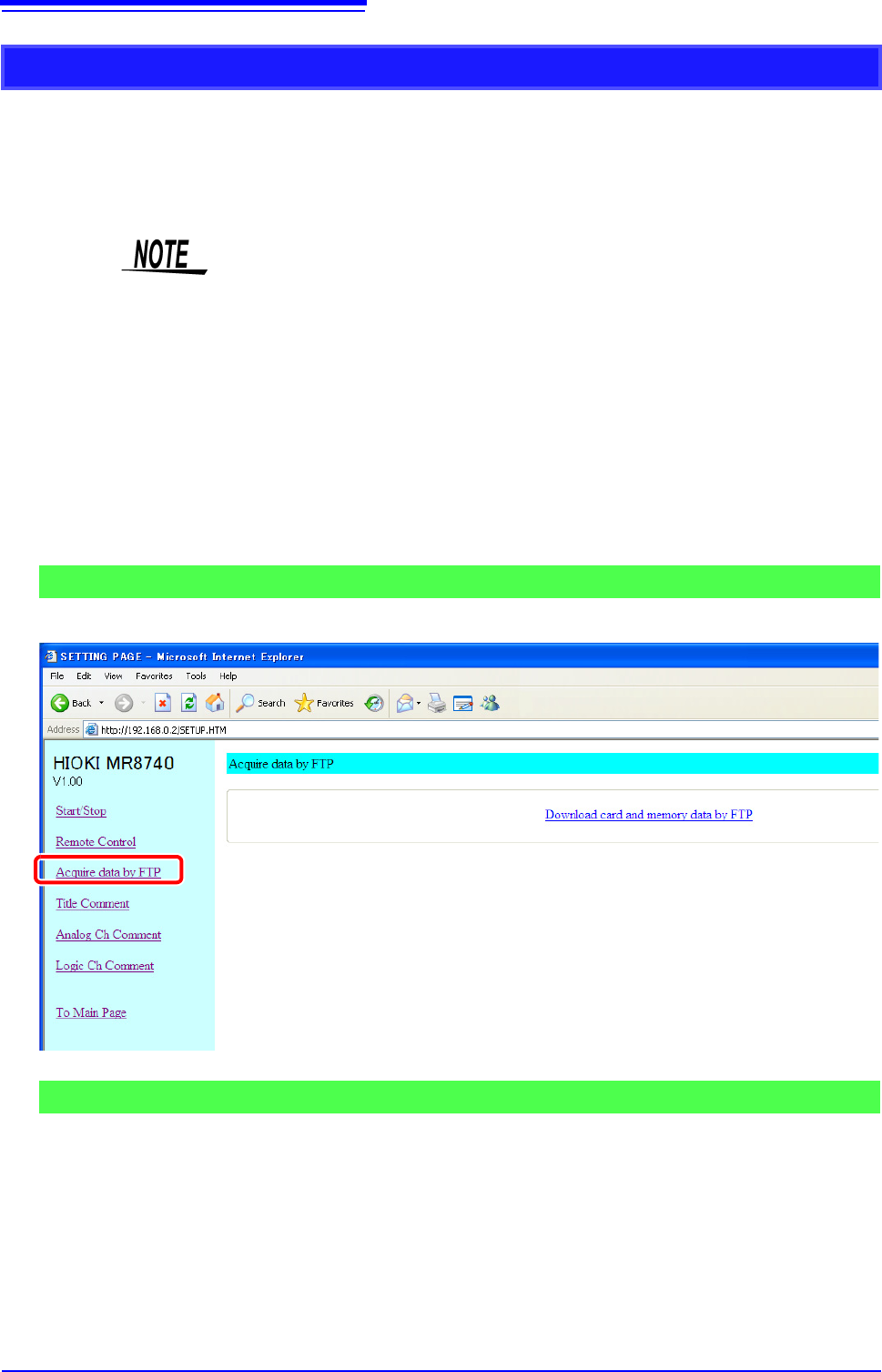
To open the screen: Click [Acquire data by FTP] in the list of operations.
Click [Download card and memory data by FTP].
A list of folders is displayed.
For details on how to perform file operations, see "15.3.3 Using FTP for File
Operations" (p.330).
Acquiring Instrument Memory Data from a Computer
For details on each of the commands, refer to the Instrument Communication
Command Instruction Manual on the application CD.
1
Save the data you want to acquire to a USB memory stick.
See: "4.2 Saving Data" (p.87)
2
Use the FTP function to move the saved data to a computer.
Screen for Acquiring Data by FTP
Procedure
15.2 Performing Remote Operations on the Instrument (Use an Internet Browser)
325
12
Chapter 15 Connection to a Computer
14
15
Acquiring data by communication commands ______________________
Transferring storage data (measurement values)
Use :MEMory:VDTA? A.
Transferring storage data in binary format
Use :MEMory:BDATA? A.
Procedure
1
:MEMory:MAXPoint?
The number of data samples stored in the memory of the instrument is acquired.
Check that storage data exists.
2.
:MEMory:POINt CH$,A
The output point of the storage data is specified.
(If you want to acquire the data from the beginning, change the value of A to 0.)
3.
:MEMory:VDATA? A
Just the number of data samples of the storage data (measurement values) specified with A is transferred
from the instrument to the computer. The output point is also incremented by the number of data samples.
• From 1 to 80 values can be acquired at one time with the VDATA command. If
you want to acquire more values than that, send the command in step
3
repeatedly.
• The maximum number of data samples that can be acquired is the value
acquired with the MAXPoint command.
Procedure
1
:MEMory:MAXPoint?
The number of data samples stored in the memory of the instrument is acquired.
Check that storage data exists.
2.
:MEMory:POINt CH$,A
The output point of the storage data is specified.
(If you want to acquire the data from the beginning, change the value of A to 0.)
3.
:MEMory: BDATA? A
Just the number of data samples of the storage data (binary) specified with A is transferred from the instru-
ment to the computer. The output point is also incremented by the number of data samples.
• From 1 to 400 values can be acquired at one time with the BDATA command.If
you want to acquire more values than that, send the command in step
3
repeatedly.
• The maximum number of data samples that can be acquired is the value
acquired with the MAXPoint command.
• #0 (indicates binary format) is added to the beginning of the output data.
• After #0, the storage data is transmitted two bytes at a time.
15.2 Performing Remote Operations on the Instrument (Use an Internet Browser)
326
You can specify strings to be used as title comment, logic channel comment, and analog channel
comment.
Information about the module type and channel (installation location in the instrument) can be
obtained and used only for the respective channel.
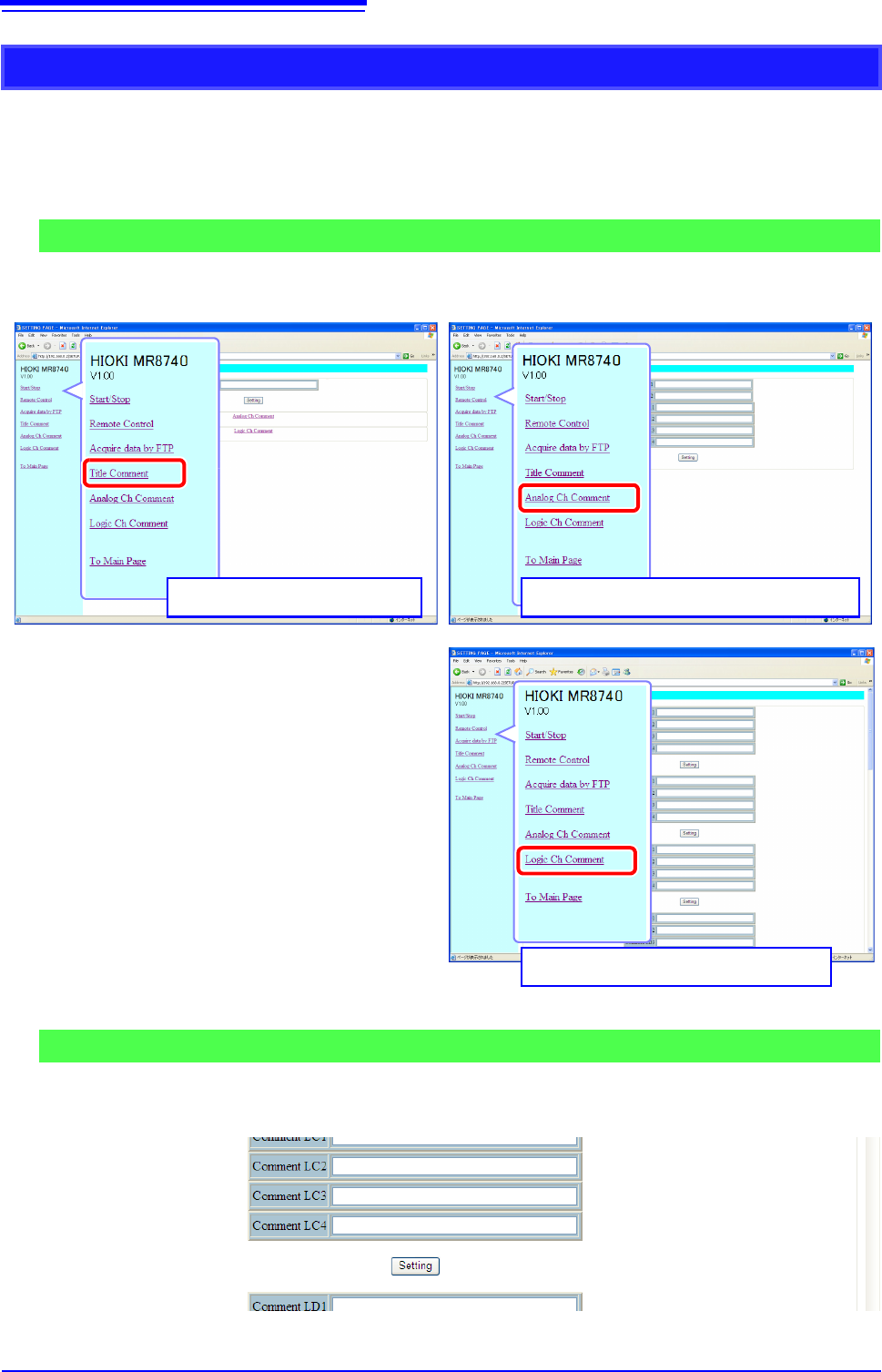
To open the screen: Click [Title Comment], [Analog Ch Comment], or [Logic Ch Comment] on list of
operations.
Enter a string in the comment input field and click the [Setting] button.
The comment string can be up to 40 characters long.
Entering a Comment
Comment Setting Screen
Analog Channel Comment Setting Screen
Title Comment Setting Screen
Logic Channel Comment Setting Screen
Procedure