MR8740、MR8741_user_manual_eng_20191016H.pdf - 第205页
8.3 Triggering by Analog Signals 193 7 Chapter 8 T rigger Settings 8 1. Level T rigger _ ________________ __________________ _____________ A trigger is applied when an input signal cr osses the specified trigger level (t…
8.3 Triggering by Analog Signals
192
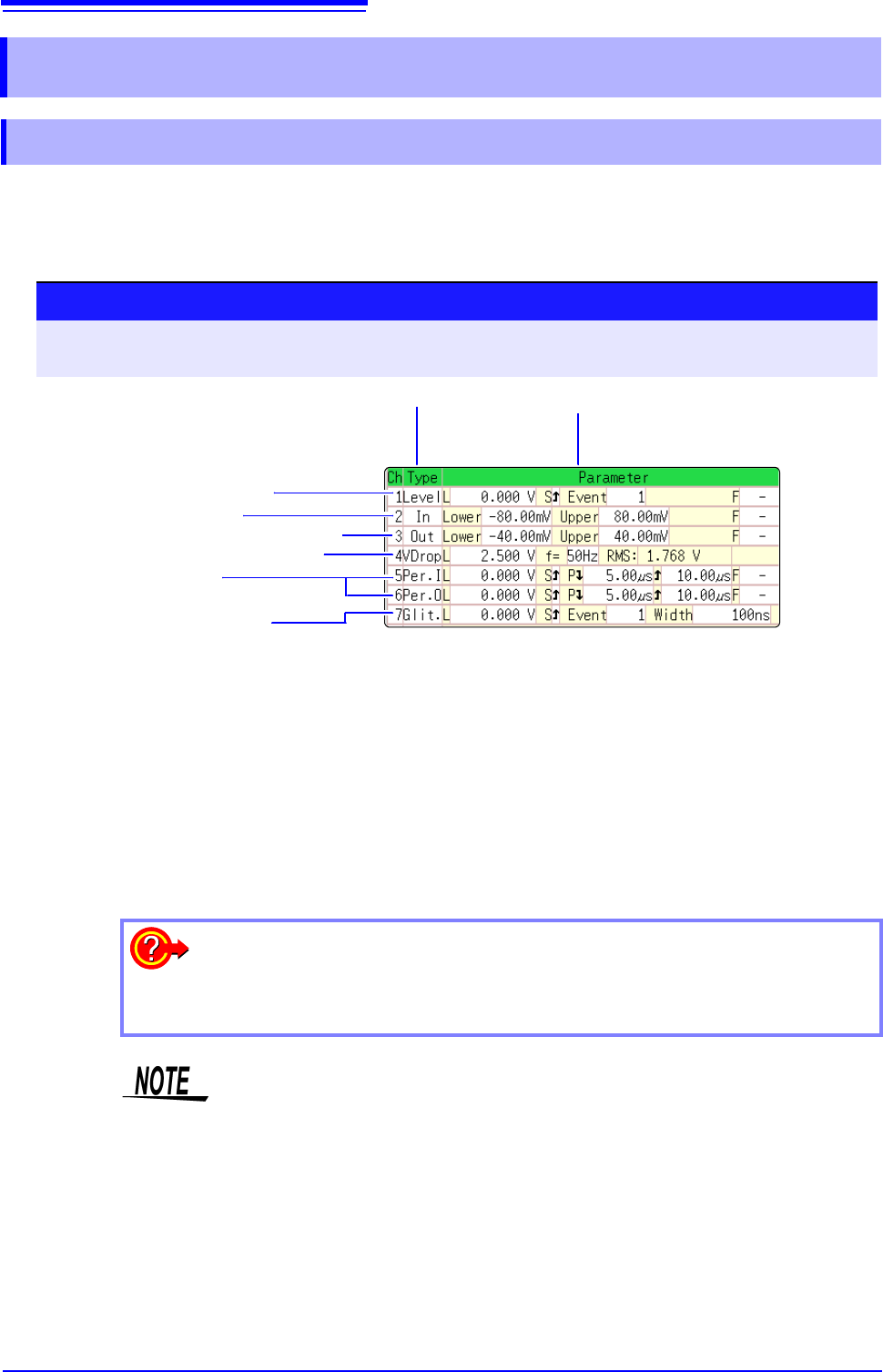
The steps for making settings and selecting the type of analog trigger are described below.
The Trigger settings window ([Analog Trg.] sheet) is used. An analog trigger cannot be set for the
channel of MR8990 Digital Voltmeter Unit.
8.3 Triggering by Analog Signals
8.3.1 Analog Trigger Settings and Types
Procedure
To open the screen: Right-click and select [DISP] Waveform screen Right-click and select [TRIG.SET]
Trigger settings window ([Analog Trg.] sheet)
1
Move the flashing cursor to the [Type] item of the channel for which to make
the setting.
2
Select the trigger type from the GUI displayed on the screen.
3
Use the mouse to move the flashing cursor to the parameter item.
4
Set the parameter value from the GUI displayed on the screen.
1 3
1. Level Trigger (p.193)
2. In-Window Trigger
Out-of-Window Trigger (p.193)
3. Voltage Sag Trigger (p.194)
4. In-Period Trigger
Out-of-Period Trigger (p.194)
5. Glitch Trigger (p.195)
To copy the setting to another channel
The Trigger settings window ([Analog Trig] sheet) can be used to copy a setting.
See:"7.8 Copying settings to other channels (calculation No.) (Copy function)" (p.160)
• When the FFT function is used and [Reference] item on the [Status] sheet is
set to [From Memory], an analog trigger cannot be set.
• Only the level trigger and window trigger can be set for the channel of the
MR8990 Digital Voltmeter Unit. The voltage drop trigger, periodic trigger and
glitch trigger cannot be set.
8.3 Triggering by Analog Signals
193
7
Chapter 8 Trigger Settings
8
1. Level Trigger ________________________________________________
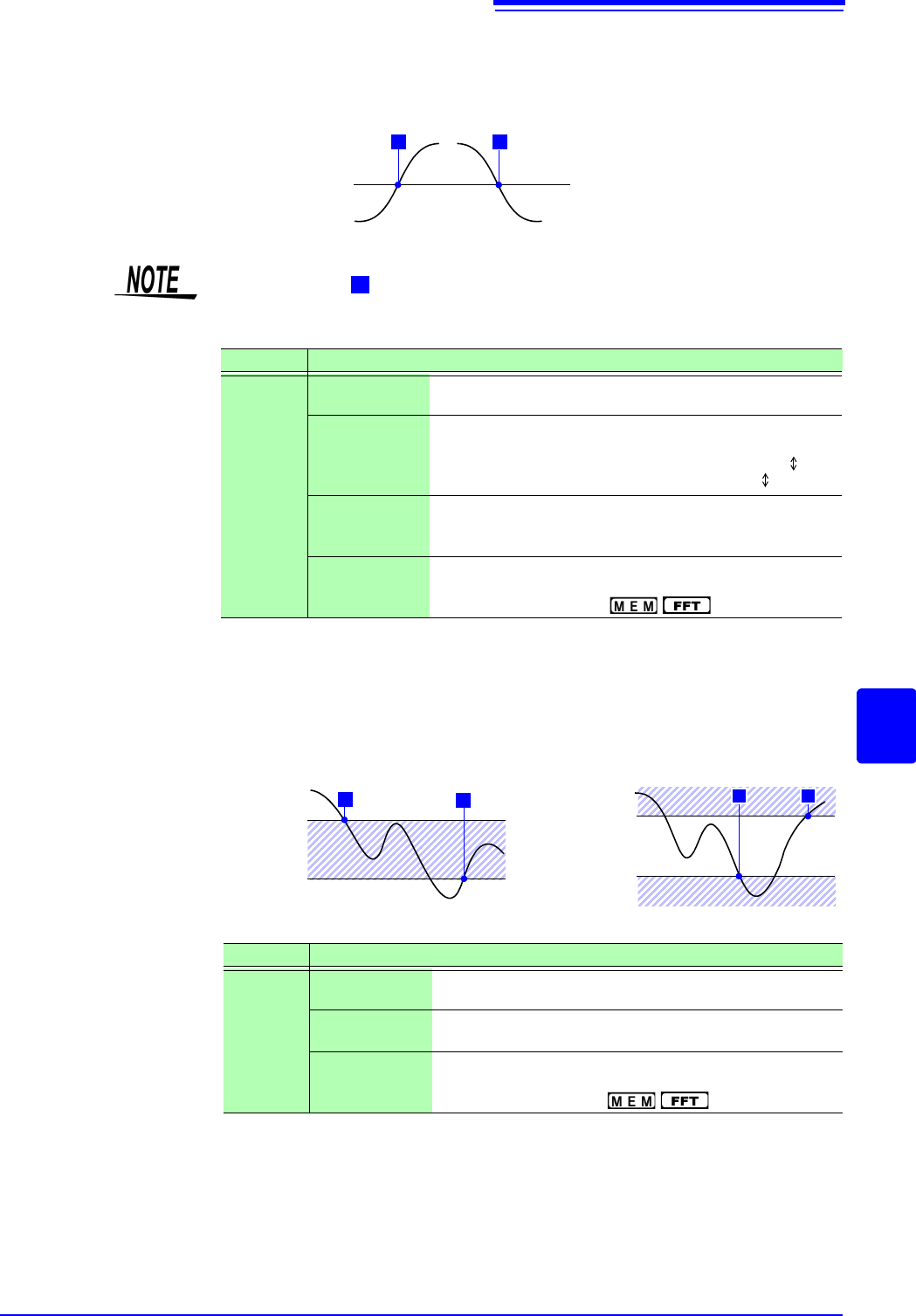
A trigger is applied when an input signal crosses the specified trigger level
(threshold voltage).
2. In-Window Trigger, Out-of-Window Trigger _______________________
Upper and lower limit values are set for the trigger level, and triggering occurs
when the input signal enters this range (In) or leaves this range (Out).
Trigger Level
Input Waveform
Trigger Slope:
[
]
T
T
[ ]
In this manual, indicates a "trigger point", as the time at which a trigger is
applied.
T
Type Parameters
[Level]
[L] (Level)
Sets the level (voltage value) for the trigger. (The setting
can be made in 1/50 increments.)
[S] (Slope)
Determines whether triggering occurs when the signal
crosses the threshold (trigger level) on the upslope (rising
edge) or on the downslope (falling edge). With the [ ] set-
ting, triggering occurs in either direction.) ( )
[Event]
The number of signal rising edge (or falling edge) events is
counted, and triggering occurs when the Event number set
here is exceeded. (1 to 4000)
[F] (Filter)
Triggering occurs when the trigger criteria are met within
the specified filter width. This is useful to prevent spurious
triggering due to noise. ( : Off, 0.1 - 10 div)
Upper Threshold
Lower Threshold
T
T
Upper Threshold
Lower Threshold
T
T
(In)
(Out)
Type Parameters
[In]
or
[Out]
[Lower]
Set the lower limit value.
(The setting can be made in 1/50 increments.)
[Upper]
Set the upper limit value.
(The setting can be made in 1/50 increments.)
[F] (Filter)
Triggering occurs when the trigger criteria are met within
the specified filter width. This is useful to prevent spurious
triggering due to noise. ( : Off, 0.1 - 10 div)
8.3 Triggering by Analog Signals
194
3. Voltage Sag Trigger ( only) _____________________________
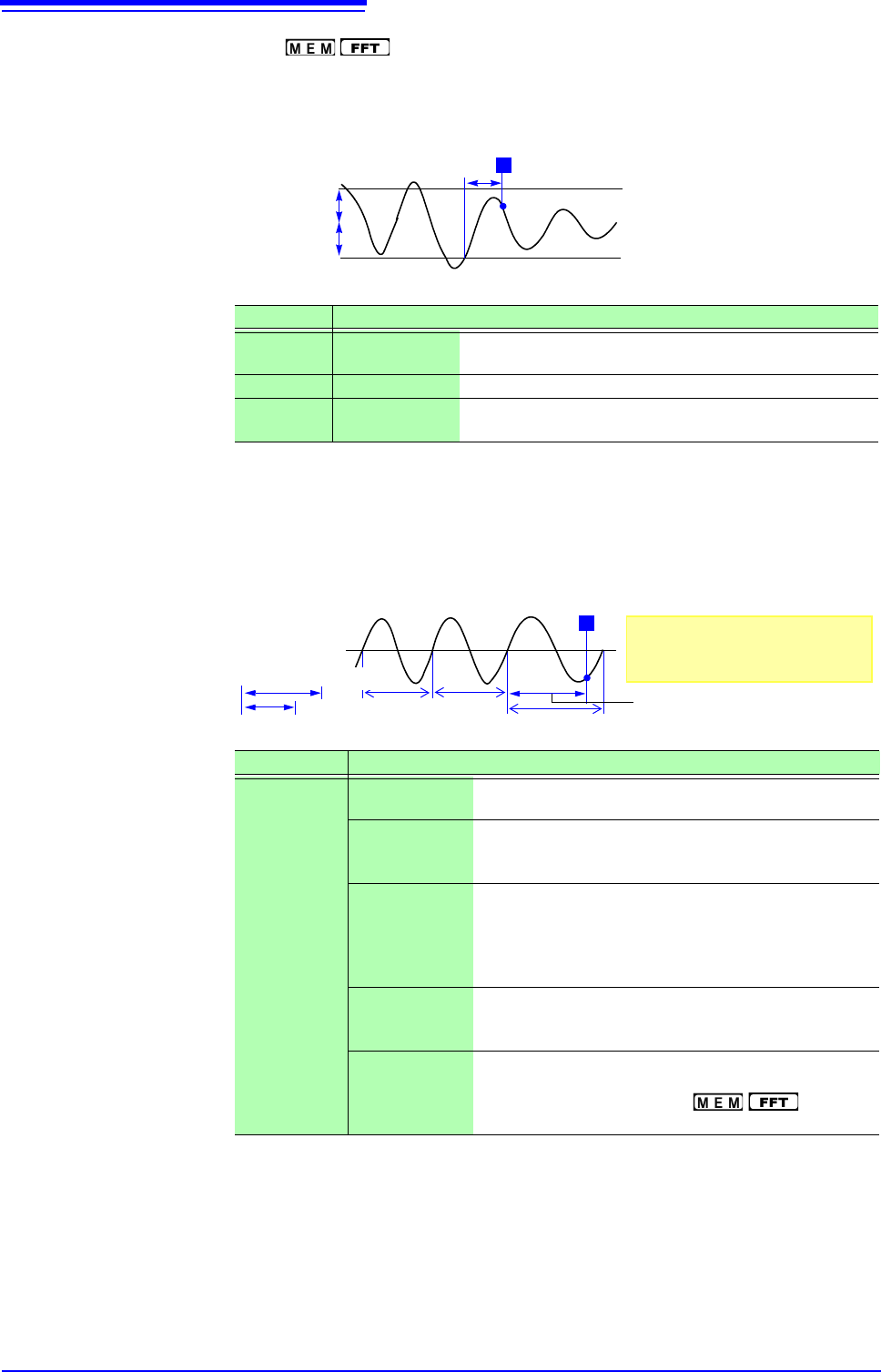
Triggering occurs when the voltage peak drops below a preset level for more
than half a cycle. The allowable time axis range is 20 s - 50 ms/div.
4. In-Period Trigger, Out-of-Period Trigger__________________________
The rising edge and falling edge cycle of the reference voltage is measured, and
triggering occurs when the cycle enters the preset range (In) or leaves the preset
range (Out).
See: "Description" (p.196)
*1: Changes in sync with the time axis range.
Type Parameters
[VDrop]
[L] (Level) Sets the level (voltage value) for the trigger. (The setting
can be made in 1/50 increments.)
[f=] (Frequency) Select 50 or 60 Hz.
RMS:
(actual value)
It is an aim of the actual value. Changes in sync with the
level setting.
T
1/2 Period
Trigger Level
Type Parameters
[Per.I]
or
[Per.O]
[L] (Level) Sets the level (voltage value) for the trigger. (The setting
can be made in 1/50 increments.)
[S] (Slope) Determines whether triggering occurs when the signal
crosses the threshold (trigger level) on the upslope (ris-
ing edge) or on the downslope (falling edge). ()
[P]
(Period lower
limit)
*1
Available settings are 0 and more than 5 times the sam-
pling frequency. Settings higher than the upper limit val-
ue are not accepted. (When the setting is 0, the lower
limit is disregarded, and triggering occurs only on the
upper limit.)
[]
(Period upper
limit)
*1
The setting range extends to 20,000 times the sampling
frequency. Lower settings than the lower limit value are
not accepted.
[F] (Filter) Triggering occurs when the trigger criteria are met with-
in the specified filter width. This is useful to prevent spu-
rious triggering due to noise. ( : Off, 0.1 -
10 div)
Within Period
Range
Out of Period Range
T
Reference
Voltage Level
Period Upper Limit
Period Upper Threshold
Period Lower Limit
About the Trigger Point
The trigger point occurs one sam-
ple after the criterion is met.