MR8740、MR8741_user_manual_eng_20191016H.pdf - 第164页
7.4 Converting Input Values (Sca ling Function) 152 When a calibration factor is stated in the strain gauge transducer inspec- tion records ________________________________________________________ Set the [Method] item o…
7.4 Converting Input Values (Scaling Function)
151
6
Chapter 7 Utility Functions
7
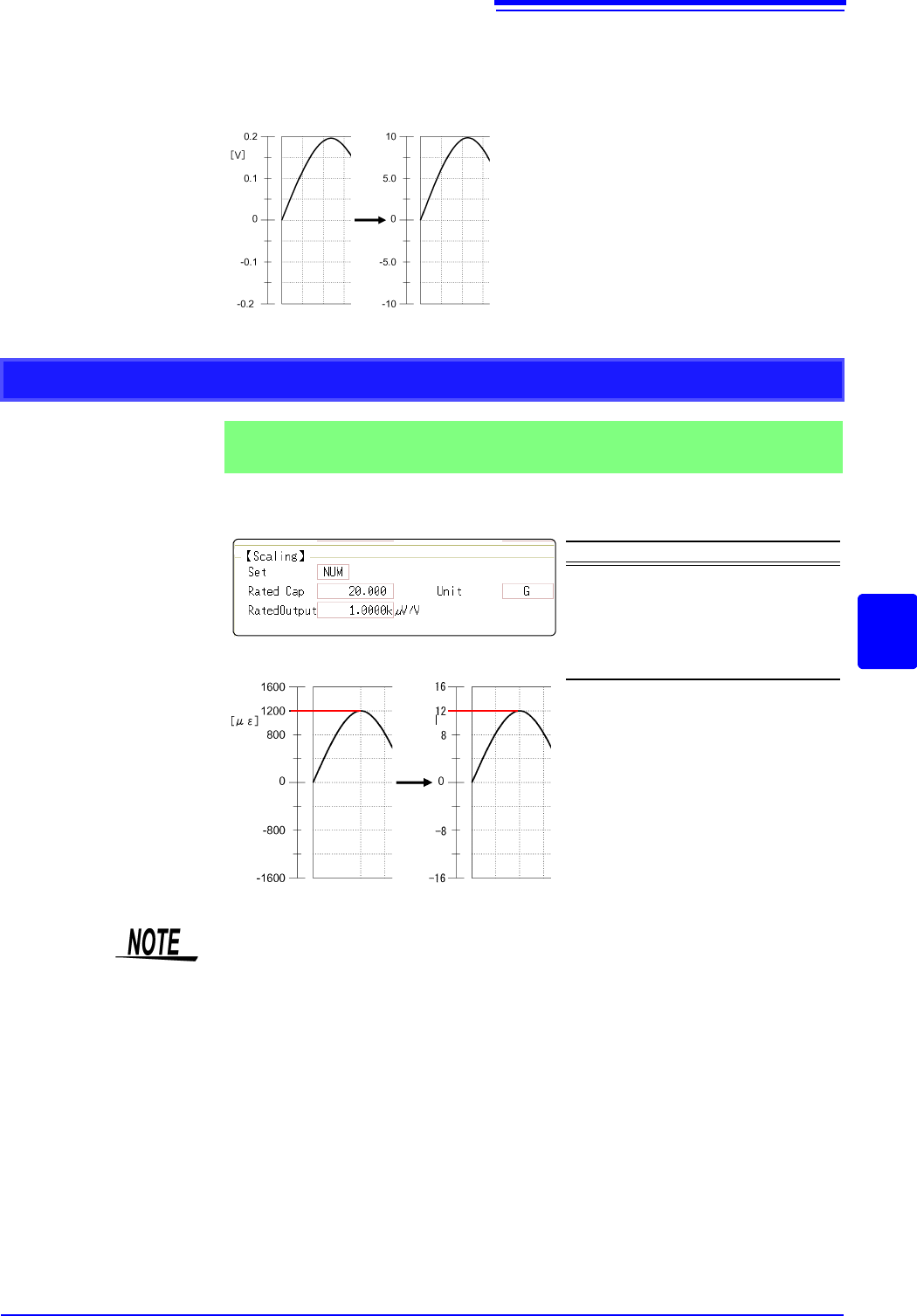
However, you may need to switch the vertical axis (voltage axis) range to suit
actual input values.
For example, to display ±0.2 V at full scale, set the vertical display to 20 mV per
division (the instrument's 20 mV/div range)
For the rated capacity and rated output, consult the calibration record of the
strain gauge transducer to be used. Set as follows:
With scaling, signals from the sensor are
acquired as current values.
A/B cursors and gauges are displayed
with current (Ampere) values.
See: Upper/lower limit: (p.134)
Cursor A/B value: (p.120)
Before Scaling
After Scaling
[A]
Using Model 8969 or U8969 Strain Unit
Example 2
Using the 20 G rated capacity and a strain gauge transducer with 1000
V/V rated output, display measured data in units of [G]
Setting Items Setting Choice
Disp NUM
Unit G
Rated Cap
(Rated capacity)
20 [G]
Rated Output 1k
By using the Scaling function, signals
from the strain gauge transducer are
acquired as physical values.
A/B cursors and gauges are displayed
as physical (G) values.
See: Upper/lower limit: (p.134)
Cursor A/B value: (p.120)
Before Scaling
After Scaling
[G]
Set the parameters such that the rated capacity divided by two times the rated output is
less than or equal to 9.9999
x 10
9
.
7.4 Converting Input Values (Scaling Function)
152
When a calibration factor is stated in the strain gauge transducer inspec-
tion records ________________________________________________________
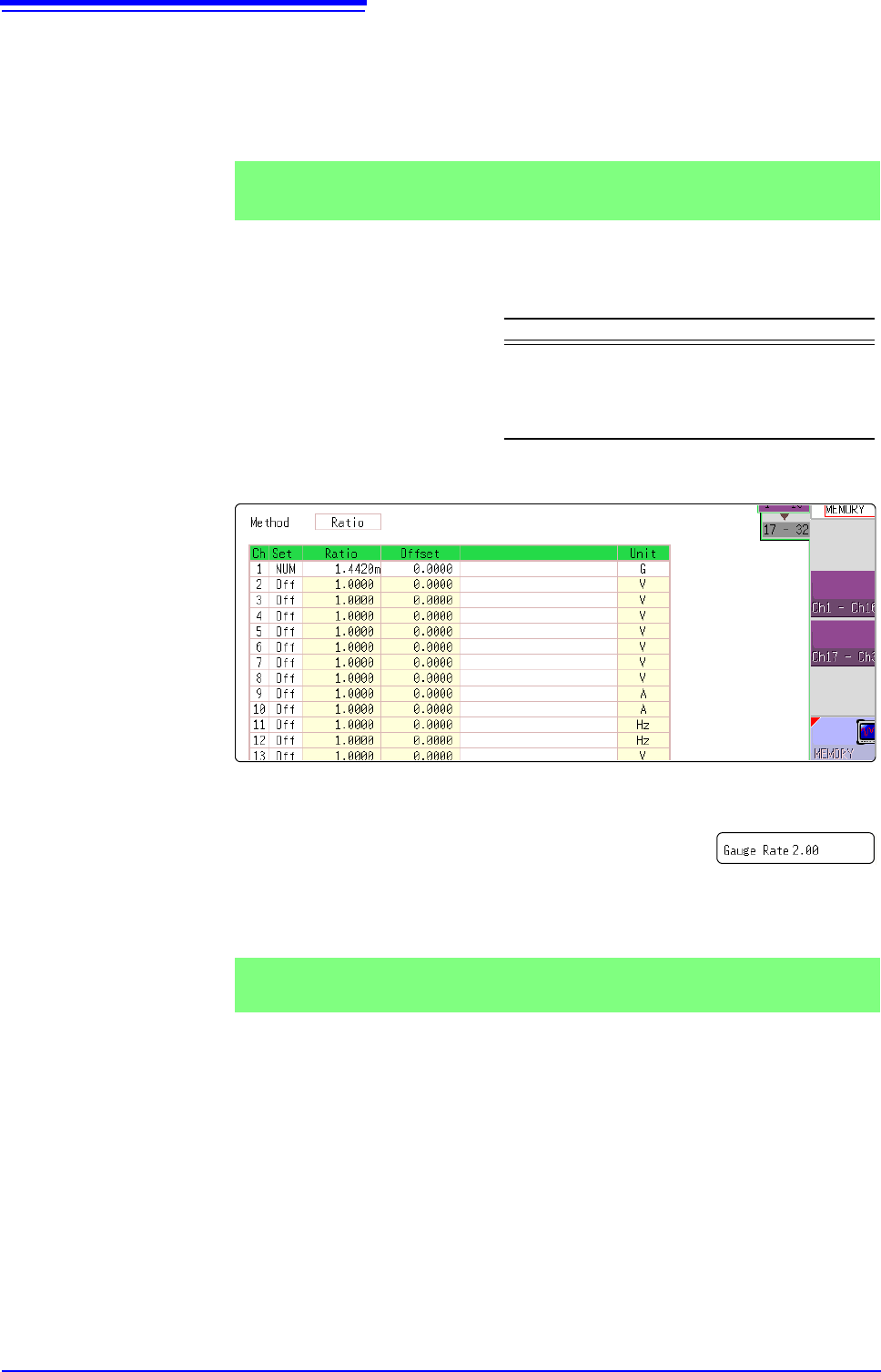
Set the [Method] item on the [Scaling] sheet to [Ratio].
The value of the calibration factor (0.001442 [G]) is set as the conversion ratio.
(* 10
-6
strain = )
Move the flashing cursor to the channel to set, and making settings as follows.
Using a strain gauge with a Gauge Factor other than 2.0_______________
The 8969 or U8969 Strain Unit measures the Gauge Rate
as 2.0.
When using the other strain gauge, the Gauge Factor
needs to be set as the conversion ratio. For example, if the
Gauge Factor is 2.1, the conversion ratio is 0.952 (2
÷2.1).
The scaling (conversion ratio) needs to be calculated to include both Gauge Fac-
tor and physical value conversions. In this case, the conversion ratio setting is
the product of the conversion ratios of the Gauge Factor and measurement unit
scaling.
The Gauge Factor component of the conversion ratio is 0.952, and the physical
value component is 0.001442*
Conversion Ratio = 0.952 x 0.001442 = 0.0013728
As in Example 3, enter [0.0013728] as the conversion ratio.
* To convert measurement values to physical values when using a strain gauge,
calculate using the Young's modulus or Poisson's ratio of the measurement
Example 3
Measure using a strain gauge transducer with a calibration factor of
0.001442 G / 1 x 10
-6
strain
*
, and display the measured data in [G] units.
Setting Items Setting Choice
Disp NUM
Unit G
Ratio
(Conversion ratio)
0.001442 [G]
(displays as 1.4420m)
This value cannot be
changed.
Example 4
Measure using a strain gauge (2.1 Gauge Factor), and display the mea-
sured data in [G] units.