MR8740、MR8741_user_manual_eng_20191016H.pdf - 第238页
9.5 Numerical Calculation Type and Description 226
9.5 Numerical Calculation Type and Description
225
Chapter 9 Numerical Calculation Functions
8
9
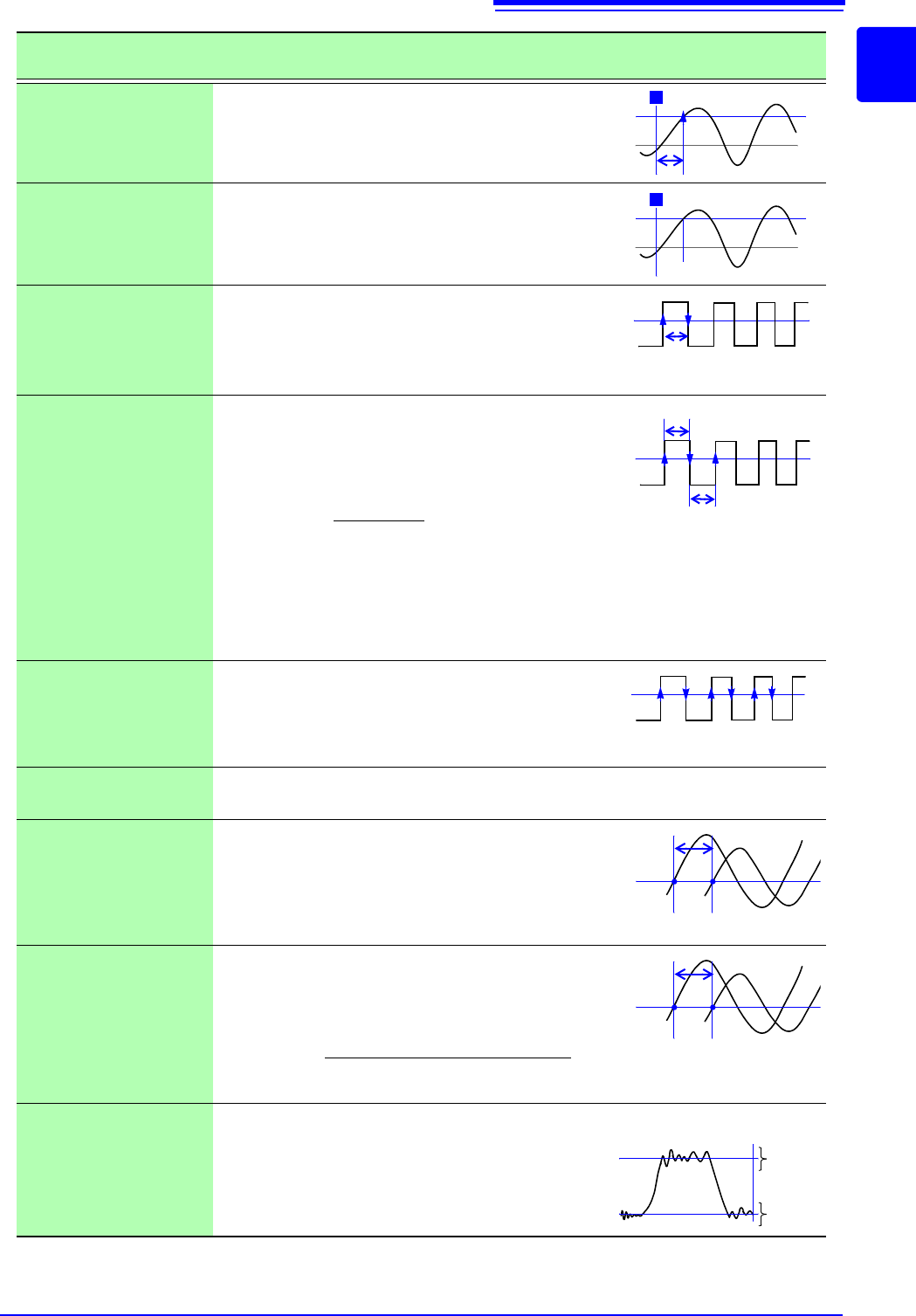
Time to Level
(Time-Lev)
Finds the point where the signal crosses a speci-
fied level from the start of the calculation range,
and obtains the time elapsed from the last trigger
event.
Specified Time Level
(Lev-Time)
Obtains the level at a specified time point after the
trigger event.
The time can also be specified using other calcu-
lation results obtained earlier.
Pulse Width
Obtains pulse width as the time difference be-
tween one rising or falling intersection of the wave-
form through a specified level to the next
intersection (with opposite slope).
Duty Ratio (%)
Obtains the duty percentage based upon the ratio
of the time from a rising intersection to the next
falling intersection at a specified level, to the time
from the same falling intersection to the next rising
intersection at the same level.
Pulses
Obtains the count of pulses from the number of ris-
ing or falling intersections with a specified level.
One pulse is counted when the signal falls back
below the specified level after rising through it (or
vice versa)
Four Arithmetic Oper-
ations (Calculation)
Performs arithmetic operations (+, - , ×, ÷) upon arbitrarily selected results of numerical
calculations.
Time difference calcu-
lation (Time Diff)
Obtain T[s], the time difference that passes be-
tween rises above or drops below the level speci-
fied for A and B waveforms.
Time difference T = B waveform (time where the
level was exceeded) - A waveform (time where the
level was exceeded).
Phase contrast calcu-
lation (Phase Diff)
Obtain the time difference that passes between
rises above or drops below the level specified for
A and B waveforms and then obtain the phase
contrast [°], based on A waveform.
High Level
Low Level
With 0% of the loaded waveform data as the Low
level and 100% as the High level, a histogram (fre-
quency distribution) is used for calculation.
Numerical Calculation
Type
Description
Level
0 V
T
Level
0 V
T
T (Time)
Level
Level
T
u-d
T
d-u
Duty (%) =
X 100 (%)
Tu-d
Tu-d + Td-u
T
u-d
: Time (seconds) after rising intersection to
falling intersection
T
d-u
: (s) Time (seconds) after falling intersection
to the next rising intersection
Level
0
123
Level
T
AB
Level
T
AB
Phase contrast=
× 360°
Cycle of A waveform
Time difference of A and B waveform [T]
0%
100%
Low
Level
High
Level
Data number

9.5 Numerical Calculation Type and Description
226
227
9
Chapter 10 Waveform Calculation Functions
10
Waveform calculations can only be used with the Memory function.
A pre-specified calculation equation is applied to acquired waveform data, and the calculation
results are displayed as a waveform on the Waveform screen.
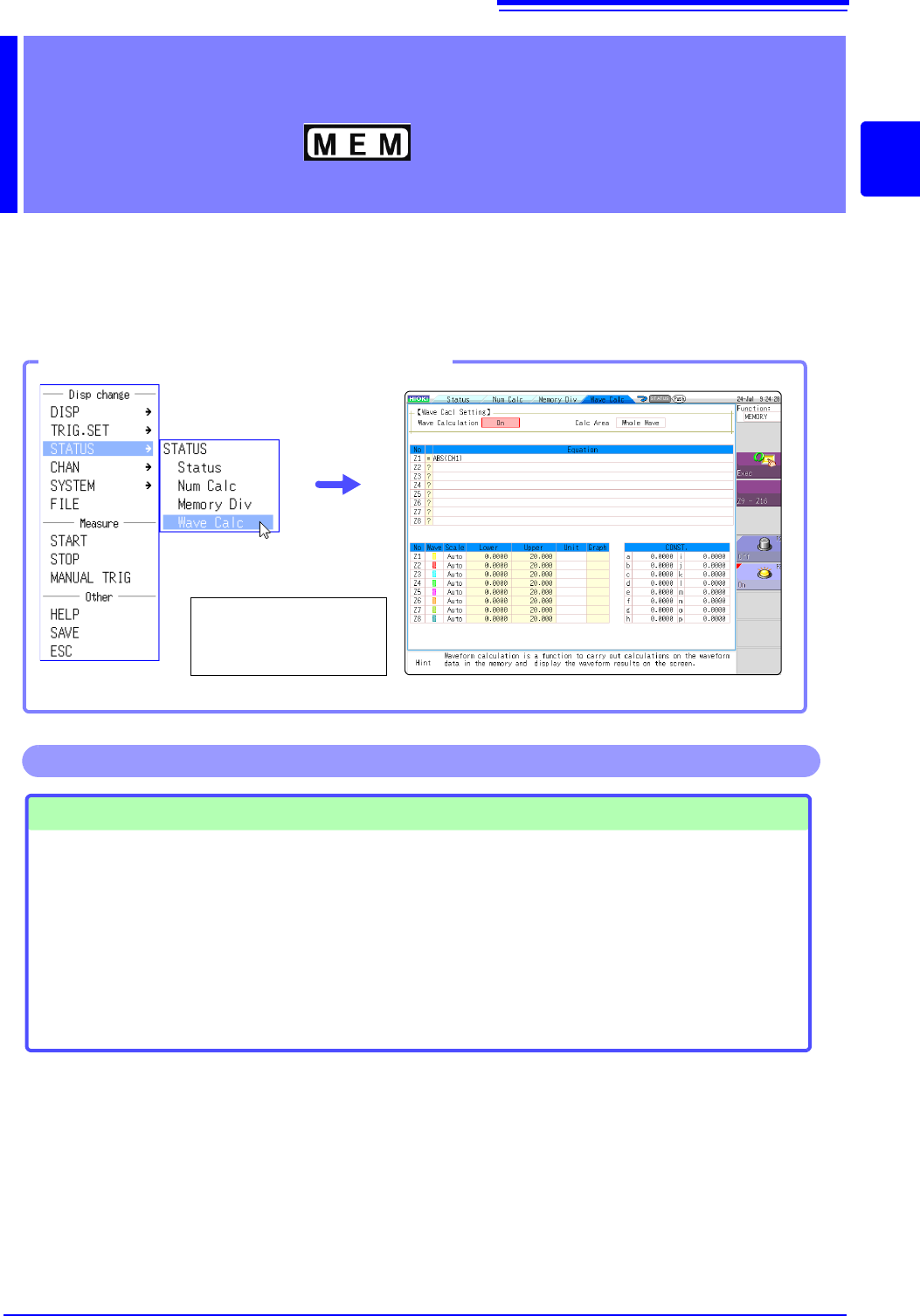
Waveform calculation settings are made on the Status screen - [Wave Calc] sheet.
Waveform Calculation
Functions Chapter 10
Opening the [Wave Calc] sheet
Select [STATUS] and
then [Wave Calc] from
the right-click menu.
Waveform Calculations
• Four Arithmetic Operators
(+, -,
, /)
• Absolute Value (ABS)
• Exponent (EXP)
• Common Logarithm (LOG)
• Square Root (SQR)
• Moving Average (MOV)
• Slide along the time axis
• Differential Calculus: 1
st
deriva-
tive (DIF), 2
nd
derivative (DIF2)
• Integral Calculus: 1
st
integral
(INT), 2
nd
integral (INT2)
• Trigonometric functions (SIN,
COS TAN)
• Inverse Trigonometric functions
(ASIN, ACOS ATAN)
• Digital Voltmeter Unit PLC delay
time shift (PLCS)
(Total 12 types)
• Specified calculation between
A/B cursors
Waveform calculations can be lim-
ited to data within the range speci-
fied by A/B cursors.
Calculation operator details:
"10.3 Waveform Calculation Operators
and Results" (p.237)
In addition to the four arithmetic operators, 10 types of functions can be used. It is possible to set up
to 16 calculation formulas.
When Scaling is enabled, numerical calculations are performed on scaled values.
Operations available from the [Wave Calc] sheet